


10 Web Development Best Practices for Business Websites

From optimization to personalization, it's important to keep these essential web development best practices in your toolkit.
Is your business preparing for a website refresh? Keep these tips in mind.
Launch day isn’t the finish line for your website. It’s only once customers start using it that the real test begins: Can they find what they need and take the next step without getting frustrated? These web development best practices can help you build a site that works as well as it looks and keeps doing its job long after launch.
1. Put mobile first.
Google uses the mobile version of your website’s content for indexing and ranking. Use responsive design so your site looks good and performs well on all devices, including tablets and smartphones. Test menus, buttons and forms on a phone, and check that mobile visitors can access the same useful content as desktop visitors.
Want more insight? Read Google’s mobile-first indexing guidance for details.
2. Optimize performance and speed.
A slow page can make it harder for visitors to find information or complete a task. Speed optimization includes minimizing unnecessary HTTP requests, enabling browser caching, optimizing images and minifying CSS, JavaScript and HTML.
Use PageSpeed Insights to identify problems. Review Core Web Vitals, which measure loading performance, responsiveness and layout stability. Good targets are:
- Largest Contentful Paint (LCP): 2.5 seconds or less
- Interaction to Next Paint (INP): 200 milliseconds or less
- Cumulative Layout Shift (CLS): 0.1 or less
Assess these targets at the 75th percentile of visits. Google’s Web Vitals guide explains these measurements.
3. Prioritize the user experience.
A good website doesn’t only look great; it provides an intuitive user experience. This involves clear navigation, easy-to-use menus and sensible page hierarchy.
Think through a task your customer needs to complete. Can a buyer find a product’s specifications and request a quote without searching through unrelated pages? Organize your content around those needs.
4. Use artificial intelligence tools with a purpose.
AI can be used for chatbots, customer service support, personalized recommendations and content drafts. Choose features that address a specific customer need and review their accuracy before launch. A chatbot should give visitors a way to reach a person when it cannot answer a question.
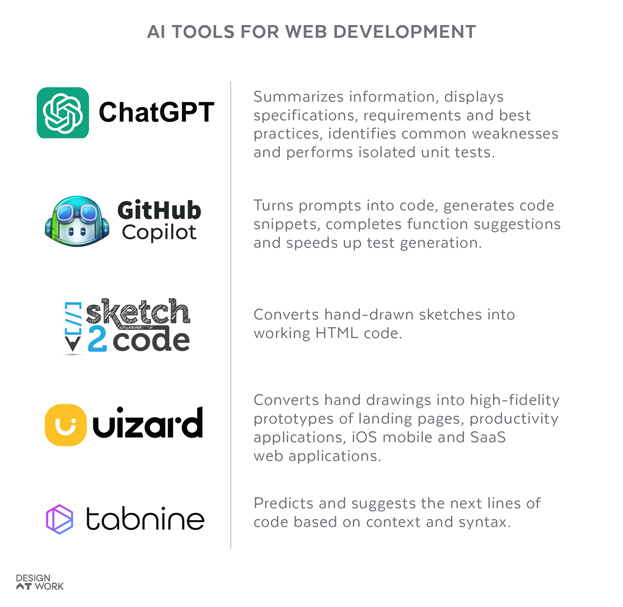
In addition to personalization features, AI can be used for the development process itself, assisting with tasks such as programming, wireframing, prototyping and quality assurance. AI-generated code and content still need human review and testing.
5. Help search engines interpret your content.
Search-friendly website development includes fast load times, mobile-first design, descriptive headings and well-structured URLs. Use crawlable internal links and check that pages intended for search can be indexed. These practices provide a foundation for search engine optimization (SEO).
Schema markup, also called structured data, is another part of that work. At Design At Work, we’re updating it on our own website.
“Think of schema markup as adding labels to the information already on your website. A visitor can recognize your company name, services and contact information by reading the page. Schema identifies those details in a format that machines can process,” said Will Roberds, digital marketing manager at Design At Work. Our goal is to make those connections clearer and keep them consistent with what visitors see.”
When implementing schema, choose relevant types, keep the markup consistent with visible content and validate it for errors.
These search fundamentals also apply to Google’s AI features. Google states that no special schema markup is required for AI Overviews or AI Mode. See its guidance on AI features and websites.
6. Build with web accessibility in mind.
When developing with accessibility in mind, consider color contrast, font size, keyboard navigation, alt text for images and transcripts for audio and video content. Add descriptive form labels and visible focus indicators so visitors can identify the element selected with a keyboard. Test these features both manually and with automated tools to identify barriers visitors may encounter.
7. Take precautions to keep your site secure.
Make sure your website is secure by regularly updating your software, using HTTPS, restricting file uploads and employing security measures like a web application firewall. Limit administrative access, use multifactor authentication where available and maintain backups you can restore.
8. Test your website before launch.
Test forms, navigation, downloads and integrations across browsers and devices. Submit a real test inquiry and confirm it reaches the right inbox or system. Check analytics events so you can measure completed actions after launch.
For a redesign, map changed URLs to relevant replacements with permanent redirects. Our website redesign SEO checklist walks through the process.
9. Use micro-interactions to give feedback.
Micro-interactions are small, subtle animations or design elements that guide a user or give feedback on their actions. These can include button animations and hover effects. A form confirmation or clear validation message can tell visitors what happened and what to do next. Avoid unnecessary motion and respect reduced-motion preferences.
10. Perform regular updates and maintenance.
Once your website is up and running, perform regular updates and maintenance so your pages remain relevant and function correctly. Keep all plugins, themes and your content management system up to date, and run audits periodically to test for functionality, speed and errors. Recheck forms and links after updates, and assign responsibility for fixing problems.
Web development best practices in action.
A refresh can preserve the parts of a website that customers recognize. For one manufacturing client, Design At Work combined elements of the existing brand with updated design and messaging. The project included website development and organic SEO alongside other marketing materials. That example illustrates the value of coordinating website changes with the company’s broader brand.
Put your website plans to work.
Does your website need an upgrade, or are you planning a completely new site? Design At Work’s website design and development services include planning, development and testing across desktop and mobile devices. Once your site goes live, our digital marketing experts can help it get noticed with SEO and AI search optimization. You put work into your website.
Ready for a website you’re proud to send customers to? Let’s talk.
Get marketing tips and news sent to your inbox.