Whether you’re interested in expanding your brand into the international sphere or revamping your image to stay in step with the times, rebranding your business can provide many benefits. From broadening your reach to remaining relevant to increasing your revenue — all are possible if you commit to a sound rebranding strategy.
And yet, as ethical as your motivation to rebrand might be (and as clear as your vision may seem), you could make some easy mistakes if you’re unaware of the most common errors.
Top 10 Rebranding Mistakes That Hurt Your Business
From Uber creating a logo deemed unidentifiable to Weight Watchers changing a name that resonated with consumers since the brand’s inception, there are several ways that your rebranding efforts may backfire. Therefore, it’s important that you note these prevalent rebranding mistakes so that you can dodge them.
Not Doing Your Research
Solid market research is crucial to a successful rebranding campaign. That is, you must have a solid grasp of what your audience values in a brand — research reveals that 82% of consumers want a brand’s principles to reflect their own.
A handful of the most prized values a brand can demonstrate include:
Sustainability
Authenticity
Consistency
Depending on your niche, market research may entail a combination of qualitative analyses (examining your competition and consumers) and quantitative research, which will urge you to dig deeper to explore audience segmentation and brand positioning.
Not Using a Brand Style Guide
Authority, credibility, and trust are built through consistency through every touchpoint of the consumer’s journey. This includes everything from the color scheme on your social media to the voice you use in your posts.
To this end, a brand style guide is imperative. It functions as a rule book that establishes how your brand is presented, ensuring that every facet of your organization (including everything from your logo to how your phones are answered) represents your brand’s vision, personality, and mission.
Lack of Cross-Channel Consistency
Imagine a prospective customer discovering your brand on TikTok (thanks to your bright, riveting content) but finding your email blasts are totally out of character with the personality represented on the social media app.
You must foster a bond with your consumers to boost conversions. Statistics back this: 67% of customers will continue doing business with a brand only if they trust it. This means you need to prioritize consistency across all of your channels, such as:
Advertisements
Email
Social media
Direct mail
This reinforces the necessity of refining your corporate identity (based on market research) before you start rebranding your business.
Copying a Competitor
Imitation may be one of the greatest forms of flattery, but mimicking your competition can work against you. It may:
Fail to differentiate you as a unique entity — and consumers may choose to go with a well-known brand they trust rather than a newcomer
Decimate profit margins because you’ll be forced to keep your prices in line with your competition, even if you’re delivering a superior product or service
Result in humiliating online attacks from your competitors and consumers, which could harm your reputation
Your competition should inspire you to do better, but there’s a huge difference between finding inspiration from another and mimicking their style and actions.
Rebranding Only Your Logo
Rebranding only your logo is the equivalent of installing a new door on your house and calling it a home renovation. However, rebranding your business is far more profound. It’s an enterprise that should result in a fresh, improved makeover that covers the entirety of the experience you’ll provide your consumers.
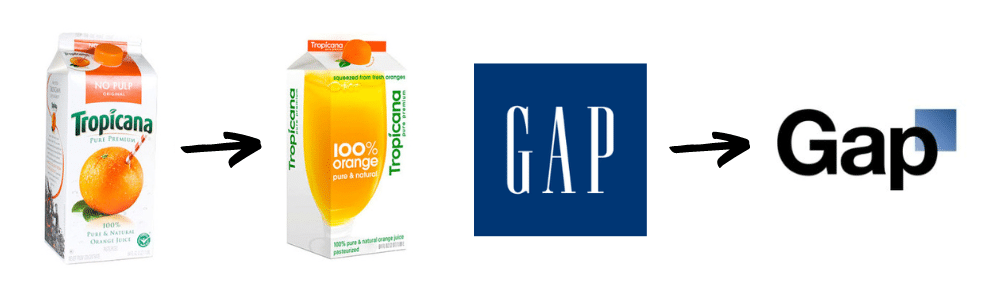
Also, if your logo has proven to work and is a large part of your identity, enhance it instead of reinventing it. Just look at Gap and Tropicana for one of the biggest rebranding mistakes you could make: Changing your image so completely that you become unrecognizable to consumers.
Changing the Name Unnecessarily
Unnecessarily changing your name is much like rebranding a logo that already works. It will almost surely cause whiplash in your audience.
Not Communicating Your Rebrand/No Rollout Strategy
Remember the importance of consistency? This applies to how you manage your makeover. “Surprising” your consumers with a rejuvenated brand identity — even if it’s better — will only cause frustration, confusion, and, quite possibly, the loss of their loyalty.
Playing It Safe
It’s safe to say you’re committed to rebranding your business to attract new customers. But a rebrand that fails to take risks (which in itself may capture attention) risks falling into the noise of the 31.7 million small businesses currently operating in the U.S. today.
Rushing the Process
Your consumers can feel the effects of a hasty rebranding effort. Therefore, rebranding should be conducted thoroughly and meticulously from start to finish and beyond. Further, changing too rapidly may prompt a negative reaction from your consumers.
Failing to Understand Why You’re Rebranding
Establishing your reasons for rebranding must be front and center before you start the process. A new brand philosophy, for example, must guide every single decision you make. If you’re rebranding your business because of a new location, this should heavily influence your rebranding strategy.
Rebranding vs. Refresh: Which Is Right for You?
If you want to enrich or modernize your brand, you might not need a complete overhaul. In fact, this may counter your marketing goals and result in a loss of revenue. Ask yourself:
Does my present situation justify a rebrand?
Do I just want to be perceived as more relevant and contemporary, and attract new consumers?
If you fall into the latter camp, a rebrand may be a waste of your time and resources, and you may be better off simply revitalizing your image and investing in content marketing.
Avoid Rebranding Mistakes with MARION
You may have the best intentions with renovating your brand, but it’s too easy to take a wrong turn and inadvertently create a rebranding disaster.
MARION ensures that you accomplish the opposite. We concentrate on three primary marketing practices — traditional marketing, digital marketing, and brand and design — to help clients like you surpass their potential.
Web design is a process of designing and formatting websites and web pages. Web designers use a variety of tools to create the desired look, feel and usability of the site. From a digital marketer’s perspective, solid web design can effectively benefit SEO, boost conversions, strengthen PPC campaigns, outshine competitors, and so much more!
But what happens if you’re not a designer? If you’re wondering what you need to know before you begin the web design process, this guide will provide some insight.
Introduction: The Basics of Web Design
Web design is not only about making sites attractive and readable; it also needs to make sure that they are user-friendly. An effective business website design should be such that the visitor doesn’t need any additional guidance or instructions to navigate through its content. Bad web design can truly make or break a website!
A great way for beginners to learn basic web design is by following simple tutorials on the internet. There is an abundance of online resources that provide step-by-step instructions on how to build specific components of a website like menus, headers, navigation bars etc.
Step 1: Planning
Planning is one of the most important phases of the web design process. The planning phase includes some basic tasks such as:
Studying and researching competition and what content is trending
Defining target audience
Collecting data about target audience’s interests, demographic, and behavior
Creating a content plan to deliver on the company’s goals and objectives; this also includes an outline on how to keep that plan updated.
This stage is crucial for any business seeking success with their website. This will help you figure out what design decisions you need to make in order to meet your goals.
Step 2: Wireframing
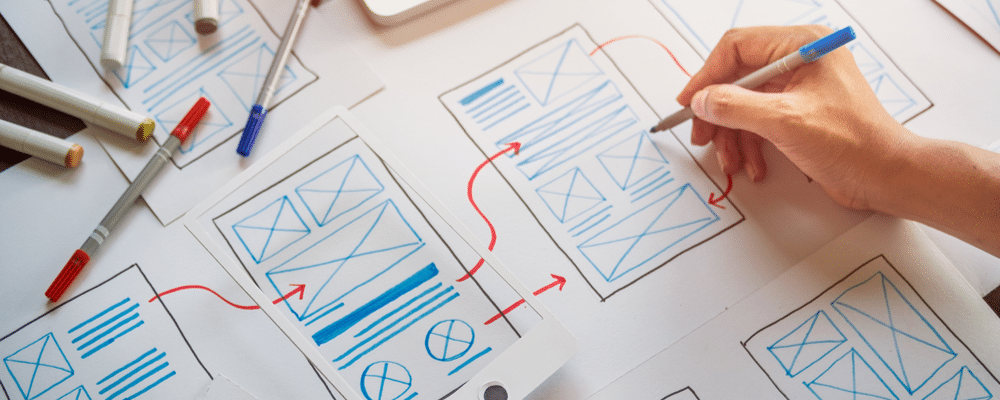
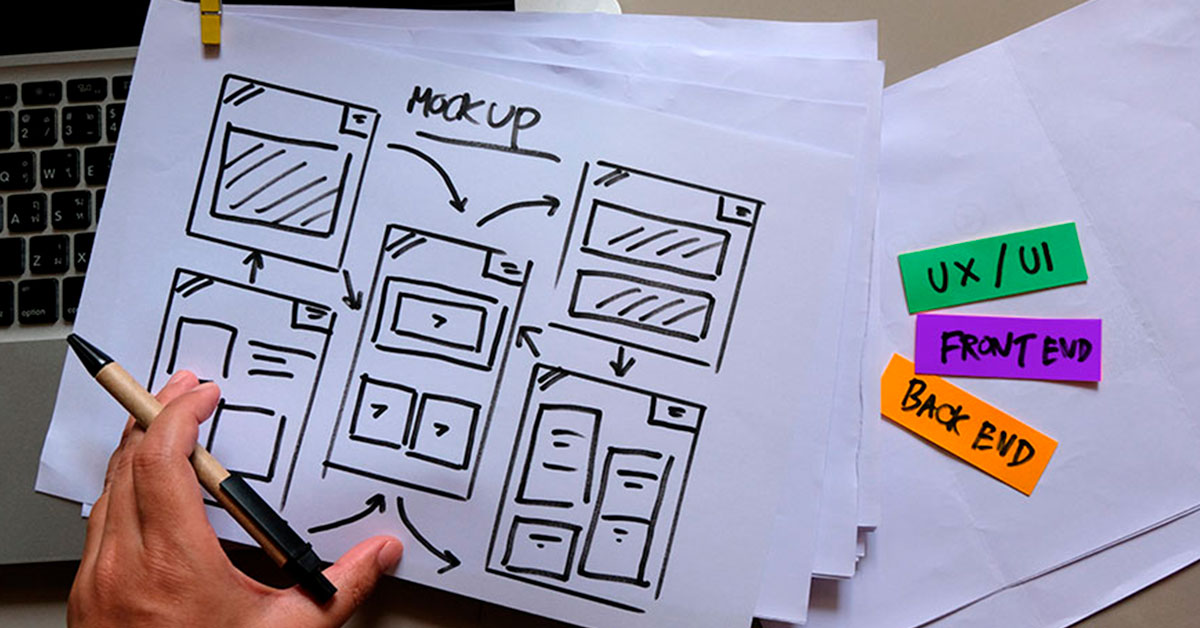
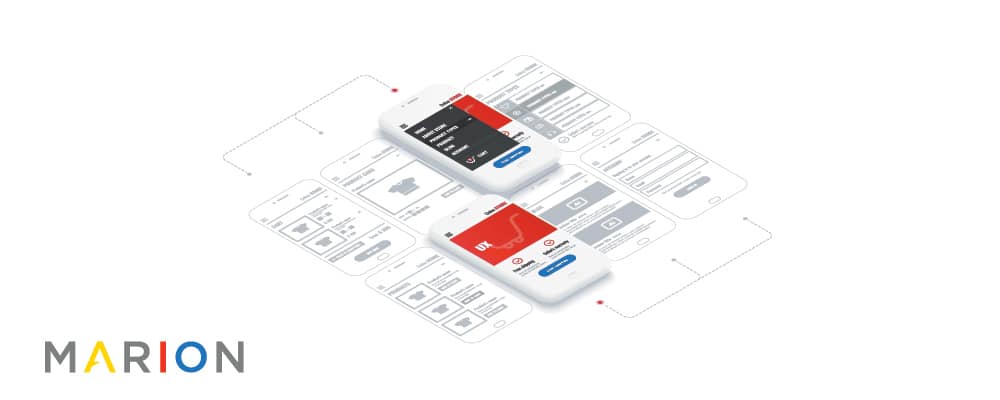
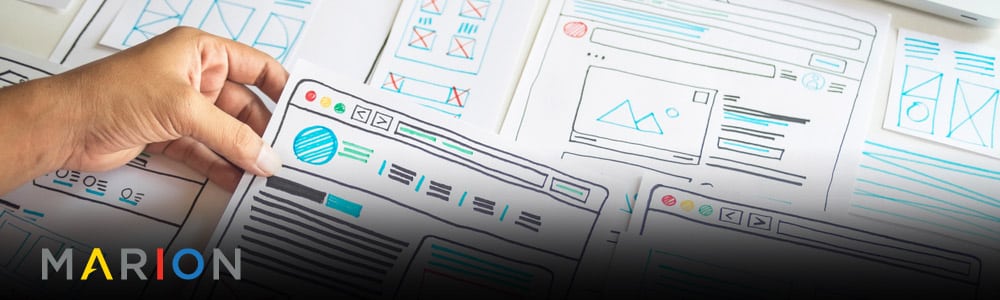
The wireframe is a crucial part of the web design process. A wireframe is a diagram that represents the structural layout of a website or application. It covers the site’s content, hierarchy, interactive elements, and navigational flow. Wireframes can be created with pen and paper before they are transferred to more sophisticated design tools like Photoshop or Illustrator.
The goal of this process is to ensure that all stakeholders are on the same page before any work begins on visual design, coding, or development processes. This way everyone knows what to expect from each other and can plan accordingly.
Step 3(a): Designing the Layout
Web design is the process of creating a design solution for a website. This includes gathering and analyzing information about the desired content and the intended audience, and then creating a representation of these on screen.
There are some basic elements you need to consider when designing your web layout:
What is your goal?
What are you trying to communicate?
Who is your target audience?
How much space do you have?
How many pages do you want on your site?
There are also different layouts that can be used such as: grid, mobile, one column, two column, etc. Be sure to research your layout options before deciding on one.
Step 3(b): Designing Typography
Typography is the work of selecting typefaces, point size, line length, letter spacing, and adjusting other elements of type to create a particular mood or tone. Additionally, it includes features that are more decorative in nature, such as choosing colors for text and backgrounds.
A person skilled in typography design is actually referred to as a typographer.
With so many factors to take into consideration when designing typography for your website, it can be hard to know which fonts are best for your project. Typographers have studied the factors that affect legibility and readability on screen or paper so they know what matters most when designing fonts. One factor is x-height which is the height of lowercase letters relative to capital letters in proportion to their widths. This is just one example, but there are many factors a web designer should consider with typography. That’s why having an experienced designer is so important to web developement!
Conclusion & What’s Next?
Let’s conclude by saying that the future of web design is going to be a bright one. We predict that these next years are going to bring a lot of changes and new technologies for us to explore. To maximize your website performance and get the most out of web design, it’s helpful to partner with the right web design agency. Contact us online today to schedule a free marketing consultation!
Outsourcing your marketing tasks can be a cost-effective way to market your business.
Outsourcing has the potential to save you time, money, and resources when it comes to marketing. Oftentimes you will need outside help when it comes to marketing your business, but sometimes the best thing for you is if you outsource part of your marketing process.
This article will explore some of the most important benefits that come with outsourcing your marketing tasks.
Why You Need to Outsource Your Marketing Tasks
In today’s market, companies have to be on their toes from the moment they start operations. They have to be competitive and innovative in order to stay afloat. In previous times, marketing was confined to a company’s four walls. Today, marketing has become a top concern for business owners who want their brands to reach a wider audience and achieve greater success.
The best way for a company to grow is by outsourcing some or all of its marketing tasks – starting with tasks that can be outsourced – such as data analysis, social media management, content management, and virtual assistant services.
3 Best Ways to Outsource Your Marketing Tasks for Less Time & Money
Marketing is a time-consuming and expensive endeavor for most small business owners. You can outsource the marketing tasks to other specialists, but you need to know how to go about it.
Here are three ways you can outsource your marketing tasks and save time and money in the process:
1. Hire a Marketing Agency: You can hire a full-service marketing agency that specializes in services such as content writing, SEO optimization, etc. They would take care of all your marketing needs at a fixed monthly cost which is much lower than hiring an employee for each task or paying hourly rates for freelancers.
2. Hire Freelancers: The other way to outsource your marketing tasks is by hiring freelancers who specialize in specific areas of work.
3. Do a Hybrid Approach: This might be the best option, as you can enjoy the benefits of both freelancers and a marketing agency.
Why Outsourcing Your Marketing Work is the Key to a Productive Workflow
Outsourcing marketing work can help you to create a better, more productive workflow.
The conventional way of marketing is no longer as effective as it once was. Technology has changed the world and the way people view things. In the olden days, advertisers only had to make sure that they were reaching their target audience by broadcasting their message through on-air media and print advertisements. Nowadays, it becomes a challenge for marketers to reach out to people who can be interested in their products or services due to the change in communication habits and platform use.
Other Advantages of Outsourcing Your Marketing Tasks
Marketing outsourcing can provide a unique solution to many of the problems faced by marketing teams, such as time and labor constraints, lack of in-house expertise, and lack of budgets.
As an example, you might outsource your advertising campaigns to an agency that specializes in that area. This ensures that you’re not wasting time with skillsets that you don’t have and instead focusing on what you’re best at – creativity, emotions, and your brand.
When it comes to content in website design, messages can get lost in a sea of never-ending information on a company’s website. Website personalization is geared around creating a personal digital experience for customers who venture on to a webpage. Why is this important? Because the more engaged a customer is, and the more relatable the content, the more likely they are to be repeat customers.
Website personalization builds a custom experience for each visitor as they enter a webpage, tailoring content based on the visitor’s personal preferences of data collected from previous online behavior. By collecting information on items that have been clicked on prior, other items of similar interest can be suggested to the customer. Email reminders that entice them with more information on products they have already looked at are also a way to invite customers back to your website. Let’s investigate why website content should be based on personal preferences and past behaviors.
Understand Your Audience.
Hone in on the needs of your target audience. By responding to their needs, preferences and expectations, your business can better connect and keep them engaged. For example, this would allow your business the opportunity to make more in-demand items available on your website. When you know what they like, you can make sure you offer it to them.
Increase Customer Loyalty.
Simply put, if you offer them what they want, they will keep coming back for more. A customer is more likely to be a repeat customer if they can relate the message received and website content with their lifestyle. Having options suggested based on their personal preference means they do not have to dig through multiple pages to find what they want. The more user-friendly the website is, the more likely they are to come back and use it again.
Keep Visitors on Your Site Longer.
The average visitor only spends 45 seconds on a website before ditching it. If they stay longer, it’s quite the accomplishment. Capturing a visitor’s attention makes them more inclined to stay awhile. The longer they stay, the higher the likelihood is they will purchase something. When it is personal and more about what you can do for them versus what your company offers in general this is easily achieved.
With only 45 seconds to capture the attention of the average online visitor, you need to hook them — and fast. Website personalization helps you keep your customers engaged and coming back for me. Ready to add personalization to your site? The team at Design At Work, named one of Houston’s best web design companies by DesignRush in 2021, is here to help. Contact us to learn more!
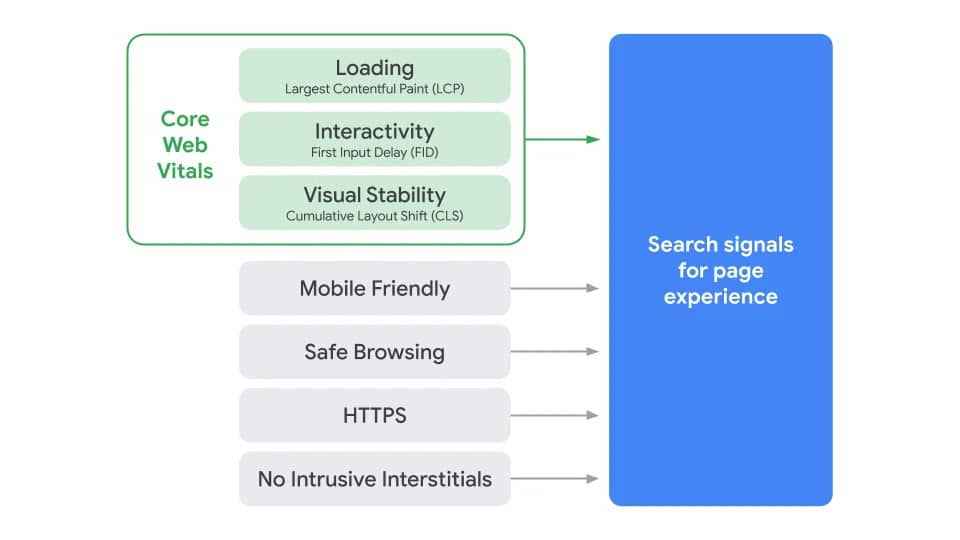
For years, Google has been introducing ranking factors centered around the user experience (UX) on your website. Elements like offering safe browsing, mobile-friendly pages via responsive web design, non-intrusive pop-ups, and using an HTTPS connection are examples of these UX search signals.
A new ranking signal has entered the SEO game and is expected to go into effect during 2021. The new signal is called Cumulative Layout Shift, and is a one of the three Core Web Vitals Google uses to gauge page experience on your site.
What Is Cumulative Layout Shift (CLS)?
Cumulative Layout Shift is a measure of the stability of the elements on a web page. If the visible elements on your page move around a lot within a user’s viewing screen, you likely have a high CLS score.
You’re reading a news article and go to click on a link, then—NO!— the page shifts down and you end up clicking something else entirely. If this describes an interaction you’ve experienced before, then you’re already familiar with CLS.
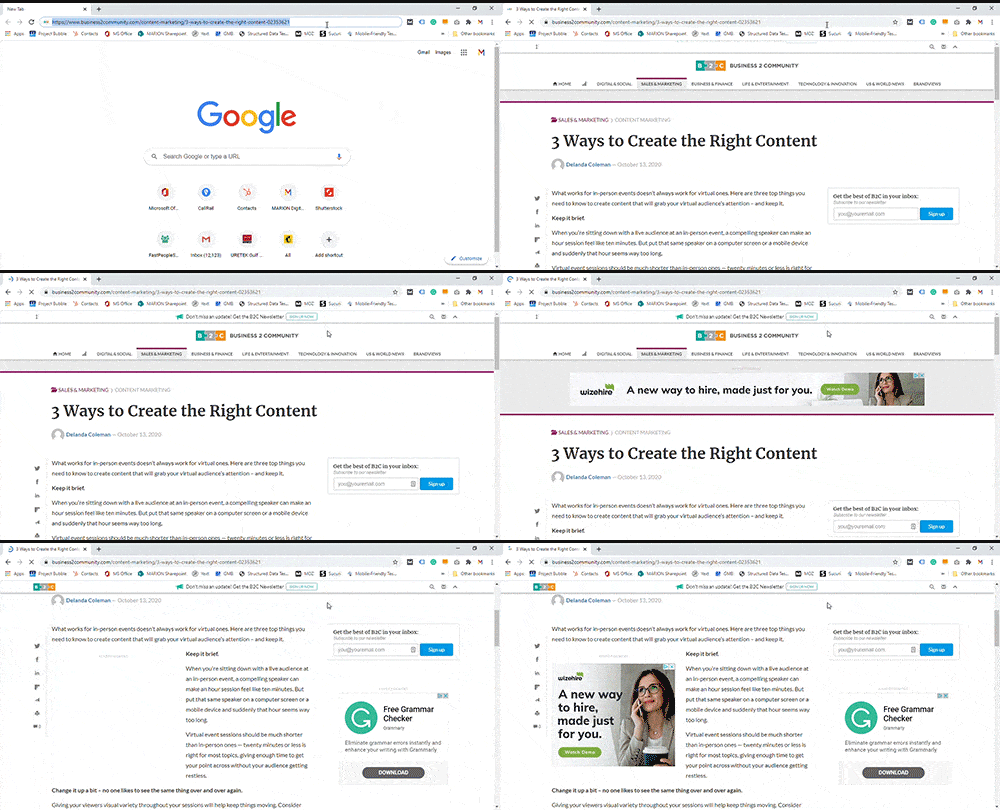
Cumulative Layout Shift is a Core Web Vital within Google that is scored like golf – the lower the shift of your page, the better. CLS can occur because of third-party advertisements, font changes during page load, or videos and images without set dimensions.
The gif above is an example of a high Cumulative Layout Shift on a news website due to third-party ads. Seconds after the initial page load, advertisements cause the HTML content on the page to shift.
Why Is CLS Important?
In May 2020, Google announced that Cumulative Layout Shift (along with several other Core Web Vitals) will become a ranking signal in 2021. They made it clear that webmasters will be given a six-month notice before this new signal goes into effect.
In other words, keeping a stable page that loads quickly will become more important to your Google rankings than ever before.
How to Fix Cumulative Layout Shift
Cumulative Layout Shift can be mitigated by taking the following measures.
Always set image/video dimensions
Avoid using third-party advertisements on your site without specifying their container’s predetermined dimensions
Don’t use fonts and back-up fonts above the fold on a page
If making these changes are out of your realm of expertise, then our team can help. MARION’s web design in Austin, Houston, and DFW can help with the technical issues that affect your site.
Get Help with CLS from the Pros at MARION
Not only are we versed in web design and development, but we are a full-service SEO agency in Austin, Houston, DFW, and every place in between. MARION has been providing marketing services for Texas businesses since 1981, and we practically started offering SEO services when search engines were born.
As a small business owner or marketing manager, you do your best to operate on a lean budget. For that reason, it’s not uncommon to experience sticker shock after the first few website design quotes you gather for your business.
You have the option to relegate your business website to a cost center role or build it into a powerful profit center and asset by choosing a good web designer. If you’re ok with the former, then a DIY site might be right for you. However, if you’re interested in creating a strong business asset, this article will help you establish some realistic web design budget parameters and get over your sticker shock.
So, how much does a website cost in each case? You’ll discover the costs associated with DIY web design, professional website design, and ongoing website maintenance.
How Much Does It Cost to Build a Website Yourself?
A DIY website offers one main advantage: raw cost savings.
Building a house or car with your own two hands also costs less than buying one from an experienced professional… but that doesn’t guarantee you’ll get what you need. Regardless, if this is the route you’ve chosen, you can opt to use a template or attempt a custom web design.
There are significant differences between custom web design vs. website templates – one of which being the associated cost of each. MARION has been offering Houston, DFW, and Austin web design for almost as long as website design has existed, so we’ve got a few insightful notes on this topic.
The following sections highlight differences in the average cost of website design when you’re using templates vs. creating a custom design.
Using a Template
Templates come in all shapes and sizes, and most CMS platforms and website builders have several free and premium templates that you can choose. Most templates, especially the premium ones, will be updated by the template author over time so that your website doesn’t break.
The following popular website builders offer templates that can make website creation easier if you don’t have HTML and CSS experience. The pricing reflects the lowest service tiers that give you access to web templates on each platform.
WordPress.com
$4 per month
Squarespace
$12 per month
Wix
$14 per month
Shopify
$29 per month
The main disadvantage of using a template is that your website might look oddly like several other popular websites with which your users are familiar. Using a website template is like showing up to a car show in a Honda Civic – it meets the minimum level of performance, but you will probably go unnoticed by your audience.
Custom Design
Custom design can be a great way to stand out from other websites. You can include custom features that highlight your unique product or service offering. The main downside to attempting a DIY custom web design is that you need to know HTML, CSS, and how to properly design and optimize a website. It can take years for professionals to thoroughly grasp all these elements.
However, if your goal is to simply take the first step toward creating an online presence, even if it’s at the expense of your marketing growth, then a DIY site can still help you do so.
These popular website builders also offer HTML and CSS customization that lets you break the mold by creating your own layout. Unlike the “Template” section above, you’re not limited to drag-and-drop website building at these price levels.
WordPress.com
$8 per month
Wix
$14 per month*
Squarespace
$18 per month
Shopify
$29 per month*
*If you compare pricing for the template and custom design sections above, you’ll see that Wix and Shopify offer customizable website building rates.
How Much Does It Cost to Get a Website Made by Professionals?
Obviously, the cost of getting a website designed by a professional will be much higher than a DIY site. A professional web designer will generally know design and UX best practices, have some sort of optimization strategy, know HTML and CSS, and can create a custom website that perfectly suits the needs of your target audience.
In other words, a pro web designer isn’t just creating a minimum viable website – they’re creating a powerful marketing tool that will pay dividends for your business.
MARION Integrated Marketing offers web design in Houston, Austin, and DFW, so contact us to schedule a free consultation regarding your business website needs today!
So, how much does website design cost when you’re having a professional do it?
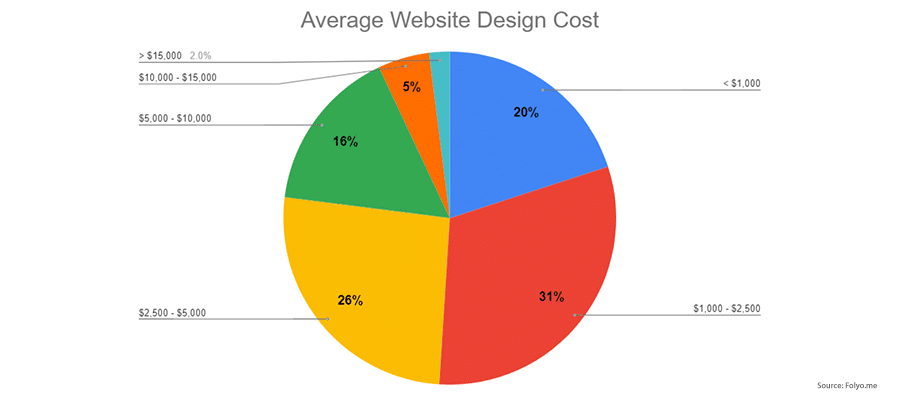
The average cost of website design by professional designers is around $4,000, according to a recent survey by Folyo.me of over 200 freelance designers. This website cost estimate is for design only and does not include the coding of your website.
Another study of 400 freelancer profiles on UpWork shows the following website design and development costs depending on your unique needs.
10-page Informational Website
$200 – $1,500
10-page Informational Website with Custom Designs
$1,500 – $5,000
10-page Custom-designed Site with Custom Functions
$5,000 – $10,000
In our experience at MARION Integrated Marketing, three general price ranges exist for small to mid-sized business website design. We provide a high-level web design cost breakdown for what you get in each tier.
Less Than $1,000
Websites in the range generally don’t include design insight or direction, development, or strategic input. This is just a bare-bones, possibly unbranded website that uses a very basic or free template. This represents the main difference between custom web design vs. website templates.
$1,000-$7,500
The web design cost for this price range includes some design insight, development and / or strategic input. This is a small, basic branded website that may use a configurable pre-built template or a custom designed template but does not include much strategic insight or advanced functionality like e-commerce or third-party integrations.
$7,500 and Up
At the bottom end of this range you will find smaller, but custom-designed websites that include custom interior and landing pages as well as more strategic insight regarding conversions process and optimization.
The web design rates in this range continue upward in price dependent on needs including extensive web design and/or custom development, e-commerce integrations, large scale third-party integrations, and large scale websites (100+ pages).
How Much Does It Cost to Maintain a Website?
Ongoing website maintenance costs are generally low. If you’re building your own site and have the option to pick the lowest cost providers, you can significantly hedge these costs. You get what you pay for, so expect the functionality of these maintenance solutions to be limited.
If at any point you decide to upgrade your services or change platforms, it may require an entire website rebuild. Keep in mind that these ongoing costs do not include any layer of strategy or optimization, just as registering a business entity doesn’t mean that you’ve purchased a profitable business.
The pricing below reflects some of the lowest pricing available at the time of this writing. The SSL quotes come from Comodo. Almost any web host offers .com domain names at around $10 per year. The web hosting price examples were pulled from bluehost, and Ecommerce functionality is based on the use of Shopify’s monthly rates at their lowest service tier.
Maintenance Item
Annual Fee
Website (DIY)
Ecommerce Website (DIY)
Domain Name Registration
$10 per year
X
X
SSL Certificate – Domain Validated (DV)
$7.27 per year
X
X
SSL Certificate – Organization Validated (OV)
$28.44 per year
X
X
SSL Certificate – Extended Validated (EV)
$74.99 per year
X
X
Web Hosting – Shared
$8.99 per year
X
X
Web Hosting – Dedicated
$124.99 per year
X
X
Ecommerce System
$360 per year
X
Total
$254.68
$614.68
Instead of piecing each of these web maintenance factors together, you could bundle your web design budget, maintenance, and ongoing marketing together. MARION offers full-service outsourced marketing that includes the following marketing and design elements.
* Requires subscription to approved 3rd party email marketing and/or automation tool ** 3rd party advertising costs not included
MARION Can Help You Build a Website That Pays Dividends
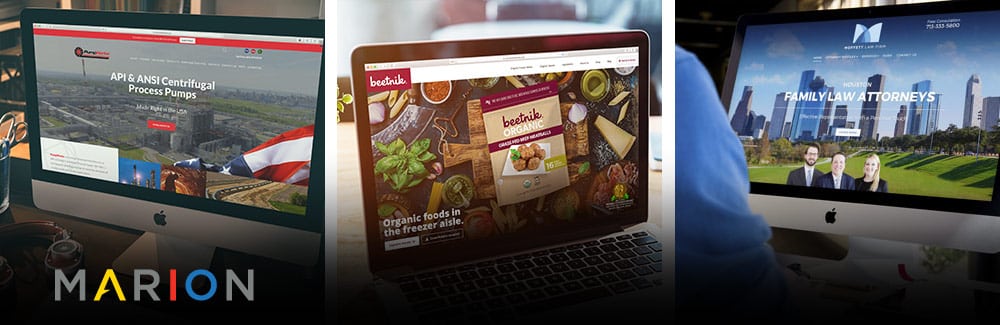
MARION Integrated Marketing has been serving Texas businesses for nearly 40 years. We’ve been developing custom websites for almost as long as the market has existed for them. Check out MARION’s website design portfolio to see what we’ve created for businesses like yours.
As a small business owner or marketing manager, having to balance operations, marketing and sales, and customer service leaves you with a packed schedule. Establishing a marketing budget for your small business is one thing, but being responsible for potentially thousands of advertising dollars can be a lofty task.
You can put your advertising dollars to work by maximizing the odds that your potential customers convert every time they encounter your ads. Learn how to make a high-converting landing page to realize the best return on your marketing spend.
What Is a Landing Page on a Website?
Unlike other pages on your site, landing pages are standalone pages; in other words, you will not find them in the navigation menu, nor are they linked to any other page on your site. They are specifically designed for marketing campaigns.
For example, if someone clicks on your Facebook ad or a PPC ad, they would be directed to the landing page, rather than an existing page on your site.
Purpose of a Landing Page
Landing pages are created with a specific goal and call-to-action in mind, in the hopes of maximizing the number of conversions you can capture from your digital marketing campaigns. While other pages on your site may have several different goals, the sole purpose of a landing page is to drive conversions.
The singular purpose of landing pages makes them invaluable tools in your B2C or B2B marketing strategy toolkit.
With an ad, you typically offer an incentive or a value proposition that entices people to click on the ad. However, you are unlikely to feature this prominently on your general-purpose website, or if you do, your website contains so much additional information that it may get lost in the sea of information. This is where your landing page comes into play.
A landing page enables you to mirror and elaborate on the message featured in your ads without having to make any form of changes to your website. It narrows the visitors’ focus on the message.
Splash Page vs. Landing Page
There are many similarities between a splash page and a landing page, but the main way in which a splash page differs from a landing page is that a splash page is not a standalone page. It’s not even a page at all, despite what the name may imply.
Instead, a splash page is a large screen that appears when visitors first enter a site. While the goal of both a splash page and a landing page is to drive more conversions on your site, splash pages are intended to convert more visitors to the site as a whole and are not necessarily catered to any specific digital campaign.
Do Landing Pages Work?
The short answer is yes, landing pages do work.
Landing pages are more effective than the typical page on your website because they are specifically designed with only one goal in mind: conversions. The best converting landing pages have content and information that is incredibly relevant to the ads that you are running, and the lack of extraneous information keeps the visitors’ focus on the page, helping to drive them further down the marketing funnel towards the conversion.
Elements of a Good Landing Page
Making a good landing page can seem overwhelming, but the following six elements of an effective page will eliminate some of your confusion.
One of the very first things visitors notice when they land on your page is the landing page headline. First and foremost, your headline needs to align with the ad the user clicked on to find your landing page.
Then, in very few words, your headline needs to be interesting and eye-catching, telling visitors exactly what they can get from your company. Once you have grabbed their attention and given them an idea of what your product or service is with your headline, you can use your sub-headline to further convince them to take the desired action.
Should a Landing Page Have Navigation?
Landing pages are more limited than a regular page on your site, including where navigation is concerned. Unlike the other pages on your site, you would not include a full navigation menu on the landing page, as the lack of navigation focuses your visitor’s attention on the content on the page.
For that reason, some design experts advise you to limit the use of navigation as much as possible; potentially even limiting it down to simply including your logo that links to your home page.
At MARION, we’ve experienced mixed results from eliminating page navigation. Easily accessible navigation is a major part of what makes a good website. Ultimately, you’ll want to test this out on your landing pages to see which method gets the best results with your unique audience.
2. Compelling Content
The key to a high-converting landing page is compelling content. In a concise manner, communicate the benefits of what you have to offer and how it will meet the needs of your landing page visitor. You know what you have to offer, so communicate that to your visitors as well. If you featured a special or incentive in your ads, be sure to elaborate on those offers on the landing page.
Your digital content strategy should ultimately depend on your offer. When PPC advertising is concerned, the better you can match your landing page content with the information found on your PPC ads and the keywords you use in your campaigns, the better your campaign and your landing page will perform.
3. Call-to-Action
As with any digital ads, a call-to-action is critical to driving conversions. That rule does not exclude landing pages. Your landing page should prominently display your call-to-action, telling visitors exactly what they need to do to get in contact with you.
As with your headlines and content, your call-to-action must be compelling and persuasive. The design, color, and placement of your CTA are all factors that need to be taken into account in order to create high-converting landing pages.
4. Supporting High-Quality Images and Videos
Images and videos are an eye-catching and persuasive way to provide context and give visitors an even more clear idea of what it is you can do for them. Showing, in addition to telling them, is key for effective landing pages. Keep in mind that your images must be high-quality and relevant.
If you’re interested in customized graphic design in Houston, Austin, or DFW, MARION can help created supporting images that will resonate with your audience.
5. High-Visibility Form
Having a high-visibility form on your website is what makes a great landing page truly effective. Your landing page form is one of the most critical elements to include as it simplifies the conversion process, thereby making it easier to convince visitors to convert.
6. Continuous Testing
As with virtually everything else in digital marketing, continuously A/B testing your landing page is the key to ensuring that your landing page is maximizing the number of conversions it could potentially capture. It allows you to see what elements do or do not work and make any necessary changes.
Process for Creating Landing Pages that Convert
The process for creating landing pages that convert can vary depending on your requirements for your page. For the most part though, you’ll want to start by creating a wireframe that outlines the page structure and layout.
If you choose to work with a professional designer, they will then be able to use your wireframe to come up with a clean, organized design with minimal elements and contents that is sure to convert. A developer can then use the design to code the website and get it to look and function as it should.
For the best odds of choosing a web designer that brings your visualizations to life, research some selection criteria that will help you identify the right fit.
How Long Does It Take to Create a Landing Page?
As with the process for creating landing pages, the time it takes to create a website landing page depends on several different factors: Is it a custom landing page, or a templated one? There are many benefits of custom web design, but completely custom landing pages take longer to create than a templated one.
The bigger the scope of the landing page, the more elements added to it, and the more complex the design, the longer it will take to create. Are you attempting to create it yourself or are you going through an agency? If you do go through an agency, the time it takes would depend on the agency’s process, their workload, and the speed of the individuals working on the landing page.
3 Examples of Landing Pages that Convert
Before learning how to create a converting landing page on your own, look at the following three examples of landing pages that convert. These companies have clearly been using a thoughtful landing page development process to hone their pages into what they are today.
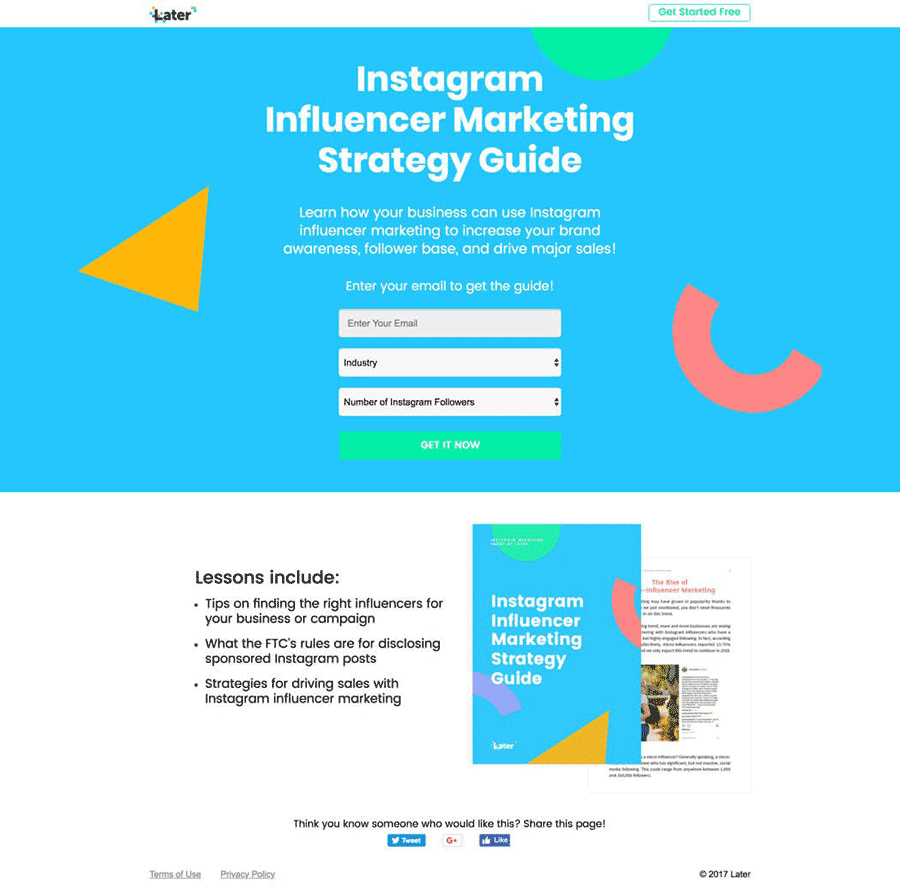
Later has does an excellent job creating an effective landing page that is sure to convert. At a glance, you can see exactly what the page is about, what you can expect to gain from it, and how you can convert via the form. The content is concise and straight to the point, giving you all the pertinent information.
The call-to-action “Get It Now” is also compelling and sure to get people to convert. If you look closely, you’ll also notice that there is no navigation menu. They utilize high quality images that gives you a clear idea of what you will get once you convert. While we can’t know if they are conducting A/B tests, they have included all the elements of a persuasive landing page.
2. Uber
Source: Uber
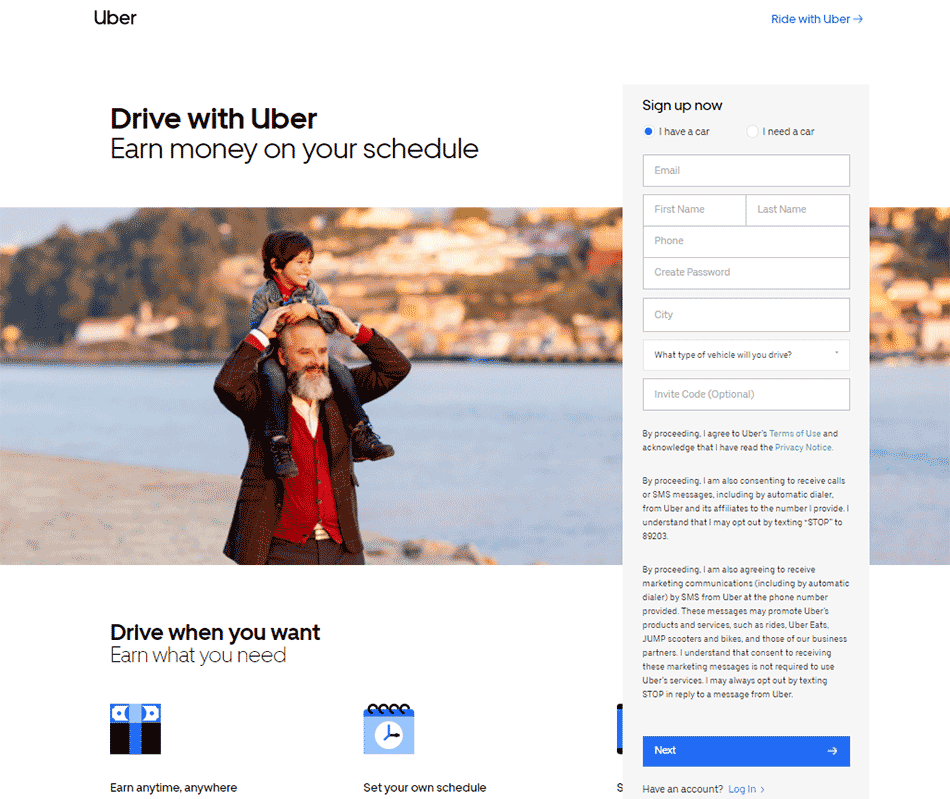
Though Uber’s landing page does not have as much content as the previous example, the content they do have is concise and to the point. You know exactly what the page is about, what you can expect to gain from signing up, and you can see immediately how to sign up.
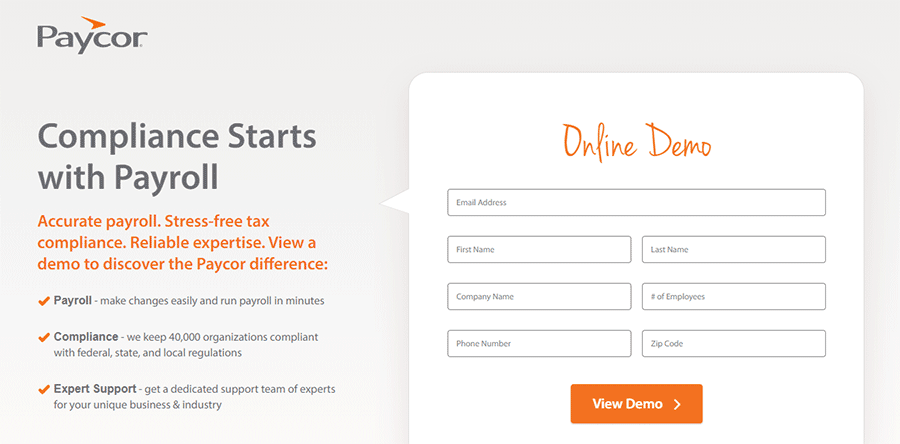
So, what makes a great landing page? Paycor definitely has the answer. This landing page is linked to a search ad, and their heading and subheading closely align the intent of the original search.
Right off the bat, they make their content compelling with a clear landing page value proposition. Their service is the solution to a common pain point of small business owners – compliance.
Their demo call to action is clear, and there is a highly-visible form near the top of the page. As a bonus, there is no top navigation to lead users away from the main CTA.
To improve one aspect of this landing page according to best practices, Paycor may benefit from adding supporting imagery or video.
MARION’s Web Design Team Can Help You Craft Effective Landing Pages
It’s clear that your business is a success, but growth has become a priority and landing page design is not your expertise. MARION has been around for nearly 40 years, and our Austin, DFW, and Houston web design capabilities have evolved to suit the needs of your business.
An effective business website is critical for a positive first impression – make sure it’s well-designed and functional. Not only should it be attractive, but it should also be easy for people to find out more information about your business. Learning how to choose a web design company that builds high-performance sites is the first step toward making this happen.
If your website is difficult to use, you may lose a potential client or sale!
Should I Build My Own Website or Pay Someone?
When deciding whether to hire a web developer or do it yourself, you should consider what you’re trying to accomplish. If you are a business owner who is strapped for time, you might not have enough hours in the day to learn how to build and optimize your own website. If productivity is your goal, hiring someone to make a website for you could allow you to spend your precious time on other tasks.
Pros and Cons of Doing It Yourself
Website builders are an inexpensive option for business owners to get their website up and running. They rely on visual editors so a beginner can easily edit and plan their website. However, they often are limited in their design and technological capabilities and you run the risk of looking too similar as other websites using the same builder. DIY website builders generally incur a recurring usage cost.
One of the main disadvantages of building your own website is that you likely aren’t aware of best practices for user experience (UX) design or SEO-friendly web design. In the end, you’ve paid much less, but your DIY website is not effective at getting leads for your business.
Pros and Cons of Hiring a Web Design Company
Although a web design company will cost more initially, you ultimately get what you pay for. Hiring a web development company means hiring a team of experienced professionals who specialize in necessary elements critical for your online presence. You can avoid spending your valuable time and money building an underperforming website from scratch.
Choosing a web design company can feel overwhelming if you don’t know where to start. In this article, we’ll discuss how to find a good web design company for your needs.
1. Look at the Websites They Have Built
One of the best tips in choosing a web designer is to consider what you are looking for in a website and comparing how their previous experience aligns with your intended goals. By looking at their portfolio, you can evaluate if their style and design approach fits your own.
2. Visit the Company’s Own Website
When choosing a web design agency, check out their own client-facing website. You wouldn’t hire someone to make your website if their own website doesn’t look professional and up-to-date. Ask yourself – does this company walk their talk?
3. Talk to the Web Design Agency About Their Process
When hiring a web development company, it’s important to understand how their process works so both parties can maximize productivity. The initial stages of your website design project will probably take weeks, while overall website services may continue indefinitely. This professional relationship will be long-term, so make sure it’s a good fit.
4. Verify That Your Budget Works with Their Pricing
Before jumping in, you should discuss with the agency your goals and the allotted budget. Most agencies don’t have their pricing on display since every project has its unique requirements. Having a budget and hammering out these details ahead of time can save you a lot of money on professional web design services.
As a point of reference, the average cost for websites we build at MARION is between $5,000 and $15,000. Some of our clients have more aggressive growth goals, requirements for advanced customization, and complex needs that drive their level of investment to more than $15,000. However, the cost is always tied to value-added; paying more for a website from MARION means that it becomes an even greater revenue-generating tool for your company.
5. Schedule a Meeting with the Web Design Agency
The best way to find out all the answers you need is to schedule a meeting and bring questions to ask the web development company you’re considering. A meeting is great for both parties to find out if you’re a good match for each other’s businesses.
5 Questions to Ask a Web Design Agency
Once the meeting is scheduled, here are the best questions you should ask to gauge if you should trust a web design company with your valued business!
1. Can I Meet Your Web Design Team?
The people you meet with to discuss the questions with may not be the same people who will be working on your website. You may want to ask if you can meet the people you’ll be interacting with the most once your project has begun.
Efficient web design companies are generally hesitant to pull their designers away from important work for sales meetings. So, understand that you may not meet the whole team until after an agreement is in place.
2. What Is Your Web Design Process?
A good web development company will walk you through their design process step by step in an easy-to-understand manner. They’ll explain what you should do on your end (such as creating a design brief for their graphic designers), iterations that may be required, and how they’ll work to achieve your goals.
3. How Do You Incorporate User Experience into a Website Design?
User experience is a big factor in a website’s success – most people will leave if your web design is not intuitive, easy-to-use, and fast. A good web designer will have up-to-date strategies on incorporating user experience into your website’s design.
4. Have You Designed a Site for My Industry or Goals Before?
When deciding between professional web design companies, you should look at how much experience they have. Have they worked with all kinds of clients before? Do they have experience with your industry? Do they know what to do in a wide range of situations? These are all good questions to ask to gauge if they’re fit for the project.
At MARION, we find that our content marketing in Houston, Austin, and DFW benefits from the years of experience our team has in common regional industries. Having previous experience writing high-performing copy for your industry enhances the quality of your new website.
5. How Is Ongoing Website Maintenance Managed?
Over time, a website may need changes and ongoing maintenance. A design firm could give you guidelines on how to make these changes on your own, or they could be responsible for making updates. It will most often be a combination of the two, so clarify what their rates will be or how this process will work in your case.
MARION Has Been Providing Professional Web Design Services for Years
If you need a new website or an overhaul of your existing website, you can trust MARION to get the results you want. Our inbound marketing agency works with you every step of the way to develop a strategy and design that captures your vision. Our dedicated team of web designers will work towards your goals while you focus on other aspects of your business.
Everyone appreciates websites that perform adequately and efficiently with ease and reliability. All too frequently, good function and performance take a back seat to visual appeal when it comes to website design. When websites don’t function as anticipated, the lack of forethought regarding user experience can leave users disappointed.
When it comes to creating effective business websites, UX design and web design should coexist as complementary elements—but there are some marked differences between the two.
You may be wondering whether you need UX design or web development. In this article, we’ll discuss some of the differences between UX and web design.
What Is UX Design?
UX is the acronym for “User Experience” and simply refers to the experience a user has from a product or interactive media, such as a website. UX design is not limited to the internet or digital media. UX can be applied to almost anything that offers human interaction—like playing a video game, driving a car, or, using a coffee maker.
UX design focuses on the user—to understand their habits, needs, behaviors, motivations, and emotions. A UX designer considers how the experience makes the user feel and how easy it is to accomplish the desired result.
For instance: Does the game controller fit comfortably in the user’s hand, and does it respond as expected? Does the car’s dashboard present an intuitive layout to aid in the driving experience? Does the coffee maker have easy-to-read controls while efficiently brewing that hot cup of coffee?
A company looking to create an elaborate internet application needs someone with experience in problem-solving through an understanding of interactive methods, user research and behavior, customer engagement, and other criteria. Before software or app design begins, a UX designer will develop user personas and apply a specific methodology around the end-user.
Providing the best possible user experience in interactive media requires good UX design. UX is not all about visuals, although that plays a part. Before the design is implemented, interactive prototypes or simple static wireframes are created. Then, usability testing can occur by navigating through the prototype where assessments and necessary adjustments to functionality can be made. Testing will occur again after the design is completed and before launch/product release.
Core Competencies of UX Design
UX design is especially relevant to digital applications, such as apps, software, and websites. A nice-looking website is the goal of a good web designer, but UX requires a specific methodology to create a great experience for the end-user.
What Is Web Design?
Website design is a process of planning, creating, and aesthetically presenting content and information on the internet. It may encompass several different aspects, including webpage layout, content production, and graphic design. Web design typically includes several different visual components including, but not limited to, written content for headlines and body copy, images, videos, fonts, colors, and graphical elements—all arranged to accentuate and complement a company’s brand.
Aside from the basic elements of branding and web design that make a site beautiful and visually compelling, a website should always be user-friendly. Website design not only includes how things look but also how they work. Both the look and functionality of a website can play important roles in site performance.
Website design can have an impact on search engine performance, so careful planning and placement of content, images, videos, and keywords can make a positive impact in helping potential clients find your website. An SEO-friendly web design adds yet another set of considerations for a high-performing site.
Core Competencies of Web Design
In addition to design elements and strategy, web design involves HTML, CSS, and sometimes, JavaScript. Often, web designers will do the “front-end” development (what you can see) while a web developer focuses on the “back-end” (what you can’t see). At MARION, we have years of experience with WordPress design and development in Houston and can build fully-custom themes.
Many web design services provide creative concepting, color theory, typography, infographics, icon development, diagrams and tables, and interactive navigation, i.e., rollovers, drop-down menus, digital slideshows, call-to-action buttons, and forms.
Web design is also focused on the client’s brand from both a visual and messaging perspective. The right branding agency in Houston, Austin, or DFW can help turn your website into a powerful marketing asset. Understanding which competencies help these professionals excel makes learning how to choose a web design agency that much easier.
Main Difference Between Web Design and UX Design
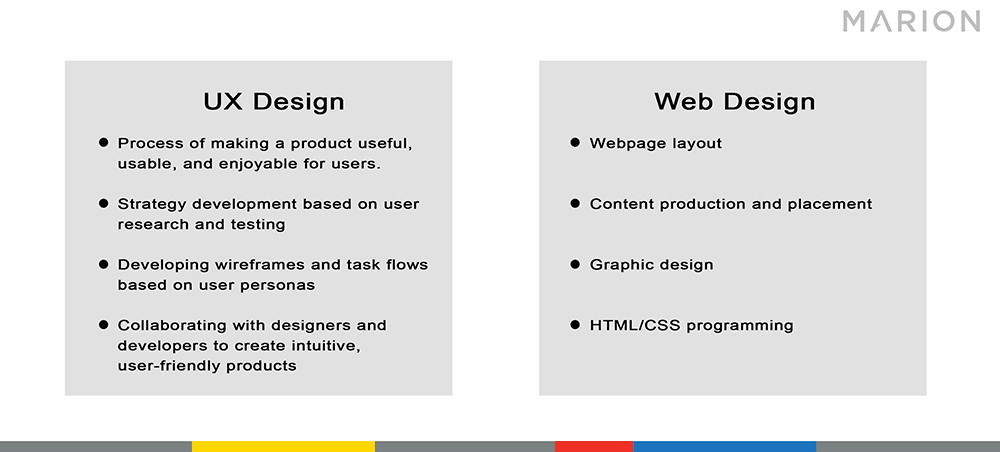
Web design is the process of creating websites for the internet, whereas, UX design is a broader term and is the process used to create products that provide meaningful and relevant experiences to users— this is the difference between web design and UX design.
UX design involves:
The process of making a product useful, usable and enjoyable for end-users
Strategy development based on user research and testing
Developing wireframes and task flows based on user personas
Collaborating with designers and developers to create intuitive, user-friendly software and apps
Web design involves:
Webpage layout
Content production
Graphic design
HTML/CSS Programming
MARION Can Create a Beautiful, User-Centric Website for Your Brand
Creating a great user experience on the internet takes foresight, testing, and planning. At MARION, we can design a website for your business that creates an engaging experience for your potential clients.
Our marketing agency in Houston has decades of experience building traditional and digital marketing assets that can generate leads and expand your bottom line. Your website will have purpose, relevant and original content, clear and easy navigation, and will set your brand apart with a professional design and SEO to maximize visibility and web traffic.
For digital marketers, strategists, and search engine optimization (SEO) professionals, prioritizing website redesign SEO seems like a no-brainer. However, many graphic designers, developers, or account managers may not fully understand the relationship between SEO and website redesigns.
Whether site redesign SEO is new to you, or you’re a seasoned vet that just wants to make sure you’ve checked off all the boxes – this eight-step website redesign SEO strategy is for you.
Importance of SEO for Website Redesigns
It all boils down to profit. In most cases, a website redesign is a marketing investment intended to increase your revenue by means of increased rankings and traffic.
There’s a good chance you’re redesigning your website because you want it to be more appealing to your target audience. In theory, a more attractive website will generate more revenue (either through branding or business lead generation) and produce a return on your investment many times over.
However, your website has two main functions:
Attracting your target audience
Engaging and converting your target audience once they visit your site
Redesigning your website without considering SEO neglects the first function. Doing so is a quick way to squander years of your prior digital marketing investment. This can reduce your company’s profit, and significantly lengthen the payback period for your website redesign.
How to Redesign a Website Without Losing SEO
When you redesign your website without losing SEO value, you’re strengthening both of its main functions. Your site will do a better job at attracting potential customers AND helping them convert into paying customers.
The following site redesign SEO checklist will help you navigate the redesign process without losing your hard-earned rankings within major search engines.
1. Take Inventory of All Pages from Your Existing Website
Every page on your website is an asset when it comes to Search Engine Optimization. You can collect a list of your pages in several different ways:
Use a crawler
Use your sitemap
Use Google’s index of your site
Use Google Search Console
Using a Crawler
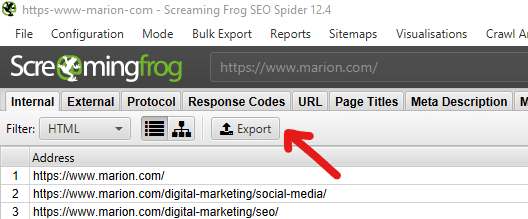
I lean heavily on Screaming Frog for crawling website pages. The tool costs around $165 per year and is great for more than just listing web pages. This tool provides a lot of value with minimal impact on your small business marketing budget. If your website has fewer than 500 pages, you can use Screaming Frog for free.
The Screaming Frog User Guide can help you get started if you’ve never used the tool. Beyond using Screaming Frog to take an inventory of your web pages, it can help find technical SEO elements like broken links, 404 pages, oversized images, missing HTML tags, missing or duplicate meta descriptions, and more.
Using Your Sitemap
If you’re using a content management system (CMS), you may already be using an automatic sitemap generator to keep a running inventory of your pages. If you’re not leveraging a CMS, you may already have a manually-compiled sitemap.
A common case would be a WordPress website using Yoast SEO to auto-generate a sitemap. You can get a mostly complete list of your web pages from your sitemap if this is the case. Keep in mind, a Yoast sitemap will only include up to 1000 URLs and won’t include pages that you’ve labeled “noindex.”
Using Google’s Index
For smaller websites, doing a Google search for “site:yourwebsite.com” will return results for all your unique pages that Google knows about today. For larger sites, combing through pages of search results isn’t very feasible. Additionally, Google may have excluded some of your pages if they identified them as duplicates or established that they weren’t important enough to include in its results.
Using Google Search Console
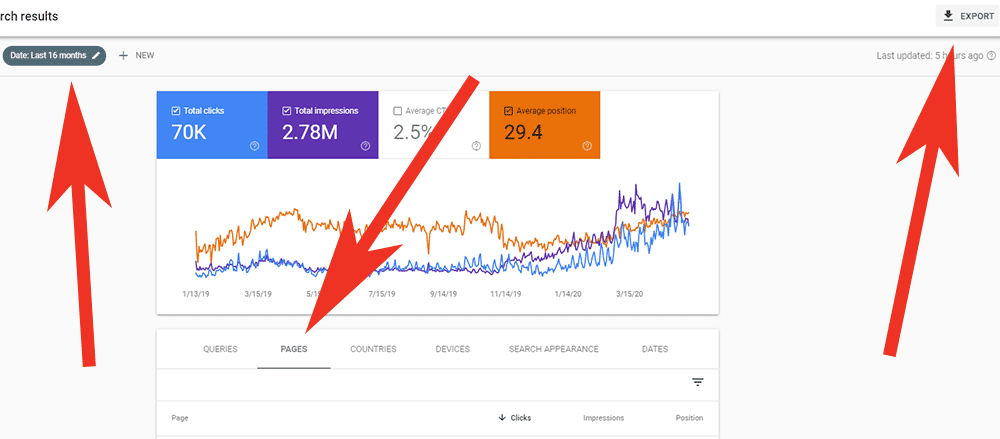
If you’re familiar with using Google Search Console, you can find a mostly complete list of your pages there. After navigating to the Search Results report, you can extend the date range out to 16 months and filter by pages to see a list of all your URLs that Google identified in the past 1+ years. There’s even an Export button in the top right that will generate a CSV list for you to use.
2. Implement Your Redesign on a Test Site or Staging Environment
Now that you’ve taken inventory of your existing website, you can begin redesigning a new version. To maintain your SEO during a website redesign, it’s important that you make your design changes in a staging site (sometimes called a “dev site,” or “test site”).
The main reason for using a separate development environment during your redesign is to avoid having search engines crawl and index an incomplete version of your new site. You also don’t want users to see web pages that are in the process of being overhauled.
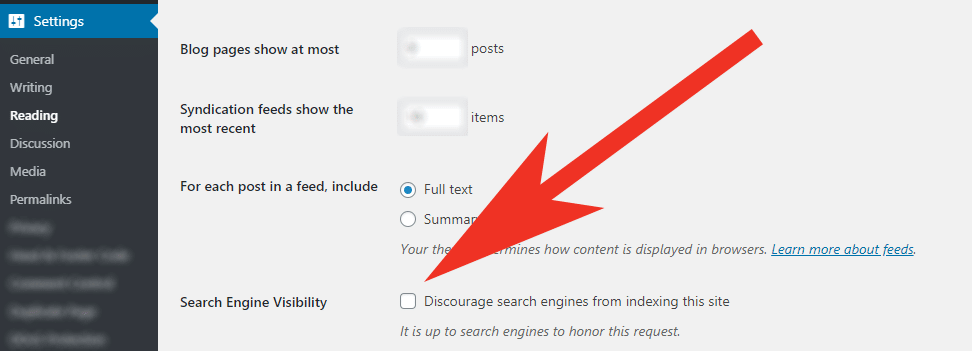
To prevent search engines and users from discovering your work in progress, make sure you prevent your test site from being indexed. You can do this by:
Clicking “Discourage search engines from indexing this site” if you’re using WordPress
Explicitly adding a “noindex” meta robots directive to each of your pages
Disallowing all robots from crawling your site via your robots.txt file.
3. Audit Your New Website
Now, if your website redesign only involved “reskinning” your existing pages, there won’t be much new information to audit. For example, updating branding color schemes and spacing between HTML elements using CSS generally won’t introduce new SEO issues that will hurt your performance.
If you’ve undergone a more extensive redesign, you’ll want to do a complete website redesign SEO audit. We offer an in-depth guide for doing a website SEO analysis in a previous blog post. This will help you identify thin or duplicate content that can cause you to lose SEO rank in unexpected ways.
If you’d prefer professional Austin, DFW, or Houston SEO services instead of a DIY approach, contact MARION today.
Common Issues During a Redesign Audit
The biggest issues that arise during this stage are caused by combining pages, changing URLs, or eliminating pages.
Imagine you’re a mid-sized manufacturer for B2B machinery and you have three different pages about calculating payback periods for your products. If you tell a web developer to combine those pages, they might simply copy and paste the content from two of the pages onto the third and call it a day.
In this scenario, the two pages that have been eliminated may have had valuable backlinks from third-party websites. You will lose the SEO value from those backlinks and confuse users that happen to click on those links and show up to a “Page Not Found” placeholder on your new website. To avoid this issue, you’ll need to set up the appropriate 301 redirects (we cover this in the next section).
In the second scenario, imagine your most popular page (about machinery payback calculations) was located at https://www.yourwebsite.com/payback-calculation/. During your site redesign, a developer changed the URL to https://www.yourwebsite.com/payback-calculations/ (with an “s”). The SEO impact of changing URLs can be significant if not handled properly.
This situation would result in search engines needing several months to drop the old URL from their index, index your new URL, and rank your page from scratch. You would also forfeit all the backlinks from third-party sites that your old URL had earned over the years. Again, setting up the appropriate redirects (covered in the next section) will help you avoid losing SEO value during your redesign.
4. Set Up 301 Redirects
When you use a 301 redirect, it forwards an old URL to a new URL of your choosing. It also tells search engines that this is a permanent change, which is very important.
When you use a 301, you keep most of the SEO value attributed to the old page by transferring it to your new one. Therefore, setting up the right redirects is essential to your site redesign SEO. This will preserve website functionality and your previous link building investment.
For WordPress Websites
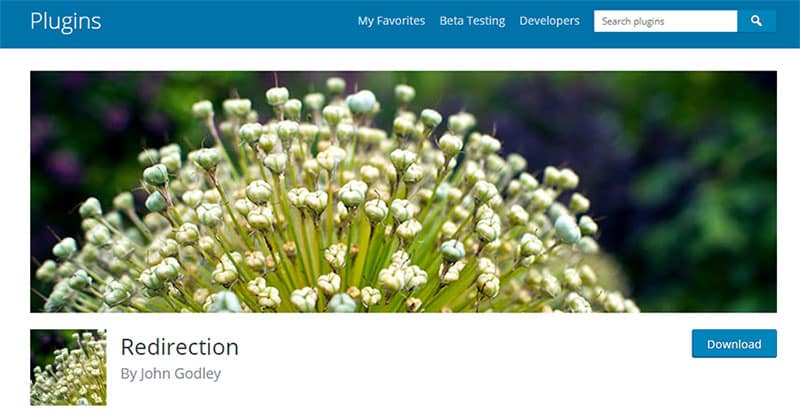
If you’re using WordPress, implementing a 301 redirect is easy. I highly recommend a plugin called Redirection by John Godley. Download it through the plugin directory in your WordPress backend, and follow the easy instructions that the plugin author laid out.
For Other Websites
If you’re using a different CMS for your website, it may already have a built-in redirect functionality for pages. Access the CMS’s knowledge base or do a quick Google search to see if that’s the case.
If your site is based on an Apache server, you (or your developer) can set up redirects within the .htaccess file.
Many domain name providers also allow you to implement redirects through their advanced DNS settings. If you choose this option, make sure you document that you’ve done this so you don’t stump your team members in the future.
If all else fails, you can add meta refresh code to the header of a page. Here is an example:
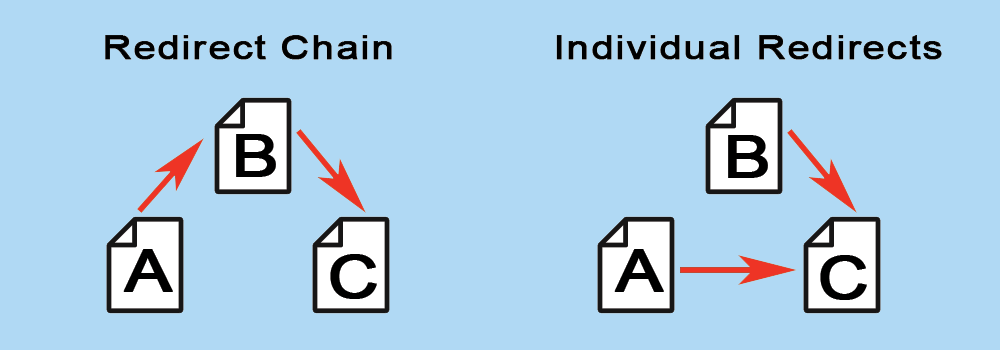
If you’re already familiar with SEO, there’s a very good chance you already have an extensive list of 301 redirects in place. In this case, the SEO checklist for your website redesign should include removing any redirect chains.
A redirect chain is when URL A is forwarded to URL B. After this relationship has been forgotten (usually months or years later), someone may decide to forward URL B to URL C. This means that a poor website user trying to visit URL A would be forwarded down the line several times before reaching their destination.
Historically, each 301 redirect diminishes the SEO value that is passed each step of the way (though a Google spokesperson confirmed that an SEO factor called “PageRank” is not diluted in this transfer). Eliminating these redirect chains benefits users and can help you maintain as much SEO value as possible.
Every time you plan on redirecting a page, search your list of 301 redirects to make sure nothing is already being redirected to the page you plan to forward. If it is, update those redirects to forward directly to your new page destination.
In other words, if you want to redirect URL B to URL C, make sure you don’t have anything redirecting to URL B. If you find that URL A is redirecting to URL B, then update that 301 redirect to go directly to URL C.
5. Activate Your Redesigned Website
Once you’ve put in the redesign work and your fresh website is ready for users to see, it’s time to activate your design. The heavy lifting during this step will typically be done by developers, but you need to double-check that everything is working as planned.
For example, remember in step two when you prevented search engines from finding your site? Make sure this functionality has been removed when your redesigned site is activated. I’ve seen marketers (and even done it myself) launch a new website that included “noindex” directives on each page that caused the entire site to slowly disappear from search results.
You can’t improve your SEO strategy if you don’t have hard data backing up the decisions you make. You’ll want to ensure that your tracking codes are set up and collecting data. This means Google Analytics, heat-mapping, social media pixels, etc.
Download our 8-point website launch checklist to discover other major items that you’ll want to consider after your site is launched. This can have a very positive impact on your SEO strategy during a website redesign.
6. Verify Robots.txt and Meta Robots
Your robots.txt file can include an explicit link to your redesigned website’s sitemap. By including your new sitemap in the robots.txt file, you’re making crawling and indexing as easy as possible for search engines.
Like we addressed in step five, make sure you’re not accidentally preventing important pages from being indexed. On the flip side, if there are certain landing pages that you DO want to keep from being indexed, check those items now. If you have any canonical links implemented on your site for very similar pages, make sure those are appearing as planned too.
7. Set Up Google Search Console
If you’re unfamiliar with Google Search Console (formerly Google Webmaster Tools), this easy guide from Google will help you get started.
In addition to including a link to your sitemap within your robots.txt file in step six, make sure you submit your sitemap URL to Search Console as well. This helps Google identify and crawl all the indexable pages on your redesigned site with ease.
8. Monitor SEO Ranking Changes
At this point, the work is done and you’re ready to continually monitor new incoming data about rankings, conversions, and overall performance. Now that you’ve got access to your data, it’s up to your marketing and executive teams to learn how to choose marketing KPIs that matter.
Keep in mind, a successfully implemented website redesign SEO plan will may not immediately improve any of your SEO results. That’s fine! Your goal was to maintain the SEO value that your site had accumulated.
However, if your designers and user experience (UX) team succeed, your redesigned site will engage users more and result in more customer conversions. Longer dwell times and happier website users will slowly improve factors that have a direct positive impact on your search engine rankings, so be patient!
For top-quality DFW, Austin, or Houston web design, contact MARION for a consultation today.
MARION Can Guide Your SEO and Web Design Efforts for Higher Returns
For nearly 40 years, MARION has been providing marketing solutions for Texas-based businesses. Today, our digital marketing agency is staffed by experienced professionals with a passion for helping you succeed.
If you’re in search of an SEO agency in Austin, Houston, or DFW, we can help. We have over a decade of experience helping our clients attract their ideal customers with a thoughtful SEO strategy.