Category: Web Design

Should AI be doing your marketing?

Why AI alone isn’t enough — and where agency expertise comes in.

For many businesses, keeping marketing in-house seems like the practical choice. With AI on the scene, it seems more cost-effective than hiring an agency and promises to keep projects moving quickly. After all, if a tool can write copy, design graphics, manage your social calendar and analyze campaign data in seconds, why wouldn’t you let it handle everything?

The challenge is that marketing isn’t just a series of tasks to check off a list. AI, for all its capabilities, can’t replace the strategy, creativity and cross-channel expertise it takes to grow a brand. Without that guidance, even the fastest, most affordable marketing efforts can fall short.

So should AI be doing your marketing? The answer is yes and no.

The limits of “good enough” marketing.

AI can make marketing look easier, but it doesn’t erase the gaps that come with relying on a single, inexperienced hire or asking a non-marketing employee to juggle tasks. These arrangements may keep projects moving, but they rarely produce the kind of coordinated, impactful marketing that fuels growth.

Here are the top five problems with “good enough,” AI-fueled marketing:

1. No clear strategic direction.

AI can produce content on demand, but it doesn’t decide what your brand should say, when to say it or how to connect the dots between campaigns. Without a strong, guiding strategy, marketing efforts can result in a haphazard mix of posts, emails and ads that don’t support measurable goals. The result? Activity without impact.

2. An inconsistent brand voice.

When messaging is created by a single marketing generalist — especially one without deep branding experience — messaging can drift from one piece to the next. AI can mimic tone in isolated pieces, but it can’t ensure your voice is applied consistently across all channels and touchpoints. This kind of inconsistency can erode customer trust and make your brand forgettable.

3. Limited creative perspective.

“AI tools should complement, not replace human creativity.”

— Chad Gilbert, VP of Content Marketing, NP Digital

A lone marketer (or a non-marketing employee) has limited bandwidth and creative diversity to draw from. AI might churn out endless variations, but without the insight to know which ones will resonate, you risk spending time and budget on campaigns that don’t connect with your audience.

4. Fragmented execution.

Effective marketing forms a cohesive ecosystem. Your campaigns, channels and messages should work together to tell one story. A single person juggling multiple responsibilities, even with AI’s help, can find it difficult to keep that ecosystem in balance. Opportunities to cross-promote, retarget or build momentum between campaigns are easily missed.

5. Reactive rather than proactive marketing.

Without dedicated expertise, marketing often becomes reactive, responding to immediate needs instead of building toward long-term growth. AI can accelerate that reactive cycle, producing more content faster — but without direction, it’s just more noise in an already crowded space.

How experts make AI work harder for you.

The smartest approach isn’t choosing between humans and AI. It’s combining the two.

“AI won’t replace humans, but humans with AI will replace humans without AI.”

— Tom Davenport, AI researcher & author

AI can move faster and process more information than any person, but it needs expert direction to ensure the work it produces supports your goals, reflects your brand and reaches the right audience. When guided by experienced marketers, AI becomes a powerful force multiplier that elevates both the quality and the efficiency of your marketing.

How AI enhances productivity.

AI can handle many of the repetitive, time-consuming tasks that slow down marketing teams. But knowing which tasks to automate and which to handle manually takes experience. Agencies can evaluate your current workflow, identify the most valuable opportunities for automation and select the right AI tools to execute them.

That might mean using AI to generate an outline of a blog post, resize campaign graphics for multiple platforms, create A/B test variations for an ad or segment an email list based on behavior and preferences. By automating these routine processes, agencies free up time for the high-value work AI can’t replicate: strategy, creative concept development and campaign refinement.

Brand consistency across every channel with AI.

AI can produce an impressive amount of content in seconds, but speed without oversight can easily lead to brand drift. Without the guardrails of a clear voice, tone and style, messaging can start to sound generic, disconnected or off-brand.

An agency provides that critical layer of review and refinement, ensuring that every piece of AI-assisted content is not only accurate but also aligned with your brand’s personality, values and messaging framework. This means your social media posts, email campaigns, paid ads, blog articles and landing pages all tell the same story — and reinforce it in a way that builds trust over time.

33% of businesses report that brand consistency increases revenue by at least 20%1

Data turned into action.

AI is excellent at producing dashboards, charts and detailed reports. But more data doesn’t automatically lead to better decisions. Without interpretation, it’s just numbers on a screen.

Experienced marketers know how to dig into AI-generated insights to uncover what’s truly driving performance. They can spot patterns that suggest shifts in customer behavior, diagnose why a campaign is underperforming and identify new opportunities for engagement. Just as importantly, they can translate those insights into clear, actionable next steps — adjusting creative, refining targeting or reallocating budget to maximize ROI.

The Best of Both Worlds.

AI won’t replace skilled marketers, but skilled marketers who know how to use AI can replace outdated, inefficient processes. This combination gives your business faster execution, better insights and more impactful campaigns.

Ready to combine AI with marketing expertise? At Design At Work, we blend forward-thinking strategies with the latest AI tools to help companies market smarter, stay competitive and grow with purpose. Contact our marketing experts to learn how we’re using AI tools differently.

Marketing emails you’ll actually want to read.

Get marketing tips and news sent to 
your inbox.

This field is for validation purposes and should be left unchanged.
Name(Required)


Sources:

  1. Capital One Shopping Research, 2025 Branding Statistics Report

How To Check the Number of Pages On a Website

Have you ever wondered how many pages a website has? Maybe it’s a competitor’s site or even your own. Knowing this can be useful for SEO planning, content strategy, and benchmarking your digital presence. In this guide, we’ll share three simple ways to check how many pages are on a website.

How To Find Out How Many Pages a Website Has

As mentioned above, there are three easy ways to accomplish this:

  1. XML Sitemap Method
  2. “Site:” Operator Method in Google Search
  3. Google Search Console Method

1. XML Sitemap

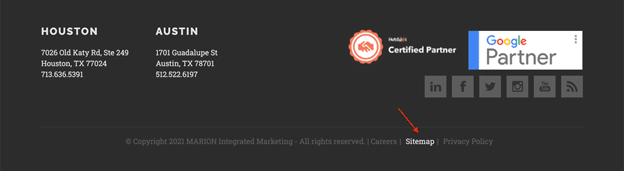
Using the XML sitemap is a simple way to count the number of pages on a website. Plus, the sitemap method is available to anyone! To access a website’s sitemap, scroll to the website footer and follow the link to their XML sitemap.

Footer Example

If you can’t locate a “Sitemap” link on the website, there is another quick solution. View any sitemap in your browser by using either of the following URLs. All you need to do is replace “sitename” with the name of the website!

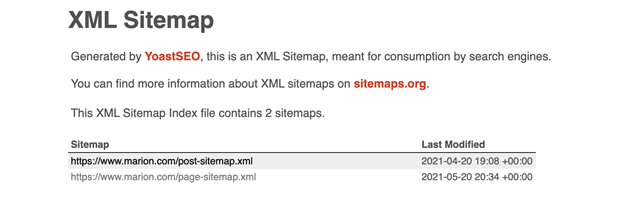
For example, if you wanted to check the number of indexed pages on our website, marion.com, you would search: https://marion.com/sitemap.xml

XML Sitemap

If the website you are checking uses advanced sitemap plugins, such as YoastSEO, the URL count will be automatically shown. Otherwise, you’ll need to count the number of pages manually.

Should every business create an XML sitemap?

Yes, in most cases. Even small businesses benefit from making their content more accessible to search engines. Sitemaps are quick to generate and can be submitted through Google Search Console for free.

2. Site: Operator

For this method, you will need to open a new Google search and copy the following search query, replacing “sitename” with the name of the website you are looking for:

site:sitename.com

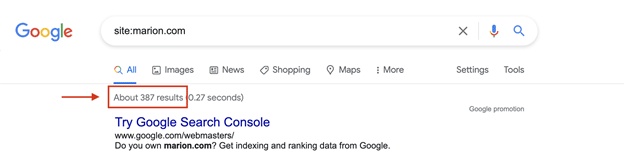
For example, if you were checking our website, marion.com, you would search: site:marion.com.

Google Results

Keep in mind, this number is approximate. Google doesn’t always display the exact count, and the number may fluctuate over time. Still, it’s a quick way to get a rough idea of how many pages a domain has in Google’s index.

3. Google Search Console

For your own website, Google Search Console gives the most reliable picture of indexed pages. To use it, you’ll need to be a verified site owner or have access granted. Once inside, you can open the Index Coverage report (previously called “Index Status”) to see total indexed pages, errors, and exclusions. The Sitemap report also shows how many pages you’ve submitted and how many Google has accepted.

This method is particularly useful for spotting issues. For example, if you’ve submitted 500 pages but only 300 are indexed, it signals that you may need to review your site’s crawlability, content quality, or technical SEO setup.

Why is the page count different between a sitemap and Google Search Console?

Sitemaps show what a site owner submits to Google, while Search Console shows what Google actually indexes. Some pages may be excluded if they’re duplicates, low-quality, or blocked in robots.txt.

Why Your Website Needs an XML Sitemap

XML sitemaps are especially beneficial for large-capacity websites, new websites, and websites that use rich media content. However, almost all websites will benefit from incorporating this feature. Sitemaps allow Google to easily locate web pages and determine when they were last updated.

In addition, website page counters can be used for:

  • Clarifying how many active web pages your site has
  • Seeing all of the pages on your competitor’s domain

This is especially useful for:

  • Large websites with hundreds or thousands of pages
  • New websites with few external links
  • Sites with complex navigation or rich media content

Competitor research is another perk. By reviewing a competitor’s sitemap, you can see the breadth of their published content and how they organize it.

Refresh Your Website with MARION

With these three methods, you now know how to check the number of pages on any site. Most websites make their sitemap easy to find, but even if they don’t, Google’s tools provide alternate routes to the same insight.

MARION is a trusted Texas marketing agency with 40+ years of experience helping businesses grow through website design, digital marketing, and SEO services. We design with both strategy and execution in mind, so your site works hard for your business.

Schedule a free marketing consultation with MARION today and learn how we can help grow your business.

Marketing emails you’ll actually want to read.

Get marketing tips and news sent to 
your inbox.

This field is for validation purposes and should be left unchanged.
Name(Required)

The hidden costs of DIY Marketing

Why going it alone might cost your business more than you think.

Small and midsize businesses often juggle tight budgets, making DIY marketing seem like an appealing option to cut costs. On the surface, it feels practical and empowering — after all, you know your business best. But while managing your own marketing might initially save money, the hidden costs can quickly pile up, negatively impacting your overall success.

Before committing to a do-it-yourself approach, consider these sneaky expenses and potential setbacks that might be lurking beneath the surface.

The opportunity cost of your time.

Time is your most valuable asset, and DIY marketing demands a significant investment. Hours spent crafting social posts, editing newsletters or creating sales sheets are hours not spent building relationships, developing new products and strategizing your next big move. Even if you’re outsourcing to freelancers — whether for content, design or website updates — you’re still spending time managing the process, providing direction, organizing assets, and chasing down deliverables.

While handling marketing in-house may feel cost-effective, you’re essentially pulling resources away from your core competencies. Remember, every hour dedicated to marketing tasks means less attention to what you and your team do best — serving your customers and growing your business.


Costly Rookie Mistakes.

Marketing isn’t as simple as it might appear. Missteps, especially in digital marketing, can drain your budget quickly. For instance, improperly set up PPC ads or social media campaigns can burn through your dollars without generating meaningful results. Even worse, these blunders might harm your brand’s reputation or confuse potential customers. The same goes for traditional marketing — think billboards with unclear messaging, tradeshow booths that don’t reflect your brand, or brochures with inconsistent visuals. When your materials don’t align with your brand or speak to your audience, you risk wasting both money and opportunity.

By entrusting your strategy to marketing professionals, you’re investing in expertise. Agencies know the pitfalls of the field and how to avoid them, keeping your budget working harder and smarter.

Inefficient targeting and wasted resources.

Effective marketing isn’t about reaching everyone. It’s about reaching the right people. DIY efforts often lack the strategic precision of professionally managed campaigns, leading to resources spent targeting audiences who are unlikely to convert. Without expert insight into customer behaviors, platforms and messaging, your carefully crafted marketing could simply be shouting into the void.

Professional marketers use data-driven strategies to pinpoint your ideal customers, maximizing every dollar spent and driving more valuable engagement.

Underestimating the value of professionals — and professional tools.

Behind every great marketing campaign is a team of experts who bring more than just creativity. They know how to use the right tools and resources to manage your brand effectively, optimize campaigns and adapt quickly when something isn’t working. It’s not just about having access to advanced platforms; it’s about knowing how to use them strategically. Sure, free online tools exist, but they usually offer limited functionality. Advanced tools that professionals leverage — such as in-depth analytics software, SEO optimization platforms, design software and email marketing systems — often come with a price tag that’s hard to justify when you’re marketing solo. However, without these tools and the expertise to use them well, you’re likely to miss opportunities to optimize performance and drive real ROI.

Inconsistent branding and messaging.

Consistency is key when building brand recognition and trust. DIY marketing often leads to disjointed branding — different voices, varying visuals and uneven quality across channels. This inconsistency confuses your audience and weakens your brand credibility.

By contrast, a professional marketing agency ensures your branding is cohesive and resonates powerfully across every platform. With experienced graphic designers and copywriters on your side, you get visual and verbal alignment that reflects your brand’s personality and values. Uniform messaging builds trust and positions your company as professional, reliable and memorable.

Underutilizing analytics.

One of the biggest mistakes businesses make in DIY marketing is overlooking or misunderstanding analytics. Without clear insights into what’s working (and what’s not), your marketing decisions become guesswork. Proper analytics tracking requires expertise — knowing what metrics to measure, how to interpret them and how to pivot strategically. Professional marketers regularly use analytics to refine their approaches, resulting in more effective spending and stronger outcomes.

Missing out on fresh perspectives.

Marketing thrives on creativity and fresh perspectives. Handling everything internally can result in tunnel vision, where new opportunities or innovative strategies go unnoticed. Professional marketing agencies bring an outsider’s view, backed by experience across diverse industries and campaigns, sparking creativity and innovation that might never arise internally.

The cost of burnout.

Marketing is relentless. DIY marketers frequently juggle numerous responsibilities, which inevitably leads to burnout. When you’re stretched too thin, both the quality and consistency of your marketing suffer — along with your mental and emotional health. Burnout not only impacts marketing effectiveness, but can also negatively affect other aspects of your business operations.

Knowing when it’s time for professional help.

DIY marketing can seem cost-effective in the short term, but it’s crucial to recognize when it might be holding your business back. Professional marketers not only save you from the hidden expenses outlined above, but also position your company for sustained growth.

At Design At Work, we partner with businesses just like yours, delivering strategic expertise and creative solutions that drive real results — without the hidden costs. Ready to reclaim your time, optimize your efforts and fuel your growth? Contact us today and let’s talk about how professional marketing can transform your business.

Website Maintenance & Management Guide for Business Success

Imagine walking into a store with flickering lights, broken shelves, and outdated products. You’d probably turn around and leave, right? That’s exactly how visitors feel when they land on a poorly maintained website.

Your website is a 24/7 sales rep, but if it’s slow, outdated, or broken…it’s costing you customers. Let’s fix that.

What We’ll Cover

Website maintenance doesn’t have to be overwhelming. Here’s what you’ll learn in this guide:

  1. Why Website Maintenance Matters
  2. Common Website Issues
  3. Essential Maintenance Tasks
  4. DIY vs. Hiring a Pro
  5. How Often to Update
  6. Best Tools for Website Maintenance
  7. What to Do if Your Website Breaks
  8. Why Outsourcing Website Management is Worth It

Now, let’s dive in.

1. Why Website Maintenance Matters for Your Business

Your website isn’t a “set it and forget it” deal. Regular maintenance is crucial for:

Expert Tip: A fast, secure, and regularly updated website builds trust and boosts conversions.

2. Common Website Issues That Hurt Your Business

Here’s what might be secretly sabotaging your website:

  • Slow Load Times53% of users leave if a page takes more than 3 seconds to load. (you know it’s true)
  • Broken Links & 404 Errors – Frustrate visitors and hurt SEO rankings.
  • Outdated Content – Makes you look inactive or irrelevant.
  • Security Vulnerabilities – Outdated plugins and software make you a hacker’s easy target.
  • Poor Mobile Experience – Most users won’t recommend a business with a poorly designed mobile site. Not to mention, Google prioritizes mobile-friendly sites. Run a mobile usability test on a regular basis.

Fun Fact: Did you know that Amazon once lost an estimated $34 million in a one-hour website outage?

3. Essential Website Maintenance Tasks (Even If You’re Not a Techie)

One of the biggest mistakes business owners make is thinking website maintenance is just about security. It’s also about user experience. A slow or broken site frustrates visitors and makes them leave before converting.

Not a tech wizard? No problem. Here’s a simple checklist:

  • Update software & plugins (monthly)
  • Run security scans (weekly)
  • Fix broken links (quarterly)
  • Test site speed & performance (quarterly)
  • Backup your site (weekly or before updates)
  • Check mobile responsiveness (quarterly)

“Is website maintenance necessary if I’m not making changes to my site?”

Yes! Even if you’re not adding new content, backend updates, security patches, and performance monitoring are still very important.

4. DIY vs. Professional Website Management: What’s Right for You?

DIY Approach: If you have time and a little patience, you can handle basic updates, backups, and monitoring.

Hire a Pro: If you’d rather focus on your business than wrestle with WordPress errors, outsourcing is your best bet.

I’ve seen too many businesses wait until their site is completely broken before reaching out for help. Think of website maintenance like regular check-ups for your car. Waiting until something crashes can cost you far more in lost revenue, security breaches, and frustrated customers. A little prevention goes a long way.

5. How Often Should You Update Your Website?

TaskFrequency
Software & Plugin UpdatesMonthly
Security & Malware ScansWeekly
Content RefreshQuarterly
Full Site BackupWeekly/Before Updates
SEO & Performance AuditQuarterly

Expert Tip: If your website hasn’t been updated in over a year, you’re overdue for a check-up.

need a website designer

6. Top Tools & Services for Website Maintenance

No need to start from scratch! These tools have your back:

The right tools can make website maintenance almost effortless. But tools alone aren’t enough. You need the expertise to interpret the data and take the right actions. Investing in a website management service ensures your site is not just monitored but actively optimized for security, speed, and conversions.

7. What to Do If Your Website Breaks or Gets Hacked

A hacked website is every business owner’s nightmare, but the worst thing you can do is panic. Instead, have a solid backup strategy (and a professional you can call.) MARION web development agency has helped businesses recover their websites in hours, but those without backups? That’s where things get tricky.

First, don’t panic. Follow these steps:

  1. Check for updates – Outdated software is often the culprit.
  2. Restore a backup – Always have a recent version ready.
  3. Scan for malware – Use Sucuri or Wordfence.
  4. Change passwords – Secure your accounts.
  5. Call in a pro – If all else fails, get expert help.

Pro Tip: Regular backups are your best insurance policy. If things go south, you can restore your site in minutes.

8. Hiring a Website Management Service: Why It’s Worth It

You’ve got enough on your plate. Keeping your website secure, updated, and running smoothly shouldn’t be another headache.

At MARION marketing agency, we take care of the heavy lifting so you can focus on growing your business. Our website maintenance services include:

✓ Security monitoring & malware removal

✓ Regular updates & performance optimization

✓ 24/7 uptime monitoring & support

SEO and content updates

Your website is too important to ignore. Let’s make sure it’s working for you, not against you.

Ready for a worry-free website? Contact MARION today for expert website management that keeps your business ahead of the curve.

Marketing emails you’ll actually want to read.

Get marketing tips and news sent to 
your inbox.

This field is for validation purposes and should be left unchanged.
Name(Required)

The Truth About Content Mapping and SEO

If you want to drive more organic traffic and make your content work smarter, not harder, it’s time to take a closer look at how these strategies work together. Here’s everything you need to know about content mapping and SEO.

What is Content Mapping?

Think of content mapping as a way to deliver the right content to the right person at the right time. It’s all about creating content that aligns with your audience’s journey, from first discovering your business to becoming a loyal customer.

Key Components of Content Mapping:

  1. Buyer Personas: Who is your audience? What are their goals, challenges, and pain points?
  2. Customer Journey Stages: What are the steps your prospects will take? (awareness, consideration, and decision)
  3. Content Alignment: How can you match your content to specific personas and their stage in the journey?

Why It Matters: Content mapping makes your digital marketing more efficient and focused. Instead of guessing what your audience wants, you’re delivering exactly what they need when they need it.

The SEO Side of the Equation

Search Engine Optimization ensures that the content you create gets found. Without it, even the best content can sit unseen. Pairing SEO with content mapping means you’re not only creating content for your audience but also optimizing it to rank well on search engines.

How SEO Complements Content Mapping:

  • Keyword Research: Identify what your audience is searching for at each stage of their journey.
  • Content Structure: Use headings, subheadings, and metadata to make content easier to read and index.
  • Search Intent: Understand why someone is searching for a term and create content that answers their query.
Link Building for SEO

How to Build a Content Map with SEO in Mind

Here’s a 5-step guide to successfully combining your content mapping and SEO efforts:

Step 1: Know Your Audience

Start by truly getting to know who you’re talking to. Who are your ideal customers? Researching buyer personas can help you understand their goals, challenges, and what drives their decisions. If you can, use tools like surveys, interviews, or analytics to gather insights that paint a clear picture of your audience. The better you know them, the easier it is to create content they’ll care about.

Marketing Tip: Don’t skip analytics – without data, you’re flying blind!

Step 2: Research Keywords and Topics

Now it’s time to dig into what your audience is searching for. Tools like Ahrefs or SEMrush can help you uncover the terms and questions your potential customers are typing into search engines. Focus on long-tail keywords (specific phrases that match their concerns or interests.) This approach helps you align your content with the exact topics your audience wants to learn about.

Step 3: Map the Customer Journey

StageWhat They NeedExample Content
AwarenessGeneral information about a problem or goalBlog posts, infographics
ConsiderationComparisons, pros and cons, how-to guideseBooks, case studies, white papers, videos
DecisionProof of your value and why they should choose youTestimonials, free trials, demos

Step 4: Create Content That Ranks

When it’s time to start writing, focus on making your content as useful and actionable as possible. Do your research, and don’t skimp on providing real value. Keywords are important, but they should feel like a natural part of the flow (not crammed in awkwardly.) Boost your content’s credibility with link building. Include both internal links to your own pages and external links to trusted sources.

In short, you should:

  • Write actionable, well-researched content
  • Include keywords naturally without forcing them
  • Add internal/external links to improve credibility

Marketing Tip: Don’t overstuff keywords. Search engines penalize content that feels spammy.

Step 5: Track Performance

Once your content is out there, keep an eye on how it’s performing. Use analytics tools to monitor traffic, engagement, and conversions. If something isn’t clicking with your audience, tweak your content map and adjust your strategy to focus on what’s working best. This ongoing process helps you stay aligned with your audience’s needs.

Tips to Get Ahead:

  • Conduct a content audit: Review existing content to find gaps and opportunities.
  • Cluster your topics. Group related topics and keywords to create a series of content.
  • Repurpose your content. Turn a webinar into a blog post, infographic, or social media series.
  • Collaborate across teams. Involve sales, customer service, and marketing to gather diverse insights.

The key to long-term success? Keep refining your strategy as your audience evolves. The more you adapt, the better your results will be.

Let MARION Guide Your Content Strategy

Not quite confident in your content strategy? At MARION, we specialize in everything digital marketing – content marketing, SEO, social media, PPC services, internet marketing audits and more. Our team understands how to align your content with your business goals, ensuring every piece you create works harder for your brand.

Contact our digital marketing agency today to set up a consultation!

Marketing emails you’ll actually want to read.

Get marketing tips and news sent to 
your inbox.

This field is for validation purposes and should be left unchanged.
Name(Required)

9 Brilliant Examples of B2B Websites for Design Inspiration

Creating a B2B website can be daunting because you want to convey a lot of information at once in a professional manner without losing the visitor’s interest. This is especially challenging because it takes a lot of work to make technical jargon sound exciting.

What is a B2B Website?

A business-to-business (B2B) website is a company website that intentionally speaks to business professionals. Unlike a straightforward B2C website, B2B websites need to target multiple decision-makers from different levels in a company without losing focus or sacrificing relevance.

What Makes a Great B2B Website?

Not all websites are created equal. A great B2B site has a few key things going for it:

  • It’s easy to use (no one wants to dig through a maze of menus).
  • It nails the “why us” message right off the bat.
  • It looks fantastic on any screen, big or small.
  • It’s fast — like blink-and-it’s-there fast.
  • And it knows how to nudge you with just the right CTA.
In need of more design help? The professionals at our web design company in Houston can turn your website vision into a reality.

If you’re an industrial business, check out our related article for more specific examples of the best manufacturing website design and our guide to digital marketing for manufacturers. You’ll learn about user experience and how to improve your manufacturing company’s SEO.

9 B2B Web Design Examples

Balancing all these fine lines can be difficult, but luckily for you, here are some B2B site examples that you can draw inspiration from! See what makes a good business website to help improve the vision you have for your own brand.

1. Bentobox

best B2B websites

Bentobox

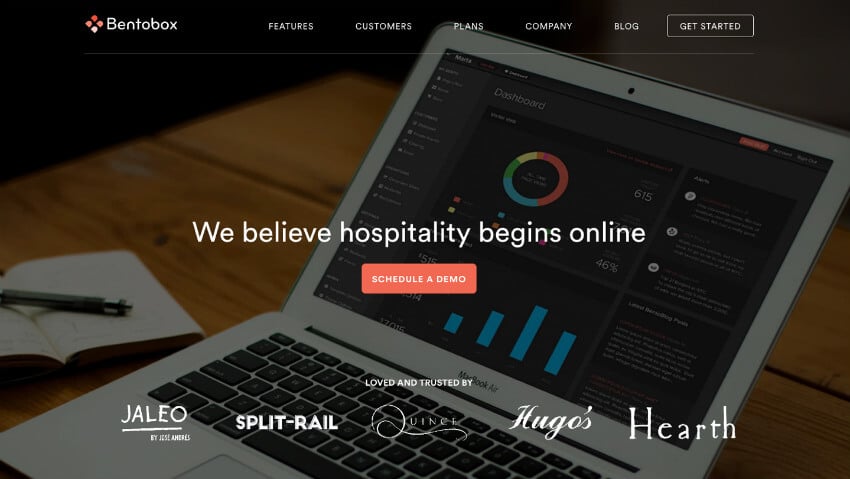
Bentobox follows the mantra that “less is more” by letting their copy speak for itself. A minimalist approach is hard to find in B2B industries where companies often bog website visitors down with too much information on the first page.

Bentobox gets straight to the point with a call-to-action button in the center of the landing page that stands out among the other muted colors. A simpler home page also improves page load speed.

A fast-loading site is important because 47% of users expect a maximum load time of 2 seconds, and 40% of visitors will abandon sites that are still loading after 3 seconds.

2. SpareFoot

B2B website design

SpareFoot

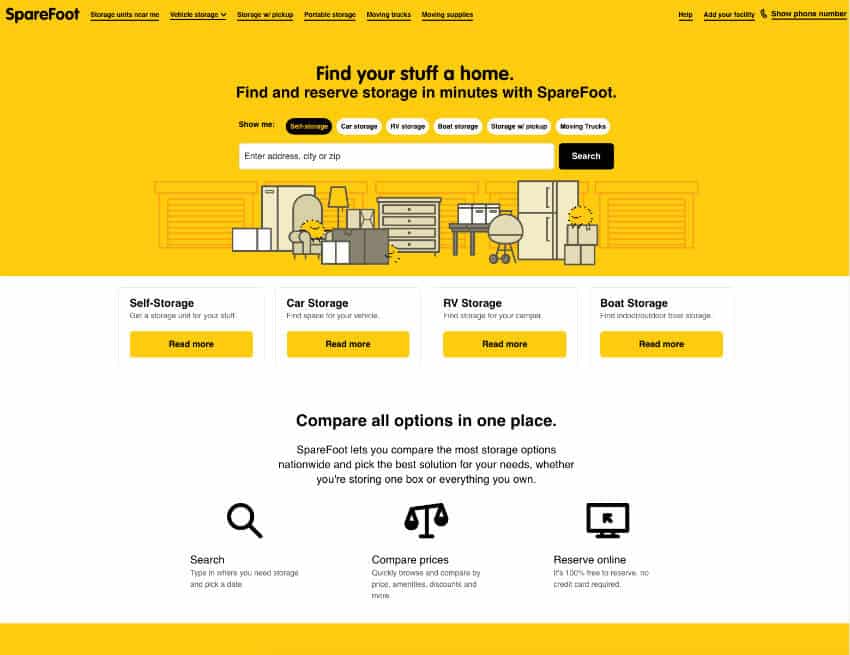
SpareFoot manages to get away with the text-heavy homepage by breaking it up with a cheeky image and organizing the options to make it easier for prospective customers to choose what they need. Everything you need is neatly organized and just a click away.

Instead of dryly listing all the options they have, they allow you to search the nearest units near you straight from the homepage for quick ease of use. The playful image ties everything together- without it, the website would look quite monotonous and ordinary.

3. WeWork

B2B website design agency

WeWork

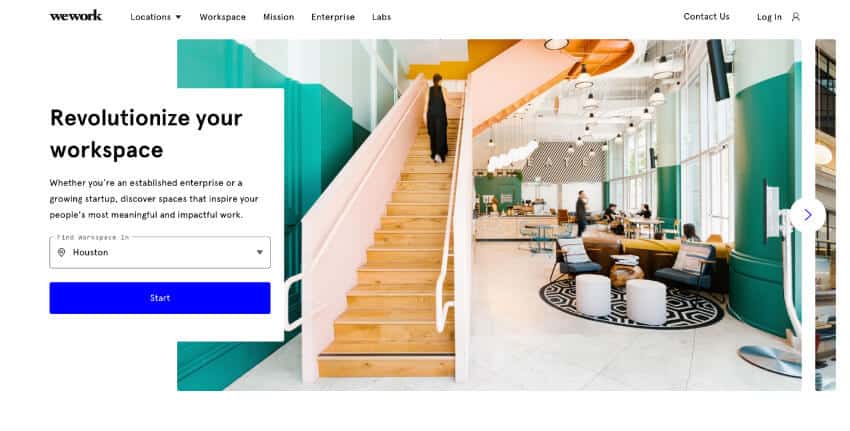
WeWork uses visually appealing pictures of their workspaces to create pleasing displays on its website and showcase available locations to potential customers. The clean and light design evokes a sort of blank slate for your needs, which follows their business philosophy.

Looking for a visually compelling layout on your new B2B site? The web design veterans at MARION’s website design company in Austin have years of experience delivering stunning end results!

One of the most effective design elements in this B2B website design is the personalized location search that automatically pulls where you are. This simple feature makes it easier for both you and the customer by anticipating their needs and getting them to click the call-to-action that much faster.

4. Proof Drinks

business to business website design

Proof Drinks

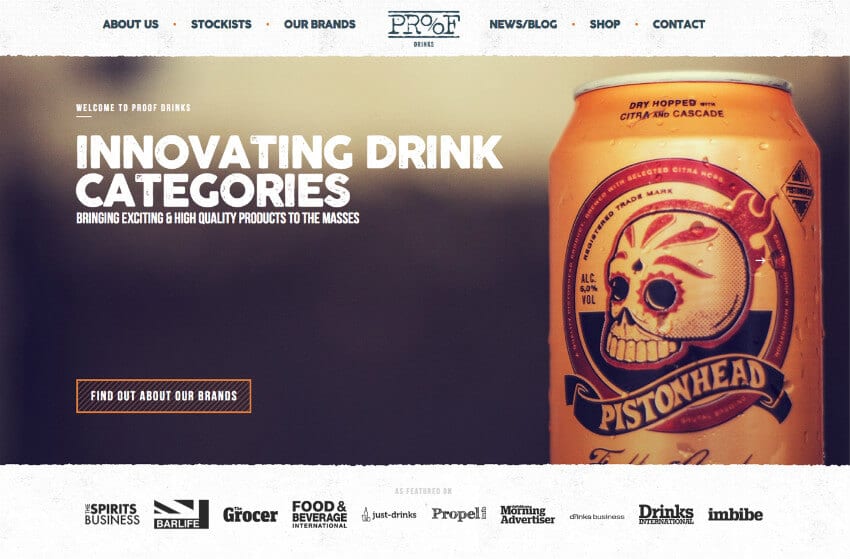
Proof Drinks leans into their edgier aesthetic by prominently showcasing one of their example product brands as the hero image. Their copy supports this decision with words like “exciting” and “innovating”.

If you were a brewery looking for a company that supports creativity, it’d be easy to be drawn to Proof Drinks. Overall, you immediately get the gist that this is a unique company that prides itself on their dynamic culture and philosophy.

5. MOO

best B2B site examples

MOO

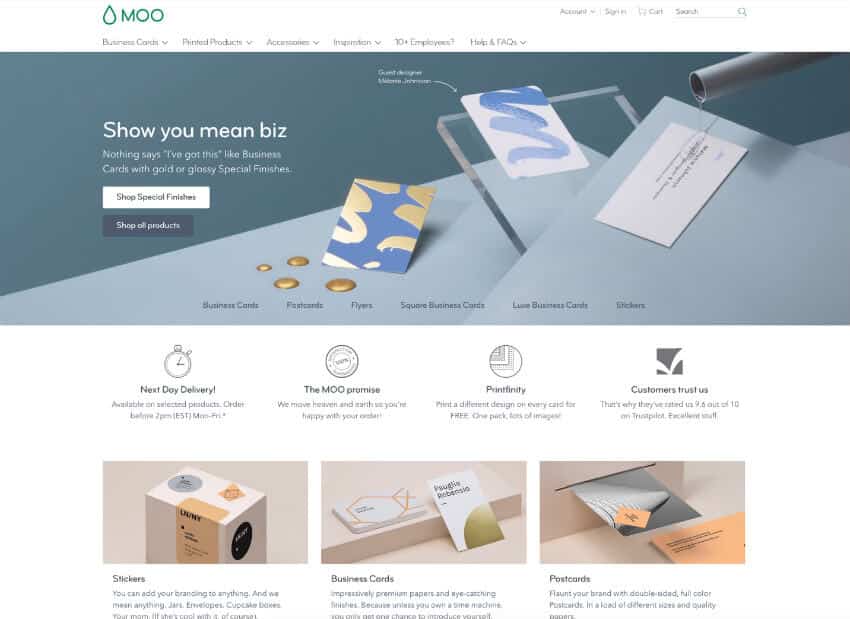
MOO makes the boring art of business card printing look trendy and fun. Their website is a great example of how to transform a traditionally dull service into an engaging and visually appealing experience. The perfectly curated design pulls you in from the get-go, and the casual, conversational copy shows they’re far from your average printing company. Every detail on the site feels intentional, and it’s streamlined to make the entire customer experience as user-friendly as possible.

They don’t just present their services; they make you want to stick around and explore. From the vibrant visuals to the effortless navigation, everything is designed to engage visitors and keep them coming back. Compared to the traditional cut-and-dry printing companies, MOO stands out in every way. It’s not just about getting the job done; it’s about making the process enjoyable while showing off all the details that set them apart.

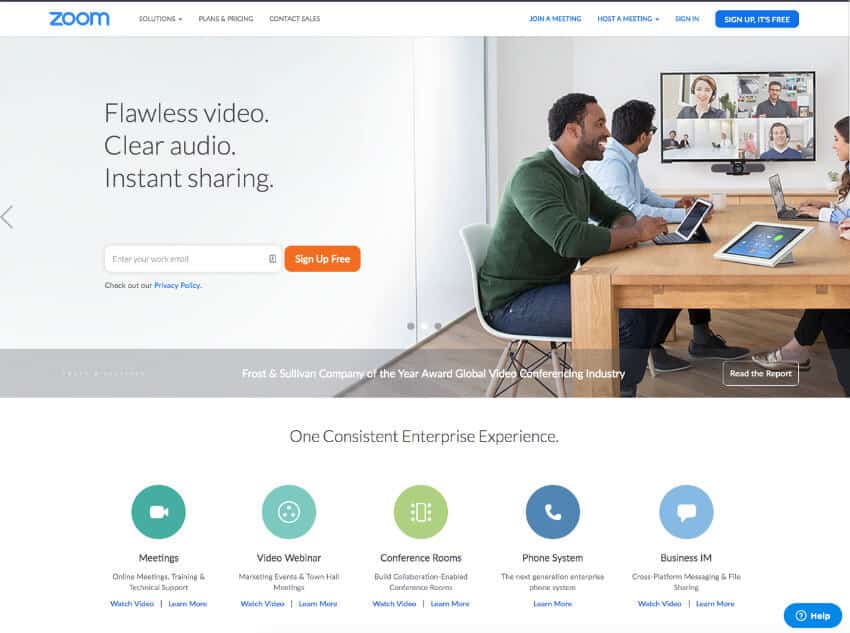
6. Zoom

B2B website design examples

Zoom

Zoom has a no-nonsense and professional website that gets straight to the point. From the moment you land on the page, it’s clear they’re not here to waste your time. The design is clean and professional, making it easy to focus on what really matters. The copy doesn’t beat around the bush — it’s short, clear, and tells you exactly what you need to know without drowning you in jargon or unnecessary details.

The call-to-action is impossible to miss, letting you sign up or start using the company’s services right away. No digging around or jumping through hoops. Everything about their product and service solutions is neatly organized and presented on one page, so you can quickly understand what they offer without endless scrolling or confusion.

What’s even better is that there aren’t any distracting elements pulling your attention away. Zoom’s site is designed with purpose, just like their platform. It’s straightforward, intuitive, and gets you where you need to go in just a few clicks. It’s a no-nonsense approach that makes the process of getting started feel effortless; exactly what you’d expect from a company that prides itself on efficiency and reliability.

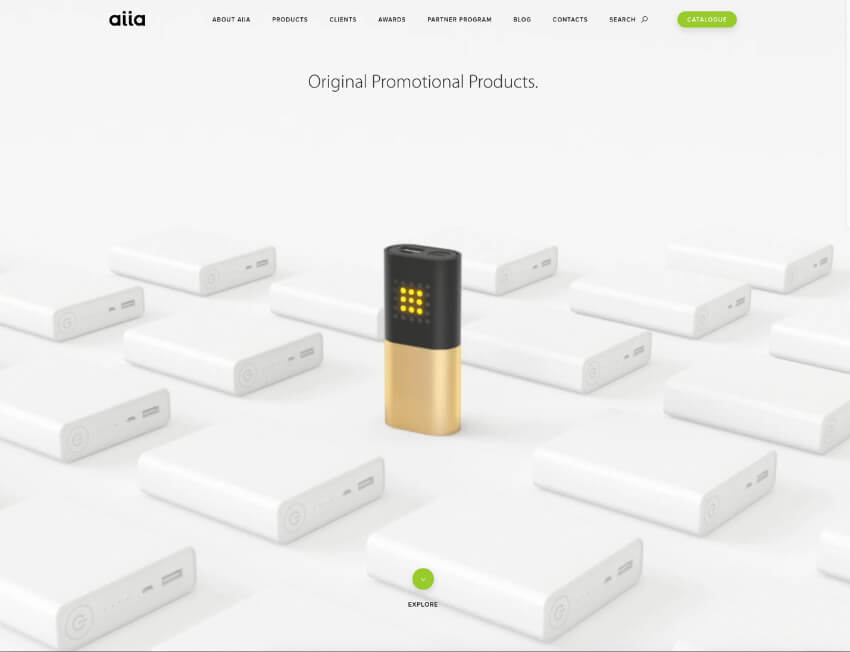
7. Aiia

best business to business websites

Aiia

Aiia lets their product speak for itself with an image that takes up the entire homepage. The picture tells the story of their simple tagline, “Original Promotional Products” and shows that their values and products break from the norm.

Aiia’s website proves that sometimes you just need an impactful photo to do all the heavy work. When you scroll down the page, it transforms into a promotional video that showcases their newest and most exciting products.

8. Rocka

great B2B websites

Rocka

As one of the most experimental website designs on this list, Rocka highlights their innovation and youthful energy with a unique background image and bold typography. The modern design is a departure from other B2B websites, which works for newer companies.

If you’re not as established as other companies, a dynamic landing page might catch the attention of a prospective partner. New visitors might be intrigued and want to learn more. Even the best B2B websites can lean towards boring, but you can’t accuse this one of being dull!

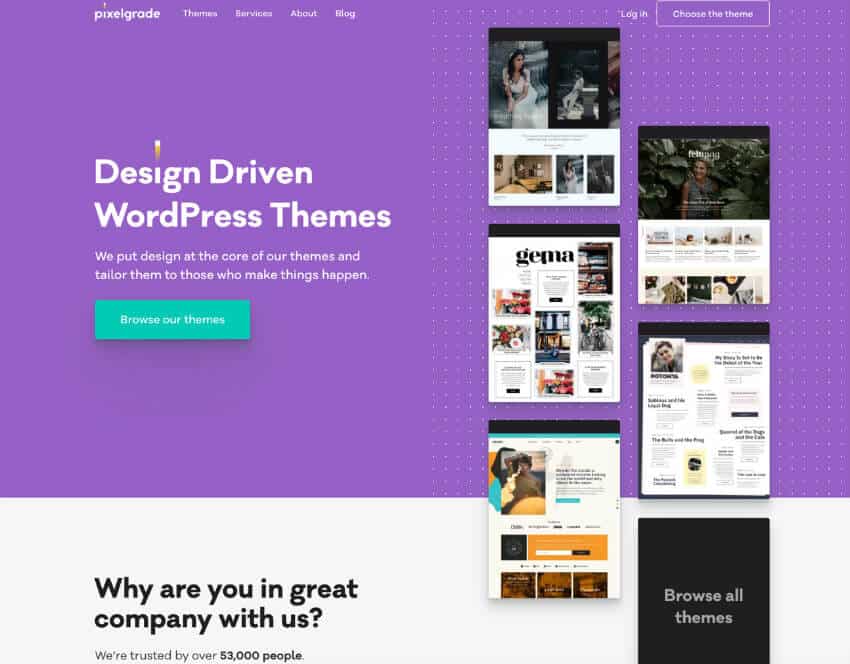
9. Pixelgrade

top B2B websites

Pixelgrade

Pixelgrade’s home page showcases its different themes on the right-hand side in a way that makes it “bleed” down, making you scroll further to discover more and read on. The distinctive color scheme also makes it so that the call-to-action button heavily contrasts against the background without being jarring. All the basic design elements work together to create an engaging website.

It’s not just about function; a little flair goes a long way. Think bold color palettes, layouts that don’t scream “template,” and interactive features that make you want to stick around longer. A well-designed site says, “Hey, we know what we’re doing.”

Quick Tips for Building Your B2B Website

Thinking of revamping your site? Here’s the cheat sheet:

  • Pick a platform that makes sense for your goals and budget.
  • Consider working with pros. DIY can only take you so far.
  • Focus on your target audience. What do they need, and how can your site deliver?

Trust MARION with Your B2B Web Design

If you’re thinking, “Wow, our website could use some love,” you’re in the right place. With over 40 years of marketing experience, MARION has the right team to create a visually engaging website for your brand. The strategic approach of our digital marketing agency marries the best user experience and graphic design practices to deliver a revenue-generating machine.

Reach out to our Houston, Austin, and Dallas web design agency, and we’ll show you how to turn your B2B website into your best salesperson. It all starts with a quick conversation. Let’s talk

Marketing emails you’ll actually want to read.

Get marketing tips and news sent to 
your inbox.

This field is for validation purposes and should be left unchanged.
Name(Required)

The Best B2B Manufacturing & Industrial Web Design Examples

An effective industrial website needs to quickly convey what products and services your company provides without overwhelming the visitor. In today’s marketplace, you can’t slide by with a 90 ‘s-themed industrial website that isn’t mobile-friendly.

Your industrial website design needs to engage buyers, whether they’ve just discovered your company or they’re existing customers browsing your complete line of capabilities. Truth is, the best manufacturing websites incorporate great website design and SEO (search engine optimization) so that they cater to repeat buyers and new sales prospects alike.

Key Features and Design Elements for B2B Industry Leaders

Industrial companies have unique needs when it comes to B2B website design. Your site should instantly communicate your offerings without overwhelming your visitors. Modern industrial website design focuses on engaging potential customers while providing existing clients with an easy way to explore your products and services. Here, we’ll look at some effective elements of industrial websites to help your brand stand out.

1. Engaging Visuals That Set Your Brand Apart

A standout industrial website starts with captivating visuals. Rather than using generic stock photos, invest in high-quality imagery that showcases your products, facilities, or the environments in which your products thrive. Strong visuals keep visitors’ attention and convey that your business is committed to quality and innovation.

Example: Kuraray

Kuraray, a global leader in specialty chemicals, uses clean, professional images of their facilities, products, and industry applications on their website. The imagery isn’t just visually appealing. It reinforces Kuraray’s brand as a cutting-edge, leader in the chemical industry. (Full disclosure: MARION works with Kuraray)

Industrial Website Example Kuraray

Kuraray

2. Compelling Hero Messages

For industrial websites, a compelling hero message at the top of the homepage is essential. This message should be concise and impactful, capturing your brand’s unique strengths or mission in a few words. Your hero message will likely be used across all mediums of your manufacturing content strategy. By directly addressing visitors’ needs and emphasizing your company’s solutions, you can drive deeper engagement.

The right hero message will pop out from the other contenders. For more guidance, get help from an industrial internet marketing agency in Austin or Houston today!

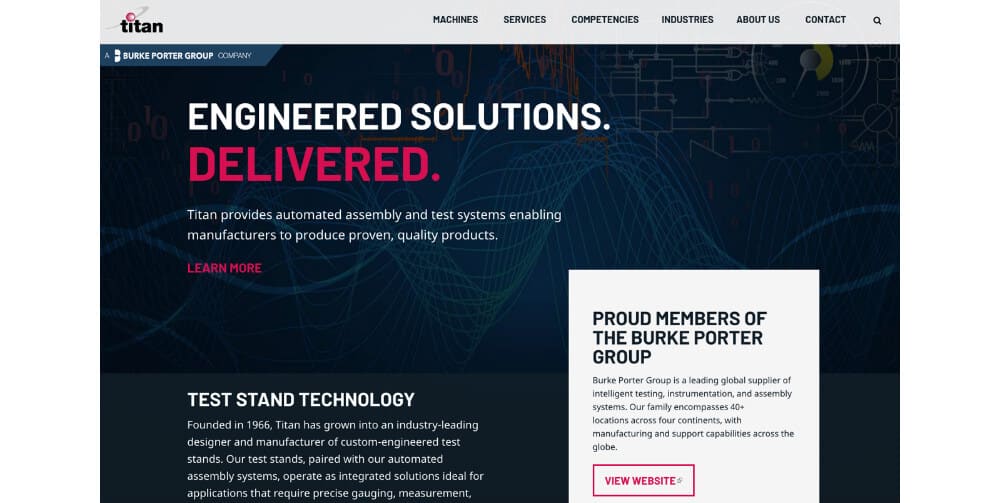
Example: Titan Systems

The message “Engineered Solutions. Delivered.” draws the reader in and is intriguing enough to make you click to learn more. The hero message works because it’s so effective in its conciseness. It tells you what the company does, and the “delivered” in red is a nice touch for emphasis.

manufacturing website design

Titan Systems

3. Clean Design and Intuitive Navigation

Industrial companies often have extensive product lines and complex offerings, so a streamlined layout with intuitive navigation is vital. Simplify your design by incorporating white space, a navigation bar, and clear calls-to-action that guide website visitors through your offerings without overwhelming them.

An easy-to-use industrial website is a critical piece of digital marketing for manufacturers. You want visitors to get the information they need as quickly and clearly as possible before they give up and leave. A clean user experience also benefits your SEO for manufacturing.

Make sure you counter this common mistake by not cramming a list of all your products on the home page. Focus on bold yet simple elements such as negative space, a definitive marketing color scheme, read more buttons (that lead to other pages), and much more.

Manufacturing web design does not need to look like a disorganized mess. For help from an effective industrial web design company in Austin, check out MARION today.

4. Integrated E-commerce Features

E-commerce features are increasingly essential for companies that want to simplify ordering for OEM customers and distributors. An industrial website that allows users to request quotes, place orders, or reorder products can boost sales while giving visitors a hassle-free experience.

Example: Protolabs

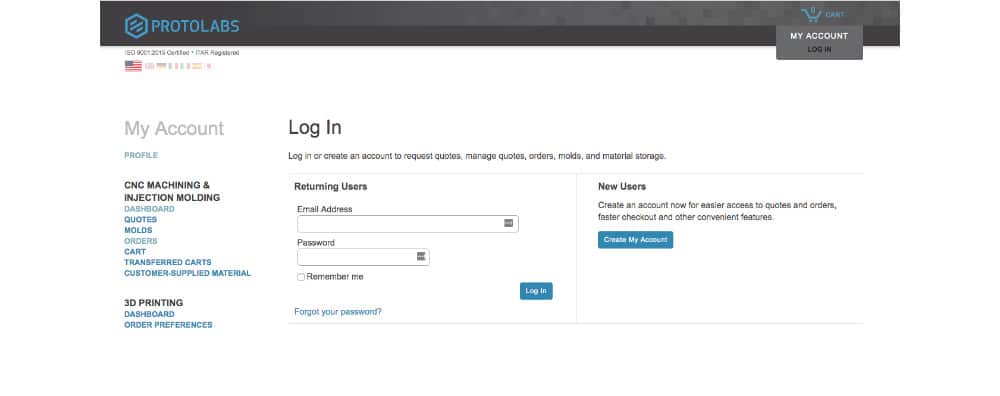
Protolabs offers an e-commerce experience with a customer portal where clients can manage quotes, orders, and materials. This not only saves time but also promotes customer loyalty, as it allows customers to easily handle transactions at their own convenience.

best manufacturing website design

Protolabs

5. Responsiveness and Mobile Development

With users accessing websites on multiple devices, responsive design is essential for any successful industrial website. This design approach ensures your site’s layout, images, and functionalities automatically adjust to any screen size, from desktops to tablets to smartphones. For industrial companies with complex content and product details, responsive design improves readability and user interaction, providing a smooth experience regardless of device.

Mobile compatibility also plays a major role in Google’s search rankings, as search engines favor websites that are mobile-friendly. With responsive design, your industrial website can attract a wider audience, engage visitors effectively, and ultimately enhance your online presence. This adaptability not only helps you reach a diverse audience but also maintains brand consistency and ease of navigation, crucial elements that instill credibility in prospective clients exploring your company’s offerings.

6. Emphasis on SEO and Visitor Conversion

A well-optimized industrial website helps increase brand awareness, attract organic traffic from search engines like Google, and ultimately drive business growth. Effective SEO combines technical elements like structured data, load speed, and mobile compatibility with on-page strategies like keyword optimization and high-quality content. This balance ensures that your site ranks well in search results, reaching the audiences searching for your products and services.

SEO is just the beginning. Conversion optimization is equally important. Your website should be designed with clear calls-to-action, easy navigation, and compelling content that leads visitors from discovery to inquiry or purchase. Whether it’s an intuitive navigation bar or a strategically placed contact form, each element should work to capture and convert visitors into clients.

Together, SEO and conversion optimization create a powerful foundation for turning website visitors into valuable leads and loyal customers, providing ROI that justifies your investment in a great industrial website.

Your Website: A Tool for Industrial Leadership

An optimized industrial website is more than a digital placeholder for your brand. It’s a comprehensive tool to attract leads, drive sales, and position your brand as a leader in the industry. From emphasizing your product lines to engaging visitors with cutting-edge design, each element is crafted to guide potential clients through the customer journey and foster business growth.


Industrial Website Design, Done Right with MARION

Industrial website design for manufacturing companies is no longer a luxury, it’s a necessity. MARION’s industrial marketing services in Houston can help your company put its best foot forward and improve your chance of attracting and closing new business.

Contact MARION today to create a custom, responsive industrial website that grows with your business. Our marketing agency in Houston has been serving the industrial and manufacturing industry for over 40 years. We’re ready to help you build an online presence that enhances brand recognition, increases conversions, and positions you as an industry leader.

Schedule a consultation or check out our industrial web design portfolio for examples of sites that we’ve created for customers like you!

Marketing emails you’ll actually want to read.

Get marketing tips and news sent to 
your inbox.

This field is for validation purposes and should be left unchanged.
Name(Required)

How to Protect Your Website from Hackers in 2024

Ever had your website hacked? Sometimes it’s obvious — you go to your website, and something other than your content appears, instantly jolting you into a state of dread and dismay. If you’ve not experienced a website defacement before, you may not know what to do about it, which makes it even worse.

But, at least you know an intrusion has occurred.

Lately, hackers have stepped up their use of stealth hacking to compromise websites. Instead of announcing themselves by defacing your website, hackers leave code in place to perform a variety of misdeeds while you, the site owner, are none the wiser.

Search engines, however, can detect malware and blacklist the website, leaving you with a red banner over your content and probably a red face to go with it. Even so, search engines only find a portion of all malware infections, and they don’t block all the infected websites they find.

In 2022, only 8.42% of malware-infected sites identified by search engines were blacklisted.

According to SiteLock.com, a website devoted to website security: “Search engines are using greater caution when blacklisting websites to avoid reporting errors at the site owner’s expense. When a blacklisting occurs, the consequences can impact a website’s traffic, reputation, and even profitability.”

how to secure website from hackers

4 Common Website Security Vulnerabilities

Hackers commonly use these web page security vulnerabilities to exploit your website. Learn what they are and how to secure your website against them.

1. Lack of Server Security

If your website’s hosting environment is not secure, neither is your website. Some budget hosting plans are at increased risk for intrusion due to the high volume of websites and traffic on a single server. If it becomes infected, the hosting company could be forced to shut down your website to prevent harm to other sites on the same server. And it would be you that contracts and pays for the cleanup.

It’s usually preferable that experts deal with a malware infection than to do it yourself. So, a hosting plan with excellent support, such as managed hosting, is beneficial for security.

2. The Login

Brute Force attacks are automated attacks used to crack a login or PIN. In a brute force attack, a software program goes through a series of guesses, for example, a list of words from a dictionary.

Dictionary attacks are still used but not as often as they once were because computer processing power has increased. A modern computer can crack an eight-character alphanumeric password in about 2 hours — no dictionary needed. Guessing every possible combination of letters and numbers is called an Exhaustive Key Search.

Other types of brute force attacks include Reverse Brute Force attack, where a common password is used to try to guess a username, and Credential Recycling, which uses previously discovered user/password combinations.

3. Plugins

Website builders and CMS platforms like WordPress depend on third-party plugins or extensions to provide the capabilities of the modern website. For example, contact forms, event schedules, SEO, layout editors, popups, and a host of other functions come by way of plugins.

Hackers exploit weaknesses in the code of plugins to gain access to the site. Once in, they can leave malware, create user accounts, and wreak havoc.

4. CMS

Content Management Systems like WordPress, Joomla, Drupal, and others are vulnerable to hackers, even without plugins. Always update your CMS whenever a security patch is released. For professionally managed web design in Austin or Houston, contact MARION today!

how to protect your website from hackers

How Prevalent Is Hacking in 2024?

You might be surprised to learn that automated programs have been trying to hack your website today and yesterday, and they’ll be back tomorrow.

SiteLock has this to say about the rate of hacking attempts in 2022 from their SiteLock 2022 Website Security Report:

“The volume of threats doubled in 2022 vs. 2021, with an average of 4.1 million websites having malware at any given time. The primary source of the increase in attack volume is malicious bots. In fact, websites received 5.5 times more traffic from bots than human users, with more than 60% of those bots being malicious.”

How To Secure Your Website from Hackers

Here are six high-level options to protect your website from hackers in 2024 (and beyond!)

  1. Use strong passwords and never re-use a password. Instead, use a password management system like LastPass that stores your passwords and fills in login details for you. Password management systems can also generate random character string passwords for you.
  2. Choose plugins and extensions for your website carefully. Look for evidence that its maker supports the plugin. A list of recent updates, the number of users, and reviews are all criteria to consider before installing any plugin. For further help with WordPress web design in Houston, contact MARION today.
  3. Keep plugins up to date and delete any that are not in use. Enable automatic plugin updates where possible. An intrusion is far worse than the occasional inconvenience that an unattended plugin update may cause.
  4. Keep an eye on your website. Inspect your website at least once per day.
  5. Scan your site for malware every day. There are several ways to obtain automatic malware scanning, from plugins to paid services. Sucuri is a good free option for manual scans, but research paid options for more in-depth scans.
  6. Use a website application firewall. This will detect intrusion attempts and limit access to your website as needed. There are also different types of SSL certificates that can be used to protect access to your site.

Contact MARION for Professional Website Design and Maintenance

Contact MARION for professional web design and maintenance services that blend creativity with functionality. Our digital marketing capabilities have evolved with the industry, and we now offer custom web design services in Houston and Austin, Texas. Don’t let your website be just a presence; let it be a statement. Connect with our digital marketing agency in Houston today, and let’s build a digital experience that resonates with your audience and keeps them coming back for more.

Connect with us today to schedule a free marketing consultation.

Marketing emails you’ll actually want to read.

Get marketing tips and news sent to 
your inbox.

This field is for validation purposes and should be left unchanged.
Name(Required)

5 Tips to Increase Organic Website Traffic with Savvy SEO

Want to attract more visitors to your website using search engine optimization? Here’s how.

Search engine optimization (SEO) has come a long way since the term was first coined in the mid-1990s. In the early days of search engines (remember AltaVista and Ask Jeeves?), ranking highly in search results required little more than writing sufficient content and packing it full of more keywords than your competitors — a practice known as keyword stuffing. In 2000, Google changed the game with its Toolbar PageRank update, which allowed it to rank page importance by the number of quality links pointing to it.1

More than two decades and dozens of updates later, marketers are still scrambling to keep up with Google’s ever-evolving algorithm. The good news is that the arc of Google’s progress bends toward the user, which equates to higher-quality content. In this article, we offer tips for increasing your organic website traffic using the latest SEO best practices. 

1. Give Your Audience What They Want.

Quality content is the lifeblood of SEO strategy. Useful, interesting and readable content attracts inbound traffic to your site by answering questions, providing information or facilitating transactions. This is called organic traffic — visitors who arrive at your site via unpaid sources such as Google and Bing. To entice those visitors, you have to understand what they want and why they’re searching for it. 

Broadly speaking, there are four main types of search or keyword intent


Types of search intent
Before you can craft useful content, you have to understand users’ search intent, or what they hope to achieve by using a search engine.

2. Conduct Thorough Keyword Research

Once you know what your users want, it’s time to investigate how they’re searching for it. This is what’s known as topic or keyword research — an inquiry into the language your audience is using in its search queries. If you can’t speak your users’ language, they won’t be able to find you. 

For example, let’s say you’re a residential construction company and you want to make it easier for prospective customers to locate your website through organic search. Perhaps “residential construction” is the phrase that first leaps to mind, so you decide to test the keyword “houston residential construction.” 


Keyword research results from Semrush
Tools like Semrush allow you to estimate metrics such as search volume and keyword difficulty.

The metrics above suggest that some users enter the phrase “houston residential construction,” but not many. How else might your audience describe what they’re looking for? You might test the keywords “houston house contractor” and “houston home builder” to see if they yield more promising results.


Keyword research results from Semrush
Keyword research like this can help you discover how users are searching for content.

And voilà! The phrase “houston home builder” returns a higher search volume and more competitive keyword difficulty (we’ll talk more about this shortly). The trick to keyword research is empathy. Try to put yourself in the customer’s shoes. What do they know and what do they not know? What words are they likely to use to describe your product, service or related topic? Keep testing different synonyms and word combinations until you find the right keyword.

3. Target Long-Tail Keywords.

So how do you know when you’ve found the right keyword for a given piece of content? Generally, we recommend opting for long-tail keywords. Long-tail keywords are specific phrases comprised of three to five words that allow you to target niche queries and demographics. Short-tail keywords, on the other hand, are broader, one-to-three-word phrases. 

While short-tail keywords attract higher search volumes, they’re also extremely competitive, which means it takes longer to increase your search result rankings. The short-tail phrase “home builder,” for example, has a search volume in the thousands and an extremely high keyword difficulty. While every platform has its own SEO metrics, volume usually refers to the number of people searching for a keyword within a given period, whereas difficulty refers to how much time and effort will be required to compete with other sites for the same keyword. 

Long-tail iterations of “home builder,” such as “environmentally friendly home builders” or “sustainable home builders near me,” reveal much more promising numbers. The first targets a subset of consumers interested in green building practices, and the latter takes it one step further by localizing the query. Both of these long-tail keywords have a relatively high search volume and low keyword difficulty, making them an excellent choice for your primary keyword. 

Why? Because with good traffic and low-to-medium difficulty, you have a better chance of ranking on the first page of Google — and doing so faster. 

4. Compete for Featured Snippets.

Since 2014, Google has been promoting what it considers high-quality content through featured snippets or SERP (search engine result page) features. These snippets are highly visible and helpful, making them likely to attract significant amounts of organic traffic. 

To claim one of these coveted spots, you can optimize your content by using a question-and-answer format. For example, if you want to be featured for the keyword “how to clean a cast iron skillet,” you could include the question in a header or subheader on your page, then answer the question in subsequent body copy. Even if you don’t manage to snag a featured snippet, formatting your content in this way will increase readability and improve the performance of your page. 

5. Optimize Page Titles and Meta Descriptions. 

Page titles and meta descriptions are like an SEO appetizer — they give readers a taste of what’s to come on your page. As such, it’s important that titles not only entice users with attention-grabbing phrasing, but also accurately describe your content. Make sure to include target keywords in page titles and meta descriptions, and keep character limits in mind. Only 30-to-60-character titles will appear in full on SERPs, and meta descriptions should be less than 160 characters. Portent’s SERP Preview Tool makes it easy to ensure you’re staying within your character limits and offers a preview of how your content will appear in SERPs. 


Search engine result page title and meta description examples
Page titles and meta descriptions are usually your first opportunity to attract audiences, so it’s important to make them eye-catching and descriptive.

If you’re looking for a partner to help you implement the latest and greatest SEO strategies, look no further than Design At Work. Let’s talk about how we can increase your website traffic and boost your rankings. 


Sources:

  1. Google Launches the Google Toolbar, Google

7 Steps to Developing a Successful Content Marketing Strategy

In today’s digital age, content marketing has become vital to any successful marketing strategy. By creating and distributing valuable, relevant, and engaging content, businesses can attract and retain their target audience while establishing themselves as industry leaders. However, developing an effective content marketing strategy requires careful planning and execution.

What is a Content Marketing Strategy?

A content marketing plan is a strategic approach that outlines the who, what, when, where, why, and how of your content creation and distribution. It is a documented strategy that guides marketers in their content marketing efforts.

Why A Content Marketing Strategy Is Important to Your Business

The plan helps marketers define their target audience, determine the type of content to create, decide on the platforms to distribute the content, and establish marketing goals and objectives for their digital marketing initiatives. By creating a digital content marketing plan, marketers can ensure that their efforts are purposeful, organized, and aligned with their overall marketing strategy.

There are several benefits to having an effective content marketing plan:

  • Helps boost website traffic by providing relevant content that attracts and engages the target market.
  • Drives more sales by establishing expertise, authority, and trust with the audience, making them more likely to make a purchase.
  • Creates brand awareness by consistently delivering valuable content that resonates with the viewer and builds familiarity with the brand.

These benefits contribute to the overall success of a marketing campaign and help businesses achieve their goals.

content marketing planning team

Build A Content Marketing Plan in 7 Steps

Now, let’s explore the essential steps to developing a successful content marketing strategy that will drive results for your business.

Step 1: Define Your Goals and Target Audience

Before diving into content creation, it’s crucial to establish clear goals and identify your target market. Define what you want to achieve through digital content marketing, whether it’s increasing brand awareness, generating leads, driving website traffic, or nurturing customer loyalty.

Understanding your target audience’s demographics, interests, pain points, and online behavior is equally important. This information will help you tailor your content to meet their needs effectively.

Step 2: Conduct a Content Audit

A content audit evaluates your existing content to determine its performance and relevance. Analyze your website, blog posts, social media content, and other materials. Identify content that has performed well and resonated with your audience and identify areas for improvement.

This audit will provide valuable insights into what content types and topics are successful, allowing you to optimize your strategy moving forward.

Step 3: Develop a Content Plan

Create a comprehensive content plan based on your goals, target audience, and content audit findings. This plan should outline the types of content you will create (blog posts, videos, infographics, case studies, etc.), the topics you will cover, and the channels you will use for distribution (website, blog, social media platforms, email newsletters, etc.).

Create a content calendar to ensure consistency and provide a clear roadmap for content creation and publication.

Get Started with Our Free Content Calendar Template >

Step 4: Create High-Quality Content

Now that you have a plan in place, it’s time to create engaging and valuable content. Focus on producing content that educates, entertains, or solves your audience’s problems. Craft compelling headlines, use a mix of formats to cater to different preferences, and incorporate visual elements to enhance engagement.

Remember to optimize your content for search engines by including relevant keywords and providing meta descriptions.

Step 5: Promote and Distribute Your Content

Creating great content is only half the battle; promoting and distributing it effectively is equally important. Utilize various channels to reach your target audience, including social media platforms, email marketing, guest blogging, influencer partnerships, and online communities.

Engage with your audience, encourage social sharing, and consider paid advertising to boost the visibility of your content.

content marketing plan laptop

Step 6: Measure and Analyze Results

Regularly monitor and measure the performance of your content marketing efforts. Utilize analytics tools to track key marketing metrics such as website traffic, engagement, social shares, conversions, and ROI.

This data will help you identify what content resonates most with your audience, what channels are most effective, and areas that require improvement. Use these insights to refine your strategy and optimize future content creation and distribution efforts.

Step 7: Iterate and Improve

Content marketing is an ongoing process that requires continuous improvement. Actively seek feedback from your audience, engage in conversations, and adapt your digital content strategy based on your target audience’s evolving needs and preferences.

Stay updated with industry trends, emerging technologies, and changes in search engine algorithms to ensure your content remains relevant and effective.

MARION Digital Content Marketing Services in Houston, Texas

Whether you’re looking to enhance your brand awareness or boost your online presence, MARION has the expertise and resources to deliver high-quality content that resonates with your target audience. Our team of experienced copywriters and digital strategists is dedicated to providing innovative and effective content solutions that drive traffic, engage audiences, and generate leads.

Contact MARION today for a free consultation!

Marketing emails you’ll actually want to read.

Get marketing tips and news sent to 
your inbox.

This field is for validation purposes and should be left unchanged.
Name(Required)