Category: Search Optimization (SEO)

Are Social Signals a Secret Weapon For SEO?

In this competitive market, small businesses are always looking for strategies that can give them an edge with search engines. Many believe that social signals are a secret weapon in this fight for search engine superiority.

What are SEO social signals? And what is the importance of social media in SEO?

Here’s what you need to know about social signals for SEO, what search engines have to say about SEO social signals, and how social media helps SEO.

What Are Social Signals in SEO?

Put simply, social signals are indicators that tell search engines when a piece of content is engaged in a certain way on social media platforms. This engagement generally takes the form of likes, shares, comments, and retweets, thus showing that the corresponding page contains valuable, high-quality information.

How Does Social Media Help SEO?

Determining social media impact on SEO is an equation many marketers are still trying to figure out. Frankly, most marketing experts don’t explicitly know how social media helps SEO rankings.

Like most SEO factors, major search engines have not revealed exactly how closely social media and SEO are tied together. In 2014, Matt Cutts (a Google representative at the time) explained that Social Signals were not a signal in Google’s ranking algorithm, but their ability to incorporate social signals for SEO may change in the future.

Despite the apparent ambivalence towards social signals, several case studies have been conducted that suggest there may be more to how social signals affect search rankings than Google is telling us. Some of the conclusions drawn from these studies include:

  • Tweets from high-authority Twitter users produce short but powerful ranking boosts.
  • Google disproportionately rewards pages with high numbers of +1s on Google+. This type of social signal tends to produce longer-term ranking benefits.
  • Facebook likes and shares have a positive impact on page rank for relevant keywords.

Taking this research one step further, an experiment conducted using six brand-new websites offered some quantifiable insights into the amount of impact social signals could have. Based on that experiment, 300 Google +1s improved page ranks by 9.4 percent, while 100 Google Plus followers had an impressive 14.6 percent beneficial impact.

Facebook had slightly lower effects, with 70 shares and 50 likes producing a ranking boost of 6.9 percent. Twitter placed last, with 50 retweets yielding only a 2.9 percent ranking improvement.

Finally, one of the most in-depth experiments done to date (by Cognitive SEO) looked at 300,000 pieces of content, coming from 34,000 randomly chosen keywords that ranked on Google in positions 1 to 10 between May and June of 2016.

The following two findings resulted from the research.

Strong Presence on Social Networks Is Correlated with Better Rankings

what are social signals in SEO?

The cognitive SEO report indicates that “on average, presence on social networking sites (which includes likes, shares, and comments on Facebook, plus shares on Google+, LinkedIn and Pinterest) is negatively associated with site rank, and the relationship is close to linear (and perfectly linear for the first 5 ranks). This means that, in general, the smaller the rank number is (so, the higher up the website), the higher the chances are that the average presence on a social network is larger.”

Higher Rankings are Correlated with Facebook, Google Plus, and LinkedIn High Shares Altogether

In addition to social media presence, the report states that “Facebook (overall activity, including likes, shares, and comments) and Google+ are the closest to a perfectly linear relationship, each with 2 “deviations” from the expected values. LinkedIn’s relation to site rank is decidedly less linear, although the overall trend still holds true.”

Social Signals Are an Indirect Factor for SEO

It’s important to note that these studies, experiments, and reports indicate a correlation, not a cause and effect relationship. Regardless of whether Google explicitly tells us that social signals are a direct factor in SEO rankings, we know that they can be an indirect factor.

We know that references and citations, usually in the form of links, play into Google’s algorithm. We can be fairly certain that while social media links may not count the same as links from authoritative sources, they are counted, and a high number of social signal links should have a positive impact on your rankings.

Also, creating engagement with your website through the savvy use of social media can increase traffic, lower your bounce rate, lead to longer dwell-time on your website, and more repeat visits. All these factors are important in how Google and other search engines view your website and ultimately where it should be returned in search results.

Using Social Media for SEO

how social media helps SEO

Unlike some aspects of SEO, it is relatively easy for businesses to begin using social signals to get traffic to their sites. The first step is to create pages for your business on every major social media platform, being sure to use your focus keywords in your page name and description. Next, you need to begin posting.

Depending on the size of your following, you should post anywhere from several times per month to twice per day. The volume of posts should increase with the size of your following.

Finally, you should equip pages on your website with “share” buttons for the major social media platforms to make it easier for visitors to share your site with their friends.

All this posting will also give you the opportunity to drive traffic directly to blog posts, offer pages and email sign-ups on your site from social media platforms. The better the content that you share and the more active you are on social media, the more traffic that you can drive to your website.

In addition, a larger social media following can also help you build a targeted audience for your remarketing efforts. Ultimately, knowing how to use social media for SEO begins with mastering the basics.

Your Take-Away About Social Media and SEO

Knowing how to use social media for SEO will allow you to generate visitors, leads, and ultimately revenue from your website. And in theory it’s simple; you post engaging posts on your business social media profiles, people share it, and you generate more traffic and higher rankings for your website. Social signals SEO isn’t hard to execute, it just takes dedication and focus.

The difficulty for many small to mid-sized businesses comes from planning and executing the social media SEO strategy that will be necessary to generate content that is truly shareable.

In addition to creating the content, managing multiple social media profiles can be a very time-consuming endeavor and can often lead to a failure to launch for your content marketing and social media marketing plans.

If you’re interested in launching an effective social media SEO strategy for your business, but don’t have the internal resources or time to manage it in-house, we highly recommend that you consider working with MARION. We’re a full-service marketing agency that offers highly rated SEO services for your websites, ensuring that customers find you organically. Based in Houston, we have decades of experience creating beautiful experiences.

Contact us today so we can focus on optimizing your social media and SEO to generate relevant leads.

Marketing emails you’ll actually want to read.

Get marketing tips and news sent to 
your inbox.
This field is for validation purposes and should be left unchanged.
Name(Required)

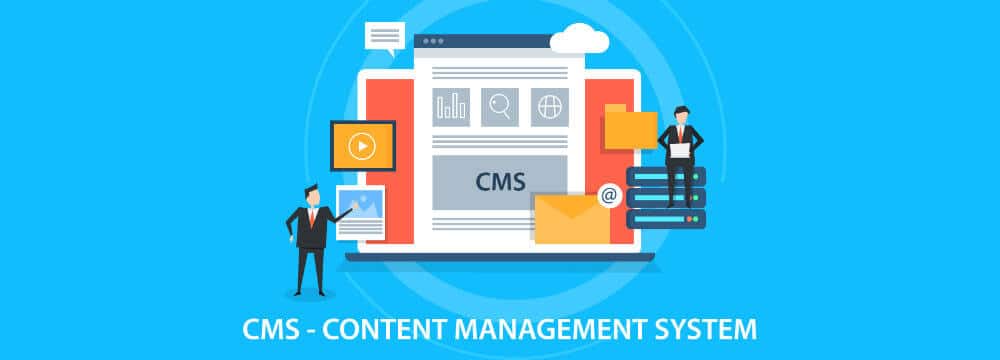
CMS vs. Website Builder

If you’re looking to create your own website, there are two routes you can take. The first option is to use what’s known as a Content Management System (CMS), such as WordPress or Drupal. The second option is to use a website builder, such as Squarespace or Wix.

Though the two share similarities, they offer completely separate solutions depending on the needs of the user. Understanding the differences between CMSs and website builders will help you to determine which option is best for you and your organization.

What Is a CMS?

A content management system is online software that lets you create easily manageable websites by leveraging a pre-built framework. When using a CMS, you can purchase pre-designed, customizable themes, which reduce the need for users to have in-depth coding skills to effectively manage a website.

The beauty of content management systems is they give the user a massive range of flexibility and scalability because of their in-depth customization options. CMS systems require a steeper learning curve when compared to website builders, but this is offset by the amount of control you’re given over your website.

If you’re the owner of a small business, choosing a reliable CMS to build your website will likely be the best option. If you don’t have the expertise to set one up on your own, you can hire a web developer for a more state-of-the-art web design.

Pros of Using a CMS

  • Improve functionality with plugins – Nearly every CMS allows you to install plugins to increase the features your website can offer for both your business and your visitors. For example, if you want to collect emails on your homepage, you can simply install a plugin that prompts a pop-up to appear and collect the information you require from your visitors.
  • Choose from thousands of attractive themes – Website builders may excel when it comes to ease of use, but content management systems have their own theme options that allow you to set up your website with minimal technical knowledge. Some CMS themes even come with their own drag and drop features, making them just as easy to use as website builders.
  • Offers greater customization – Content management systems allow access to the underlying code, allowing you to make specific changes you wouldn’t be able to make when using a website builder. Even if the theme you’re using limits a specific function, you can simply dig into the code and tweak it until you’re satisfied. This helps blur the line between custom web design and website templates. If you don’t have the expertise to do this on your own, you can find a web designer to make the changes on your behalf.

Cons of Using a CMS

  • Steep learning curve – When compared directly to website builders, CMS platforms have a much steeper learning curve. You’ll have to acquaint yourself with a full management system, meaning you’ll have to learn all the ins and outs to use the system to its full potential.
  • Working with hosting solutions – Content management systems require that you find a hosting solution for your website. Sites such as Bluehost and GoDaddy are the most popular options, but they also add another layer of complexity to the equation of getting your website up and running.

>> A lean website will help keep costs down, but don’t cut too much functionality! Learn about these 24 website must-haves today!

What Is a Website Builder?

Website builders are easy to use tools that use pre-built components to create a fully functional website. Most website builders use a drag and drop function, which allows you to change the layout of your website with ease.

Once you’ve had a little bit of practice, you can create websites that aesthetically appear as if they’ve been built by a professional. Website-builders such as Wix and Squarespace come equipped with pre-built website templates that are created to suit a wide variety of needs.

difference between CMS and website builder

While website builders are easy to use, they lack the flexibility offered by a CMS because they’re limited by the platform (Wix for example) which can only be customized to a certain extent. For a more in-depth look at the differences between a CMS and a website builder, check out this comparison between Wix and WordPress.

Pros of a Website Builder

  • Easy to use – Frankly, the most attractive feature of website builders is their ease of use. Zero coding knowledge is required, and streamlined tools allow you to easily set up your website with drag and drop functionality.
  • Cheap and fast – Website builders provide a quick and inexpensive solution to your website problem. They’re the ideal choice for those who are putting together their first website. Furthermore, they’re cheaper than paying the costs associated with content management systems. Due to their ease of use, you can easily have a website up and running in thirty minutes or less.

Cons of a Website Builder

  • Not scalable – Website builders are great for those who need a quick and simple website that is aesthetically pleasing, but they wouldn’t work for small businesses and larger organizations that require more complex websites. Website builders lack the advanced features of a CMS, which not only gives businesses more control of their website but also allows them to scale when the need arises.
  • Limited customization – Website builders offer plenty of customization options, but you’ll eventually hit a wall (this is where scalability issues come into play). Websites may need to change and add features as the needs of the business evolves over time. This will eventually become a problem for businesses that decide to use a website builder as opposed to a CMS.

Is WordPress a website builder or CMS?

is WordPress a website builder?

Is WordPress a website builder or a CMS? From the surface, it can be difficult to answer this question, because WordPress shares similarities with both sides of the spectrum. However, WordPress is an open-source content management system due to its customization options (amongst other reasons).

You can either install WordPress as part of a web hosting service, or you can download it to be hosted on your own network. Unlike a website builder, WordPress requires a bit of a learning curve to master. Contact MARION for more help with your WordPress web development.

Once you’ve worked out the details (hosting, installing WordPress, installing a theme, etc.) WordPress is still relatively simple to use.

How to Find out Which CMS a Website is Using

find out which CMS a website is using

Knowing which CMS a website is using can be very useful. You could also use this information to generate leads. Knowing that a website uses WordPress as their CMS, for example, could allow you to reach out to them and offer your own custom theme instead. Or perhaps a competitor has a fantastic website, and you’d like to use the same CMS to help level the playing field.

Tools known as CMS detectors, such as Builtwith and W3techs, are the best way to find out which CMS a website is using. Both tools are easy to use, and they provide information that includes lead generation, hosting information, report filtering and much more. You simply copy and paste the website URL in question, and the CMS detector will give you a list of tech that the site is using.

CMS vs. Website Builder – Which is right for you?

Understanding the differences between CMSs and website builders will help you to identify which is the right choice for you. Ultimately, your decision will be determined by the needs of your organization.

If you need a quick and simple website that’s cheap and you don’t mind limitations in terms of customization options, then a website builder will be the best choice.

On the other hand, if you’re a small business owner or marketing director looking to build a website that gives you greater control and allows you to adapt and scale as your website needs change, you’ll most certainly want to choose a content management system.

MARION is a full-service marketing agency that offers highly rated marketing and custom web design in Houston and Austin. We understand the complexities of working with content management systems. Not only will we drive customers to your website, but we will also optimize your site for conversation, ensuring your revenue stream continues flowing day and night.

Contact us today so we can start transforming your website into a business growth tool!

Marketing emails you’ll actually want to read.

Get marketing tips and news sent to 
your inbox.

This field is for validation purposes and should be left unchanged.
Name(Required)

Wix vs. WordPress – Which One Is Better For Your Small Business

If you’ve got a small business and need a website, there are two top-notch website builders to go with: WordPress and Wix.

Some experts strongly recommend WordPress because of its popularity and widespread use while others rally behind Wix due to its drag-and-drop functionality that reduces the barrier to entry.

But you? Can’t make your mind up.

And I get it — this is a major decision. Once you’ve committed to a website platform and spent lots of cash and time on getting your website up and running, the last thing you want to do is admit that you chose the wrong website builder.

For that reason, I’ve decided to put together this 100% impartial and objective comparison article to help you make a better decision.

4-Factor Comparison Between Wix and WordPress

Let’s take a look at the true battle of the ages — WordPress vs Wix.

1. The Tools Within Wix and WordPress

Everyone raves about WordPress plugins. Need a plugin for SEO? They’ve got a ton. Need a plugin for your opt-in forms? They’ve got a million.

A lot of their plugins are top-notch and highly recommendable.

Wix, on the other hand, has nowhere near the same amount of tools and apps available to you.

So WordPress wins here, right? Not exactly…

See, the WordPress Plugin Directory can boast over 56,000 plugins in their armory. Wix, on the other hand, probably has less than 1,000 apps and tools.

The problem for WordPress is that it’s an open source platform which means that any Tom, Dick or Harry who fancies himself a coder can create a plugin. As a result, not all of those 50,000+ plugins will be worth your time. A lot will be total junk. Worse still, they might be buggy.

Wix isn’t open source, and one thing you can be sure of is that each and every one of its tools was made by a pro developer and properly tested before being launched.

As such, if you’re in a hurry and don’t want to be bogged down by potentially buggy tools, you might want to go with Wix.

On the other hand, if you have a need for WordPress’ extensive array of versatile plugins, do check the reviews and number of active installs out before downloading anything.

Of course, while both Wix and WordPress provide the tools for you, it’s still up to you to optimize your pages for maximum conversions.

2. The Simplicity of Wix or WordPress

WordPress is really flexible and allows you to customize many aspects of your website in a way that Wix won’t allow, but as you know, with greater flexibility usually comes less simplicity.

WordPress is more demanding to use than Wix, and its learning curve is steeper. There are major contrasts in custom website design vs. website templates. Sure, you can customize your WordPress website, but you must know how to code or know someone who does. Otherwise, your WordPress web design options are limited.

WordPress vs. Wix CMS

Wix is simpler and doesn’t allow for much customization, but it wasn’t designed for pro coders. It was designed for beginners.

Moreover, Wix is a drag and drop site, which really appeals to non-developers and those who have never developed a website before.

WordPress is more powerful and can do more. But if you’re a small business operating with few resources, zero coding knowledge and this is your first website, we’d say that Wix wins this one.

3. The Support for Wix vs. WordPress

We know how it goes — it’s product launch day and you’re really excited. Everything is in place and you’re expecting lots of sales.

But then your website won’t load.

Worse still, your hosting platform is slow to react and can’t provide you with satisfactory answers. Oh no!

WordPress is well-stocked up with community users who are on hand to help you out with whatever you need, whenever you need it.

They have an insane amount of forums where a quick search for a problem will bring up lots of answers. Now, while this sounds good in theory, it can prove problematic if you’re overwhelmed with the number of possible answers.

Wix doesn’t have the same level of community members that WordPress has, but they have a support team for paid members. And like WordPress, they also have articles and tutorials that might be able to help you out.

If things are so desperate that you need to get on the phone with someone, Wix allows you to arrange a phone call if you’re on a paid plan.

All in all, this one’s a tie. WordPress’ level of support is incredible, and if you can find the right answer to your question right away, it’s happy days.

4. The Pricing of Wix versus WordPress

Small businesses don’t always have the biggest budgets when it comes to their websites, which makes pricing an important consideration.

Wix has a tiered pricing structure designed to appeal in some way to everyone. Its most basic plan costs just $5 a month, but to remove Wix ads you’ll need to pay $10 a month.

Freelancers and entrepreneurs tend to go for the $14 a month plan, but Wix has structured a plan aimed specifically at small businesses. It costs $17 a month and lets you create your own online store within your website.

This is a pretty good deal because you know exactly where you stand and what you’re getting. Plus, you have the option to pay yearly instead of monthly to save money.

WordPress, doesn’t host your website for you, so you’ll need to get your own hosting service. This can cost as little as $3 a month if you find the right hosting provider. WordPress comes with free themes, but you have the option to purchase more robust themes if the free options are too generic for your taste. A new theme will typically be a one-time cost of $30 to $80.

For more functionality, you might decide to purchase a few plugins. Some are free but advanced plugins with special features can cost up to $50.

A custom domain name will typically cost about $12 per year.

The outlay for a more advanced WordPress site can be a lot more than it is for a Wix site if you pay for your Wix site monthly. However, WordPress themes can really enhance the look of your website, and plugins can make your life easier.

All in all, both WordPress and Wix have their pros and cons. If you’re a small business on a very small budget and have no coding experience in your team, Wix is a solid option. On the other hand, if your budget is a bit bigger and you can afford to hand the reins over to a pro developer, WordPress is both more powerful and more flexible.

Let us know your thoughts in the comments!

About the guest author:

Wix vs. WordPress Aljaz Fajmut Guest Author

Aljaz Fajmut is a digital marketer, internet entrepreneur, and the founder of and Nightwatch a search visibility tool of the next generation. Check out Nightwatch blog and follow him on Twitter: @aljazfajmut

Marketing emails you’ll actually want to read.

Get marketing tips and news sent to 
your inbox.
This field is for validation purposes and should be left unchanged.
Name(Required)

WordPress Editing Tips! Part I

For the past several years MARION has built many custom-themed WordPress websites for our customers. WordPress began as a tool for blogging and quickly became extremely popular. Soon the ability to publish “pages” which exist independently outside of blog hierarchy was added, which made WordPress a full-fledged content management system, or CMS.

Contact MARION today to learn how our WordPress web design in Houston can help take your website to new heights.

The major reason customers need a CMS of any kind is to gain the ability to publish and manage content without knowledge of coding. WordPress was built to make website publishing as easy as writing a document in MS Word or another word processor. For the most part, it really is that easy. When pages contain multiple content areas, we define custom editing fields for each area where content can be updated without endangering the overall format of the website. All of these fields are available and labeled clearly in the page editor for that individual page.

But even with this functionality, we know that many of our customers are hesitant to make their own updates. Of course, many of them are busy doing other things for their companies, but another reason is apparent as well: they’re unfamiliar with the admin area of WordPress.

The purpose of this series of posts is to help leap that small hurdle. While not covering every aspect of editing and publishing, the topics included for this series were chosen because we know these areas are sometimes frustrating for beginning editors. Additionally, we show how to add some features that make publishing beautiful content even easier. 

Logging In

If you’re an absolute beginner, you probably don’t know how to login to the WP admin. Most of the time, the login screen is located at www.yourwebsite.com/wp-admin/. If you cannot locate your login information, use the Forgot Password link to receive a reset email. If your email address is not associated with the login, you may need to contact your developer or your hosting company to help you gain access. These resources can supply a new login by adding a new administrator or editor account directly to the database, and there are other methods that you as the site and hosting account owner has access to.

Tired of hunting for that password? We recommend a password manager like Dashlane or LastPass that can remember it for you and log you right in.

Posts vs. Pages 

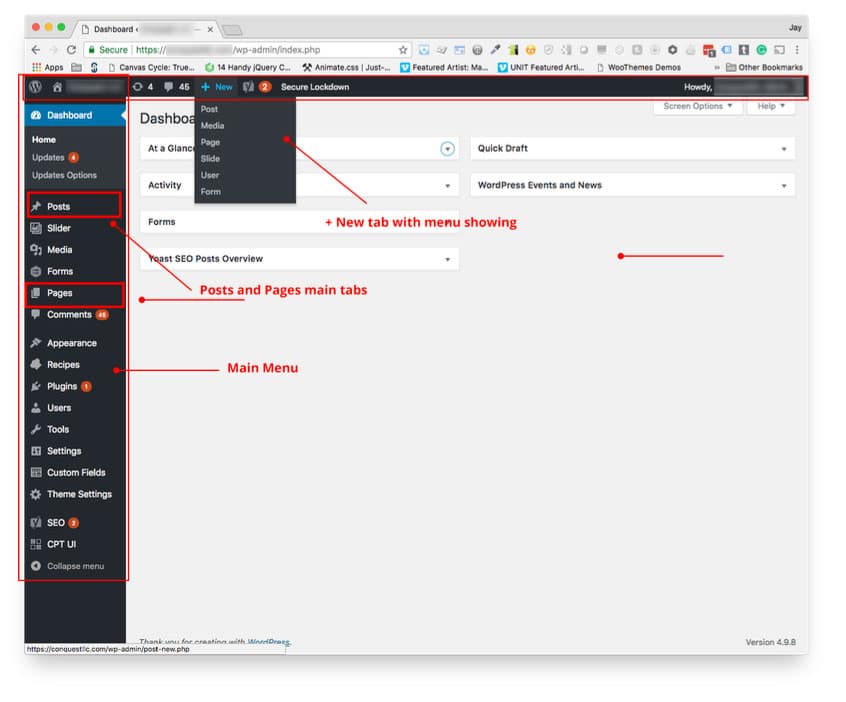
After logging in, the WP Dashboard displays. On the left side of the dashboard is the main menu consisting of all the major tools required to manage your site. At the top of the desktop is the incredibly handy admin bar that helps you access often-needed features without re-displaying the dashboard just to get to the dashboard menu.  

If you need to create a new blog post or edit earlier drafts or published posts, use the Posts tab from the desktop menu. You can also add new posts from the top menu under the “Add New” tab. If you want to create a new page or edit a page, use the Pages tab from the desktop or the admin bar.

When you choose to create a new post or page, you are immediately taken to the editing screen where you can enter a title and begin writing the other content. If you want to edit an existing post or page, you will be taken to the listing of posts or pages. Underneath the titles of the items are smaller links, including the edit link which will take you to the WP editor screen for that page or post.

WordPress Visual Editor Basics


The WordPress Visual Editor displays an icon toolset familiar to anyone accustomed to writing documents at a computer. The most often used items display by default, including bold, italic, bulleted and numbered lists, block quote, text alignment, hyperlinks and (i.e., the full address to the published item), and the editing mode tabs: Visual or Text. We will explore the Text editor in a future post.

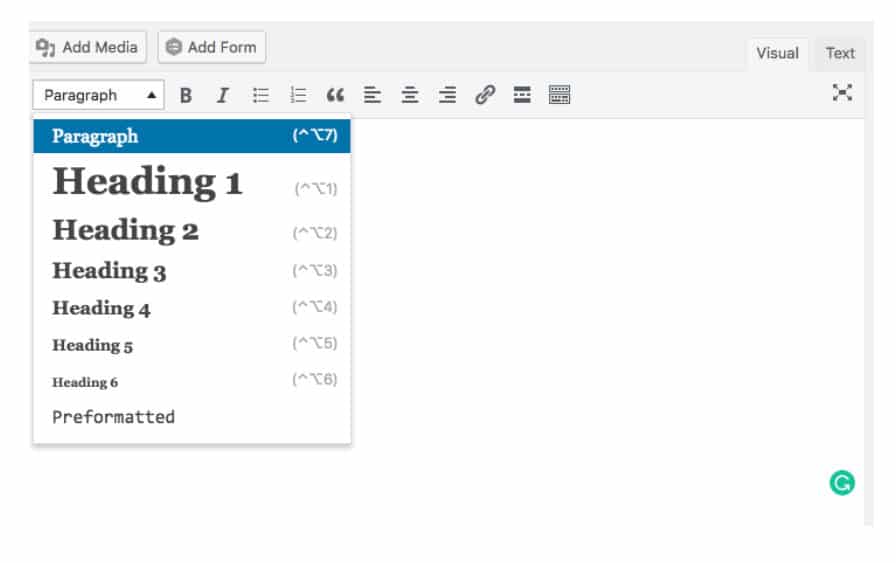
On the far left, next to the icon row is the extremely important format selection drop down, which assigns selected text to paragraphs or levels of headings. Using the formatting drop-down will add the appropriate HTML tags to the selected text, although you will not see the tags in the Visual Editor. Correct HTML text formatting is important for search engines in crawling and evaluating your content as part of calculating page rank in search results. In short, the formatting drop-down will make your content easier to find on the Internet. For example, it’s very important that the primary subject of your article is enclosed in an “H1” heading tag, with subheadings also assigned in their correct hierarchy of importance using H2, H3, H4 and so forth.

Using the formatting drop-down will also make your editing life easier because this will also supply the correct color, size and any other attributes required to display your content consistently and adhere to the overall style of your website.

Please also note that the editor itself does not use the same set of instructions to display elements that the public facing side of your website uses. This can be a bit disconcerting because the text you see is not styled like the text when viewed on your site. But, if you’re ever not sure how it will look, you can preview it without saving it, and you can even revert in the event you do save an edit you regret. More about those two life-saving features later.

The “Kitchen Sink”


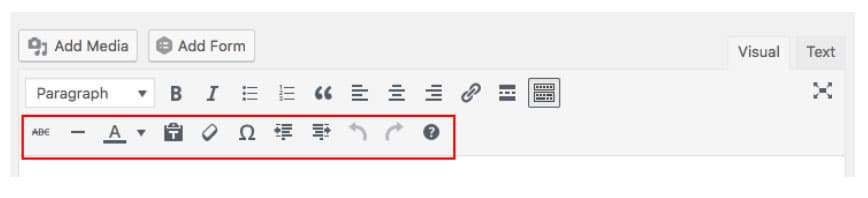
Pressing the far right (“Kitchen Sink”) icon will display additional tools often needed in content creation, including strikethrough, horizontal lines, text color, paste text without formatting, clear formatting, special characters, indentation, undo, redo, and keyboard shortcuts.

Paragraphs and Line Breaks: How WordPress does it.

When composing in the Visual Editor, press the Enter key where you need a new paragraph to occur. It is not necessary to select the text and assign it to a paragraph via the formatting drop-down. WordPress assigns the HTML for the paragraphs when the page is rendered in the browser. It’s important to understand that, because you won’t see the paragraph tags in the Text editor either unless you apply special formatting to an individual paragraph.

Sometimes you need to force a line break, such as when composing addresses. To do that you use Shift + Enter, the same way you are used to doing it with word processing software.

Bulleted and Numbered Lists

To create a bulleted list in the Visual Editor, simply hit Enter then type the list items, pressing the Enter key at the end of each. Then, once you’ve completed the list, use the mouse to select the entire list and press the Bulleted or Numbered icon from the tool set. WordPress will wrap all the items with the correct tags. Using Shift + Enter will supply a line break within a single list item but will not help you to create lists.

To create a sub-list, also called a nested list, select the group of list items that will be nested, then use the indentation icon. You’ll need to use the Kitchen Sink icon if the secondary row of icons is not displaying.

Columns!

Ordinarily, displaying content in columns, especially “mobile responsive” columns, on a website requires understanding HTML along with CSS (Cascading Style Sheet – which is where the instructions for how to display the HTML are written). As desktop screens get wider so do websites. This makes arranging content in columns a valuable and attractive way to present text and other content.

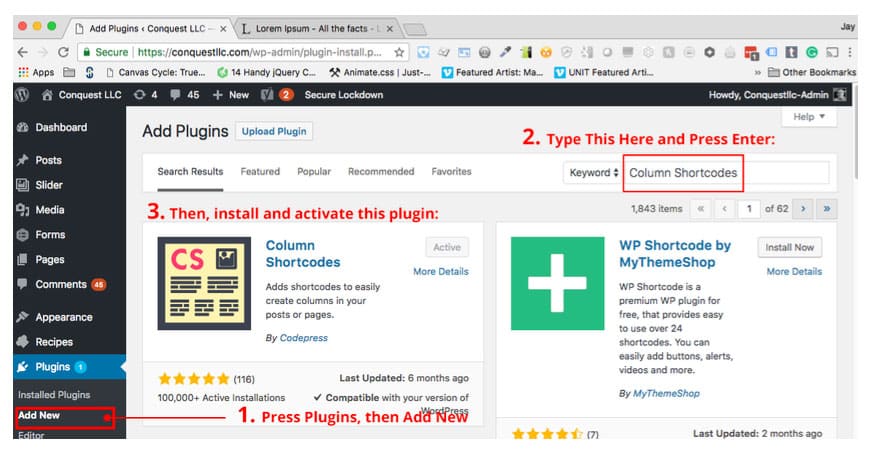
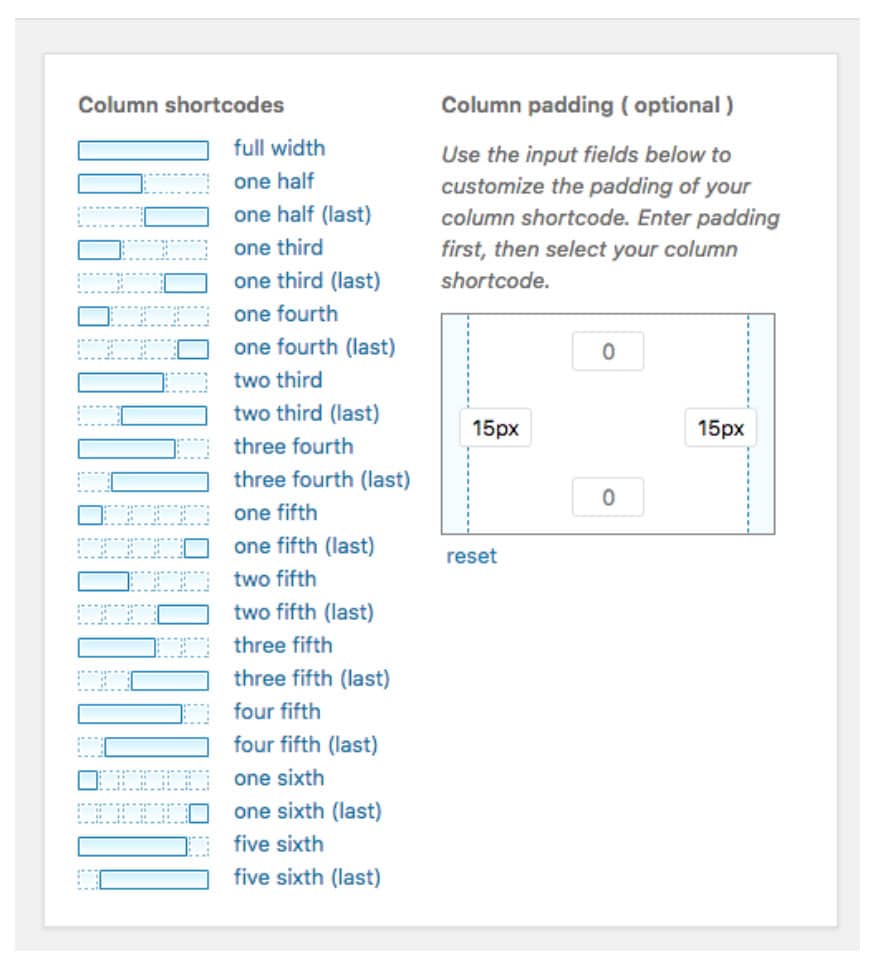
WordPress does not come with a built-in feature for adding columns as of this writing, so we will show you how to add that ability with a plugin called Column Shortcodes.

  1. Go to the Dashboard menu and choose Plugins, then Add New
  2. Search for “Column Shortcodes” in the search bar of the Add Plugins screen.
  3. Use the Install button to install the plugin, then press Activate after it installs.
  4. Then return to your post editing screen.

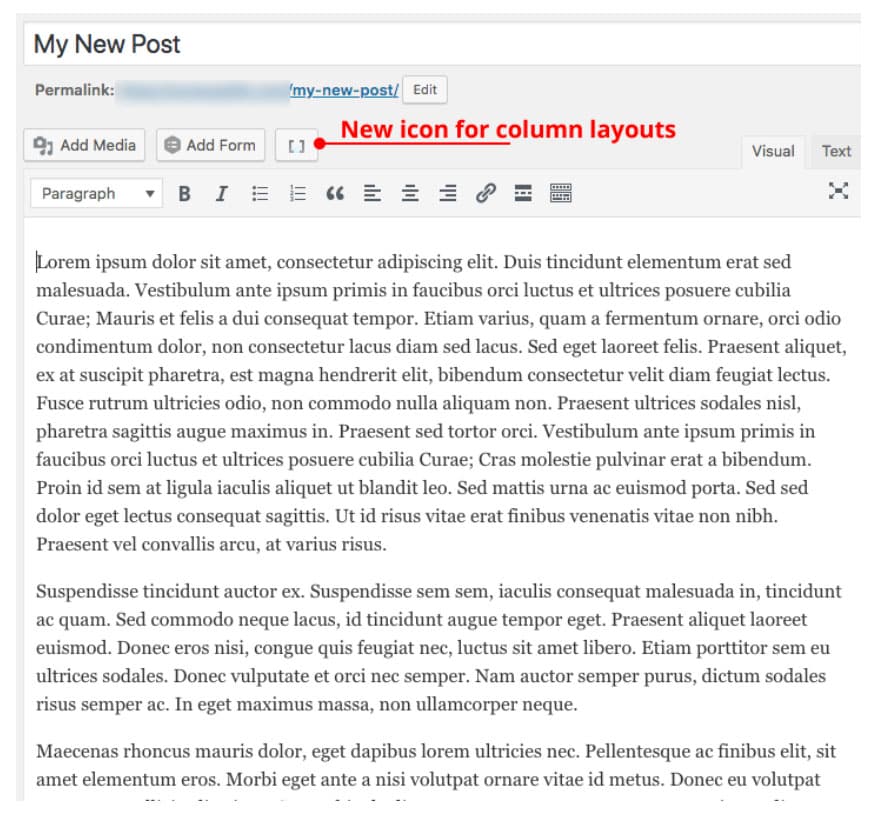
When you return to edit your post, you’ll see a new icon above the toolset. (If you don’t see the icon, it’s possible you did not activate the plugin after installing it. Go back to the listing of installed Plugins and click the Activate link.)
The following image shows some example content that has already been separated into paragraphs. These will become columns. 

  1. Place your cursor where you want the first column to appear.
  2. Then Click the column icon and the columns window appears.
  3. Since we need to create three columns, first we’ll enter some padding to create the column gutters. To keep it simple we’ll set all columns with the same padding on the right and left of 15px. Doing this will create gutters between the columns that are twice as wide (30px) as the value entered in the column padding widget, because the space will include the right side padding of a left column added to the left side of the adjacent column.

When you click “one third” the plugin will immediately place a column shortcode pair where you had your cursor. This will consist of the opening and closing shortcodes:

[one_third padding=”0 15px 0 15px”][/one_third]

  1.  
  2. Here’s where you need to be a little careful. Select all the text you want to be in the first column, then Ctrl-X (CMD-X on Mac) to cut it, then Ctrl-V or CMD-V to paste it between the two parts of the shortcode pair, like so:
  3. Repeat the process for the second column
  4. For the third (last) column, you need to place the cursor where your last column starts and click the column icon again to redisplay the columns menu. Fill in the padding (if it is not already) then select “one third (last)” this time. The final column shortcode pair looks like this:

[one_third_last padding=”0 15px 0 15px”]

  • There is a Preview button available in the upper right quadrant of the editor screen. It’s often a good idea to preview your changes, especially if you’re using a plugin you just installed. Click the Preview button to see how the content will appear:
  • The columns created by this plugin are responsive, meaning they will stack vertically when a small screen such as a mobile phone is being used to display the content.

    The next installment of the series will cover tables and how to use images and other media in your posts.

    In the meantime, learn how MARION’s Houston marketing firm, can deliver a Houston website design that will turn visitors into customers. Contact us today to learn more!

    Marketing emails you’ll actually want to read.

    Get marketing tips and news sent to 
your inbox.

    This field is for validation purposes and should be left unchanged.
    Name(Required)

    How to Tell if a Website Is Secure – Why & How to Change HTTP to HTTPS

    If you have a business website, you probably worry about security. This concern is especially likely if you collect sensitive information such as credit cards and social security numbers.

    In an age where hackers are constantly on the hunt for easy targets, website security should be one of your top priorities.

    One way to significantly improve the security of your website is to change HTTP to HTTPS for the transfer protocol of your site. Sites that don’t use HTTPS are essentially open books for hackers to crack open and read to their hearts content (to the detriment of your customers).

    If you’re asking yourself – how do I make my website secure? – please continue reading.

    What is HTTP & HTTPS

    HTTP stands for Hypertext Transfer Protocol, and it makes it possible for web users to transfer and receive information over the internet. HTTP is one of the most widely adopted application protocols online and its existence makes the modern web what it is today.

    HTTPS stands for Secure HyperText Transfer Protocol, and it operates in the same way HTTP works in that it allows web users to receive and transfer data.

    Why Use HTTPS, and Why Is HTTPS Important?

    The defining difference between the two transfer protocols is that HTTPS transports data using an extra layer of protection known as Secure Socket Layers (SSL).

    In most cases, SSL (known commonly as SSL certificates) is used to secure the transfer of data, confidential login information and credit card transactions. Simply put, HTTPS is the secure version of HTTP.

    change HTTP to HTTPS

    Do I Need an SSL Certificate for My Website?

    It doesn’t matter what type of website you run or the type of information you collect, it’s always beneficial to get an SSL certificate for your website. SSL certificates encrypt the data that users input so it remains secure as it travels from a user’s web browser to your server.

    Consumers are always wary of the many veiled security risks that can threaten their information each time they engage in online transactions (inputting a credit card number into an e-commerce site for example).

    Securing your website with an SSL certificate will give your visitors confidence that their information is safe within your database. It also adds credibility to both your business and your website because it communicates the message you’re serious about the security needs of your customers.

    HTTP vs. HTTPS SEO

    When it comes to Google SEO, HTTP vs. HTTPS makes a difference. Search engine are constantly evaluating which web pages provide the best experience for users.

    In addition to contextually addressing user queries, search engines look for measures of a site’s credibility. Because using HTTPS instead of HTTP makes your website more secure for users, Google sees this as a credibility booster.

    In August of 2014, Google announced that moving to HTTPS could give your site a subtle rankings boost. This makes the change to HTTPS even more critical for the performance of your site.

    How to Tell If a Website Is Secure

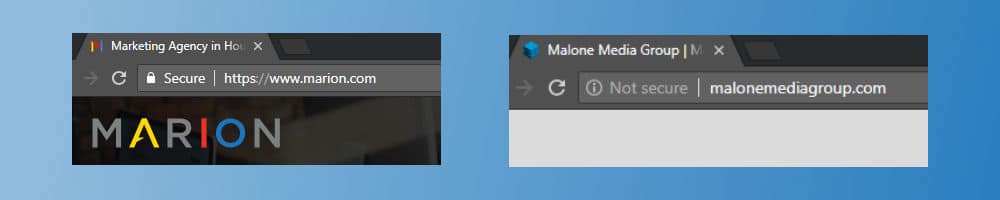
    It’s quite simple to determine whether a website is secure. Pull up a browser and type in the URL of any website. If the URL starts with “http://” the website is not secure. If it starts with “https://” that website is secure.

    It’s possible that a site has manipulated their server to show “https://” when they don’t have a valid SSL certificate. When you look to the left of your browser’s URL bar you can see “Secure” or “Not secure.” This is another sign of whether a site is secure.

    HTTP vs. HTTPS SEO

    Get into the habit of checking whether the sites you frequent are secure. This is especially important for websites that require you to enter highly sensitive information such as your credit card number or login credentials.

    If you’re interested in further verifying the security of a website, click on the green lock icon next to the “Secure” display in your browser’s URL bar. This should prompt a pop up to appear with in-depth security details.

    Are we saying HTTPS is the only security measure you need to protect your website? Of course not! Hackers can still compromise a website that’s protected by an SSL certificate.

    That’s why you need to perform follow up actions to ensure a website has multiple layers of security. One way you can do this is to read a site’s privacy policy. Most privacy policies will explain how your information is collected and used, and what security measures are in place to protect your private data. If a website doesn’t have an adequate privacy policy, that’s a red flag.

    Download this free guide about the 24 website must-haves that will evolve your digital marketing today!

    You should also check to see if the site’s contact information is up to date. Most security conscious website administrators will have a valid email where they can receive information pertaining to possible security issues. Keep on the lookout for social media icons, a valid email address, a telephone number and possibly a physical address if relevant.

    How to Change HTTP to HTTPS

    To enable HTTPS on your website, you’ll need an SSL certificate. SSL certificates are issued by a certificate authority or certification authority (CA).

    Not all security certificates are created equal. For example, 1024-bit security certificates provide less protection than 2048-bit certificates. Keep this in mind as you’re moving over to HTTPS.

    how to change HTTP to HTTPS

    .htaccess – Force SSL

    If you’re using an Apache server (most WordPress sites do), you will also need to include a URL rewrite rule that redirects your HTTP URLs to HTTPS. The code will look like the following:

    RewriteEngine On
    RewriteCond %{HTTPS} off
    RewriteRule ^(.*)$ https://%{HTTP_HOST}%{REQUEST_URI} [L,R=301]

    If your site uses the WordPress CMS, make sure you include the above code outside of the WordPress comment tags:

    # BEGIN WordPress
    # END WordPress

    Contact the experts at MARION for more help with WordPress development in Houston.

    SEO Concerns When Switching to HTTPS

    As you change to HTTPS Google will treat the transfer as a URL change and there’s a very good chance you will experience temporary ranking fluctuations until the transfer is complete.

    You will eventually regain the rank you lost. The major downside to this transfer period is you will miss out on vital organic traffic until you recover your rank.

    Regarding long-term SEO concerns, you should have nothing to worry about as long as you configure your SSL certificate correctly on your website. Configuring your SSL certificate incorrectly (such as pointing it towards the wrong domain) can affect your SEO negatively.

    To ensure you go about the process the right way, let’s look at Google’s process of switching over to HTTPS:

    • Determine the type of certificate you need for your site (single, multi-domain, or wildcard)
    • Update your robots.txt to allow Google to crawl your website
    • Ensure your site returns the proper HTTP status code
    • Use a 2048-bit key certificate
    • Ensure you maintain an up-to-date SSL certificate

    Of course, if you’re unsure of how to configure your SSL certificate correctly, turn the job over to professionals who know what they’re doing. It’s a much better option to pay a little bit of money up front to ensure the job gets done right the first time.

    Understanding Why HTTPS Is Important

    It’s a no brainer why you should use HTTPS over HTTP. Google is becoming more and more stringent against sites who have yet to make the switch. Furthermore, sites who don’t use an SSL certificate run the risk of losing the trust of their visitors.

    If your website is still using HTTP switch over as quickly as you can to avoid any negative repercussions. MARION’s Houston marketing agency can help.

    If you’re a small to medium sized business our combination of SEO services and custom web design services in Houston will ensure you not only stand out from the competition with a beautifully crafted website, but you also have a sound SEO strategy to rank well on Google.

    Contact us today to learn more about our services.

    Marketing emails you’ll actually want to read.

    Get marketing tips and news sent to 
your inbox.

    This field is for validation purposes and should be left unchanged.
    Name(Required)

    How to Create a Content Marketing Calendar for Your Business Blog

    It’s no great secret that a good content marketing strategy will set you apart from the competition and entice your audience to stick around for future content.  From lead generation to customer engagement, creating relevant and useful content consistently can have amazing benefits for your business blog.  

    If your business blog doesn’t have a content strategy set in place, you’re already behind the curve. And even if you’ve laid the ground work for an effective strategy, you’ll still need a way to stay organized. That’s where a content marketing calendar comes into play.

    What is an editorial calendar?

    A content calendar (or editorial calendar) is a schedule of content you plan to create and publish for your audience to consume through reading, watching or listening. A content marketing calendar will keep you on track and ensure your content continues to flow without interruption.

    Often, you’ll need a content calendar for two aspects of your business blog — blog posts and social media. With that being said, let’s dive into creating editorial calendars for both.

    Creating a blog editorial calendar

    social media editorial calendar example

    Your blog is often where you’ll create the lion’s share of your content. High-quality blog posts draw in your audience and keep them coming back for more. Let’s examine the process of setting up your blog content calendar.

    1. Brainstorm blog post ideas

    One of the worst times to come up with a blog post idea is when you’re pressed by a deadline. Therefore you should draft up your blog posts early. You should aim for ten blog posts every time you sit down for a brainstorming session. Don’t hold yourself back during this process. Jot down anything and everything that comes to mind. You can tweak the details later.

    2. Identify your audience

    This one isn’t hard to figure out. Your customer is your audience, plain and simple. Before you begin writing your first blog post you should know exactly who you’re targeting. If you’re targeting CEOs in the greater Houston area, your writing should be professional and business savvy to remain effective at business to business marketing in Houston, TX. If you’re targeting young teens, using fun language and writing with a relaxed and humorous voice may be the way to go. Often your audience will determine your writing style for a particular post.

    3. Determine your posting schedule

    Figure out how often you should post to your blog. You can post as often as once a day or as little as once a month. The key here is to stay consistent. It’s better to post once or twice a month on a consistent basis as opposed to randomly posting whenever you feel like it. There are plenty of examples out there of successful blogs that post only once or twice a month. However, they do so consistently month after month and provide immense value with each post.

    4. Creating a content calendar

    blog editorial calendar graphic

    Knowing how to make a content calendar to keep you on track with your content marketing schedule is the most crucial step in the process. Now you have to find the right program to schedule your posts. There are many great programs out there that will allow you to build your blog editorial calendar easily.

    Asana is one of the best project management websites out there. You can easily load up the calendar with your blog posts and get email notifications when the due dates approach. It even comes with an app so you can stay organized while you’re on the go!

    SEMrush has also recently created a new marketing calendar feature within their suite of SEO and content marketing tools. The marketing calendar allows you to share internal calendars with you team, create and track tasks for team members, and customize certain aspects of your calendar presentation. Any Houston SEO firm will tell you that SEMrush is a highly useful and widely used tool, so including their new calendar in your content marketing process is an easy decision.

    Google calendar is also an excellent choice for creating any number of editorial calendars. Simply fill out the fields on the desired due dates and you’ll be able to stay on track for all future blog posts. These are just three of many project management tools that you can repurpose for content calendar creation.

    how to run an online marketing campaign

    Creating a social media editorial calendar

    Scheduling your blog posts is just one part of the equation. You’ll also have to schedule your social media posts. The concepts between the two are very similar, but the process can slightly differ while creating an editorial calendar for social media.

    1. Find what content resonates with your audience

    When it comes to social media, your audience will let you know what they like and what they don’t like by the amount of engagement you get on a particular post. Therefore, you should scour the popular social media accounts in your niche and find the blog posts that get the most likes and shares. From there you can model your own posts based on the most shared content on social media from comparable accounts.

    2. Figure out how often you should post

    There are so many social media platforms (i.e., Facebook, Twitter, Google+, etc.) out there it can be challenging to keep track of how often you can post on each one. Furthermore, the posting frequency of your social media campaigns is often influenced by your audience, your campaign, your business and much more.

    Avoid spamming your social media accounts with endless posts. The fastest way to lose followers is to spam your accounts. Also, ensure that your posts are relevant to your audience. The more relevant and engaging your posts are, the more positively they will impact your social signals for SEO.

    Learning how frequently you should plan to publish posts within your social media marketing content calendar can be difficult. Here are some rules of thumb for how often you should post:

    Pinterest: 5-10 per day

    Facebook: 3-10 times per week

    LinkedIn: 2 – 5 per week

    Google+: 3-10 times per week

    Twitter: At least five times a days

    3. Create or borrow content to share

    The beauty of social media is that all parties involved benefit when you share someone else’s work. For example, sharing an excellent blog post on how to grow your social media following doesn’t only bring more awareness to the author of the original post, but it also allows you to meet your own content goals. Furthermore, your audience gets to read great, relevant content. Everyone wins. So don’t be shy to share articles outside of your own site. Of course, don’t forget to give credit if your borrowed content doesn’t have a link.

    4. Creating a social media calendar

    As mentioned earlier, SEMrush and Google calendar are excellent choices for organizing your blog content. However, one of the best tools for posting to social media is Hootsuite. Hootsuite is an all-in-one tool that allows you to post to all of your social media platforms, which can be very convenient if you don’t want to go through having to post to all of your separate social media accounts individually.

    Hootsuite supports Linkedin, Pinterest, Facebook, Instagram, Twitter, Google+, YouTube, and WordPress blogs. It’s an excellent tool that allows you to pre-schedule posts in advance, eliminating the stress of having to post manually on a daily basis. Hootsuite is one among many social media scheduling tools out there, so do your research to find what best suits you.

    Creating a content marketing calendar is essential for your business blog

    If there’s one takeaway you can glean from this article it’s this — consistency is key. The devil is certainly in the details as you’re planning out your content strategy, but posting on a consistent basis will be what truly keeps your readers coming back for more.

    Looking to eliminate the hassle of marketing your own content? At Marion, our Houston marketing agency offers specialized content marketing services that help increase traffic to your blog and reach more prospects on through your social media marketing channels.

    Interested in working with our top-rated team? Contact MARION today and let’s meet your content marketing goals together.

    Marketing emails you’ll actually want to read.

    Get marketing tips and news sent to 
your inbox.

    This field is for validation purposes and should be left unchanged.
    Name(Required)

    How to Write an About Us Page

    Writing an effective and engaging About Us page involves finding the right balance between following digital marketing best practices while avoiding the formulaic. A good About Us page should establish your authority, outline your experience, and tell your company’s story in a way that showcases the brand’s unique personality, voice, and style.

    Learning how to make an About Us page for a website is not as easy as you might think. Here are a few tips and examples to help you get started creating a professional About Us page for your company.

    Writing an About Us Page for a Website

    From SEO keywords for About Us pages to your unique selling proposition, writing an optimized About Us page is about painting a picture for your current and prospective clients. Demonstrate what you can do, prove that you can deliver, and add a little flair to illustrate how you stand out from the competition.

    What to Put on About Us Pages

    The best About Us pages are often wildly creative and draw prospects in by helping them to establish a connection to your company’s story. While there are no hard and fast rules to predict what will make a successful About Us page, there are definitely a few guidelines to consider when creating your website:

    Establish a Mission and Vision Statement

    Who are you? What do you believe? What are your goals and what do you bring to the table as a company and brand?

    Writing an About page for a website that includes a strong, solid mission statement that clearly outlines the company’s philosophy and methods will keep your prospects reading and wanting to learn more. Here are some ways to improve About Us information on websites:

    • Tell your company story with relatable anecdotes and real-world examples
    • Go light on buzzwords and industry jargon, and avoid overly broad and superficial statements
    • Show that you know your customer by addressing a problem – and how you are in a unique position to solve it
    • Establish trust by offering proof of your success across social media, awards, client testimonials, and relevant press coverage and mentions

    Learn more about writing an effective mission statement today!

    Formatting is Your Friend

    There is no greater truism in web design and content marketing than this: the information on your website’s About Us page is only as good as the layout and formatting.

    Breaking up long blocks of text into shorter, succinct paragraphs and using subheadings and bullets throughout will make the content on your page stand out and much easier to digest. Learning how to write an About Us page in a visually appealing way can really help position your brand in a positive light.

    If you have great testimonials from current and former clients, consider using the best ones in pull quotes to really emphasize your experience and best success stories. Also keep in mind that while content may be king, visuals go a long way in telling a story and keeping the reader interested. Professional and well-designed images like photographs and infographics are essential to making your About Us page really pop.

    SEO Keywords for About Us Pages

    When it comes to SEO, About Us pages can be leveraged a few different ways. If your unique value proposition is closely tied to a keyword group, you can use SEO keywords for About Us pages that reflect that value propostion.

    For example, if you offer consulting services that leverage lean six sigma, your homepage might be focused on “consulting services,” or a more local SEO marketing approach, like “consulting firms in [city].” Writing a good About Us page for that same company might include keywords revolving around “lean six sigma” or “six sigma manufacturing.” Because lean six sigma is what sets your consulting firm apart from the rest, you can use those unique keywords for your About page.

    In most cases, your unique value proposition won’t be tied to a strong keyword group like our example above. If your homepage is about digital marketing, you don’t necessarily want to optimize your homepage for the same terms. Doing so could cause keyword cannibalization, and negatively impact the rankings of your homepage.

    SEO keywords for About Us page

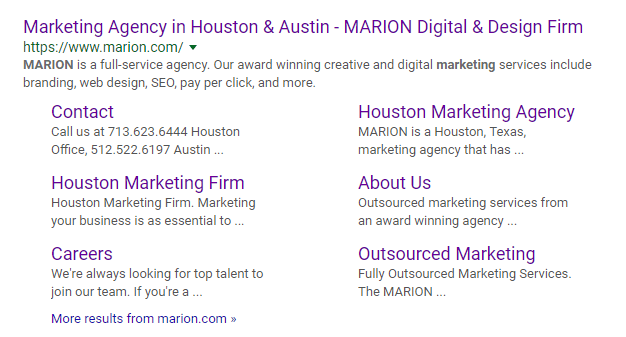
    Typically, SEO for About Us pages won’t be a priority, but make sure you don’t noindex/nofollow the page. Your About page has the potential to pick up a lot of backlinks, so nofollowing it would be detrimental to your link building strategy. About Pages also typically show up as sitelinks for your brand searches, so noindexing it would force Google to replace that real estate with another page that doesn’t communicate your brand as thoroughly.

    Schema Markup & Technical SEO About Us Page Tips

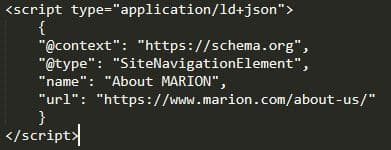
    The last, and perhaps most important About Us page SEO tip is related to structured data. Schema markup is a form of structured data that you can include on your website to help search engines better understand your content. There are different schema types that you can use across your site.

    For example, there is a schema type called LocalBusiness that lets you identify details about a local business location with special code. When it comes to schema for your About Us page, you will want to use SiteNavigationElement markup. This will help your about page show up in the sitelinks when someone searches for your brand. You can find an example of MARION‘s About Us page being marked up with SiteNavigationElement schema below.

    About Us page SEO snippet

    4 Examples of the Best About Us Pages

    The best way to get started is by drawing a little inspiration from websites that have mastered the About Us page writing game. You want your own page to be unique and one of a kind, but studying what makes good About Us pages work can help you pick up useful tips about what works when you are putting together your own strategy. Here are a few examples of About Us pages that hit all the right notes.

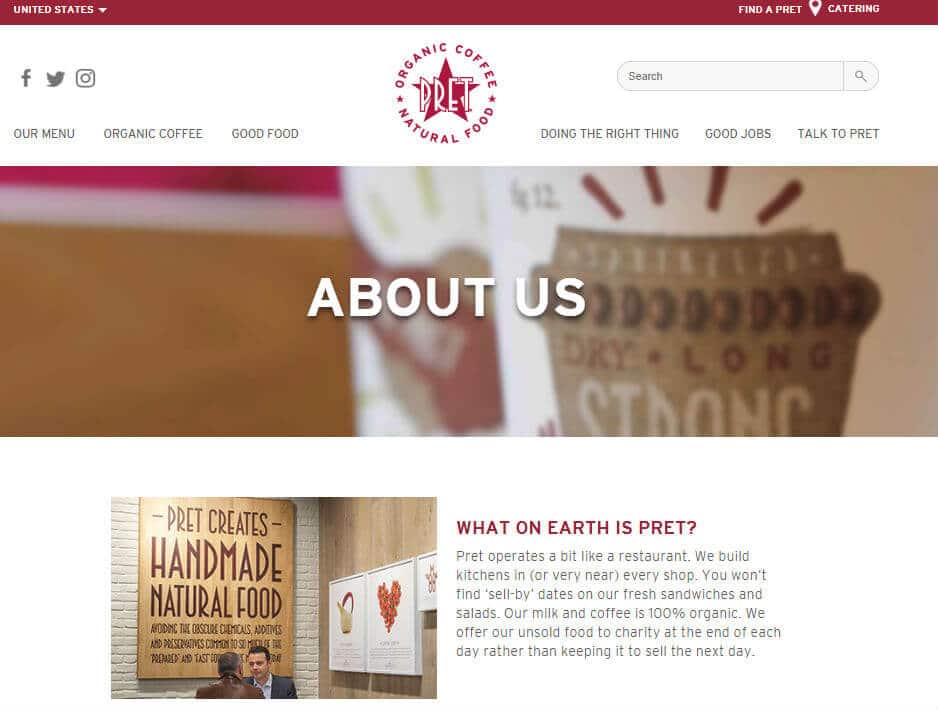
    Pret

    how to write an About Us page

    Pret gets things going by asking (and answering) a question that may very well be on an unfamiliar consumer’s mind “What on earth is Pret?” They follow it up by explaining how they are more than just another coffee and sandwich chain. It’s short, to the point, and uses a well balanced mix of text and visuals.

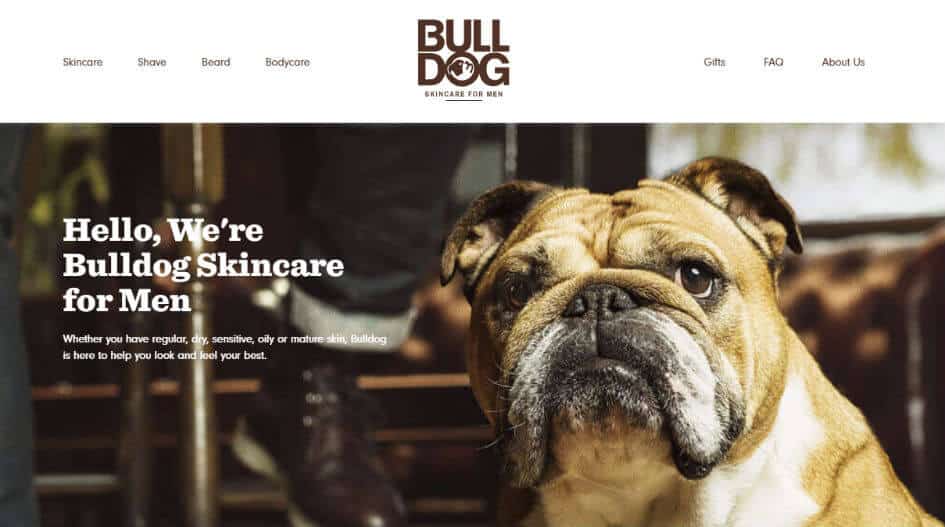
    Bulldog Skincare

    the best About Us pages

    Whether your company is named after a dog or not, who can resist an adorable picture Man’s Best Friend – which is exactly what Bulldog skincare banks on with the image on their About page. They create a brand name by using a reinforcing image that sets the tone for their mission statement – to provide men with all natural skin care products.

    Nike

    writing an About page for a website

    Does Nike even need an About Us page one might wonder? Rather than resting on the reach and name recognition of the ubiquitous “just do it” slogan, Nike’s About page uses an image and text elevating regular people to athlete status to illustrate that their products are made for anyone on the move.

    Rather than using an image of professional athletes, Nike’s About page becomes instantly relatable and creates a connection with the average consumer by allowing them to literally picture themselves in the shoes.

    Eight Hour Day

    SEO About Us page

    If you want your customers and prospects to know who you are, the easiest way is to literally show them. The Eight Hour Day team uses images of their workspace, complete with adorable office dog, to straightforward descriptions of their creative process and sources of inspiration.

    Contact MARION Today

    Don’t leave your digital marketing results up to chance. Engage with a creative marketing agency like MARION, and start elevating your brand today!

    For more information on how our marketing firm can help grow your bottom line, contact Marion today.

    Marketing emails you’ll actually want to read.

    Get marketing tips and news sent to 
your inbox.

    This field is for validation purposes and should be left unchanged.
    Name(Required)

    What Is Local SEO Marketing? – Best Practices & Importance

    We’ve all heard it before, SEO (search engine optimization) is essential for your business. If you optimize your website according to local SEO best practices, you’re more likely to rank well in Google. Better rankings will drive more traffic to your website and subsequently through the front doors of your business.

    What Is Local SEO?

    Local SEO is a strategic way to market your business online. Local search engine optimization helps businesses promote products and services to local area customers when they search for them. Every day, millions of potential customers conduct searches to find nearby businesses whose services they need.

    When it comes to local search engine optimization you must narrow your focus. The core of a thriving local business SEO campaign is optimizing your online presence so that local customers can easily find you.

    The Benefits of Local SEO

    The advantage local search engine optimization holds over “regular” SEO is that it’s easier to rank in a certain city or region if you have a physical address in that location. Understanding the importance of local SEO for your business can ultimately help you generate more leads from potential clients in your locality.

    Contact MARION today to learn how our Houston SEO company can help you achieve the growth you’re looking for.

    How to Do Local SEO

    Now that you understand the benefits, let’s take an in-depth look at a few Local SEO best practices so that you can figure out how to do local SEO for your business properly.

    local business SEO

    Offline Optimization

    Local SEO marketing extends even into the offline realm. Traditional marketing can be a great approach to establishing an online presence for your business. For example, let’s say you send direct mail to several neighborhoods promoting your business. At the bottom of your promotion, you append your social media (i.e., Facebook, Instagram, Snapchat, etc.). As a result of your direct mail campaign, your social media following may increase substantially. If you add your website URL to the promotion you may see a boost in website traffic.

    Applying local SEO best practices to billboards, radio ads, and TV commercials can also enhance relevant website traffic. Posting your website and social media handles in your traditional marketing campaigns can have a very real effect on your local SEO due to the potential online traffic that may result.

    Good Content Marketing

    As with all SEO, good content is still king. Creating high-quality articles will drive traffic and encourage your followers to share your posts. You can improve your local rankings by writing numerous articles with targeted local keywords.  For example, your content marketing efforts can include an article about “6 strategies for marketing your small business in Houston, TX.” Such an article is perfect for targeting the location-specific keywords you need to rank well for your local area.

    To figure out where to start with your content, do an SEO marketing analysis. Use the results to drive your strategy.

    Add Service and Location Pages

    Adding service and location pages allows you to add additional, targeted content for search engines to crawl and rank. For example, let’s say you run a bakery in Houston. You can create a page on your website titled “Best bakery in Houston!” You can then add some content about the community that includes pictures of local projects and so on. Don’t forget to add a call to action to the bottom of the page!

    Include Your NAP

    NAP stands for “Name, Address, and Phone Number” and you’ll want to have this information in the footer of every page on your website. This helps search engines tie each page back to your location and is another excellent way to boost your SEO for local visibility. This will also help potential customers easily find your contact information and is more evidence of the importance of local SEO.

    Fix Your Online Listings

    There’s a good chance that your website, along with your NAP, is listed on dozens, if not hundreds, of sites online. These sites include directories, review sites, social media platforms and so on. Therefore, you should hunt for inconsistencies and inaccuracies regarding your business NAP.

    Even the smallest inconsistency can cause issues. For example, let’s say a listing claims you’re located at “1234 Westheimer Rd. Houston, TX” on five directory sites. However, let’s say another five sites lists your address as “1234 Westheimer Road, Houston, TX.” Even this small and seemingly meaningless inconsistency (“Rd.” vs. “Road”) can be detrimental to your local search engine optimization.

    There are hundreds of directories that list business information all over the internet.  To effectively manage this, MARION became Yext Certified Partners.  The partnership with Yext allows us to efficiently and effectively ensure all business citations across the internet have the correct business information.

    Ask for Reviews

    In today’s digital world, your online reputation is more important than ever before. Reviews help to spread your reputation. Thus, you should incorporate a system into your online marketing process that allows you to gather as many reviews as you can.

    how to do local SEO

    As a local business, here are a few questions you should ask yourself as you’re attempting to gather reviews from your customers:

    • Do you have a feedback system that actively gathers reviews from your customers?
    • Does that system generate a steady flow of online reviews?
    • Do you leverage the hard work you put in every day to turn your customers into raving fans so that they loyally refer your business to their friends and family?
    • Do you promote your great reputation in your marketing efforts?
    • Are you monitoring what people are saying about your business?

    Typically speaking, the more reviews you receive amongst various sources (social media, review sites, etc.) the more significant the impact on your local SEO. For the best results, learn how to ask for a Google review.

    Optimize Your “Google My Business” Listing

    Out of all the search engines in the world today, most of your organic traffic will come from Google. Google My Business allows business owners to list their companies on Google. It’s crucial that you completely fill out your profile and add high-quality photos. To amplify your local SEO marketing, every listing and citation that you have online should match your “Google My Business” listing exactly.

    Enable and Encourage Social Sharing

    Your SEO always receives a boost when people share your links around the internet. When people share your content, they create backlinks that send traffic back to your site. The more quality backlinks you have, the more likely you’ll rank higher in Google.

    You should make it as easy as possible for your visitors to share your content. Adding social media icons that easily allow a reader to share your content with a click of a button is one of the best link-building strategies to make this happen. Double check that your NAP data is consistent across all of your social media profiles to avoid any inconsistencies.

    Local Business SEO Takes Time

    Local SEO marketing takes time, patience, and work. Local business SEO doesn’t succeed overnight. Don’t be surprised if it takes six months or more to rank well in the search engine results. If you stick with it and don’t give up, the benefit to your business can be monumental. SEO for local visibility can generate more leads, increase sales and grow your business exponentially.

    Thus, local business SEO is a culmination of many factors that help you drive customers to your business in a variety of ways. If you approach your local SEO strategy properly, you’ll see a significant improvement in revenue.

    For a Local SEO quote from a trusted marketing firm in Houston, please contact MARION today!

    Marketing emails you’ll actually want to read.

    Get marketing tips and news sent to 
your inbox.

    This field is for validation purposes and should be left unchanged.
    Name(Required)

    Google Advanced Search – Operators & Search Commands for Better Searching

    Whether you are conducting research or would like to perform a technical SEO audit of your website, there are advanced search methods that you can use for better results. The following Google search tips can improve the specificity of your results, and help you get the answers you need without searching through 20 pages to find what you’re looking for.

    What Are Google Advanced Search Operators?

    Google advanced search options are currently available to help support the growth and success of your online business. By understanding how to conduct more precise web searches, you can evaluate the strengths and weaknesses of your current site.

    Google is highly effective when it comes to delivering relevant results. In fact, their original mission statement was to “Organize the world’s information and make it universally accessible and useful.” However, there are times where you could benefit from greater control — especially when you are searching for something highly specific. To achieve this, you can utilize advanced Google search commands (sometimes referred to as Google search operators).

    These “Google search operators” are specific character strings that allow you to enhance the potential of a regular text search. The goal is to more quickly find answers that are relevant to what you need.

    As you learn to give Google additional pieces of information, you will narrow your search results to only what you need.
    <![endif]–>

    Are you interested in generating new leads and building your bottom line? Download this free eBook with 26 lead generation techniques that will help your business grow!

    From an SEO perspective, Google search operators can help you:

    • perform a technical website analysis
    • find targeted sites in regards to backlink prospects
    • locate specific content

    If you don’t have the time to manage your own website, find a good SEO company to improve your visibility in organic search.
    Contact MARION today! Our digital marketing company can help you attract relevant customers and improve your bottom line.

    advanced Google search modifiers

    Benefits of Google Search Commands

    Although advanced search commands may seem daunting at first, they can help you become much more efficient. Not only will you be able to better understand the efficacy of your site, but you’ll also be able to perform a more targeted competitor analysis.

    Considering that Google accounts for nearly 92 percent of all search traffic (resulting in more than 3.5 billion searches daily), leveraging the support of search operators is an excellent way to optimize your competitive advantage. In a nutshell, using advanced search operators will allow you to filter out irrelevant or unwanted results while getting your intended results faster.

    By leveraging Google advanced search options, you will be able to:

    1. Modify and refine your search with ease.
    2. Get the best possible results (using search operators independently or in combination with one another).
    3. Discover specific information that will allow you to drive your business forward.
    4. Save a significant amount of time by increasing productivity.

    11 Google Search Operators

    Use these Google search tips to support your efforts. Here are examples of both basic and advanced Google search operators. The 11 items in this Google search operators list will help you see the true potential of a more specific, targeted search.

    Google search operators for SEO

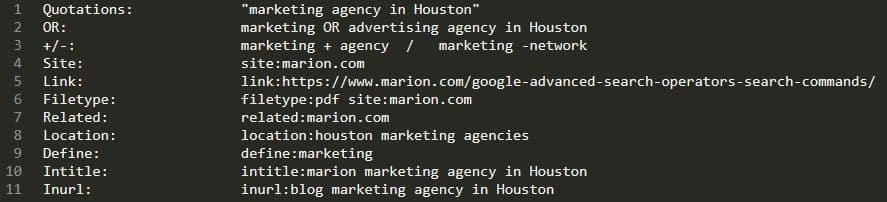
    1. Quotations – “Search phrase”

    By using quotations, any term or phrase can be used to return results with an exact match of your phrase. This is ideal when you’re not finding the type of results you want, or your search is too ambiguous.

    For example, imagine you are researching John A. Smith, the owner of a competing company. You search for John Smith and keep getting results for John B. Smith, John F. Smith, and John Z. Smith. If you adjust your result to “John A. Smith” you will only see pages that are associated specifically with John A. Smith.

    2. OR

    The OR Google operator will yield results for a given search term OR a term that is equivalent. In turn, you will broaden your search in regards to synonyms. For example, searching for marketing OR advertising would combine the results you would receive from searching for marketing and advertising separately.

    3. – (and +)

    This operator is helpful when you would like to remove specific pages that include a specific search term or phrase (or force Google to include common terms that may have otherwise been discarded). For example, if you are planning to visit the city of Liverpool but are not interested in results about the city’s football team (Liverpool F.C.), you could search: Liverpool – F.C.

    4. Site:

    This operator will let you Google search specific websites. Maybe you’re researching a vendor, but don’t know how to contact them. If their website is vendor.com, you could search for their contact page by typing in site:vendor.com “contact us”. This would return pages specifically from this vendor’s site that include “contact us” somewhere in the body or meta-data.

    5. Link:

    This operator used to be helpful when aiming to determine a sample of backlinks in relation to a specific URL. For example, link:example.com would turn up a list of websites that link to example.com.

    This Google search tip comes with two major caveats:

    1. This advanced Google search command would even return pages with internal links, so you’d have to pair it with -site:example.com to only see external links
    2. This Google search operator has been deprecated, and the resulting information is no longer accurate.

    6. Filetype: (now Ext:)

    Sometimes you want to search for a specific type of file, such as a PDF. To access files from a known source, you can combine the Google search filetype command with the previous operator (“site:”) to narrow your search even further.

    Note: Try using ext: to get the filetype results you need as an alternative.

    7. Related:

    If you’re wondering how to find similar sites in Google, know that this can be easily achieved using the “related:” command. This approach can help you better determine your top competitors and expand your blogger outreach campaign.

    8. Location:

    This will yield results from pages that are in a specific place. You can even search for a more specific type of place within that location’s vicinity. To start, you can search countries, US state abbreviations, and cities. When doing so, searching “location:NY marketing companies” will search for New York-based marketing companies, even if you’re located somewhere else.

    One of the more advanced Google search tips I can offer is to try using the location operator to research local competitors. You can combine Location: with the Related: Google search command to figure out who the closest organic competitors of a business are. You can then implement local SEO best practices based on the new insights you’ve picked up from neighbors who are already leveraging search engine optimization.

    9. Define:

    If you are unsure about a word and want to know more about its meaning, simply conduct a search to obtain definitions from varying websites. For example, define:tertiary will return a definition rich snippet describing what tertiary means.

    10. Intitle:

    Using this Google search parameter with a keyword search will give you a list of results that include your keyword in the title. For example, conducting a search for “intitle:marion” would return the top ranked pages that include “marion” in their page title.

    11. Inurl:

    Using this Google search syntax will let you search for pages with a specific word in their URL. So if you were to search for “inurl:blog how to refine my search results” you’d likely end up with a list of blog posts about how to do an advanced search on Google.

    Whether you would like to better understand your business or dive deeper into a competitor’s website, Google search modifiers (in the form of operators) can help you achieve your goals. If you are aiming to increase your online presence to further push your company’s long-term growth, you can also access a wide range of Austin and Houston internet marketing services.

    Contact MARION today for more information on how our Houston SEO services can improve your business marketing, and grow your revenue stream.
     

    Marketing emails you’ll actually want to read.

    Get marketing tips and news sent to 
your inbox.
    This field is for validation purposes and should be left unchanged.
    Name(Required)

    How to Choose an SEO Company You Can Trust

    As a small business owner, marketing may not be one of your core competencies. Sure, you’ve read up on some of the best small business marketing strategies that work for the other players in your industry, but that doesn’t mean you’re ready to do your own marketing. One complicated but highly effective strategy you’ve probably heard of is search engine optimization (SEO).

    If you’ve done your homework, you already understand that doing your own SEO requires a substantial amount of time and expertise. Unfortunately, as a business owner, your time is already being stretched to the limits. For this reason, many small business owners leverage the expertise of an SEO company.

    Learning how to find the best SEO company for your needs is your first course of action, but that’s more difficult than it seems. There are a lot of subjective layers to search engine optimization due to the closed algorithms of the major search engines. Knowing about the latest correlative studies and best practices still doesn’t guarantee that an SEO agency will be worth your investment.

    To make sure that you realize a healthy ROI from your SEO firm, use these tips to find a reliable SEO company.

    5 Tips for Choosing a Trustworthy SEO Company

    The following five tips will help you separate the SEO wheat from the chaff. I recommend that you evaluate several marketing agencies before making a decision.

    1. Realistic Offerings

    Most SEO agencies have a value proposition that you can discover on their website, or during your initial discovery call about using their services. Make sure their offerings align with your small business goals.

    While choosing an SEO company, take note of whether or not the prospective agency representative asks you about your goals. If they start rattling off a list of what they can do for you without first checking to see what you need, you can expect further assumptions and miscommunications in the future.

    The value proposition should sound realistic. Guaranteed SEO results and first page rankings should be an immediate red flag. There are no guarantees in the world of search engine optimization, and deliverables that sound too good to be true probably are.

    2. Experience

    You’re paying for expertise, so make sure your SEO agency is, in fact, an expert at what they do. How long has their firm been providing SEO services? Have they won any related awards for their work?

    Don’t let time and awards be your only measurement of experience. SEO evolves at a rapid pace, and a new provider could easily outperform a veteran that hasn’t kept up with the latest industry developments. Because there are no hard and fast rules for executing SEO strategies, it’s best to measure competency and experience by results.

    This brings us to the next pointer on how to find a good SEO company – case studies.

    how to find the best SEO company

    3. Case Studies

    A search engine optimization agency may be presenting realistic offerings and have a lot of experience, but don’t simply take their word for it. To really see how effective they are, look at the results they’ve driven for other companies.

    Reputable SEO companies can show you their previous successes. Getting pushback about client confidentiality is reasonable, but an experienced company will usually have a good enough relationship with at least one current of former client that is willing to stand witness to the agency’s competency.

    You can typically research this on your own before any sales calls by sorting through client testimonials or the firm’s portfolio page, then cross-referencing those clients with their SEO progress. You can use a tool like SEMrush to see if the agency drove significant ranking improvements for their other clients.

    4. Certifications

    What is the best SEO company doing to set itself apart from the others? One approach could be through acquiring certifications. There are several relevant certifications from HubSpot or SEMrush that your agency might have. If your agency also offers pay-per-click services, it might have Google Partner certifications as well.

    I personally wouldn’t recommend placing a tremendous amount of weight on certifications. Because of the continuous algorithm changes in the search engine marketing industry, even a certification from 8 months ago could be some somewhat obsolete. However, certifications show that the talent at any given agency is taking measures to improve, which should benefit you in the long run.

    choosing a good SEO company
    5. White Hat Practices

    A trustworthy SEO company uses “white hat,” or what I like to call “future-proof,” SEO techniques. Unfortunately, it’s not uncommon for firms to use manipulative practices that are easy to identify, and are against most search engine guidelines. While learning how to find a good SEO company, ask the following questions to make sure your firm uses future-proof strategies.

    What SEO Process Do You Use and Why?

    Each prospective agency should be willing to outline their process to some extent. They might not get into the nitty gritty details, because at the end of the day, that’s what you’re paying them for. That being said, an overview of their process will help you determine whether or not they’re using honest techniques that will keep your site healthy for the long haul.

    how to choose an SEO company

    Look out for terms like “proprietary method,” while trying to find a good SEO company, as this can sometimes equate to gaming the system through deceptive practices that the agency doesn’t want you to know about. You might think that wasting some of your money on a bad agency is the worst that can happen, but you’d be wrong. An agency that uses deceptive, or “black hat,” techniques could accidentally get your site completely removed from the Google or Bing index.

    Reporting and Communication Process

    Once you hire an SEO agency, how will you know if they’re delivering? Reporting will help gauge the success of the firm you decide to use.

    Ask them about their reporting methods. Do they use automatic or manual reporting? What online marketing metrics are they measuring? Make sure that what you deem important is something that your prospective agencies measure and report on.

    Learn about the communication patterns of each potential SEO agency as well. Do they schedule weekly or monthly calls to go over progress reports and discuss issues? How quickly do they typically respond to client questions? These matters of communication will affect you throughout your partnership, so make sure your expectations are reasonable.

    What Is Expected of You, The Client

    It’s easy to view an online marketing agency as a vendor because you’re paying a fee for services rendered, but this is a mistake. The best SEO companies for small businesses will take on the role of a partner. Will your agency be creating content, or are the expecting you to do it based on their research? How much access to your online profiles will they need?

    Your firm will be making your message visible to your target market, so make sure they understand the pain points of both you and your customers. To avoid a vendor-vendee relationship, communicate your message and concerns clearly to your agency, but keep in mind that they are experts at what they do.

    If an SEO agency does everything exactly as you say, it severely limits their ability to add value on a tactical level. Search engine optimization heavily involves keywords, so your message may need adjusted if you want to achieve the best results.

    3 Things to Avoid While Choosing a Good SEO Company

    You know what to seek out while learning how to find a good SEO company, but you should also be aware of the following red flags during your search.

    1. Don’t Choose Highest Ranking Result

    The best SEO companies for small business growth might not always be at the top of the search engine results pages (SERPs). It seems like a logical starting point – if you want them to help your web pages rank well, they should be able to achieve high rankings with their own web pages.

    Ranking highly in the competitive SEO landscape requires a huge investment of resources. However, busy agencies with a lot of happy clients are probably flooded with referral business, and investing in rankings for SEO-related search phrases with their own website would be a poor use of money. The best SEO agency could very well be operating on word-of-mouth business alone.

    2. Don’t Blindly Trust Ranked Lists

    Be careful when conducting a Google search for, “best SEO companies in [your city],” and then sorting through lists of the “best” marketing companies. It’s a common business model for business listings websites to rank highly for these terms, only to make agencies pay for inclusion. You might visit this page thinking you’re looking at a list of the best SEO companies, when really you’re looking at a list of companies that have the budget to buy your trust under false pretenses.

    3. Don’t Trust Secret Tricks

    There are no secrets in white hat search engine optimization. Search engines are aiming to provide you with the best results for your query, and tricks will not stand the test of time. If your agency isn’t using honest practices, your results, if any, will be short lived. Avoid agencies that mention using secret tactics to improve your rankings.

    Formula for Deciding on the Best SEO Company to Use

    Now that you know what to look for while choosing a good SEO company, you should know how to weight your decision. The following formula is a good rule of thumb for calculating which candidate is truly your best match.

    Trust + Referrals + Cultural Match + Contract Details

    You will discover a trustworthy SEO company through conversations about their process. If an agency was referred by one of your business or personal contacts, that is another great sign of quality.

    Through discussions and meetings with each company, pay attention to how you feel after meetings. If you find it difficult to communicate, or if you feel your agency representatives aren’t transparent about how they operate (e.g. they’re simply a SEO white label agency ), you may end up being a bad cultural fit or paying a higher price for services.

    You might be asking yourself – how much does SEO cost? Getting quotes from several companies will help you determine an average, but keep in mind that you get what you pay for when it comes to SEO services. Make sure contract length and pricing are something that you’re comfortable with while searching for reputable SEO companies in Houston.

    For more information about MARION’s SEO services, contact us today!

    Marketing emails you’ll actually want to read.

    Get marketing tips and news sent to 
your inbox.
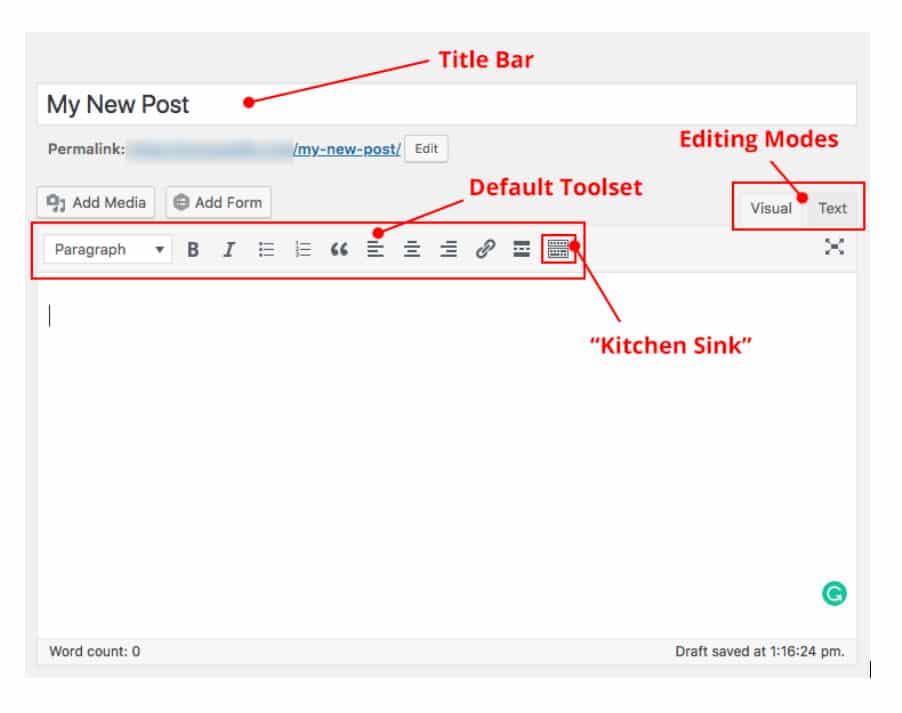
    This field is for validation purposes and should be left unchanged.

    Name(Required)