Category: Search Optimization (SEO)

How to Get Google Reviews for Your Business

“Without a certain amount of Trust between parties, a transaction will not take place. No matter what promises are made or how good the deal sounds, no customer is going to be willing to part with their hard-earned money unless they believe you’re capable of delivering what you promise.”

As author Josh Kaufman points out above, trust is critical to the success of any business. This is true for both B2C and B2B organizations.

But what is the best way to build trust online? Including first party reviews on your business website is a start, but is that credible in the eyes of your potential customers?

The data shows that third-party reviews are the gold standard in building trust. With Google receiving more than 63,000 searches per second, getting reviews on your Google My Business (GMB) profile is a critical part of any digital marketing campaign.
how to ask customers to leave a review

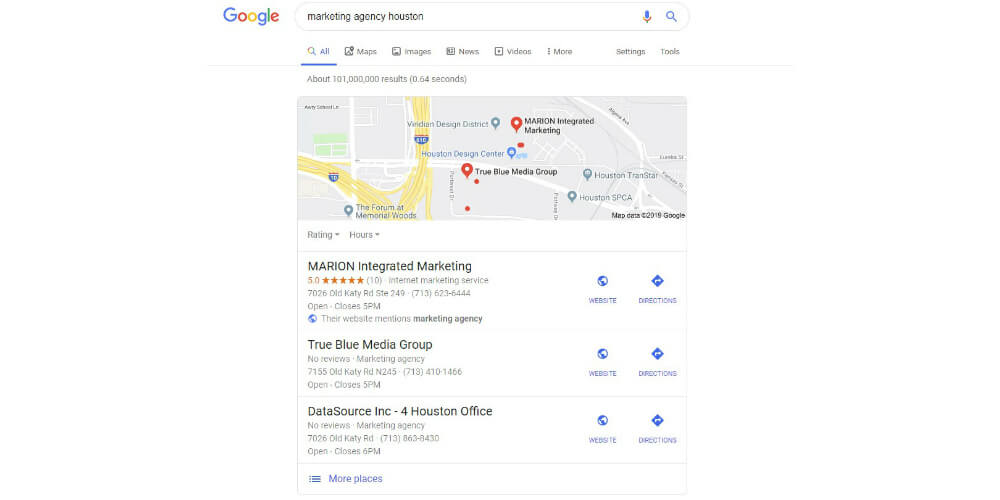
When a search engine user conducts a search with local intent, a local map pack of businesses (like the one above) will typically show up at the top of the search engine results page.

Why Are Google Reviews Important to Your Business?

It seems intuitive that being visually represented at the top of the search results can have a major positive impact on your business. Having your brand appear front and center the next time a potential customer searches for your product or services is a proven marketing strategy to increase sales. The numbers confirm this.

In a recent study by Womply, over 200,000 U.S. businesses throughout several states and industries were analyzed alongside their revenue figures. The study found that businesses with average ratings between 3.5 and 4.5 stars (out of 5) earn more revenue than any other rating, including those businesses with a perfect rating.

Having several positive third-party reviews (even if they’re not perfect) can help you build trust and generate more revenue.

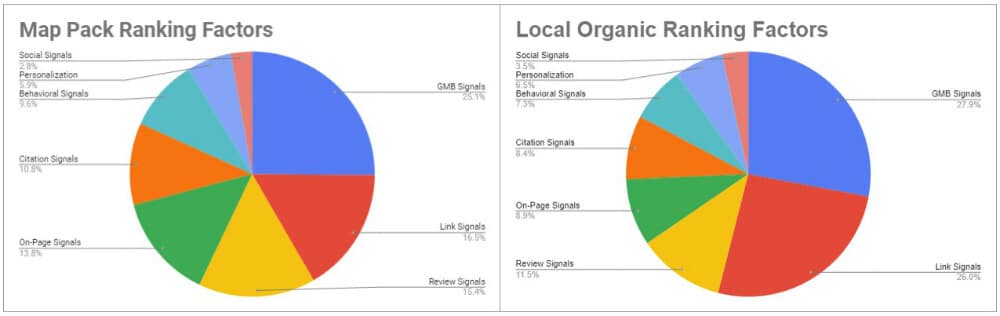
The following data from Moz also demonstrates the impact that GMB reviews have on your rankings.
how to get Google reviews for your business

In both Map Pack rankings and local organic rankings (think – ten blue links), review signals are among the top three ranking factors.

Bottom line – online reviews build trust and improve the visibility of your brand.

If you’re wanting professional help, there’s no shame in getting help from SEO companies in Austin or Houston. Contact MARION today to learn how our process can help your business grow!

How to Ask for a Google Review from a Customer

It’s clear that learning how to get customer reviews on Google is an actionable way to grow your business, but what’s the best approach?

Google gives several tips to help comply with their guidelines, one of which is, “Reviews are only valuable when they are honest and unbiased. (For example, business owners shouldn’t offer incentives to customers in exchange for reviews.)”

best way to get Google reviews

Who to Ask

Ask your customers – all of them. I’ve seen a lot of advice from other marketers advising companies to only ask happy customers to leave GMB reviews. Unfortunately, this is in violation of Google’s text review criteria that was updated as of 4/12/2018: “Don’t discourage or prohibit negative reviews or selectively solicit positive reviews from customers.”

More importantly, cherry-picking only your happiest customers will prevent you from acting on the findings from the study above – businesses with average ratings between 3.5 and 4.5 stars (out of 5) earn more revenue than any other rating.

Assuming you provide a quality product or service, there’s a good chance your average ratings will be between 3.5 and 4.5 stars anyway. Another key finding of the study is that having more reviews has a bigger impact on revenue than your average rating.

how to ask for a Google review

When to Ask

Ask you customers for reviews when they are most actively engaged with your product or service. This can mean several different things depending on whether you’re B2C or B2B, and your industry. Here are some examples of the best way to get Google reviews in different scenarios.

After Providing a Service

If you’re providing a service that shows results in real-time, asking for a review upon completion is a no-brainer. Some good examples are lawn care companies, beauticians, or a courier. If you a provide a service with a definite and immediate benefit, ask for a review upon completion.

It can be more difficult for service providers that offer less definite or visible benefits. For example, business consulting and B2B marketing offer results with longer lead times. It may take months or years for benefits from consulting to manifest themselves.

In instances where the benefits of your service aren’t immediate, you may be better off standardizing a waiting period before asking for a review. For example, you can make it standard to wait four months after beginning ongoing consulting with a client before asking for a review.

After Product Benefit Is Delivered

The benefits derived from the products you sell will almost always have a lag. Have you ever noticed that a week after purchasing something online, you get a customer service email from the seller asking for a review?

These sellers know that they need to give you a week (at minimum) to use their product before experiencing its benefit and leaving a review. Any sooner, and you’ll be reviewing the delivery service and packaging instead of the actual product benefit. Any later, and you’re not as engaged with the experience of your new product.

At a Tradeshow

If you’ve been providing products and services for years now without asking for reviews, tradeshows and related industry events provide a great way to catch up.

Another Google Maps review policy is, “Don’t solicit reviews from customers in bulk.” Not to worry – requesting reviews from customers individually isn’t the same as a bulk request, even in succession.

One of the only cases that could be made against capturing long overdue reviews at a tradeshow is that they’ll all come flowing in at once. If you have an influx of reviews during an event in January but you’re silent for the rest of the year, your online presence will appear to be thin. In fact, businesses that have more than 9 recent reviews earn an average of 52% more revenue than not.

Google review email template

How to Ask

Learning how to ask customers for Google reviews isn’t as intimidating once you’ve narrowed down the “who,” and “when.” First, let’s establish the last of Google’s ground rules.

  • Never offer money for reviews
  • Don’t ask for reviews in bulk
  • Don’t screen your reviews

This also means no discounts or giveaways in exchange for reviews. This means no widespread emails to your entire database of contacts asking for a review. And lastly, this means not gauging customer happiness, and then only asking your positive customers to leave a review.

Why follow Google’s guidelines? After all, it’s tough for them to identify whether you break these rules. Simply put, based on the Womply study that we reference above, having more reviews is more important than having a perfect star rating.

Automating the review process is the best way to generate fresh and consistent reviews.

  • Ask for a review as part of your SMS scheduling process
  • Ask for a review in your email quoting/invoicing system
  • Ask for a review in an automated follow-up email after a sale
  • Ask for a review during an in-store checkout

These methods of asking customers for Google reviews allow you to personalize your messaging while following all the relevant guidelines.

How to Create a Google Review Link

The following sections will provide example requests for Google reviews. Most automated systems will help you create your Google review link. In case they don’t, you can follow Google’s four step process (five on mobile) to create a Google review link for your business!

Google Review Email Template

The following template can help you request reviews on Google as part of your product/service follow-up.

Subject Line: How was your service with [insert your company name]?

Hi [insert customer’s first name],

Thank you for letting [insert your company name] serve you! We sincerely appreciate your business and are happy to have you as a customer.

Your feedback is important to us and to our potential customers. It would mean a lot to our team if you could take a few minutes to leave us a Google review today.

Click this link to tell us about your experience: [insert Google review link]

If you have any further questions or need to speak to someone from our team, please feel free to contact us [include contact link or phone number here]!

Thanks again,

[account manager’s name]

This is just one example of a potential email and can differ depending on your product or service. If you’re using a scheduling system, they’ll probably have some visually-appealing Google business review email templates for you to choose from that can incorporate your company’s branding.

Google Review SMS Template

What if you send Google review requests through SMS instead? Many businesses that require appointments or in-home visits use an automated text messaging service to communicate with customers.

Your text messages will be a lot more concise due to the language expected in that channel. Look at the following example of how to ask customers to leave a review via SMS.

Hi [insert customer’s first name], thank you for trusting [insert your company name]. We’d love to hear your feedback here: [insert Google review link]

Trust MARION to Improve Your Business’s SEO Today

Looking for an ethical SEO company in Houston or Austin? MARION has been providing local SEO marketing in Houston since its inception! We’ve been helping businesses like yours grow for nearly 40 years.

Contact us today to schedule a free marketing consultation with one of our strategists.


Marketing emails you’ll actually want to read.

Get marketing tips and news sent to 
your inbox.

This field is for validation purposes and should be left unchanged.
Name(Required)


How to Analyze SEO for Your Website [with a Free Website SEO Analysis!]

Did you know that approximately 51% of traffic to all websites is from organic search? Further, more than 40% of business revenue is generated by organic search traffic to B2B websites. This data from BrightEdge highlights exactly why organic search is critical to the success of your business.

So how do you improve your website ranking and capture a larger share of this high-quality traffic? Start by compiling a list of SEO stats and site analysis for your business website.

What Is Website Analysis in SEO?

An SEO site analysis is way to identify how a given website can improve its chance of ranking in search engines like Bing and Google. Your SEO analysis report lays out what your site is currently doing right, and where it falls short of your SEO competitors.

What Does an SEO Analysis Report Include?

A website SEO analysis might include items like:

  • Your top organic competitors
  • An audit of your current backlink profile to identify strong or at-risk links to your site, and your domain authority
  • An audit of your competitors’ links to identify link-building opportunities
  • Keyword rankings that include monthly search volume, ranking difficulty estimates, cost-per-click (CPC) estimates
  • Technical SEO data about average page load times and broken internal/external links
  • On-page SEO data about titles, headings, image alt text, meta descriptions, and more
  • Site structure and information architecture
  • Mobile usability
website SEO analysis

While this may seem overwhelming, these are all common components of an SEO optimization report. For help from an ethical SEO company in Houston or Austin, contact an expert at MARION today.

How to Do an SEO Evaluation

Even after researching what all the above means, it can be difficult to conduct your own search engine optimization analysis. The following four steps will help you develop a better big-picture understanding of evaluating your website.

1. Collect Search Analytics to Find Your Baseline

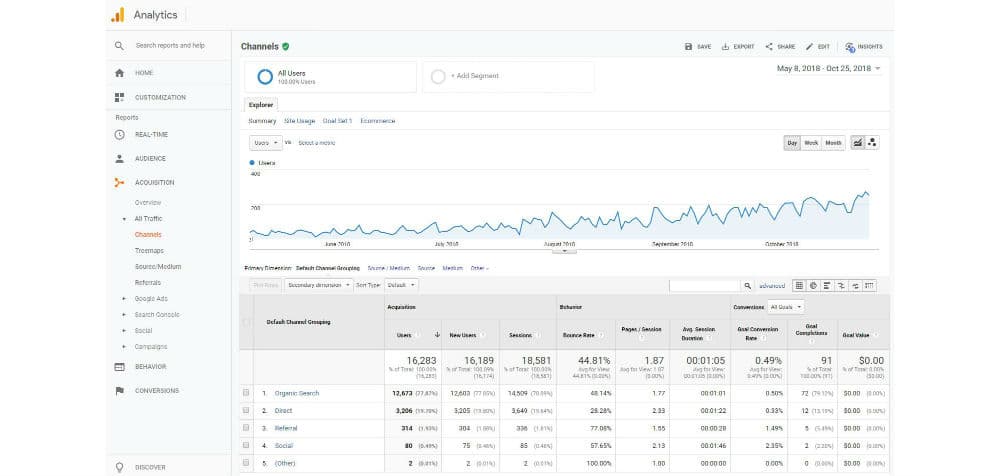
Before improving your SEO, you need to understand where you’re at. How many visitors come to your site on an average day, and how do they find you? Is most of your traffic from people searching for your brand, or is it from people who searched for a solution to their problem and found you? How long do users stay on your website, and how many pages do they visit?

The most important data about your website can be gathered using Google Analytics and Google Search console. To start collecting this data, follow this guide for getting started with Analytics, and this guide for getting your website on Search Console.

I recommend adding Analytics to your site first because you can use your Google Analytics account to verify in Search Console that you own your website.

Identify the baseline for your website by collecting data for at least a month using these two tools. You can uncover current ranking data and search terms that people use to find your site, as well as metrics like the number of visitors and new visitors, time on page, and pages per session across your website.

2. Identify Competitors

Nobody knows your business better than you (in most cases). Owners and marketing managers will usually have an in-depth understanding of the unique value their business offers, and their ideal customer.

This advanced knowledge is a great start in identifying your competitors. However, there might be a big gap between your perceived competition and your competition in organic search.

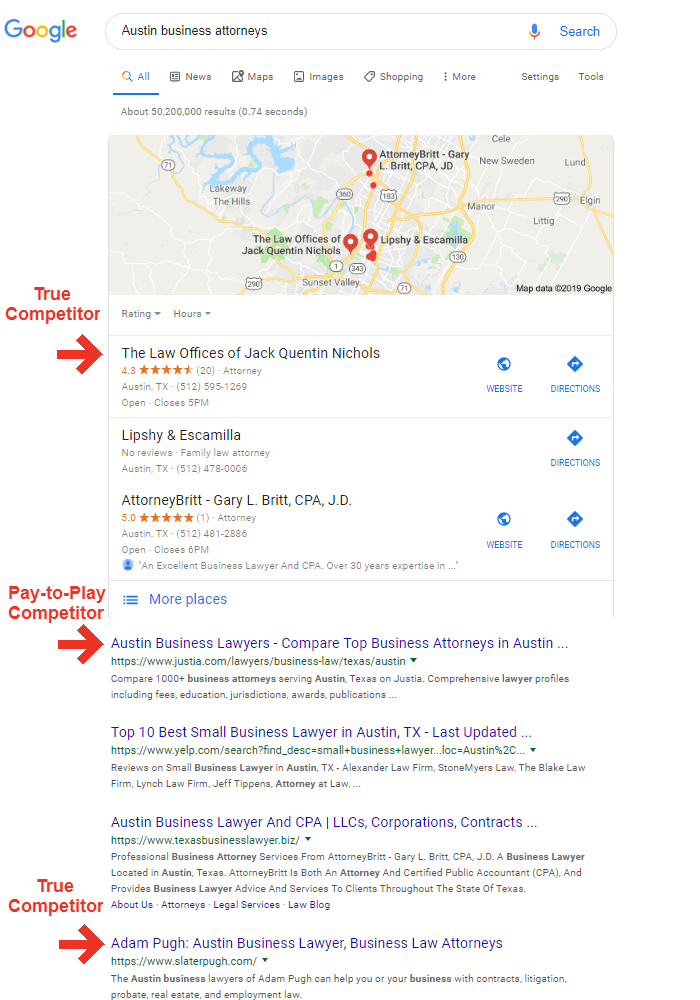
You can identify your competitors in organic search by doing a search for your core business offerings. For example, if you operate a firm that provides business law services to clients nationwide, you might do a search for “business attorneys.” Then analyze the competitors that show up in both the map results and the standard results (the 10 blue links). These competitors may be located all over the country.

There will be a marked difference in organic competitors if you only offer business law services to clients in your locality or region. For a firm located in Austin that only serves the surrounding area, you would do a search for “Austin business attorneys,” to discover your competitors.

There are two main types of organic competitors in the search engine results pages (SERPs) today: true competitors and pay-to-play competitors. Using our Austin law firm example, a true competitor would be another business law practice in Houston that ranks #2, and a pay-to-play competitor would be a legal directory that compiled their own “top list” of Austin law firms and ranks #1.

SEO stats and site analysis

You’re competing with both organizations for a share of search traffic, but you can always work with the pay-to-play website for additional traffic if you have the advertising budget. An additional approach is to leverage professional Austin law firm SEO services to improve your search engine optimization.

3. Analyze Competitor Sites for Qualifying Dimensions

After identifying your top organic competitors, you can begin your SEO marketing analysis by collecting details such as:

  • URLs
  • Meta Descriptions
  • Titles and Headings
  • Inbound Links
  • Broken Links (Internal and External)
  • Image Optimization
  • Content Analysis

While most of these items can be analyzed manually, it could take tens of hours to collect and record this data. Fortunately, there are SEO tools available that you can use to compile data for your SEO competitors.

Common Tools for SEO Site Analysis

  • Google Search Console (FREE)
  • Google Analytics (FREE)
  • Screaming Frog (~$14 per month – limited FREE version available)
  • SEMrush ($99.95 per month for lowest tier)
  • MOZ ($99 per month for lowest tier – yearly discounts available)
  • Ahrefs ($99 per month for lowest tier – yearly discounts available)

There is a lot of overlap between SEMrush, MOZ, and Ahrefs. SEMrush is great for opportunity keyword research and onsite SEO analysis, Moz is great for backlink research and domain authority, and Ahrefs is a good hybrid of both.

If you need to minimize your marketing spend, I recommend using Search Console, Analytics, Screaming Frog, and SEMrush, for a yearly total of about $1,368.

Get a Free SEO Analysis Here

MARION has provided a free SEO site analysis tool here. Just enter your domain, email, and phone number, and we’ll send a brief search engine optimization report to your inbox.

[su_template name=”semrush-site-audit-widget”]

If you need expert help resolving the issues in your SEO report, contact the experts at our SEO company in Austin and Houston today. We’re happy to help.

4. Use Data to Develop Your SEO Strategy

Now that you have an SEO site analysis report using data from the tools above, you can develop an SEO strategy. Your short term strategy should work toward filling in your weaknesses, while your long term strategy should focus on pursuing opportunities that your competitors haven’t tackled yet.

Let’s consider some short and long term B2B marketing strategy examples to give you a better idea.

Short Term SEO Strategy

Your website SEO evaluation has uncovered that:

  1. All your pages are using H2 tags where there should be H1 tags
  2. Your site has 30 broken internal links
  3. 50 of your images are over 100kb
  4. All your pages include what is considered “thin content”

Your strategy for the coming month should focus on cleaning up the broken links, changing the main headings into H1 tags, and resizing and compressing your oversized images. Having your technical SEO in order is the first step toward developing a high-performing website.

website SEO evaluation

For months two, three, and four you need to prioritize rewriting or expanding on your existing page content to fully address the needs of your website visitors. Do your product/service pages include all the important aspects of your business offering? Are your blog posts comprehensive enough to answer all searcher questions around the topic at hand?

Long Term SEO Strategy

Your short term plan covered some of the qualifying dimensions of SEO, but your long term plan should address the determining dimensions. Long term priorities should include inbound links and content analysis on a proactive basis.

Your SEO performance analysis should have identified where your organic competitors get their backlinks, so start by targeting those outlets in your link-building campaigns. However, once you’ve built a similar backlink profile, start to set yourself apart by targeting other relevant websites and news sources that your competitors haven’t approached yet.

Although you’ve addressed some of the major shortcomings of your content during months one through five, it’s now time to go above and beyond the competition. Start exploring video and audio content to include on your main pages, and create a content calendar that will help establish your brand as an authority in your industry.

Start considering the relationship between your SEO and web design as well. Many times, updating your website design to be more conversion-oriented can help users and result in a faster, more efficient site.

Trust MARION with Your Digital Marketing Needs

MARION has been serving Texas businesses since before search engines became popular. We’ve grown with the industry, and we now have experts on staff who can do a full SEO evaluation and build a powerful strategy for digital growth.

Contact us today to schedule a consultation with a member of our digital marketing agency!

Marketing emails you’ll actually want to read.

Get marketing tips and news sent to 
your inbox.

This field is for validation purposes and should be left unchanged.
Name(Required)

6 Essential Tips for Creating an Online Web Presence for Your Business

For new or established businesses, online marketing is a huge opportunity for brand and financial growth. Learning how to improve your online presence will take your business to new heights, but it can seem daunting without the right guidance.

What Is an Online Presence?

An online presence is the representation of a business or individual entity on the internet. There is a spectrum of online presence, ranging anywhere from non-existent to strong. The stronger your business’s online presence, the more visibility and engagement you command across digital channels such as websites, social media, and email.

This six-step guide to setting up an online marketing presence will walk you through the most important aspects of growing your business online. After establishing an online presence, you can identify and focus on the channels that are most effective for your individual business.

6 Steps for Creating an Online Presence

You don’t always need an online presence consultant to get started with internet marketing. You can use this six-part plan to build a foundation, then bring a digital marketing agency in once you’re ready for the next stage of growth.

1. Set Your Online Marketing Goals

As an entrepreneur or marketing coordinator, you need to know what you’re aiming for. You probably hear buzz from your network about different methods for creating a web presence on a weekly basis. Chasing down every one of these leads will leave you exhausted, disorganized, and possibly even broke.

Entrepreneurs frequently self-identify as “doers,” which can leave you particularly susceptible to this approach. Before jumping in head first, learn how to set marketing goals that will help your business succeed in a sustainable way.

how to improve your online presence

Your goal-setting process should include:

  • Aligning your mission statement with your potential goals
  • Setting Specific, Measurable, Attainable, Realistic, and Timely targets
  • Building a strategy that ties in objectives that will help you reach your targets
  • Measuring your results and correcting course when necessary

An example goal might be: Leverage online marketing to grow profits by 25% over the next two years. You will then need to create short term objectives that help define the immediate activities required to reach your goals.

2. Create an SEO Strategy

With an estimated 3.5 billion Google searches per day, optimizing for search is a cornerstone of building an online presence. Not to mention, 35% of searches for products start on Google. The fact is, search engine optimization (SEO) should be baked into every digital marketing strategy you build at your business.

Identify the intersection of:

  • keywords that are valuable to your business
  • keywords that most accurately embody what your business offers

Don’t focus all your efforts on ranking for keywords that your customers or clients don’t recognize you for (unless you’re introducing a new product or service).

You can use tools like the Google Ads Keyword Planner or SEMrush to do keyword research. These tools can help you find popular search phrases and identify how competitive you must be to rank well for them.

Creating a solid SEO strategy will be paramount for your web design (in step 3) and content marketing strategy (in step 6). Reach out to MARION today if you need help from a reputable SEO company in Houston.

3. Build Your Business Website

The next step in creating an effective web presence is building your business website. But first, why create a website when you can make a Facebook page in 1/20th of the time for free?

The simple answer is that you own your website. If Facebook decides to make a change or Instagram throttles the reach of your posts, your digital presence could be smothered. However, you can always maintain control over your business website. The best approach is to keep your core web presence on your website and use other digital channels like social media and content syndication to drive traffic back to your site.

creating an online presence for your business

The next important question – what makes a good business website? The two main components are:

  1. SEO-friendly web design
  2. Good user-experience (UX)

Turn your website into a conversion machine and improve your revenue stream today! Download our free eBook with 24 website must-haves!

SEO Web Design

Most people naturally understand the need for a visually appealing website that makes it easy for users to navigate and find what they want. What some business owners don’t naturally intuit is the need for your website to cater to searchers and search engines. Your digital real estate cannot sit idly by – it must attract users.

You could feasibly generate all your web traffic through traditional advertising, digital advertising, referral sources and word of mouth, but why not tap into the 3.5 billion daily Google searches mentioned in step two? This SEO checklist for new websites will get you started.

For more advanced techniques, get help from an Austin SEO company like MARION today.

Good UX

What about the visual appeal and user experience of your business website? Keep in mind that there are differences in UX and web design – what looks best is not always the most effective.

You’ll have to choose between creating a website using website templates vs. custom web design. Website templates are more cost-effective but will limit the creativity of your site. However, with the right amount of competitor and user research, you can still maintain an effective web presence with a DIY site.

Custom design is usually the higher quality option, but it comes with a much higher price tag. Because of the significant investment, learn how to choose a web design company before signing any contracts.

Once you find the right firm to build your site, learn how to write a graphic design brief that communicates your brand message to your designer. Learning how to brief your designer ahead of time can reduce the length and cost of your project.

For more help from an experienced Austin web design company, schedule an appointment with a MARION strategist today!

4. Leverage Social Media Marketing

Did you know that 68% of adults in the US claim to use Facebook? For a platform that is said to have more than 2 billion active users, this is a huge opportunity for your business. It’s not just Facebook ads that you need to consider – platforms like LinkedIn, Instagram, and Twitter all have significant users bases that can be tapped into.

Setting up a company profile on each platform that you intend to pursue is highly recommended. A social media profile can provide your users with details about your product/service offerings, hours of operation, and contact information. This initial setup of social media accounts is critical for reaching your web presence goals.

building an online presence for business

An organic social media strategy is a free way to start engaging with your audience. Start by learning how to create a content calendar for each platform, and how to curate content for social media. Once you know when and how to share content effectively, you can develop your strategy based on each platform’s results.

It’s important to note that organic reach on some of the major platforms (like Facebook) has declined over the recent years. Learn how to advertise on social media for the best return on your marketing investment. A paid social media campaign can still be a cost-effective way to reach your audience and drive real results.

Reach out to MARION for help from an experienced social media agency in Houston. We can help you leverage social to build an online presence for business success.

5. Run Effective Email Campaigns

Surely email is too old and boring to be an effective marketing channel for your business these days, right? Even today, email continues to be a SIGNIFICANT method for maintaining or creating an online presence for your business. Email marketing is said to generate $38 for every $1 spent, which makes it one of the highest performing marketing channels available.

If you struggle to believe the statistics, it’s likely because your perception of “email marketing” and an effective email marketing strategy are very different. Email is more than just sending a blanket message to your entire contact database every time you release a new product or service.

Workflows, segmentation, and (a healthy amount of) personalization are the keys to an effective email marketing campaign. For example, imagine that you manage a lawn care business in the greater Houston area and you’re trying to use email marketing in Houston to grow your client base.

One approach is to use lead generation resources to grow a qualified list of potential customers. For example, put together a free fertilization schedule available for download on your website. In order to have the schedule emailed to their inbox, a web visitor must fill out a form with their email address and basic contact information.

After signing up for and receiving your free offer, you set up a workflow in your email marketing software that emails your new contact about a related free offer 7 days later. If they sign up for both free offers, you may send them a code for 20% off their first month when they sign a 6-month contract with your lawn care business.

By offering several free resources and maintaining different email workflows, you can build a database of engagement target customers that need help with their lawn care.

Learning how to build an online presence through email marketing isn’t easy. If you need email marketing in Austin or Houston, contact the marketing strategists at MARION today.

6. Build and Execute an Effective Content Marketing Strategy

creating an effective web presence

Content marketing is a key component of an effective SEO strategy. In fact, content marketing should play a major role in all B2C and B2B marketing strategies to help build your online presence.

The effectiveness and necessity of content marketing is due to the evolution of marketing over the past few decades. Marketing has shifted from a business-driven activity to a consumer-driven activity.

There are very few channels where a captive audience will subject themselves to an irrelevant product or service offering. Content marketing gives businesses a way to establish their relevance and solve consumer problems.

One of the most prominent uses of content marketing is business blogging. Maintaining a blog for your business is a great way to answer user questions that are relevant to your industry and highlight how your product or service is the best solution for that question.

Helpful and relevant blog posts can be used as a driving force in your social media marketing strategy, email marketing strategy, and SEO strategy. Not only are you able to share your insightful content via social media and email, but your blogs help to attract backlinks and organic traffic. You can even extend your content marketing to third-party sites by implementing a guest blogging strategy with related organizations.

Attracting interested users to your site is great, but understand that there is a difference in demand generation and lead generation. In order to generate new business leads you must use effective calls to action to capture contact info for your potential customers. By using the right internal links and calls to action, you can turn your blogs into a revenue-generating machine.

Trust MARION for Setting Up Your Online Marketing Presence

Best practices and free advice online will help develop your understanding of online marketing. With these new insights, we hope you’ve got a better idea of how to choose a marketing agency that will help you meet your goals.

For the best results, contact MARION today. One of our marketing strategists will identify opportunities for improving your business web presence and growing your brand!

Marketing emails you’ll actually want to read.

Get marketing tips and news sent to 
your inbox.
This field is for validation purposes and should be left unchanged.
Name(Required)

5 Ways to Improve Website Load Time & Boost Performance Today!

Everyone hates a website that loads slowly. Consumers today have grown accustomed to near-instant results and a smooth online experience. Even the slightest hiccup on your website can cause visitors to abandon your site.

In today’s highly competitive market, having a fast website has become a requirement. Otherwise, your customers will turn to the competition for the online experience you fail to offer.

Why Does Website Load Time Matter?

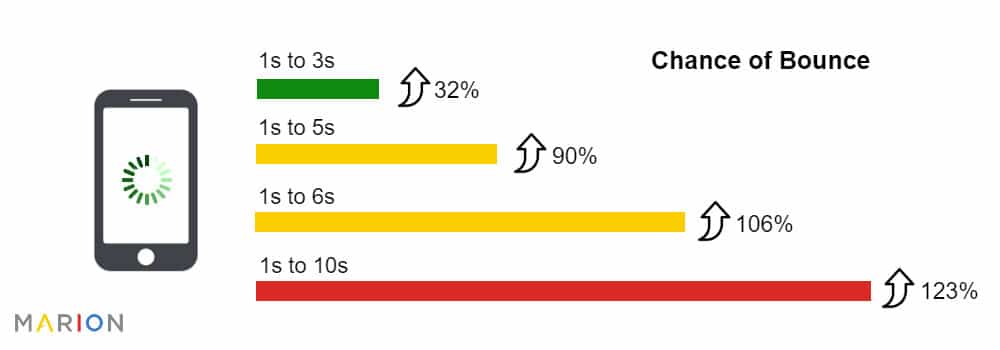
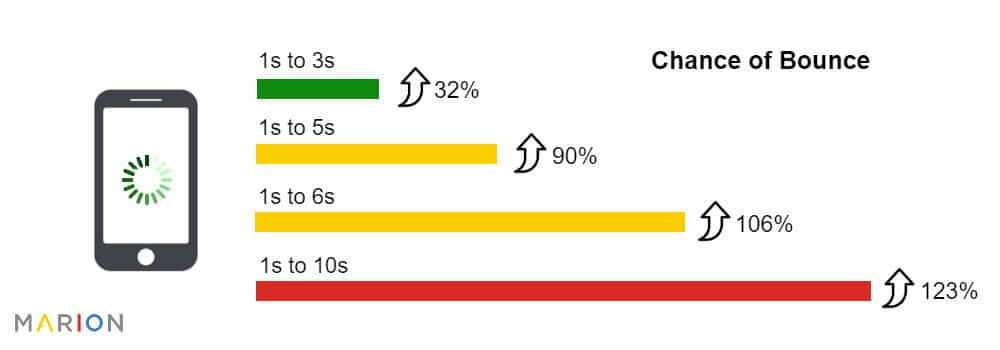
A slow-loading website will kill your conversions. Consider some of the prevalent user experience and SEO statistics. On average, 47% of consumers have an expectation of two second load times or less. Even more shocking is the fact that 40% of consumers will abandon a page if it takes longer than three seconds to load.

More than half of all internet traffic comes from mobile devices. And according to recent mobile optimization statistics, most mobile sites take 15 seconds to load on average. With most visitors abandoning sites after 3 seconds it has become more vital than ever to improve web page load time for mobile devices.

Is your website holding back your business growth? Download this free 8 point website checklist today, and start improving your results!

How Is Page Load Time Measured?

Measuring page load times will give you an idea of how fast (or slow) your website is rendering for visitors. Tools such as Google PageSpeed Insights and Lighthouse Audits measure a variety of relevant metrics to determine the average web page load time of your website.

After running a few tests, you may find that your site sits below the average page load times. Unless you’re a web developer, you may not know how to improve the load time of a website.

Making the proper corrections will set you apart from your competition.

How to Improve Page Load Speed Across Your Site

how to improve page load speed

Average page load time is determined by a variety of factors. Understanding ways to reduce page load time will help you to greatly increase site speed and ultimately improve the performance of your website.

Here are a few tips to help you figure out how to speed up website load time.

1. Reduce the Number of HTTP Requests

When a web page first loads, numerous elements must download such as scripts, images, and stylesheets. It turns out that 80% of the load time for a web page is spent downloading the various elements of the page.

Each part of a webpage has an HTTP request made on its behalf; the more components on a page the longer it takes to fully load. To improve page load speed, determine how many HTTPS requests your website is making (this can be done by accessing Google Chrome’s developer tools).

Next, focus on the JavaScript, HTML, and CSS files found on the page. These files can significantly increase the number of HTTP requests made whenever a person visits your website.

Reduce the number of HTTPS requests your site is making by minifying and combining files. This process will accomplish two goals:

  • Reducing the size of each file on your site
  • Reducing the total number of files on your site

Minifying the files on your website will eliminate a lot of unnecessary code, formatting, and whitespace. The result will be a leaner, faster website.

What about sites that use PHP to deliver HTML, CSS and JS files? If you’re using a WordPress website, you don’t necessarily need to know how to improve website performance in PHP. Instead, consider installing the Autoptimize plugin. This will make the process of minifying your files simplistic and quick.

2. Use Asynchronous Loading for JavaScript Files

There are two ways scripts such as JavaScript and CSS load on your website – synchronously or asynchronously. Scripts that load synchronously render one at a time as they appear on your screen. Scripts that load asynchronously will load simultaneously.

Web pages typically load from top to bottom. When a synchronous JavaScript or CSS file is encountered during the rending process, the entire page will pause until that particular file is fully loaded.

If that file were asynchronous, the various elements of the page would continue loading even as that particular file continues to render. The answer is obvious – use asynchronous loading for non-critical JS or CSS files to speed up page load time.

3. Compress Images

Another great trick to speed up website load time is to compress images. The images uploaded to your site can be bulky and cause a significant strain on page load time.

WordPress plugins such as WP Smush are highly reviewed and provide the perfect solution to your image compression woes. With just a few clicks and a bit of patience, you’ll be able to compress the images on your site and experience a significant speed boost in the process.

Alternatively, you can losslessly compress images using free web platforms. TinyPNG is a popular tool for both PNG and JPEG compression. In 2016, Google publicly released their own image compression program called Guetzli. Unfortunately, there are very few free online tools using this program, but more tech savvy marketers can use the open source program on a local machine.

Don’t want to manage the technical details yourself? Let an experienced Houston SEO agency handle it for you!

4. Leverage Browsing Caching

Whenever you visit a website, the elements on the page you’re viewing will download to a temporary storage folder in your browser known as a cache. This allows for faster load times because the page won’t have to bother with another HTTP request for certain CSS and JS files the next time you visit the site.

You can experience website speed improvement by enabling caching on your site. Though this method doesn’t speed up your website for first-time visitors (you’ll have to rely upon other methods for that), you’ll significantly improve load times for returning visitors.

how to improve load time of a website

5. Use a Content Delivery Network (CDN)

You can leverage outside servers to improve page load times for your visitors. Hosting your site on a single server means that a request is sent to that specific server each time a user visits your site.

In instances of high traffic, all of your users will experience a significant slowdown due to the sheer number of requests being made at a single time. A Content Delivery Network (CDN) can help to alleviate the strain on your website.

A CDN allows you to cache your site on a network of servers that are based around the globe. When a user visits your site, all requests will be routed to the closest server. CDN’s help to eliminate latency issues that users tend to experience when they’re physically far away from the hosting server.

Cloudflare is one of the most popular CDN’s on the web, but there are several providers to choose from.

Boost Your Bottom Line with Website Load Time Optimization

Knowing how to optimize website speed is a skillset every digital marketer should have in their back pocket. This list is by no means all-inclusive, but you’ll undoubtedly boost the speed of your site by employing the above tactics.

Looking to optimize your website the right way the first time around? MARION is a digital marketing agency dedicated to helping small businesses thrive online. We offer Austin and Houston website design services that follow site speed best practices for the best performance.

We’ll build your website right the first time, so you can focus on growing your business. Contact us today to learn more about how we can help grow your business.

Marketing emails you’ll actually want to read.

Get marketing tips and news sent to 
your inbox.

This field is for validation purposes and should be left unchanged.
Name(Required)

Sharing Google Access With Your Marketing Team

If you are a person, organization or business who engages in some form on online marketing, chances are highly likely you possess accounts with Google.  Most digital marketing, whether it is search engine optimization or pay per click management, requires active use on Google.

As a growing business, you’ll want to delegate certain responsibilities, which might include marketing.  Some companies hire a marketing person to work within the business.  They are onsite and usually have access to the accounts necessary for online marketing. As a business owner, you may be reluctant to share your personal or company based email credentials with a new employee. Other companies will choose to partner with an online marketing agency that will handle the digital marketing of the business.  To do that effectively and efficiently, it’s imperative that the agency has proper access to the currently used marketing channels.

It is extremely counterproductive for an agency or individual to create a new business listing on different directories like Google Maps and Bing Places, when the business already has an existing listing on that directory.   Doing that creates more clutter and bad profiles across the internet.  You would also be creating competition for yourself, with your own business.  Don’t believe that Google and other search engines will display both listings.  The truth is, the original listing will be included in the index but is unlikely to be displayed in search results.  What’s worse, the whole account can be penalized for spam (according to Moz). Trust me; it is best to share access.  This way, all of the work your business is paying the agency to do will happen on your existing profiles, and whenever the billing relationship ends, you can deactivate the shared access.  Your accounts retain the benefits of the work done by the agency, versus the agency reclaiming the profiles they created for your business and leaving your business back at the beginning.

However, before you start sharing access to your precious accounts, make sure the person/agency receiving access has a clear plan of action.  More importantly, make sure you understand what they will be doing as they represent you and your company.  For example, you may share Google My Business access with the agency.  This means they can correct and update your business listings and other information. It also gives them the ability to respond to reviews (read our blog about how to ask customers for Google reviews).  Make sure you have discussed responses and when to reply, if that is part of the agreement.

We are a fully integrated digital marketing agency, meaning we will build your website, optimize the website for search engines, pay for search engine traffic by click, design and send emails, and manage your social media.  With so many different services provided, we always need access to existing profiles.  Getting the proper shared access or current login credentials can be a hassle at times.

**Full transparency…I created this post to not only encourage you to share profile access with your marketing teams, but so our new clients can have a guide as to why to share profile access with us.  🙂

How To Share Google Account Access

Once a website has been launched, we immediately go into marketing mode.  It’s extremely important to get things set up with Google first.  The steps below will help you share the correct access with your marketing team.  Within Google, you’ll likely need to share access to Google Search Console, Google Analytics, Google My Business, and Google Ads.

Google Analytics Access

Google Analytics is a program that tracks website visitors and provides various types of data about the website visitor.  If you want to know how many visitors your website had, what they did while visiting and what the referral source was, you’ll need Google Analytics.  Follow these steps to share access to Google Analytics.

1. Log in to Google Analytics. https://analytics.google.com

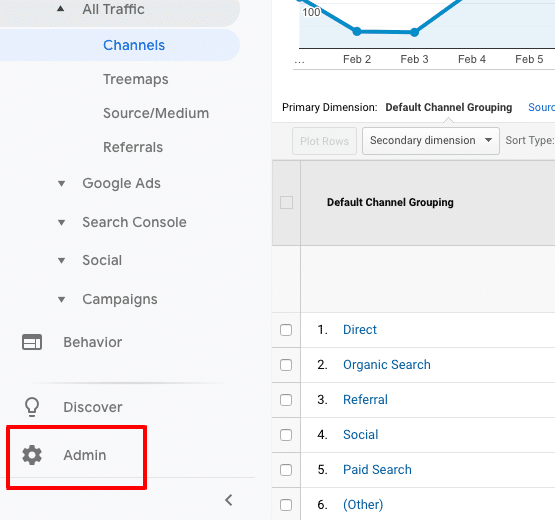
2. Select “Admin” at the bottom left corner

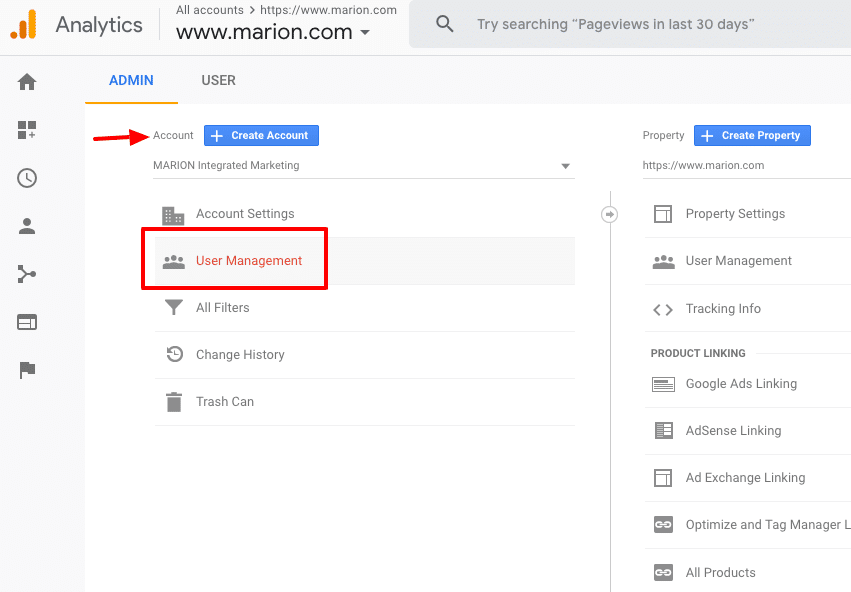
3. Select “User Management” in the Account column

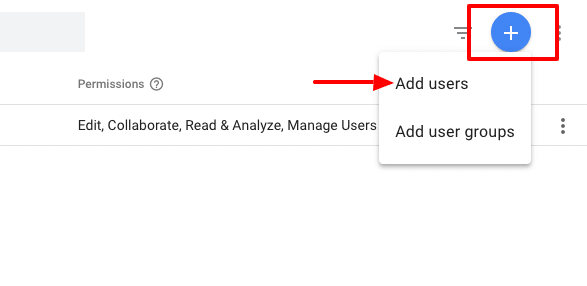
4. Click the “Plus sign” in the upper right corner and select “add users”.

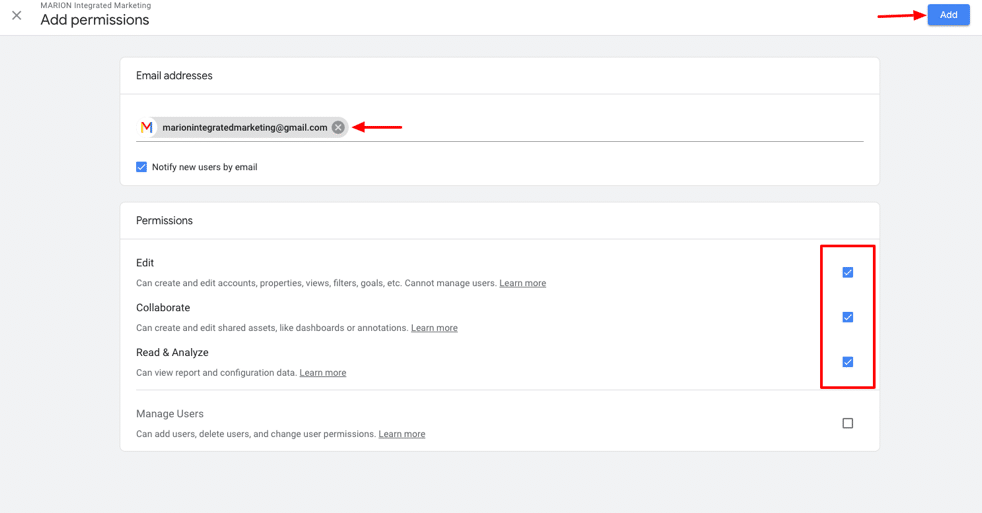
5. Input “marionintegratedmarketing@gmail.com” and check all the permission boxes.

6. Click “add” at the top right.

Once those steps are complete, the user receiving access will get an email indicating they have been given access and they should see the account when they log into Google Analytics.

Google My Business Access

Google My Business is a program created by Google to manage your local listings.  It has changed over the years.  It used to be Google Local; then it changed to Google Places.  Now, it is Google My Business.  Once this profile is verified, you can update your business listings, add images, videos and contact information as well as respond to reviews given by Google users.  If you need to be found in local searches, a properly optimized Google My Business page is necessary.  Follow these steps to share GMB access with your marketing team.

1. Log into GMB at business.google.com. If more than 1 location, select the location that access is being given to.

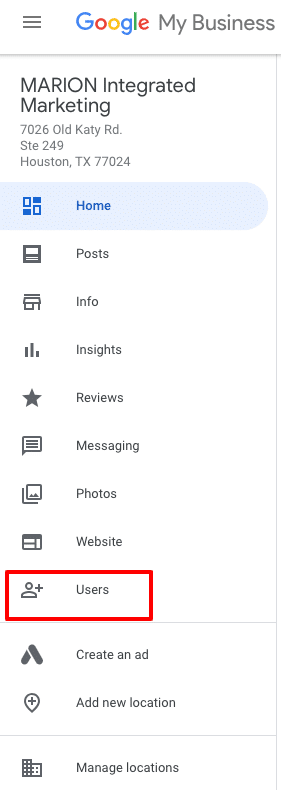
2. On the left menu, click “Users”

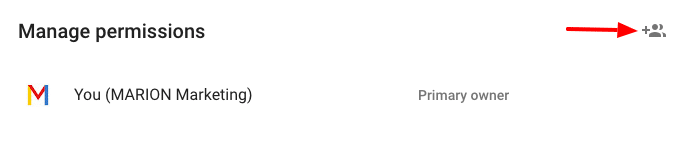
3. Click the “+” on the window that opens to add a new user

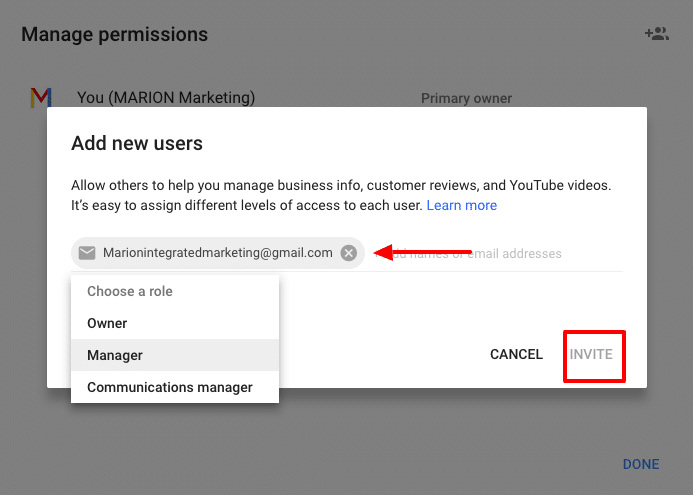
4. Input “marionintegratedmarketing@gmail.com” and choose the role of “Manager.”

5. Click Invite

Once completed, the invited party will receive and accept the invitation.

Google Search Console Access

Google Search Console is basically home base for your search engine optimization campaign.  GSC was formerly known as Webmaster Tools. This is where you inform Google of your website intentions.  Are you targeting domestic or international traffic?  Is this website using “www” or “non www”?

GSC is also where you indicate how you want your website to be indexed.  You submit sitemaps and request pages to be indexed by Google within GSC.

Accessing your link profile is done through GSC. Once logged in, you can see who links to your domain, when they linked, and what pages they are linking to.  This same area is where you disavow links.

More importantly, GSC is the messaging platform for Google to send you notifications about your website. If your site has been hacked, gets penalized, has broken pages or is inaccessible for any number of reason, GSC is where you’ll get the message.

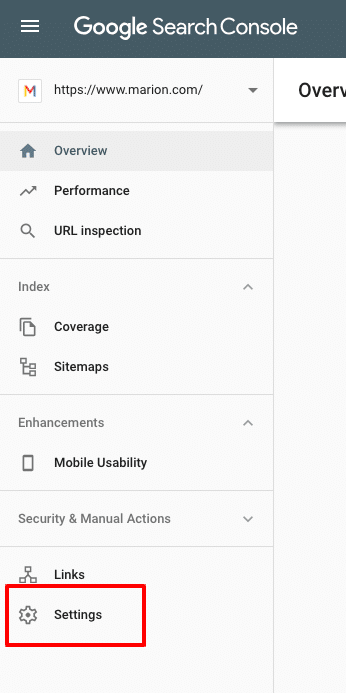
Follow these steps to share Google Search Console Access with your marketing team.

1. Log into Google Search Console at https://search.google.com/

2. Click “Settings” in the left menu

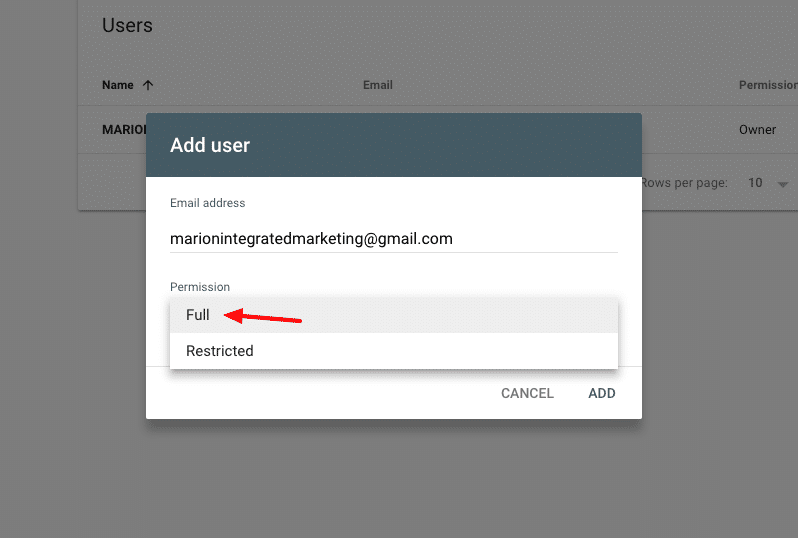
3. On the Users and permissions bar, click “Add ”

4. Input marionintegratedmarketing@gmail.com (the email address the agency has for access), give Full permission and click ADD

The end user will receive a notification that they have been given

Google Ads Access

Google Ads is the advertisement platform used to create search, display and video ads that show on Google and its properties.  It is formerly known as Google Adwords.  Any pay-per-click activities that show ads on Google should be managed through Google Ads.  There are platforms that will publish and manage your Google Ads such as WordStream, AdRoll, and others.  These platforms work fine and definitely serve a purpose in digital marketing.  I use them from time to time, but prefer to operate directly in Google Ads, or Google Ads Editor (offline Google Ads management program).

Some businesses prefer that the agency create their own new Google Ads account.  For a business that is new to Google Ads, it makes sense to do so.  However, if your company been using Google Ads for some time, it’s worth sharing that account with the new agency.  I can’t speak for all, but our process involves reviewing your past performance data.  We’ll research and develop our strategy. When possible, we like to review the past year or two worth of data to learn about peak months, top keywords and ads, and all types of other performance indicators.

There are two ways to share Google Ads access.  The client (business) can assign access to a user or a user can request access to a client.  Either way, the other party has to approve and accept it.

Follow these steps to share Google Ads access with your marketing team.

1. Log into https://ads.google.com

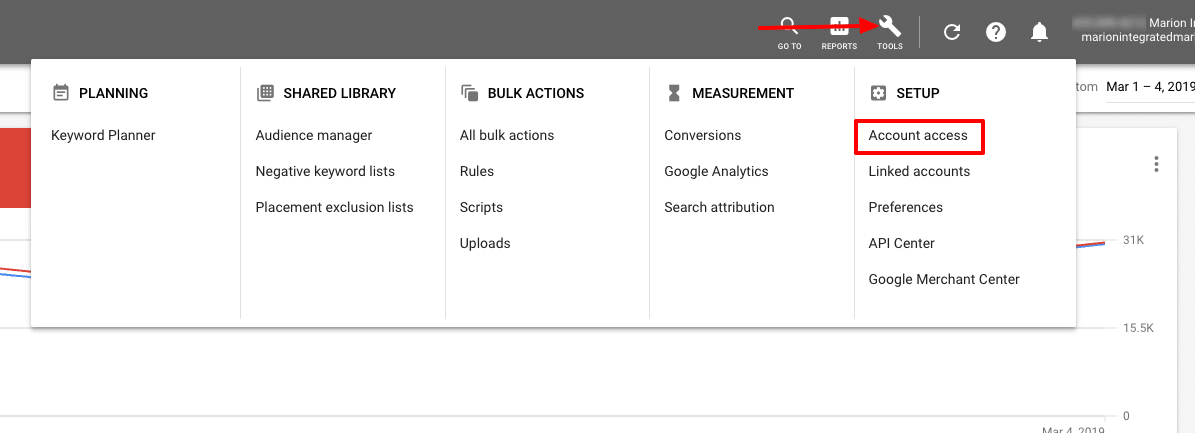
2. Click the “tools” icon (wrench) in the upper menu and select “Account ”

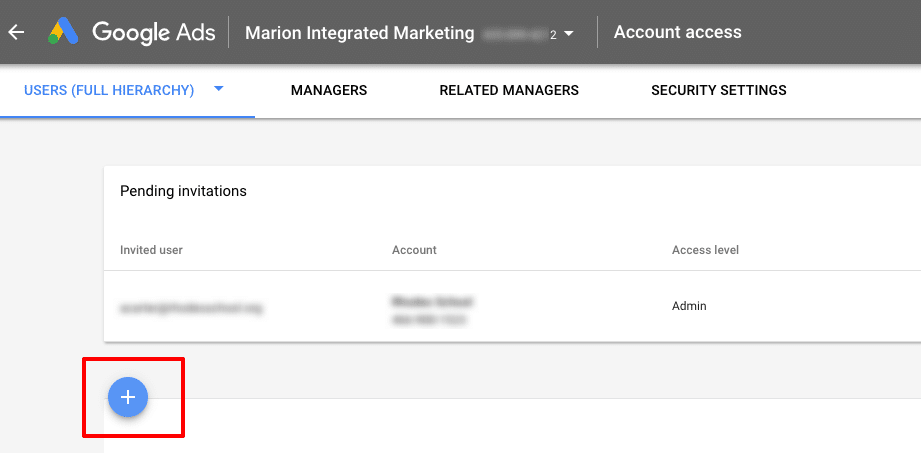
3. Click the “+” to invite a user

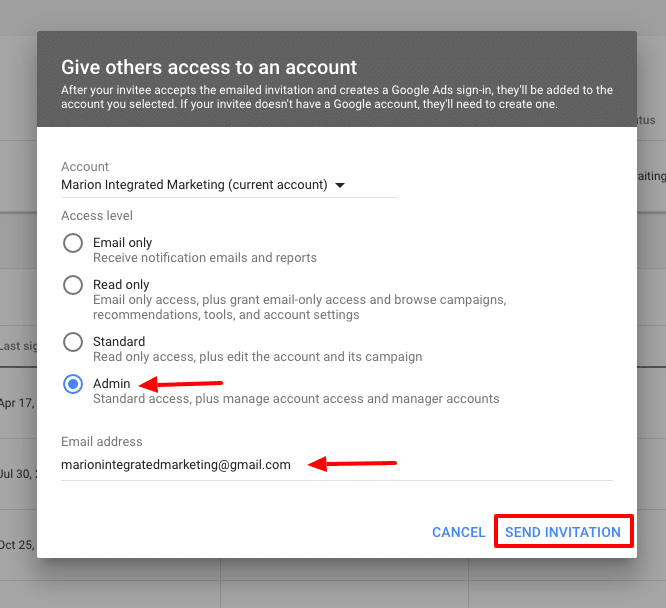
4. On the pop-up window, select the access level (normally admin) and input the email address the agency has supplied you with. Click “Send Invitation.”

The end user will receive a notification that they have been invited to access your Google Ads account.  Once logged into their existing Google Ads account, the invitation can be accepted.  At that point, they can manage your Google Ads account.

If your business has a website, and a goal to have potential clients find your website using search engines, you’ll need to actively use them. According to StatCounter, Google accounts for 88% of searches in the USA.   It’s safe to say, for effective online marketing you must be present on Google platforms.  If an agency or marketing team is managing your digital marketing efforts, share with them the correct access so that they can do the best job for you.

Marketing emails you’ll actually want to read.

Get marketing tips and news sent to 
your inbox.

This field is for validation purposes and should be left unchanged.
Name(Required)

Web Design and SEO – How to Build the Perfect Site for Traffic & Conversions

Whether you’re an agency, in-house, or DIY marketer for your own company, you know how critical your website is to the success of your business. Unfortunately, some businesses invest tens of hours and thousands of dollars into their websites without considering how they will attract visitors and generate business leads.

You do a quick online search – “Why is no one visiting my website?” All results point to one diagnosis: you need to do search engine optimization (SEO).

If you have any experience with web design, you’ve surely gotten an earful from an SEO professional at one point or another about how you’re doing it all wrong. While that’s not entirely true, let’s figure out why search engine optimization specialists are so passionate about pointing fingers at web designers and developers.

What Is SEO Website Design?

SEO web design is the practice of mapping out a plan to generate organic traffic, then designing a website according to that plan. This approach is counter to the traditional website design process where a site is built to look attractive with no strategy for generating traffic or customers.

The underlying goal of both marketers and website designers is the same – build a great website. However, there is misalignment between a marketer’s and web designer’s concept of an effective business website. Web development and SEO teams must agree on what makes a good business website before they can succeed.

The goal of a business is to have a website that serves existing customers, attracts/converts potential customers, and results in a significant return on investment.

Don’t leave money on the table by using a sub-par website. Download this free eBook today to discover the 24 website must-haves that could improve your revenue today!

When web design and SEO teams work together, the result is an attractive and SEO-friendly website that exceeds business expectations and revenue goals.

How to Build an SEO-Friendly Website

SEO-friendly website design requires that you front-load the process with strategy and planning, then execute after the bulk of the work is laid out. In the end, SEO web development ends up being about 60% planning and 40% execution.

The following considerations will help build a solid understanding of SEO for web developers. You can use these SEO website design tips to refine your current process and deliver a higher quality product.

Create a Keyword Map

Based on the industry and products/services that your business (or client’s business) offers, you will already have a good idea of which pages your website needs to include. Where business owners and web designers usually go wrong is not delineating each product/service into a definite keyword group. What does that mean?

Imagine that you are creating a website for a plastic surgery practice that specializes in facelifts and butt lifts. You may decide that you want a homepage and a surgeries page on your site. Unfortunately, your surgeries page probably won’t rank well for either of your procedures because it doesn’t cater to a single group of keywords.

A searcher looking for facelifts probably doesn’t want to see a page about butt lifts AND facelifts. They want to see a page about facelifts only. Your facelifts page won’t appear in search results because the main topic isn’t clear.

what is SEO meaning in web design?

For the best search engine optimization, you need to design a homepage, a facelift page, and a butt lift page.  Your homepage can be about plastic surgery operations in general, but your sub-pages should focus on their respective operations.

Use a tool like SEMrush to identify which keywords you need to use. This is a paid tool that will cost about $100/month, but it helps you identify which keywords people are searching for online.

Once you research a list of relevant keywords for your website, break them up into separate groups and optimize each page for those search terms.

Domain Name

Choosing a domain name is an incredibly important decision that usually isn’t given enough weight. If you have a well-thought-out brand development strategy, it’s natural to include your brand name in your domain name. While this is a perfectly good business move, a good strategy for web SEO and design is to include a keyword in your domain name.

Despite Google’s 2012 filter to prevent spammy, low-quality sites from ranking with exact match domain (EMD) names, there are still benefits to including a keyword in your domain as long as your website is high-quality.

Having one of your main target keywords in your domain name will help tie your business entity to a specific topic. For example, a local business website might include its city name in its domain name to help bolster its digital authority for that location.

A plastic surgeon in Houston might use their business brand as their domain name. After optimizing their website for several years, they could rank for highly competitive keywords. Had that same plastic surgeon established a domain name with their brand name plus “Houston,” they would have been able to rank for the same competitive keywords much sooner.

Keep in mind that your domain name must align with your business vision. If you have any hopes of growing your business into a statewide, nationwide, or global organization, you should avoid including a local identifier in your domain.

Alternatively, you could use a topical keyword in your domain name that doesn’t restrict your locality. Using your brand name plus a relevant keyword is a good approach that will accelerate your SEO results. This too can be limiting if your business model changes, and you need to evolve beyond the keyword in your domain name.

For example, if Nike had chosen the domain name nikeshoes.com while creating its digital presence, they would have limited their capacity to rank for other apparel like sweatpants and hoodies. Always balance your brand and SEO strategy while choosing a domain name.

SEO for web developers

Web Hosting

Web hosting is a critical piece of SEO-friendly website development for several reasons. Your web hosting will have implications for cost, page load speed, quality assurance, and security.

A cheaper web hosting provider may seem like a great short-term financial move, but they may cause your web pages to load more slowly than a more expensive host. This can have negative SEO effects, increase your bounce rate, and decrease your customer conversions. You can read more about speed factors in our article about new website SEO.

A more expensive web host may also have better security measures in place, making it harder for hackers to harm your site. If something does happen to your website, a good hosting provider will usually have backups that you can restore. Find a balance between cost and features when it comes to selecting a host.

CMS/Site Platform

A lot of your web design SEO will depend on the platform you choose for your site. More advanced developers may decide to build an entirely custom website. However, most businesses use some sort of content management system (CMS) or website builder for their site, making it easier to manage on an ongoing basis.

One of the most popular platforms for websites is WordPress (WP). This CMS works well for both website design and SEO goals, and gives business stakeholders the option to manage their own site after it’s built.

There are other platforms like Wix, Squarespace, Weebly, or Shopify. Each has their strengths and weaknesses, but we highly recommend using WordPress because of its versatility and broad user base. Because so many people use WP, there is plenty of documentation available on the web in case you run into an issue.

WordPress comes with a lot of SEO features built-in. For example, these features let you edit your meta title, page title, URL and meta description very easily. These features are frequently overlooked by web designers because they have little to do with the aesthetic of the page.

Page Load Speed

A website with cutting edge features and high-resolution graphics is the calling card of a web designer. Unfortunately, large resources and process-heavy websites tend to load slowly. On top of that, the popularity of accessing the web on mobile devices over slower internet connections is rising. If your website is too intricate to load quickly over a mobile connection, you will lose visitors and rankings.

In July 2018, Google rolled out its Speed Update that negatively affects the rankings of websites that load extraordinarily slow. The increasing importance of website load time encourages a balancing act between web design and search engine optimization.

what does SEO mean in web design?

An SEO-friendly design should include:

  • Properly sized images – don’t upload large images and let your CMS scale them down to size.
  • Compressed images – compress image files so that they load more quickly.
  • Minified and Combined CSS and JavaScript files – fewer server requests can help speed up page load times.
  • No Redirects – make sure there aren’t unnecessary redirects within your site when a page URL changes.
  • No hot-linked images – include code that restricts other sites from embedding one of your native images on their pages. This will use your server to load images for their audience.

SEO specialists frequently take issue with designers who disregard the load speed of a website. Perhaps the biggest website development SEO takeaway in this article is to consider the consequences of all design elements on a site.

Designers and developers can use Google PageSpeed Insights and the Lighthouse tool within Chrome Dev Tools to identify and resolve loading issues. To easily find internal redirects or images with large file sizes, use Screaming Frog to do a crawl of your site.

User Experience (UX)

User experience is website aspect that designers generally handle better than SEO experts. It’s hard to disagree with the fact that a beautiful, awe-inspiring site is great for users.

When it comes to UX, website design & SEO are usually at odds over user intent. A beautiful homepage will impress a user, but what purpose is the homepage serving? If your homepage doesn’t account for the needs of a visitor and help them take an informed next step, you have a problem.

For example, a law firm website that features a high-resolution picture of the legal team and an About Us button front and center might seem appropriate at first glance. However, users might be more interested in recent cases that you’ve won, the areas of law that the firm specializes in, and the pricing of the firm’s services.

A great way to uncover potential UX issues on a website is to install Google Analytics and periodically analyze visitor behavior. The behavior flow report is an easy way to see where users enter and exit your site. If the bounce rate on any given page seems high, try A/B testing different site components.

Potential features you can test include:

  • Site navigation
  • Call to action button styles
  • Call to action button text
  • Call to action placements
  • Prevalent page content
  • Placement of trust indicators like case studies, testimonials, and accreditations

Be sure to keep page load speed in mind as well. A slow site is not only bad for SEO performance but bad for users as well.

Indexation & Crawlability

For search engines to easily access your web pages, you need to have a few technical SEO pieces in place. These pieces include:

  • good sitewide navigation
  • a sitemap
  • non-restrictive robots.txt and meta robots
  • good information architecture
  • relevant internal links (which we will cover in the next section).

Designers will almost always include good navigational elements (think header, footer, and sidebar) because they are a standard part of web design. However, the other pieces operate mostly behind the scenes. Forgetting to include them can be a major impediment to making your website SEO-friendly.

web design and SEO

Sitemaps

A sitemap is like a table of contents for your website. An HTML sitemap is a user-friendly list that visitors can use to see all your pages, and quickly find the information they need. An XML sitemap is a search engine friendly sitemap that robots use to identify and crawl the pages on your site. Both are important for being found by your target audience.

If you’re using WordPress, generating an XML sitemap is as easy as downloading the free Yoast SEO plugin, and enabling your sitemap. HTML sitemaps, on the other hand, aren’t always necessary if you have good header and footer navigation.

Creating an XML sitemap and submitting it to Google Search Console is a critical component of SEO for web developers. Skipping this process could severely limit traffic to your site and restrict your website’s ability to convert customers and generate revenue.

Robots

Robots.txt is a file that you can access by typing your domain name in the URL bar and appending robots.txt to the end. This is like the guest list at a high-profile event… but for robots. If a robot isn’t on the list, it can’t access your website. Meta robots are HTML tags that you can include on a page-by-page basis to restrict certain pages from being included in a search engine index.

Robots directives are important because they could accidentally restrict access to your website. For example, developers frequently use robots.txt to restrict a website while it is under development. If your website is accidentally launched without removing these instructions, you might be hiding your site from important digital stakeholders.

The scope of this post won’t get into the details around website robots, but feel free to check out this post about how to prevent Google indexing using robots directives.

Information Architecture and Site Structure

Good information architecture is a very important aspect of search engine optimization. An SEO-friendly website structure can help search engines and users understand where they are on your site. This helps to build a schema of your content that influences how well your pages rank organically.

For example, an oil and gas website design might include different products relating to upstream, midstream, and downstream processes. Consider how you might structure the URLs for a LACT unit if your site offers several products that relate to different parts of the O&G supply chain.

Your homepage URL is just your main domain name. You should optimize your homepage for the overarching theme of your website. In this case, you might optimize your homepage for “oil and gas equipment.”

The next directory down, you will include your logical subsections. For your oil and gas site, your sub-directories will look like:

  • com/upstream/
  • com/midstream/
  • com/downstream/

The next directory down will contain each of the products as they relate to your sub-directories. The sub-sub-directory for your LACT unit would be yourdomain.com/midstream/lact-unit/. When someone visits this page, they will intuit that you have several midstream products and products for the upstream and downstream markets.

This directory structure will also help your homepage rank better for “oil and gas equipment” because search engines can see that you have an exhaustive selection of equipment for the entire O&G industry. Because of the useful content on your site, you are highly likely to satisfy the needs of a searcher.

Internal Links

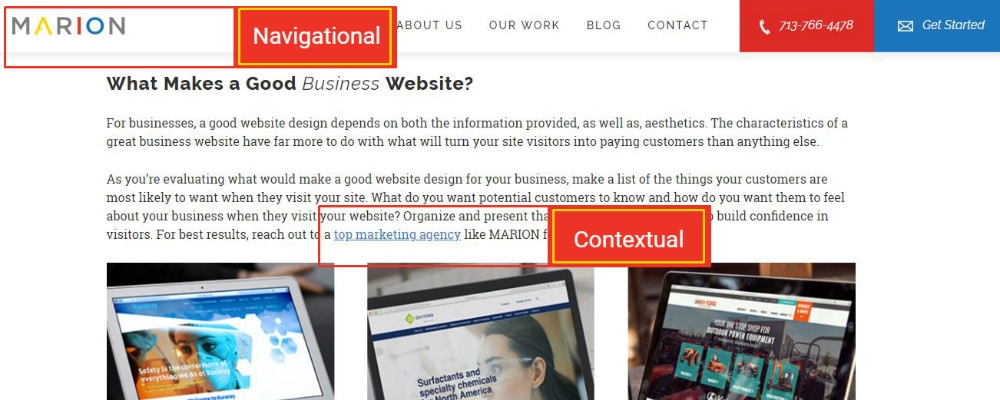
Internal links are the links from one page of your site to another. Internal links are either navigational or contextual by nature.

what is SEO in website development?

At the 22 minute mark of this 2016 Google Webmaster Hangout, Google Spokesperson John Mueller talks about how Google uses internal links within your website. Mueller points out that contextual links within the main content of your site are treated differently than your navigational links.

Navigational links are important for search engines that need to crawl your website and index your pages. They are also important for users to explore your website and quickly find what they need.

Contextual links are important to search engines and web visitors for the same reason, but give a greater indication of what the destination page is about. This is because your link anchor text gives hints about where you will end up when you click a link.

For example, imagine that you are designing a construction company website. When Google sees a link in your footer with the anchor text “home” and the URL to your homepage, it knows that you’re linking to your homepage. When Google sees a link in a blog article about how to choose a commercial contractor that uses the anchor text “top-rated commercial construction company” and the URL to your homepage, it gives context as to what your homepage is about.

Using navigational and contextual links are both important for navigating your website. However, contextual internal links within the main content of a relevant page that use descriptive anchor text are important to your rankings. This sort of insight can help designers create a search engine-friendly web design that delights users as well.

Contact MARION for SEO Website Design Today

MARION’s team is comprised of award-winning web designers and experienced SEO strategists that can help build a high-performance website for your business. Our marketing agency has been helping businesses excel for nearly 40 years and is ready to do the same for you.

Contact us today to schedule a consultation and learn how our Houston SEO services and custom web design services can help you grow!

Marketing emails you’ll actually want to read.

Get marketing tips and news sent to 
your inbox.

This field is for validation purposes and should be left unchanged.
Name(Required)

What Makes a Good Website? – Effective Business Website Design

Your website will most likely serve as your business’s first impression for potential customers. But, advice can range dramatically from one person to another about what makes a great website–one that engages and attracts buyers, and builds confidence in your brand.

Before you can create a great website, it’s important to know what the typical customer will be interested in learning when visiting your site. If you’re a local business, it may just be that they need directions, prices, or contact information. If you offer services, your site’s visitors might be most interested in making an appointment or reading testimonials from satisfied customers.

Like it or not, in our digital world, having a great website is essential if you’re looking to grow your business. If you’re interested in learning how to make a great website, we’re here to help. Keep reading for some basic tips for creating your own website, or, for those who already have a strong online presence, we’ll help you apply effective website design concepts to your existing site.

What Makes a Great Website?

As you spend time on the web, you may not have stopped to think about what actually makes a good website. What components cause you to buy from one company’s site versus another? The elements used to create a good website likely affect visitors on a subliminal level. The best designs minimize distractions, are easy to navigate, and clearly communicate your story.

What Makes a Good Business Website?

For businesses, a good website design depends on both the information provided, as well as, aesthetics. The characteristics of a great business website have far more to do with what will turn your site visitors into paying customers than anything else.

As you’re evaluating what would make a good website design for your business, make a list of the things your customers are most likely to want when they visit your site. What do you want potential customers to know and how do you want them to feel about your business when they visit your website? Organize and present that information clearly to help build confidence in visitors. For best results, reach out to a top marketing agency like MARION for help.

how to make a good website

3 Characteristics of a Great Website

First, whether designing a new website or updating and existing one, it’s important to consider what your customers will see. Branding is important, and a great website will consistently reinforce it. Studies show that 94 percent of first impressions of a website are design-related.

Want to take your website to the next level, but you’re on a budget? Download this free eBook with 24 website must haves that will help improve your site today!

In addition to a simple, attractive design, it’s important that your website design match other existing branding. Maybe you need to update or create branding guidelines for your business. A branding agency like MARION can help with that, too.

1. Your Website Reflects Your Business/Brand

One of the top principles of great web design is that you should update your site’s look and feel to current standards. An outdated design gives a bad impression. And, if your website is behind the times, your customers will get the impression that your products and services are, too.

2. Your Website Is Expandable If You Offer New Products/Services

Next, your website should allow for easy expansion allowing for additional products and services. As you’re researching how to format your website, notice that navigation and menu structure is vital to clearly presenting products and service to site visitors. Your sitemap needs to match the long-term goals of your business. What makes a great business website is not only that it’s great today, but that it can also expand as your business grows.

3. Your Website Is Easy to Use and Navigate

Then, make sure your website is easy to use and navigate. Potential customers should be able to easily find the information they need. An easy-to-use menu is fundamental to good web design. Creating a successful website is often something as simple as customers being able to quickly find product information, how to book an appointment, and contact information.

The top custom website design firms in Houston can help design an aesthetic and functional business website. Check out MARION’s work to see some B2B web design examples.

features of a good website design

How to Make a Good Website

When it’s time to get started on design, it’s important to know the basics of how to make a great website. It can help to look at other business websites and evaluate what makes a great website and what doesn’t. Here are a couple of things to help get you started.

Incorporate a Good Logo, Graphics, and Consistent Branding

Consistency is key when creating a great website. Effective website design also means making sure the overall impression customers get matches your brand. Start with your logo if you already have one, and choose fonts, colors, and graphics that reinforce your brand. If you’re a law firm, the characteristics of a great website may mean simplicity and formality, whereas a day care may use fun colors and more playful fonts. If you’re hiring someone else to do your graphic design, make sure you understand the important pieces of writing a design brief for graphic designers.

If you don’t already have a logo, MARION can provide professional logo creation services. Like all things design, you get what you pay for. Don’t be afraid to invest in the future of your company by establishing an elegant logo that captures the essence of your brand.

Provide Your Company Information in the Expected Places

Customers must be able to easily find the information they need. This includes your location, contact information, and description of your products. A great website design makes that information easily accessible.

Company information is often found on an About Us page, as well as at the bottom of every page. Working with a firm like MARION that provides professional web design in Austin can help you ensure your site is as customer friendly as possible.

Make Sure Your Contact Information Is Consistent (Consistent NAP)

Make sure that contact information is up-to-date at all times. Name, address, and phone number (NAP), is an important part of SEO, and one of the most vital features of great website design. Failure to keep this information current may prevent customers from contacting you, and may also negatively affect your ranking in search results.

Build Your Site to Be Responsive

At this point, responsive web design is more than just a trend, it’s vital, and among the very basic features of what makes a website successful. As one of the most popular website design features, responsive web design simply means your pages automatically scale to fit the size of the screen, whether it’s being viewed from a smartphone, tablet, laptop or desktop computer. Because mobile internet usage took the lead over desktop computers in 2018 with 63 percent of internet visits, this is one of the most important aspects of making a great website.

great website design features - responsive

Optimize Your Website for SEO

If your pages don’t rank, customers won’t be able to find you. Optimizing your pages is a major component of what makes a successful website. Here is an SEO checklist for new websites that will help you implement a high-performing SEO website design.

effective website design - SEO

Fast Web Page Load Speed Is Critical

Search engines want to make the browsing experience as pleasant as possible for consumers. Part of what makes a great website is fast page load speed. If your site loads too slowly, you’ll be penalized. If your graphics or videos are too large to load or begin streaming quickly, your design could be negatively affecting your company’s bottom line.

Optimize Your Website for CRO

The ability to assess conversion rates is another factor that can make a website great. Build in ways to regularly test how many of your visitors turn into paying customers. This may include A/B testing and setting up analytics to monitor how customers interact with your site. Continued CRO is a great way to get leads for your business over time.

create a good website - testimonials

Add Testimonials and Testimonial Videos from Customers

Effective website design means making sure visitors get what they need. If possible, include written or video reviews of your products and services on your website. Up to 70 percent of consumers check reviews before buying a product.

Text testimonials are better for your SEO efforts than using video reviews only. If you choose to use video, include a transcript to get the most out of your SEO efforts.

what makes a good business website? - secure

Secure Your Site with SSL and Firewall Protection

No features of good website design matter if your site isn’t secure. Not only are there big HTTP vs. HTTPS SEO differences, but it will drive away customers who get security alerts from their browser or virus protection software. If you aren’t sure how to get the proper security certification for your site, you can work with an experienced web developer to make sure your site is safe.

If you’re ready to create a good website for your business, trust an experienced design team. We can get you started by going through your business objectives, helping you learn more about your target audience, and creating a site that gets results. Get in touch with MARION about our web design services today.

Marketing emails you’ll actually want to read.

Get marketing tips and news sent to 
your inbox.

This field is for validation purposes and should be left unchanged.
Name(Required)

Say Cheese to Video Marketing

Why Video Marketing Is the Future

Video has become the white-hot marketing tool, having grown immensely in popularity the last few years. Video marketing provides a unique opportunity to reach consumers in extremely personal and effective ways, bringing them as close to real-life interactions with brands as possible.

Research has shown that this platform, whether used long form or short form, can be extremely impactful in generating leads that ultimately turn into customers. Keep reading to find out why you need to start using video advertising today.

Videos Aren’t Just for Social Media Anymore

In the past, video advertising has been a popular outlet on Facebook, YouTube and other social sites. But recently we have seen a shift from video for the purpose of enjoying viral social media content to enhancing everyday life. Brands are now using video throughout the entire customer journey as a versatile tool to educate buyers, build relationships and improve satisfaction.

According to research conducted by Ascend2 in partnership with Vidyard, companies with the greatest success in video marketing see customer testimonials, product demonstration videos, tutorial videos and thought leadership interviews as the most important and effective types of video.

video marketing interview

This shows that video is one of the most diverse tools we have for reaching consumers in the manner they want to be reached within their customer journey. Video marketing provides many avenues to interact with the consumer, giving them just what they want, when they want it.

Consumers Simply Like Video

Research shows that today’s consumers have a shorter attention span than ever before. In addition, they have higher expectations than consumers before them, expecting to be both entertained and informed by ads. These modern consumers respond so positively to video content that 69 percent of them reported preferring to watch a video instead of reading content online when presented with both options in order to learn about a product or service.

Videos Are Memorable

Consumers who view video ads retain 95 percent of the message, versus just 10 percent when they read an ad. Furthermore, these videos stick with people, with 80 percent of consumers recalling a video ad they viewed in the past month.

video marketing services

Not surprisingly, funny ads are most likely to be remembered. With 71 percent of consumers preferring funny ads, it’s no wonder advertisers are fighting every year to get the biggest laughs from their Super Bowl commercials.

Videos Build Trust

Consumers nowadays are more distrusting of digital ads than ever before. Ads are seen as an annoyance and a pain to consumers’ everyday lives, rather than having any real credibility and relevance.

According to a recent survey, only 7 percent of consumers view online ads positively, and more than 30 percent of respondents complained about page-load times, the presence of irrelevant ads and the size of digital ads they were served. In a separate study about brands and advertising, 69 percent of consumers said they distrusted brands’ advertising.

With these alarming statistics, marketers must focus on new ways to build trust. Enter video advertising! Nielsen reports that almost half of consumers across the globe trust video ads. Furthermore, people who watch video ads increase their purchase intent for that brand by a whopping 97 percent. In a time when trust and honesty are the ultimate marketing buzzwords, we cannot ignore the power of video advertising.

Want to build a better brand for your company? Learn how today with this free eBook about brand building like a pro!

Video advertising will continue to gain traction and change the way consumers view and interact with ads in the years to come. Advertising must always be improving and moving forward to meet the changing needs of consumers, and video marketing is the wave of the future.

Contact MARION today and hit the PLAY button on incorporating video ads into your digital marketing campaigns.

Marketing emails you’ll actually want to read.

Get marketing tips and news sent to 
your inbox.

This field is for validation purposes and should be left unchanged.
Name(Required)

Using SEO Vs. Social Media Marketing for Your Business

The fight for online traffic has come down to two primary strategies — Search engine optimization (SEO) and social media marketing (SMM). SEO and SMM are both inbound channels, and they’re both used for content marketing purposes. So what’s the big difference between them and which should you use for your business?

SEO vs. SMM

SEO draws in traffic from search engine rankings and excels at creating awareness of your brand. On the other hand, social media marketing is all about building deeper relationships with your audience and drawing in traffic from social media platforms such as Facebook, Twitter, and Instagram (to name a few).

Though they’re both used to draw in traffic, SEO and social media marketing have their differences. Examine the strengths and weaknesses of search and social to help you decide which strategy to spend the most time on, where you should invest your marketing funds, and how to set your expectations.

1. Which Topics Perform Well?

Which topic performs the best for SMM/SEO? As you become a better marketer, you’ll be able to “sense” the best place to promote your content.

SEO

Evergreen topics that are continually useful no matter how much time has passed tend to rank well on search engines. How-to guides and other researched-based content that address common questions also tend to rank well.

Want to generate new business? Download this free eBook to learn about 26 lead generation techniques you can’t afford to overlook!

Social Media Marketing

Posts that stir up emotions such as anger, anxiety, sadness, or awe tends to get the most likes and shares overall. Trending topics also get a lot of engagement on social media platforms.

2. Which Format Performs Best?

SEO vs. SMM

Whether it’s text, audio, images, or videos you need to know what format of content performs best on each channel. Note that performance depends on context and what your business goals are.

SEO

Search engines love long-form text. The longer and more informative the post (with well-placed keywords) the better. On average, pages that have 1,500+ words rank well on Google and Bing. Search engines also love keyword-inclusive headlines that are long and descriptive.

Social Media Marketing

Social media is a vastly visual platform. Video and images are shared far more frequently than posts purely composed of text. Frankly, the likelihood of receiving shares and likes are exponentially higher when a visual is attached. Emotional, concise headlines will serve you well here.

Read Now: Google Ads vs. Facebook Ads – Which is Better?

3. Does SEO/SMM Convert Better?

Does one channel convert better than the other? Make sure you set marketing goals and objectives and define what a conversion looks like for your company. Put a measurement system in place so that you can assess results and make improvements.

SEO

You can only drive in so much traffic before you hit the ceiling with SEO. You will never exceed more traffic than the number of people who are searching for a specific keyword every day.

Social Media Marketing

The number of conversions you can generate on social media is practically limitless. As long as you’re running an active campaign, your conversions will continue to flow without interruption.

4. Can You Grow an Audience Faster with SEO or Social Media?

SEO and social media marketing

Between search and social, how long will you have to wait to see the fruits of your labor? Which of the two is faster?

SEO

When it comes to SEO slow and steady wins the race. Competing for the most valuable keywords takes time and patience. It can take a year or more before you learn how to generate business leads through your SEO efforts.

Social Media Marketing

Where SEO is slow, social media marketing is practically instantaneous. Sure, it takes time to grow an audience, but social media posts can garner likes and shares right away and start generating results instantly.

5. How Long Do Results Last?

Just like everything else for search & social, the duration of results between the two is vastly different.

SEO

SEO requires a significant upfront investment which can be scary for many business owners because the results aren’t immediate. Once a page is ranked, it has lasting effects that can span for weeks, months, or even years.

Contact MARION if you’re in need of an SEO company in Houston or Austin that can provide lasting results from organic search.

Social Media Marketing

The investment for SMM is small when compared to SEO. Traffic generation begins the moment your ad becomes live. Despite this quick response rate, the moment your effort stops, the results instantly die away.

6. How to Measure Success for Search and Social

Measuring your analytics is the only way you can determine whether your current strategy is working, but how do you go about correctly measuring search outcomes?

SEO

Reach is easy to measure for SEO, but it’s much more difficult to measure engagement. There are plenty of tools out there, such as Google Analytics, that can help you identify the number of clicks and impressions you receive for a specific key phrase.

Unfortunately, Google Analytics does not measure behavior metrics per keyword, which means you’ll never truly know which keyword led to which action on your website without using advanced analytics.

If you don’t know how to gauge your efficacy, speak with a Houston or Austin SEO company for help.

Social Media Marketing

Social engagement is simple to measure on social media, but it’s more challenging to measure reach and impressions accurately. Most social media platforms provide users with their reporting, allowing them to view analytics such as likes, shares, and comments.

Measuring reach (the total traffic of social activity) is a more difficult task when compared to the simplicity of measuring other analytics. The right tool will do the job, but specific familiar tools like Google Analytics are known to provide inaccurate results when measuring social media reach.

7. Social Media and Search Engine Optimization are Interdependent

Despite their significant differences, social media marketing and search engine optimization often rely on each other in a variety of ways. Here are a few ways SEO and SMM are connected:

SEO

One vital aspect of SEO is building relationships (a chiefly social activity) which can lead to mentions, links, and ultimately better rankings. Reaching out to bloggers and online news outlets for PR often takes place on social media. Some of the most crucial skill sets for SEO success are outreach, backlink pitching, and list building — all of which can be done through social media marketing.

Social Media Marketing

Content that ranks well has the potential to swell your social media followers who will in turn like, comment, and share your content. SEO benefits social media growth over the long term which ultimately helps to build a lasting growth strategy.

As it turns out, learning how social media helps SEO (and vice versa) can significantly boost your marketing results.

Using the Right Strategies for Your Business

Social media marketing and search engine optimization have their differences. Knowing how to incorporate the strengths of both strategies into your marketing plan will benefit your business the most.

It takes expertise to leverage social media and SEO for your business successfully. That’s where we come into the picture. MARION is a full-service marketing firm that excels in growing small businesses through strategic SEO improvements and social media marketing. We’ll develop sound strategies that will drive traffic where you need it, allowing you to focus on what’s most important — running your business.

Contact MARION today for more information about how our SEO and social media marketing in Austin and Houston can significantly improve your marketing results.

Marketing emails you’ll actually want to read.

Get marketing tips and news sent to 
your inbox.

This field is for validation purposes and should be left unchanged.
Name(Required)

How to Do SEO for a New Website – 9 Step Checklist

Launching a new website is a big step for your business. Whether you’re replacing an old website or you’re breaking new ground, you stand to gain a lot from this new digital marketing tool.

Avoid the common trap that many businesses fall victim to – designing sites for visual appeal only. While sites should be aesthetically pleasing to visitors, they should also be SEO-friendly and compatible with your marketing goals.

To prevent your business from sinking thousands into an attractive but useless online catalog, learn how to start SEO for your new website before it’s too late.

9 Step SEO Checklist for New Websites

To attract your ideal customers to your site, follow these SEO steps for your new website.

1. Create a Keyword Map

Before you even begin designing new pages or laying out your site, create a conceptual map of what you hope to rank for. We call this a “keyword map,” and you can use it to develop your site structure.

To get a better understanding of keyword maps, consider this example about SEO for law firms.

SEO tips for new website

Determine the main topic or several main topics that you’d ideally like to be found for. From there, build a hierarchy with those main topics at the top.

Once you have your topic map created, do keyword research to determine a list of keywords that each page should rank for. To keep things simple, each topic should have about five related keywords that you will optimize for.

A keyword map is a great example of how to start SEO for a new website. It gives you an idea of how to structure your URLs, and how many different page designs you will need for each level. If you need further guidance, consider doing a quick website SEO analysis for more details.

2. Choose Domain Name

Choosing a domain name is a critical step in the SEO process for your new website. Your domain name will be tied to your brand for years to come, and it’s difficult to start over once you’ve built SEO signals to your domain.

In step one of your SEO checklist for new websites, you identified the most important keywords for your website. Use the phrases at the top of your keyword map to influence your domain name selection.

Using keywords in your domain has been an SEO practice for over a decade. In 2012, Google introduced an algorithm update that decreased the effectiveness of using an exact keyword in your domain name (called EMDs or Exact Match Domains). Despite this algorithm update, including a keyword in your domain, and even within your business name, remains an effective way to rank well in organic search results.

If you use the law firm example above, you might decide that including “divorce law” in your domain name would be beneficial. Consider pairing your brand name and a relevant keyword together for the best results. If I were to start a law firm site, I might decide on the domain www.tonydivorcelaw.com.

3. Mobile Usability and Responsive Design

As of 2015, the majority of Google searches are conducted on mobile devices. In 2018, Google introduced mobile-first indexing for the majority of websites in their index.

If you’re designing your website for desktops and neglecting the mobile user-experience, your rankings (and potential customers) will suffer. One of the best SEO tips for a new website is to put mobile first. Google has a free tool to help you test whether or not a page is mobile friendly.

Make responsive web design the standard for your business website. Any time you build a new feature or run a promotion, make sure it looks good on your phone. This includes new landing pages, emails, or even images that you include in blog posts on your site.

If you’re using a website design company to build your new business site, check out their previous work to make sure they excel at responsive design. Follow our guide on how to choose a website designer for more tips on evaluating web designers.

Not sure what makes a great website? Download our eBook about 24 Website Must Haves to improve your website performance today!

4. Speed

As of July 2018, load speed affects SEO for new websites more than ever. On July 9th, 2018 Google announced the “Speed Update” that introduced page speed as a ranking factor for searches on mobile devices.

If your pages load slowly on mobile, your rankings will decrease, and your bounce rates will increase. The negative effect will be compounded because user signals like high bounce rate can negatively impact your rankings.

SEO before website launch speed

You can use the Google PageSpeed Insights tool to measure your site’s load speed. This tool measures two metrics that are important to new website SEO: page speed and optimization.

Page Speed

Page speed is measured by two factors: time to first contentful pain (FCP), and DOM content loaded (DCL). FCP is the amount of time it takes for a user’s browser to produce a visual response when a page is visited. DCL is the time it takes for the actual HTML page to be loaded and parsed by a browser.

In general, FCP will be more dependent on server response times. You can use a content delivery network (CDN) or high-performance web host to increase load speeds.

A CDN creates copies of your site and houses them on servers spread across the world. This reduces the physical distance between your website and a user so that your pages load quickly. A good analogy is using an ATM instead of going to your main bank location each time you need to withdraw cash.

Your DCL will be affected by your website delivery. If you’re using a website builder or CMS like WordPress, make sure you’re using a recent version of PHP so that your website reacts and loads quickly.

The scripts and other components of your site will also take time to load. By correctly minifying, compressing, combining and placing the different resources on your pages, you can increase your DCL. This is where the optimization part of your site speed comes into play.

Optimization

Your optimization is a measure of how well you implement best practices for fast load times. Google PageSpeed Insights lists several suggestions for better speed optimization and average page load times.

Optimization factors include:

  • Optimizing images
  • Reducing server response times
  • Eliminating render-blocking JavaScript and CSS in above-fold content
  • Use Browser Caching
  • Minifying HTML, CSS and scripts
  • Enabling resource compression

For users to benefit, you need to make sure your site is optimized, and your pages are loading quickly. This will have a positive benefit on your SEO before website launch, and your users will be less likely to bounce.

5. Can Search Engines Crawl and Index?

SEO checklist for new websites

There are some obvious components to making sure your site can be crawled and indexed. For example, check your robots.txt file to make sure you aren’t hiding important pages from search engines.

Robots.txt

To check your robots.txt file, enter the URL of your domain into your browser with robots.txt appended. If your site is at example.com, you will type the following into your browser.

https://example.com/robots.txt

Make sure that you don’t see the following:

User-agent: *
Disallow: /

This code would prevent all search engines and crawlers from accessing any part of your site. You can also see different user-agents explicitly listed with corresponding URIs (URLs without your domain name at the beginning) that you don’t want search engines to crawl.

Meta Robots Tags

Check to make sure that your important pages don’t have meta robots tags on them. I’ve heard horror stories about developers that have activated new websites with noindex/nofollow meta tags on every page. A noindex/nofollow meta robots HTML tag will look like the following.

<meta name=”robots” content=”noindex,nofollow” />

Noindex means that you don’t want search engines to include your page in their index. Nofollow means that you don’t want search engines to let the links on your page pass SEO value.

Note that including meta robots tags on your page does not prevent search engines from crawling it. They can still access and read all your page content, but they won’t record it in their index.

Sometimes, even when you include a noindex or nofollow tag on a page, search engines will ignore your instructions and index the page anyway. In this situation, you can use the Google Search Console URL Removal Tool to deindex the page.

XML Sitemap

While learning how to do SEO for a new website, make sure you understand how to use an XML sitemap. Providing search engines with an XML sitemap is like adding a table of contents to a book. XML sitemaps make it easy for search engines to crawl your pages and understand what your site is all about.

If you’re using a CMS like WordPress (I highly recommend that you do), you can use the free Yoast SEO plugin to automatically create your sitemap. Any time you add or remove pages, the plugin will automatically update your sitemap so that you don’t have to make manual adjustments.

Steps 4 and 5 above involve some coding, and that can be very intimidating to business owners or marketing executives. If you need help with WordPress development in Houston, contact the experts at MARION today.

6. Set Up Tracking Codes

Make sure you can measure the effectiveness of an SEO strategy for your new website. To do this, you can use several tools.

If your company already uses a CRM or a data analytics tool, you’ll want to make sure you have the necessary integrations set up. However, if this is your first time around, here are some free tools that you can use before you start SEO for your new website.

best SEO strategy for new website

You can use the data from Google Analytics to determine which of your pages are being visited and engaged with, and where those visitors came from.

Google Search Console and Bing Webmasters tools will help with basic SEO for new websites. These tools will identify which search terms potential customers are using to find your pages, and where your pages rank. You can also use these tools to identify which of your pages are linked to the most and if there are any indexing issues on your site.

The step-by-step SEO for your new website should include these tracking tools so that you know if your marketing is effective, and where to make improvements. There are also paid tools like SEMrush, Screaming Frog and Moz that you can use when you’re ready to move beyond the basics. These tools will help you track rankings, backlinks, and identify technical SEO issues.

7. Set Up Structured Data

Structured data is coding on your website that helps search engines better understand your content.

Structured data is like having an expert witness for a court case, an operators manual for an oil and gas pump, or before and after pictures for a plastic surgeon. While these secondary pieces of information aren’t explicitly about your products or services, they add helpful context to stakeholders.

Schema, Microformats, and Open Graph Protocol are the most popular forms of structured data to include as part of your new website SEO.

Schema Markup

Marking up your pages with Schema can help you add:

  • Rich Search Results (like star ratings in search engine results)
  • Rich Cards
  • Mobile Carousels
  • Rich AMP Results
  • Enriched Search Results
  • URL Breadcrumbs
  • Knowledge Graph

You can add Schema in the HTML of your page, or you can use JSON-LD in the head of a page. Both ways will increase the likelihood of earning special features in the SERPs. I’ve found that adding Schema to the HTML of a page is the more immediate way of getting your markup included in search results.

Microformats

Similar to Schema, Microformats is structured data markup that you can blend with your HTML to help search engines identify what your site is about.

If you’ve ever seen something like <article class=”h-entry”> in your code, this is microformat data. Microformats have many properties that can be used in almost the exact same way that you would use Schema.

Open Graph

You can use Open Graph Protocol to help influence social media sharing of your web pages. While this won’t have an explicit impact on your rankings, open graph markup gives you a say in how your content is shared on social media.

8. Create Content Before Launching

SEO process for new website

Content is another critical component of SEO for a new website. Before launching, make sure you’ve created and formatted your content for the best results.

Use your keyword map from step one to determine which pages you need to have complete before launching. Try not to leave any core products or services out when you release your new site.

If you’ve included potential blog content and help articles that are related to your industry, it’s up to you to decide if they need to be complete before launching. You may not be able to complete an FAQ page if users haven’t had time to use your services. However, you may want to prepare high-potential blogs posts for topics that most of your competitors have already written about.

Content isn’t limited to written copy. Feel free to create videos and images that are relevant to your industry as well. Rich content like images and videos can help position your brand and keep your users engaged. They also facilitate higher levels of content-sharing that could help promote your new site.

9. Launch Promotion

Steps 1-8 should lay a solid foundation for your SEO before website launch, but now you must market your creation.

While your site is being designed and developed, create a list of industry connections that could benefit from sharing your content with their network. You can partner with these contacts to run pre-launch email, social, and blogging campaigns that highlight your upcoming site.

You might already have some people in mind but look to related, non-competing sites if you’re just getting started. For example, if you’re a local business, you can leverage your chamber of commerce or surrounding businesses if you offer complementary or supplementary products/services.

In addition to partnerships, consider learning how businesses use social media to advertise. Pair social media advertisements with PPC campaigns to spread the word while you’re building your long-term digital authority for SEO.

Using a balance of paid and organic search in the early days of your website will help you generate new business leads while developing your off-page SEO foundation.

Contact MARION for Help with Your New Website SEO

MARION’s team of website designers and SEO experts have experience building custom websites that incorporate high-performing SEO strategies for new websites. Your website is only as good as the ROI it achieves, so work with a Houston marketing agency like MARION that builds sites with long-term marketing goals in mind.

Contact MARION today for more information about how our marketing and SEO company can help you grow.

Marketing emails you’ll actually want to read.

Get marketing tips and news sent to 
your inbox.

This field is for validation purposes and should be left unchanged.

Name(Required)