Everyone appreciates websites that perform adequately and efficiently with ease and reliability. All too frequently, good function and performance take a back seat to visual appeal when it comes to website design. When websites don’t function as anticipated, the lack of forethought regarding user experience can leave users disappointed.
When it comes to creating effective business websites, UX design and web design should coexist as complementary elements—but there are some marked differences between the two.
You may be wondering whether you need UX design or web development. In this article, we’ll discuss some of the differences between UX and web design.
What Is UX Design?
UX is the acronym for “User Experience” and simply refers to the experience a user has from a product or interactive media, such as a website. UX design is not limited to the internet or digital media. UX can be applied to almost anything that offers human interaction—like playing a video game, driving a car, or, using a coffee maker.
UX design focuses on the user—to understand their habits, needs, behaviors, motivations, and emotions. A UX designer considers how the experience makes the user feel and how easy it is to accomplish the desired result.
For instance: Does the game controller fit comfortably in the user’s hand, and does it respond as expected? Does the car’s dashboard present an intuitive layout to aid in the driving experience? Does the coffee maker have easy-to-read controls while efficiently brewing that hot cup of coffee?
A company looking to create an elaborate internet application needs someone with experience in problem-solving through an understanding of interactive methods, user research and behavior, customer engagement, and other criteria. Before software or app design begins, a UX designer will develop user personas and apply a specific methodology around the end-user.
Providing the best possible user experience in interactive media requires good UX design. UX is not all about visuals, although that plays a part. Before the design is implemented, interactive prototypes or simple static wireframes are created. Then, usability testing can occur by navigating through the prototype where assessments and necessary adjustments to functionality can be made. Testing will occur again after the design is completed and before launch/product release.
Core Competencies of UX Design
UX design is especially relevant to digital applications, such as apps, software, and websites. A nice-looking website is the goal of a good web designer, but UX requires a specific methodology to create a great experience for the end-user.
What Is Web Design?
Website design is a process of planning, creating, and aesthetically presenting content and information on the internet. It may encompass several different aspects, including webpage layout, content production, and graphic design. Web design typically includes several different visual components including, but not limited to, written content for headlines and body copy, images, videos, fonts, colors, and graphical elements—all arranged to accentuate and complement a company’s brand.
Aside from the basic elements of branding and web design that make a site beautiful and visually compelling, a website should always be user-friendly. Website design not only includes how things look but also how they work. Both the look and functionality of a website can play important roles in site performance.
Website design can have an impact on search engine performance, so careful planning and placement of content, images, videos, and keywords can make a positive impact in helping potential clients find your website. An SEO-friendly web design adds yet another set of considerations for a high-performing site.
Core Competencies of Web Design
In addition to design elements and strategy, web design involves HTML, CSS, and sometimes, JavaScript. Often, web designers will do the “front-end” development (what you can see) while a web developer focuses on the “back-end” (what you can’t see). At MARION, we have years of experience with WordPress design and development in Houston and can build fully-custom themes.
Many web design services provide creative concepting, color theory, typography, infographics, icon development, diagrams and tables, and interactive navigation, i.e., rollovers, drop-down menus, digital slideshows, call-to-action buttons, and forms.
Web design is also focused on the client’s brand from both a visual and messaging perspective. The right branding agency in Houston, Austin, or DFW can help turn your website into a powerful marketing asset. Understanding which competencies help these professionals excel makes learning how to choose a web design agency that much easier.
Main Difference Between Web Design and UX Design
Web design is the process of creating websites for the internet, whereas, UX design is a broader term and is the process used to create products that provide meaningful and relevant experiences to users— this is the difference between web design and UX design.
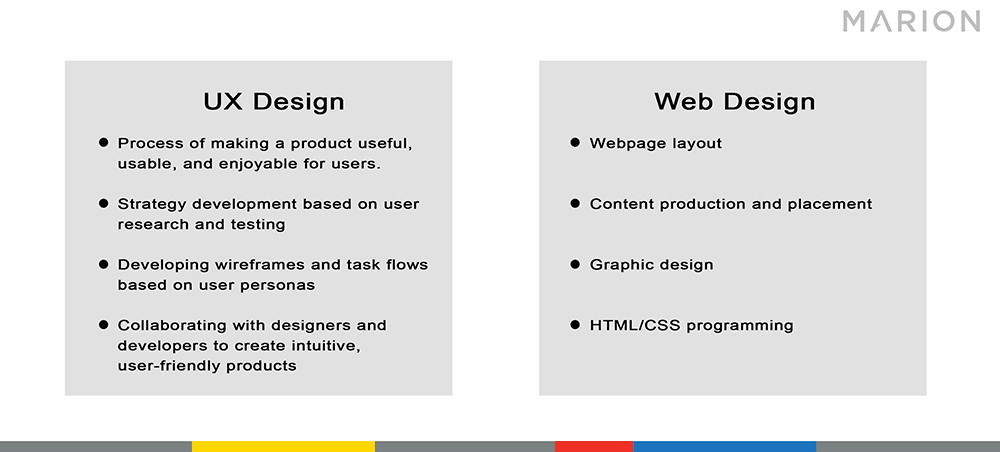
UX design involves:
The process of making a product useful, usable and enjoyable for end-users
Strategy development based on user research and testing
Developing wireframes and task flows based on user personas
Collaborating with designers and developers to create intuitive, user-friendly software and apps
Web design involves:
Webpage layout
Content production
Graphic design
HTML/CSS Programming
MARION Can Create a Beautiful, User-Centric Website for Your Brand
Creating a great user experience on the internet takes foresight, testing, and planning. At MARION, we can design a website for your business that creates an engaging experience for your potential clients.
Our marketing agency in Houston has decades of experience building traditional and digital marketing assets that can generate leads and expand your bottom line. Your website will have purpose, relevant and original content, clear and easy navigation, and will set your brand apart with a professional design and SEO to maximize visibility and web traffic.
For digital marketers, strategists, and search engine optimization (SEO) professionals, prioritizing website redesign SEO seems like a no-brainer. However, many graphic designers, developers, or account managers may not fully understand the relationship between SEO and website redesigns.
Whether site redesign SEO is new to you, or you’re a seasoned vet that just wants to make sure you’ve checked off all the boxes – this eight-step website redesign SEO strategy is for you.
Importance of SEO for Website Redesigns
It all boils down to profit. In most cases, a website redesign is a marketing investment intended to increase your revenue by means of increased rankings and traffic.
There’s a good chance you’re redesigning your website because you want it to be more appealing to your target audience. In theory, a more attractive website will generate more revenue (either through branding or business lead generation) and produce a return on your investment many times over.
However, your website has two main functions:
Attracting your target audience
Engaging and converting your target audience once they visit your site
Redesigning your website without considering SEO neglects the first function. Doing so is a quick way to squander years of your prior digital marketing investment. This can reduce your company’s profit, and significantly lengthen the payback period for your website redesign.
How to Redesign a Website Without Losing SEO
When you redesign your website without losing SEO value, you’re strengthening both of its main functions. Your site will do a better job at attracting potential customers AND helping them convert into paying customers.
The following site redesign SEO checklist will help you navigate the redesign process without losing your hard-earned rankings within major search engines.
1. Take Inventory of All Pages from Your Existing Website
Every page on your website is an asset when it comes to Search Engine Optimization. You can collect a list of your pages in several different ways:
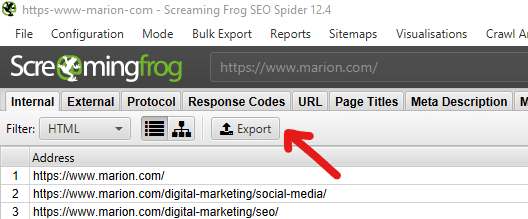
Use a crawler
Use your sitemap
Use Google’s index of your site
Use Google Search Console
Using a Crawler
I lean heavily on Screaming Frog for crawling website pages. The tool costs around $165 per year and is great for more than just listing web pages. This tool provides a lot of value with minimal impact on your small business marketing budget. If your website has fewer than 500 pages, you can use Screaming Frog for free.
The Screaming Frog User Guide can help you get started if you’ve never used the tool. Beyond using Screaming Frog to take an inventory of your web pages, it can help find technical SEO elements like broken links, 404 pages, oversized images, missing HTML tags, missing or duplicate meta descriptions, and more.
Using Your Sitemap
If you’re using a content management system (CMS), you may already be using an automatic sitemap generator to keep a running inventory of your pages. If you’re not leveraging a CMS, you may already have a manually-compiled sitemap.
A common case would be a WordPress website using Yoast SEO to auto-generate a sitemap. You can get a mostly complete list of your web pages from your sitemap if this is the case. Keep in mind, a Yoast sitemap will only include up to 1000 URLs and won’t include pages that you’ve labeled “noindex.”
Using Google’s Index
For smaller websites, doing a Google search for “site:yourwebsite.com” will return results for all your unique pages that Google knows about today. For larger sites, combing through pages of search results isn’t very feasible. Additionally, Google may have excluded some of your pages if they identified them as duplicates or established that they weren’t important enough to include in its results.
Using Google Search Console
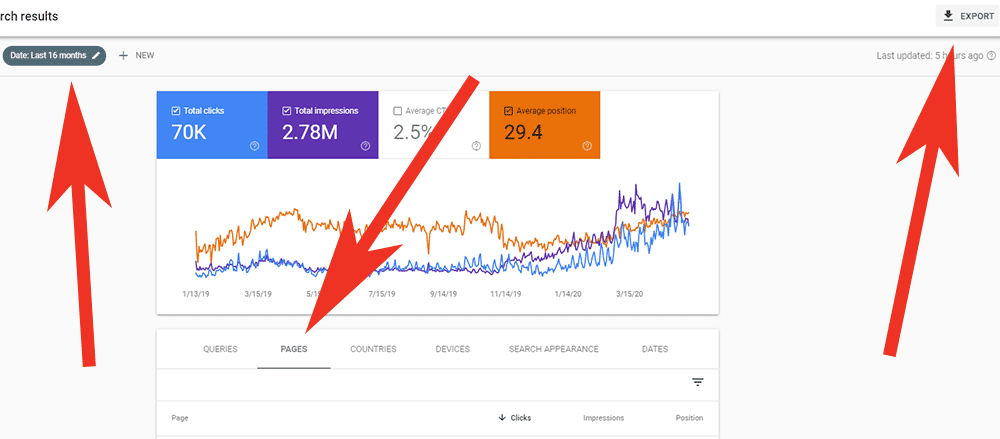
If you’re familiar with using Google Search Console, you can find a mostly complete list of your pages there. After navigating to the Search Results report, you can extend the date range out to 16 months and filter by pages to see a list of all your URLs that Google identified in the past 1+ years. There’s even an Export button in the top right that will generate a CSV list for you to use.
2. Implement Your Redesign on a Test Site or Staging Environment
Now that you’ve taken inventory of your existing website, you can begin redesigning a new version. To maintain your SEO during a website redesign, it’s important that you make your design changes in a staging site (sometimes called a “dev site,” or “test site”).
The main reason for using a separate development environment during your redesign is to avoid having search engines crawl and index an incomplete version of your new site. You also don’t want users to see web pages that are in the process of being overhauled.
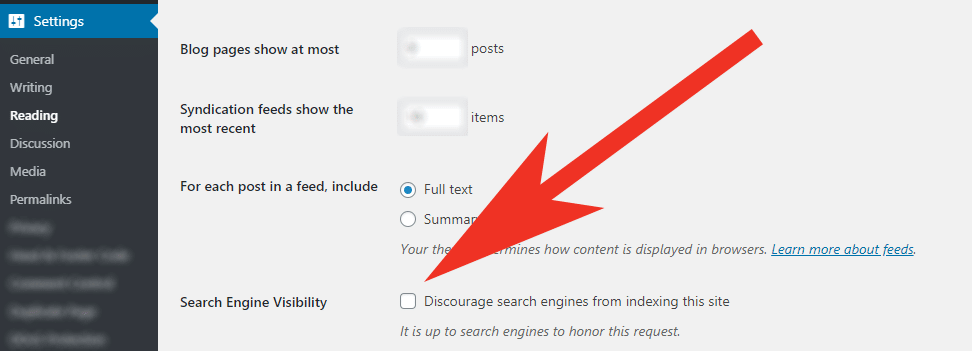
To prevent search engines and users from discovering your work in progress, make sure you prevent your test site from being indexed. You can do this by:
Clicking “Discourage search engines from indexing this site” if you’re using WordPress
Explicitly adding a “noindex” meta robots directive to each of your pages
Disallowing all robots from crawling your site via your robots.txt file.
3. Audit Your New Website
Now, if your website redesign only involved “reskinning” your existing pages, there won’t be much new information to audit. For example, updating branding color schemes and spacing between HTML elements using CSS generally won’t introduce new SEO issues that will hurt your performance.
If you’ve undergone a more extensive redesign, you’ll want to do a complete website redesign SEO audit. We offer an in-depth guide for doing a website SEO analysis in a previous blog post. This will help you identify thin or duplicate content that can cause you to lose SEO rank in unexpected ways.
If you’d prefer professional Austin, DFW, or Houston SEO services instead of a DIY approach, contact MARION today.
Common Issues During a Redesign Audit
The biggest issues that arise during this stage are caused by combining pages, changing URLs, or eliminating pages.
Imagine you’re a mid-sized manufacturer for B2B machinery and you have three different pages about calculating payback periods for your products. If you tell a web developer to combine those pages, they might simply copy and paste the content from two of the pages onto the third and call it a day.
In this scenario, the two pages that have been eliminated may have had valuable backlinks from third-party websites. You will lose the SEO value from those backlinks and confuse users that happen to click on those links and show up to a “Page Not Found” placeholder on your new website. To avoid this issue, you’ll need to set up the appropriate 301 redirects (we cover this in the next section).
In the second scenario, imagine your most popular page (about machinery payback calculations) was located at https://www.yourwebsite.com/payback-calculation/. During your site redesign, a developer changed the URL to https://www.yourwebsite.com/payback-calculations/ (with an “s”). The SEO impact of changing URLs can be significant if not handled properly.
This situation would result in search engines needing several months to drop the old URL from their index, index your new URL, and rank your page from scratch. You would also forfeit all the backlinks from third-party sites that your old URL had earned over the years. Again, setting up the appropriate redirects (covered in the next section) will help you avoid losing SEO value during your redesign.
4. Set Up 301 Redirects
When you use a 301 redirect, it forwards an old URL to a new URL of your choosing. It also tells search engines that this is a permanent change, which is very important.
When you use a 301, you keep most of the SEO value attributed to the old page by transferring it to your new one. Therefore, setting up the right redirects is essential to your site redesign SEO. This will preserve website functionality and your previous link building investment.
For WordPress Websites
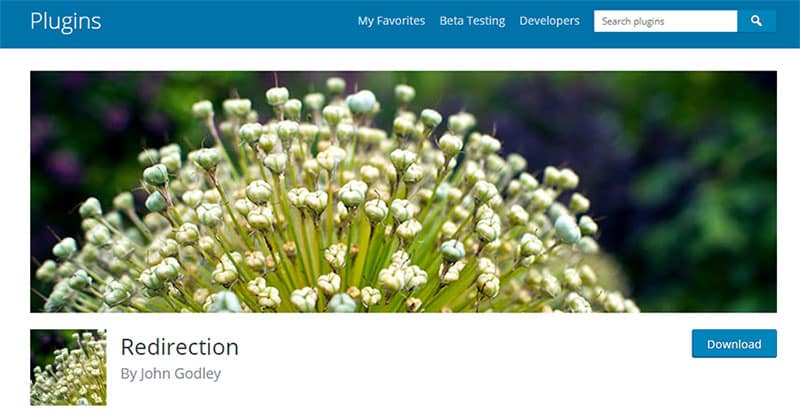
If you’re using WordPress, implementing a 301 redirect is easy. I highly recommend a plugin called Redirection by John Godley. Download it through the plugin directory in your WordPress backend, and follow the easy instructions that the plugin author laid out.
For Other Websites
If you’re using a different CMS for your website, it may already have a built-in redirect functionality for pages. Access the CMS’s knowledge base or do a quick Google search to see if that’s the case.
If your site is based on an Apache server, you (or your developer) can set up redirects within the .htaccess file.
Many domain name providers also allow you to implement redirects through their advanced DNS settings. If you choose this option, make sure you document that you’ve done this so you don’t stump your team members in the future.
If all else fails, you can add meta refresh code to the header of a page. Here is an example:
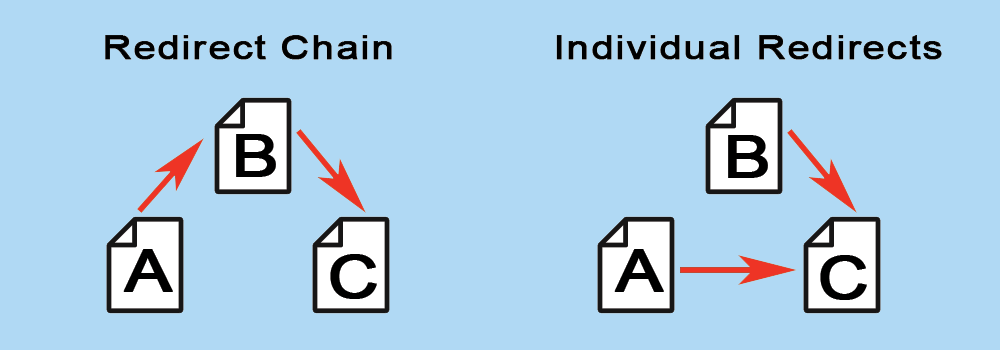
If you’re already familiar with SEO, there’s a very good chance you already have an extensive list of 301 redirects in place. In this case, the SEO checklist for your website redesign should include removing any redirect chains.
A redirect chain is when URL A is forwarded to URL B. After this relationship has been forgotten (usually months or years later), someone may decide to forward URL B to URL C. This means that a poor website user trying to visit URL A would be forwarded down the line several times before reaching their destination.
Historically, each 301 redirect diminishes the SEO value that is passed each step of the way (though a Google spokesperson confirmed that an SEO factor called “PageRank” is not diluted in this transfer). Eliminating these redirect chains benefits users and can help you maintain as much SEO value as possible.
Every time you plan on redirecting a page, search your list of 301 redirects to make sure nothing is already being redirected to the page you plan to forward. If it is, update those redirects to forward directly to your new page destination.
In other words, if you want to redirect URL B to URL C, make sure you don’t have anything redirecting to URL B. If you find that URL A is redirecting to URL B, then update that 301 redirect to go directly to URL C.
5. Activate Your Redesigned Website
Once you’ve put in the redesign work and your fresh website is ready for users to see, it’s time to activate your design. The heavy lifting during this step will typically be done by developers, but you need to double-check that everything is working as planned.
For example, remember in step two when you prevented search engines from finding your site? Make sure this functionality has been removed when your redesigned site is activated. I’ve seen marketers (and even done it myself) launch a new website that included “noindex” directives on each page that caused the entire site to slowly disappear from search results.
You can’t improve your SEO strategy if you don’t have hard data backing up the decisions you make. You’ll want to ensure that your tracking codes are set up and collecting data. This means Google Analytics, heat-mapping, social media pixels, etc.
Download our 8-point website launch checklist to discover other major items that you’ll want to consider after your site is launched. This can have a very positive impact on your SEO strategy during a website redesign.
6. Verify Robots.txt and Meta Robots
Your robots.txt file can include an explicit link to your redesigned website’s sitemap. By including your new sitemap in the robots.txt file, you’re making crawling and indexing as easy as possible for search engines.
Like we addressed in step five, make sure you’re not accidentally preventing important pages from being indexed. On the flip side, if there are certain landing pages that you DO want to keep from being indexed, check those items now. If you have any canonical links implemented on your site for very similar pages, make sure those are appearing as planned too.
7. Set Up Google Search Console
If you’re unfamiliar with Google Search Console (formerly Google Webmaster Tools), this easy guide from Google will help you get started.
In addition to including a link to your sitemap within your robots.txt file in step six, make sure you submit your sitemap URL to Search Console as well. This helps Google identify and crawl all the indexable pages on your redesigned site with ease.
8. Monitor SEO Ranking Changes
At this point, the work is done and you’re ready to continually monitor new incoming data about rankings, conversions, and overall performance. Now that you’ve got access to your data, it’s up to your marketing and executive teams to learn how to choose marketing KPIs that matter.
Keep in mind, a successfully implemented website redesign SEO plan will may not immediately improve any of your SEO results. That’s fine! Your goal was to maintain the SEO value that your site had accumulated.
However, if your designers and user experience (UX) team succeed, your redesigned site will engage users more and result in more customer conversions. Longer dwell times and happier website users will slowly improve factors that have a direct positive impact on your search engine rankings, so be patient!
For top-quality DFW, Austin, or Houston web design, contact MARION for a consultation today.
MARION Can Guide Your SEO and Web Design Efforts for Higher Returns
For nearly 40 years, MARION has been providing marketing solutions for Texas-based businesses. Today, our digital marketing agency is staffed by experienced professionals with a passion for helping you succeed.
If you’re in search of an SEO agency in Austin, Houston, or DFW, we can help. We have over a decade of experience helping our clients attract their ideal customers with a thoughtful SEO strategy.
As COVID-19 continues to spread, the world today looks a lot different than it did just a few weeks ago. As we all learn to adjust to our new normal, businesses must shift their marketing efforts to reflect the changing environment around them.
Social Media During the Coronavirus Pandemic
Whether your company is or is not open for business, there are adjustments you should make to your social strategy to adapt your brand’s messaging to appropriately match today’s climate.
Let’s explore what your business should and should not be doing on social media during COVID-19.
DON’T
Don’t ignore what’s happening
Everyone has been affected by the coronavirus pandemic in some way. Don’t let your brand appear naive and out of touch to what is happening. If your brand voice is more light and fun, continue toning it down for the time being to reflect the tone of the world and your audience during these difficult times.
You must find the right balance — stay true to who your brand is, while respecting the state we are all in.
Don’t make light of it
Don’t post memes or jokes that make light of the coronavirus or the preventive measures that are being implemented. When drafting posts, remember that your followers or their loved ones may have been affected by the Coronavirus. With that sentiment, make sure your posts would not be viewed as offensive or insensitive.
Also, avoid all political discussions or sharing info that could make you seem biased in any way.
Don’t share false information
Unless your business is in the healthcare industry, do not share updates regarding the status of the coronavirus pandemic. Just because there is a pandemic doesn’t mean you should start sharing health information — leave that job to the experts and trusted news sources.
Any information you choose to share about the coronavirus should be related to your industry, useful to your audience, and come from a credible source.
If, for example, you are a restaurant, it would be appropriate for you to share an article from a highly credible source about how to safely get takeout during the coronavirus. It would not be appropriate for you to make a post about a new drug combination that could treat coronavirus.
Don’t exploit the situation
Now is a time to show empathy and compassion — not to be pushy or salesy in your social media marketing during the Coronavirus pandemic. If you have promotions you need to push on social, do so with caution.
Keep your copy in line with what is happening in the world today. As you write and review your posts, do so with an overly-sensitive eye, always thinking of how you can be helpful, not exploit the situation.
DO
Do continue to stay active
Even if your business is not able to remain open or is operating lightly right now, do your best to communicate with your followers frequently. Staying in front of your customers will keep you top of mind when you’re open for business again.
A great way to do this is to provide tips to your customers, tease future promotions, and tote gift cards. For example, my local hair salon, which is closed right now, has launched a campaign called “show us your root.” Every person who posts a picture of their grow out roots with the hashtag #showusyourroots will receive $20 off their next hair appointment.
My mom, who is a fitness instructor, has been posting workout tips and videos for at-home Pilates stretches. And my favorite local boutique is posting about free online shipping and gift card promos. Genius!
Do consider posting about your COVID-19 plan (especially if your business is B2C)
If your business has any direct contact with other human beings, put out a post addressing how your business operations are changing due to coronavirus. Outline your plan for keeping people safe, how you are following CDC guidelines, and what your customers should expect to see differently when they interact with your business.
Make your customers feel safe shopping with you and show that you are taking care of your employees. At its core, your COVID-19 marketing strategy should include updates to your brand’s user experience.
Do Review scheduled posts regularly
If you preschedule your social media posts, review them often during the pandemic prior to posting to make sure they are still relevant. If you’re in need of professional help, contact our Houston social media marketing agency.
It seems like things are changing day by day and minute by minute during COVID-19, so make sure you continue to keep your posts in line with these frequent changes.
Keep your info updated
If your business hours or service operations have changed, make sure to update that on your social profiles and Google my business, as well as creating a social post about it.
Let MARION Help Guide Your Marketing Strategy During This Crisis
We are living in unprecedented times, and it’s only natural to feel confused or uncertain about what steps your business should be taking. Our team is here to help answer your questions and provide top-quality marketing services. We can help guide your Houston, DFW, or Austin social media marketing efforts.
For additional resources and advice on how to appropriately market your business during this time, visit our COVID-19 resource page.
A bad user experience, also known as “Bad UX”, is something probably every company has from time to time. We tend to think of digital interfaces when we think of UX. However, that association derives from the time the term “user experience” first originated in the 1990s, when widespread use of the Internet began.
UX is, in fact, a broad subject that applies to practically any facet of life. For example, here’s a sidewalk as an example of poor UX design:
You will discover several bad UX design examples throughout this article. Most of the examples will involve bad UX design websites, as the MARION team has unfortunately encountered these too often in our industry.
We’ll cover some bad website UX design topics like:
Websites with bad UX are still easy to find. It’s no surprise. It’s not easy to devise a brilliant website that meets or exceeds every expectation. Still, some could try a little harder. Below is a rogue’s gallery of bad user experience website examples.
Autoplay Videos
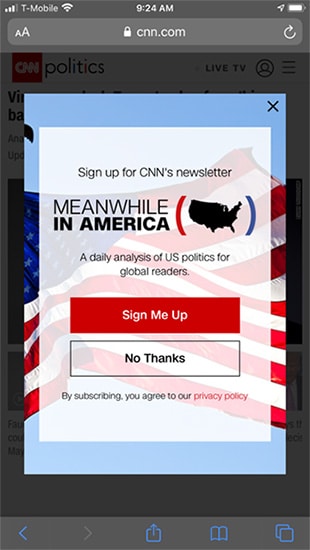
Autoplay video. Think CNN. Think Netflix. It isn’t only that you choose an article or film and suddenly scramble to turn the volume down. You also experience a perturbing lack of control when these things happen. You did not choose to watch anything; the website or app decided it for you, along with the effort of switching the annoyance off.
CNN’s autoplay videos along with its persistent popups in every session begging for email subscriptions make it one of the worst user experience websites.
Hidden Navigation
Making a website or app easy to navigate for everyone should be a top priority. Because modern websites need to fit both desktop and small smartphone screens, the navigation is often converted to a hidden feature revealed only by toggling a button or icon.
Usually, when the width of the screen falls below a certain threshold, the full menu is hidden, and the mobile menu toggle appears. Sometimes, websites resort to hiding navigation on both desktop and mobile screens. How a user interfaces with a product is generally referred to as user-interface, while the whole experience is considered “UX.” Navigation is typically a part of UI and UX, but keep in mind that there are differences in UI vs. UX.
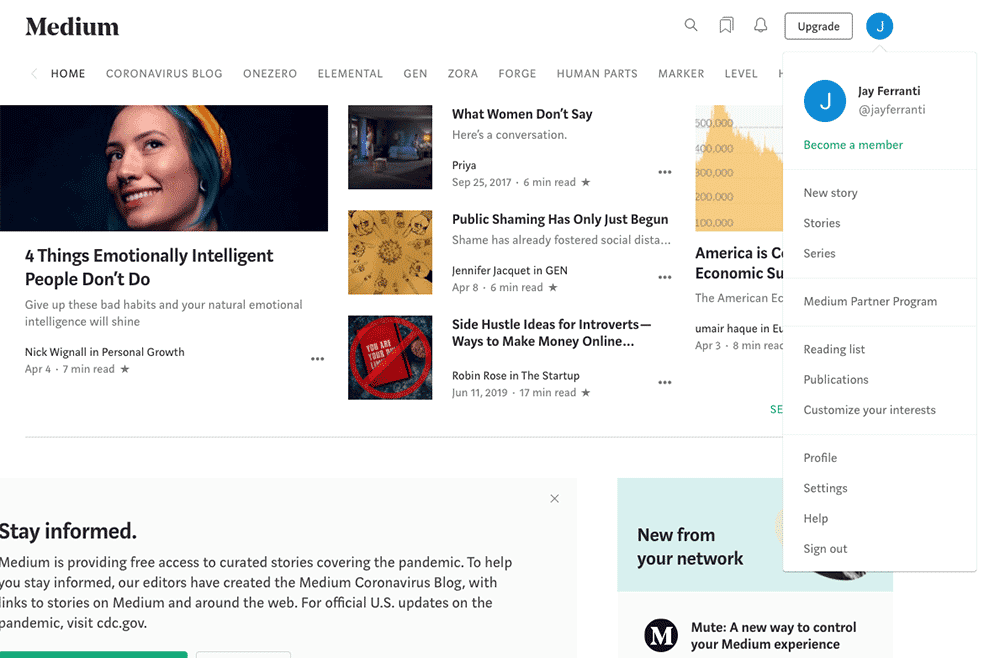
Here’s an example of hidden navigation: Medium.com. There’s nothing to indicate the icon at the top right is clickable and contains many important links.
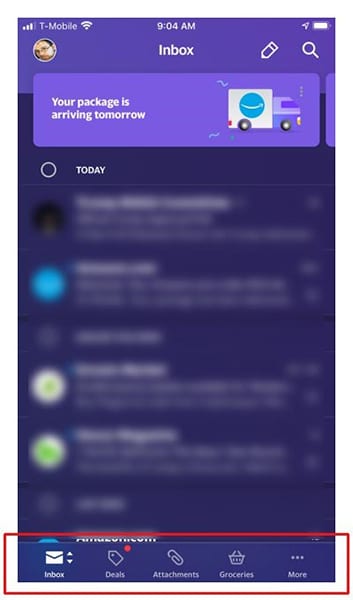
Usability studies show that this practice can be improved by adding icons that kept in plain view at all times for essential features. Here’s an example of web design that includes effective icons: The Yahoo mail app inbox. Because icons alone are often not enough to help people identify their purpose, a text label is also included.
Difficult Navigation
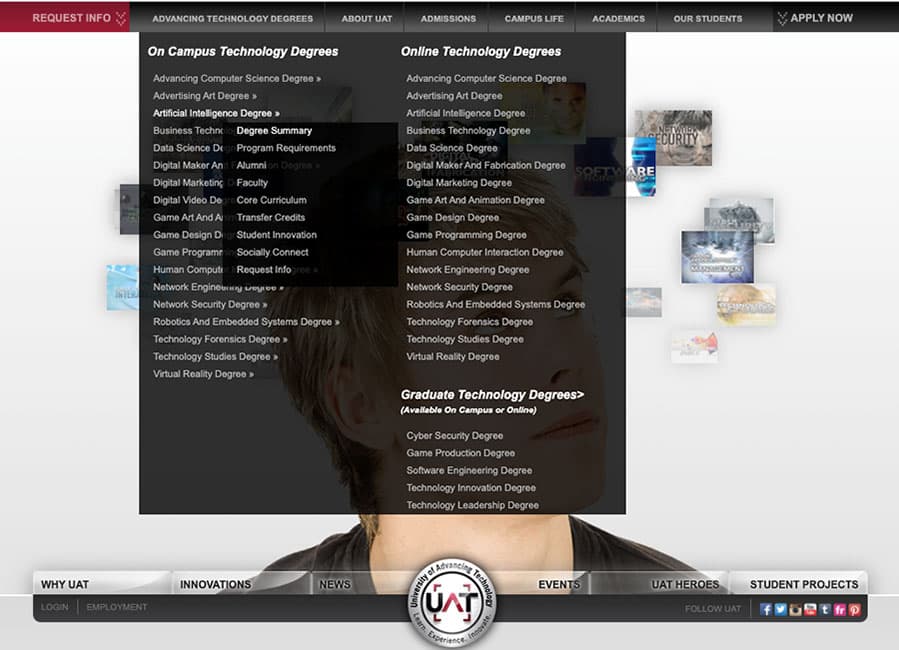
The University of Advancing Technology offers a challenging curriculum. But, to find a course you must first take this eye-test of a multi-layered flyout submenu, in tiny gray text over a black background on their website.
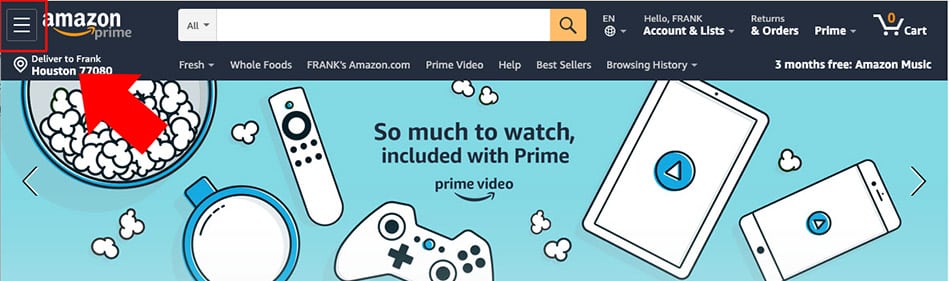
And we all know and love the Amazon header. This combination of usability disasters is incredibly busy and unattractively designed. In the desktop view, you see a horizontal row of destinations, but most of the menu is hidden under the mobile menu toggle.
The menu “hamburger” icon is squeezed into the top left corner. Because it’s fighting for its life in the space provided, the menu toggle is exceptionally difficult to find.
Dark UX
“Dark UX” or “dark patterns” refers to ways some websites intentionally deceive, conceal information, confuse, or attempt to trick the user. To learn more about the many techniques of Dark UX, such as misdirection, privacy Zuckering, roach motels, and others, visit https://www.darkpatterns.org/.
Darkpatterns.org was conceived by Harry Brignull as part of a campaign to raise awareness of dark patterns. Darkpatterns’ twitter feed, @darkpatterns is a great place to expose these shady techniques should you run across any.
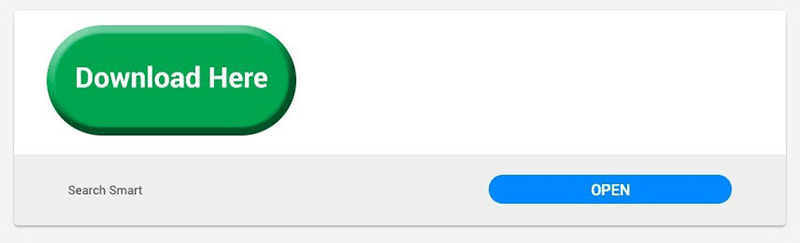
Here’s one of the most pernicious examples of dark UX trickery: the giant green download button ads. For the unwary, these buttons trick the user into thinking he’s found the download link for a product he needs. But in reality, they are misleading and possibly dangerous attempts to get the user to do something he did not intend.
Google has provided policing of this practice and will block websites that display these types of ads, however, they are still in wide use as of this writing.
Discoverability
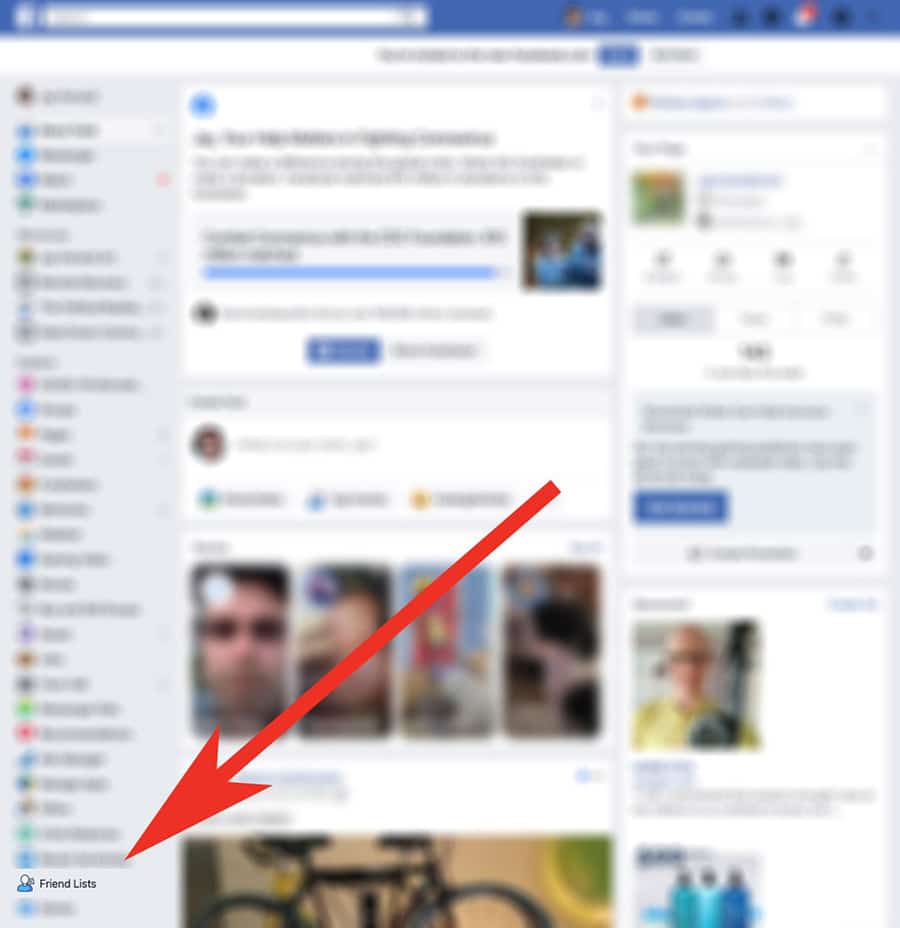
When something is hard to find on a website, it falls under the UX category of discoverability. For example, see the Facebook Friends List, below. The link is hidden in the left menu at the bottom, but only visible after clicking More. Why is it so hard to find? It doesn’t make sense.
Friends are what Facebook is all about. It’s at the end of long list of ugly clip art style icons. The Friends List is not the only hard-to-find option on Facebook. To update your security settings, you may need to consult Google for the latest Facebook security How-To.
Performance
Probably the most serious of all usability issues is a slow loading website. It’s the most serious because it’s the one that will prevent someone from ever seeing your content. Many usability studies show that websites that take more than 2 seconds to load have high bounce rates, that is, the user simply chooses not to proceed to the site at all. Enlisting the help of a quality SEO firm is one way to combat slow load times.
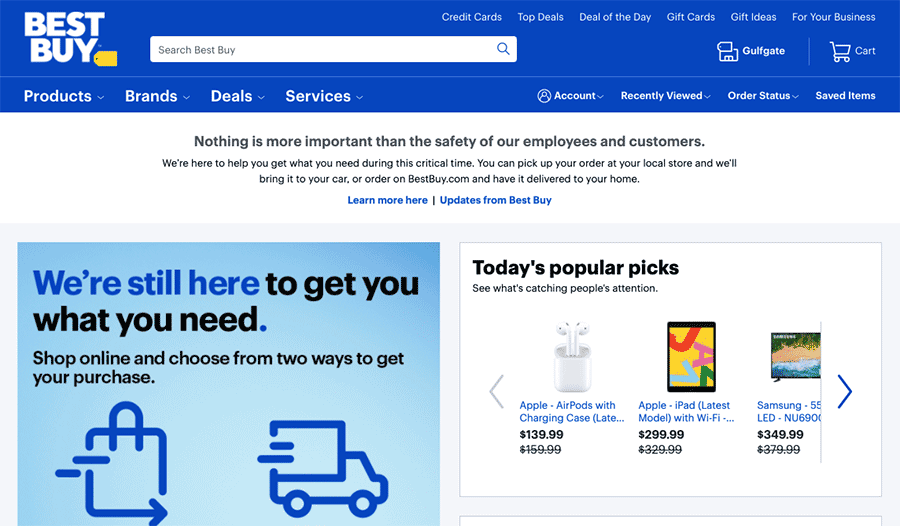
We checked performance of some well-known ecommerce sites and were surprised to see this major retailer receive a grade of 4 (out of a possible 100) for its mobile experience. The desktop experience was not a lot better at a grade of 15. Frequently, taking some simple configuration steps will help improve website load times.
Get help from our SEO agency in Austin if you’re struggling with slow load times!
Get Quality Design with Help from MARION
While our article mainly concerns digital UX, naturally, at MARION, we are concerned with good vs. bad UX design in everything we create for our customers, whether it’s a website, a business card, brochure, or box!
Our Houston, DFW, and Austin web design team and marketing strategists are at your fingertips. Contact us today to schedule a free consultation!
Display ads are an incredible way to capture the attention of your audience in a visually appealing way, increasing visibility and maximizing exposure. As Google boasts, you can reach 90% of Internet users worldwide through the Google Display Network.
You can use display ads to increase brand awareness to those who may not have heard of you before or drive consideration by re-marketing to those who have previously visited your site. At MARION, we find that combining PPC in Houston with display re-marketing drives exceeding good results. Through Google, you can run different display ads, though responsive and static image ads are the two most common display ad types.
So, what are Google responsive ads for display? What are the differences between responsive ads vs. image ads? And what do you need to know in order to create an effective and well-performing Google responsive display ad?
What Are Google Responsive Ads for Display? – Responsive Ads vs. Image Ads
Responsive display ads are the new default ad type on the Google Display Ad Network, effectively replacing static image ads, though static image ads are still available if you choose to implement them.
Image Sizes
Google responsive display ads differ from their static counterparts in that responsive ads automatically adjust their size and format to fit available ad spaces. With static image ads, on the other hand, you must create ads of different sizes in order to fit multiple ad spaces. In other words, if you don’t invest in numerous display ads of all different sizes, you simply will not get as much visibility.
There are also more elements associated with responsive display ads. With static display ads, you simply had to input a final URL and upload your images. With responsive display ads, on the other hand, you can upload up to 15 images for a single ad from which Google can choose.
Headlines
You can also include up to 5 regular headlines, one long headline (up to 90 characters), and up to 5 descriptions. With this, you can add more value and context to your ads than you were able to previously.
CTAs
Google also allows you to add call-to-action buttons outside of your image with responsive display ads. These typically appear as a button on some ad formats. You can select from 12 different preset options that range from “Learn More” to “Get Quote.” You can also select the (Automated) option, which allows Google to select the call-to-action text for you. This is a feature that was not available before with static image ads. These CTA buttons are great because they eliminate your need of having to include a CTA button in your image, and still encourage people to take action.
Google Ads Responsive Display Ads Specs
As we mentioned before, Google has simplified the design process for responsive display ads. Rather than working through a rather lengthy list of supported Google responsive display ad sizes, now you simply upload 2 different sizes: a 1200 x 628 image and a 600 x 600 image (dimensions in pixels).
Though Google allows you to upload up to 15 images for a single ad, you are only required to upload one landscape image and one square image per ad.
With responsive display ads, you do not need to include your logo in the image itself as that gets added separately when you’re setting everything up. You are encouraged to include one square logo (128 x 128 pixels or greater), and one landscape logo (1200 x 300 pixels). Opt for a logo with a transparent background if possible, as those tend to get the best results.
Benefits of Using Responsive Display Ads
With responsive display ads, you get a number of added benefits, on top of all of the benefits that static image ads provide. Given the fact that responsive display ads are able to reformat themselves to fit any number of different ad spaces, you get a lot more visibility than you typically would with a static image ad.
Since you also add headlines and descriptions to accompany the image, you can provide users with more context in which to encourage them to click on your ad. This results in higher-performing ads. It also allows Google to rotate and optimize for the combination that generates the best results, which also plays a part in generating better results. You can even repurpose the best headlines when you advertise using pay-per-click in Austin (and vice versa).
Another huge benefit to responsive display ads lies in the fact that they take less time to design. Rather than wasting time formatting all the different ad sizes as you were required to do with static image ads vs. responsive ads, with responsive display ads, you only need 2 different ad sizes.
How to Create Responsive Display Ads
When it comes to designing the ads, make sure that the main message/value proposition that you want to get across is the one that is featured in the image. The headlines and descriptions are there to help provide context to the image, but it is the image that will capture people’s attention first.
To summarize the sections below:
Represent your value proposition in the image if possible
Adhere to the 20% rule
Remember that Google can crop 5% horizontally
You can add CTA buttons in ad text (they don’t need to be in the image)
Your headline and destination page content should align
Use previous campaigns to generate the top headline combinations
You should also ensure that you are adhering to the 20% rule, where no more than 20% of the image consists of text. If you exceed this 20% limit, your ad may still get visibility depending on your audience and targeting parameters; but your ad will be limited and you will not capture as many clicks and impressions that you would have been able to capture by adhering to the rule.
Keep in mind that Google may crop the image horizontally – up to 5%. Make sure you have a margin around your image, so your text doesn’t get cut off.
As we mentioned before, you can add CTA buttons to your responsive display ads, so you do not need to include them in your image if you find that your image is too text-heavy. In order to add this feature to your responsive ads, make sure you click on the blue “More Options” hyperlink near the bottom of the setup page and check off the “Call to action text” option.
When it comes to selecting the appropriate headlines and descriptions, look at the content of the page to which you want to drive traffic. Though display ad quality scores are not calculated the same as Search ads, Google does still look at how relevant the landing page is in comparison to the text in your headlines and descriptions. The more relevant your ads are to the landing page, the higher the expected CTR and the lower the CPC of your ads.
If you are currently running text ads or have run them in the past few months, review those as well. See which ads have the highest click-through rates and analyze the highest performing ones to determine headlines and descriptions that people tended to like and click on the most. The more headlines and descriptions that you can include in your Google responsive display ads, the better the ad is likely to perform.
Responsive Display Ads Examples
Below are just a few examples of some responsive display ads that MARION has run in the past. As you can see, Google was able to reformat the image to fit a completely different ad space and create a few different options from the headlines and descriptions that we created.
MARION Provides High-performance Paid Ads for Texas-based Businesses
Executing and optimizing for a successful display campaign is no small feat. If you are interested in getting started with Google display ads or other forms of digital marketing in Houston, reach out to the experts at MARION.
Speaking strictly from a marketing perspective, the COVID-19 pandemic has transformed the current marketing landscape. Original marketing plans are being thrown out the window and we are faced with yet another challenge: constructing completely new strategies in this previously uncharted territory.
While you can still market yourself during this time, you have to be careful – even more so than usual – in ensuring that you are being sensitive to the situation.
All over the internet, we’ve seen marketers tell people to “lead with empathy” and to “be patient and kind” to your clients. While it’s undoubtedly great advice and definitely something you need to keep in mind now as well as beyond this pandemic, it doesn’t help you come up with any form of plan as to immediate actions you should be taking when it comes to your marketing efforts.
Should you stop marketing altogether for the time being? Is now a good time to continue with traditional marketing efforts or should you make the shift to digital marketing? If you choose to implement or continue with a digital marketing strategy, what specific strategies and tactics should you focus on? Pay-Per-Click (PPC), also known as Search Engine Marketing (SEM)? Search Engine Optimization (SEO)? How do you connect with current and prospective clients and consumers to minimize the negative impact to your business?
Should You Continue Marketing During This Time?
Short answer: yes, you should. We know; we sound biased being a marketing agency and all. But for you to stay competitive now and in the future, you must stay top of mind. But, to continue marketing doesn’t mean to continue doing the same things that you have been doing. There should be a shift in how you market.
Shift Away from Traditional Marketing
If you have heavily relied on traditional marketing strategies in the past, now is as good a time as any to make the shift towards internet marketing. People are not leaving their house; we’re social distancing, and there is even some anxiety when it comes to receiving things in the mail. If iPhone Screen Time reports are to be believed, the average iPhone user is spending at least twice as much time on their phones than usual.
We’re spending our days staring at different devices, from our phones to our computers, and from our tablets to our TVs, searching for a reprieve from our current situation. So, if you want people to see your ads and increase awareness of your brand right now, then digital is the way to go.
What Digital Marketing Strategy Should I Be Deploying?
This is the part where you really need to take a step back and look at your business and your industry, as each answer will vary.
If you have implemented a digital marketing strategy before, analyze your results. Look at what worked and what didn’t work. Some elements that have worked before may work in this new context. Think about conversion rate optimization and eliminating friction points on your website.
Search Engine Optimization (SEO)
Regardless of whether you are B2B or B2C, it is in my opinion that Search Engine Optimization (SEO) is the most valuable digital marketing strategy that you can deploy at this time.
While some brands are now faced with new challenges when it comes to their operations and supply chain, there is marketing potential with this shift in people’s shopping habits. For B2C businesses, anxiety (such as anxiety in regards to a pandemic) fuels impulsive shopping and “retail therapy” because it helps us to feel better, in that it allows us to feel some control over something when we are in a situation in which we have no control. We gravitate towards choices that reduce risk and uncertainty.
As for B2B businesses, anxiety also causes buyers to do more research and seek out more information before making decisions.
With SEO, you can reduce the perceived risk and uncertainty of your products and/or services by providing meaningful information and proactively answering questions that a buyer may have. Put yourself in the shoes of your target buyer (“lead with empathy”) and ask yourself what questions your buyer might be asking themselves. What problems or challenges are they facing? What solution are they looking for to solve their immediate problem and how can you help?
The more questions you can ask yourself from your target buyer’s point-of-view, the better you can anticipate their needs and the information they are searching for. In turn, you will be able to curate better and more meaningful content that will not only help your consumers but will also help your website rankings.
Focus on being educational and answering questions/potential pain points, rather than trying to push a product or service. While this type of content won’t convert in the short term, it will build awareness and consideration which will eventually lead people further down the funnel towards the eventual conversion.
Pay-Per-Click (PPC) Advertising
For businesses with a limited marketing budget that are unable to fully operate and provide services at this time, it may be best to momentarily allocate that budget towards an SEO strategy. PPC is a great way to drive traffic as it gets your ads to the top of search results, but if you are unable to provide services, you will end up with a much lower ROI than average.
On the other hand, if you are able to provide services or can cater to those impulse buys (even if you aren’t fully operational right now), don’t be so quick to reduce or reallocate your spend.
Look at your products and services objectively, as well as the industry. Are people likely to act and convert right now? If so, review your campaigns and ads to ensure that your ads are still relevant given the context and that you are being sensitive.
If certain products or services are getting more traction right now, make temporary changes to your strategy so that these products/services can get more visibility and maximize your results. If you are not currently doing PPC ads but you provide an essential service, now may be a good time to start running some paid search ads. Inevitably, there will be competitors that will reduce their spend or stop their ads altogether. This gives you a much better chance to stand out at a lower average cost!
For those with a more robust marketing budget but are unable to provide services, PPC ads are still a great way to ensure that you stay top of mind. Consider shifting internet marketing tactics from lead generation to building awareness. You can position yourself as a market leader.
MARION Has Additional Resources
Visit MARION’s dedicated COVID-19 marketing hub if you’re looking for more information on marketing during the Coronavirus.
Our strategists are constantly updating the hub with timely and valuable Coronavirus marketing articles to help you navigate during this difficult time. For those in need, we are also offering free marketing consultations to assess what actions you could be taking now or help you plan a marketing strategy for the market rebound. No obligations, no strings attached. Just give us a call or fill out one of our online forms today.
Industrial manufacturing is typically a very B2B-oriented industry and you may be wondering what the rules and best methods are when it comes to SEO for manufacturers. After all, this channel has a majority stake in the success of digital marketing for manufacturers.
In this blog post, we will discuss how to generate leads by increasing traffic to your manufacturing website through SEO.
Why Is Industrial SEO Marketing Important?
The manufacturing and industrial markets are highly competitive – everyone’s fighting for big-ticket clients and sales. Since the monetary investment is usually very high, your potential clients will be doing lots of research on your business and products.
If you are not getting ahead of the curve and developing an SEO strategy for your website, you will fall behind in the race to reach potential customers!
How to Market a Manufacturing Company Using SEO
Compared to business-to-consumer companies, B2B companies have a much smaller market of potential clients and the person researching your business may not be the final decision-maker. Because of the small target audience and fierce competition, B2B marketing strategies take a lot of time and money to execute effectively.
Keeping this in mind, there are several strategies that will help your manufacturing company rank higher in search results. Here are some of the most common methods and best practices for B2B industrial SEO.
SEO Content for Manufacturers
Having high-quality content on your website will help you generate more backlinks and help improve your search ranking on Google. If you’d like to rank higher on a search results page, you need to build authority by demonstrating your expertise.
Since manufacturing companies tend to have industry-specific jargon and concepts, this is a good opportunity to focus on creating informational or educational content that provides value to readers. Manufacturing content marketing can be in the form of blog posts, videos, infographics, white papers, case studies, payback analyses and more.
You can also prove your expertise by guest blogging on other websites and linking back to valuable resources on your own website in the process. The more quality content you publish, the more likely people will refer to you and your manufacturing website.
Optimize Titles, Headings, and Descriptions for Products and Services
A basic but often overlooked element is to properly include keywords in your titles, meta descriptions, and headings. Your manufacturing SEO strategy may be hindered if your website is bogged down with industry jargon and winded explanations.
Be sure to emphasize and summarize the most important keywords first in your titles and headings. This will help users (and Google) figure out what your page is about.
While meta descriptions may not directly affect your search ranking, customers will be searching for specific products and services. Make it easy for them to learn what you’re offering by summarizing the page succinctly. Writing copy that piques interest will greatly improve your click-through rate.
For more help with SEO in Austin, Houston, or DFW, contact the team at MARION today!
Local SEO for Manufacturing Companies in Houston
Your local SEO strategy will encompass many things. First, it’s imperative that you register and optimize your business profiles on Google My Business, Facebook, Yelp, Bing, etc. Filling out all the information (name, address, phone, hours, business description etc.) and selecting the right categories will help you rank higher and more accurately.
After you’ve created your pages, you can then start accumulating customer reviews to showcase your business’s experience and customer satisfaction. This will signal to Google and potential clients that your business is trustworthy and worth the investment.
If you operate locally, make sure you include your location(s) on your business pages and website so possible clients in your area or market can easily find you. If you’d like to go a step further, you could also create a few profiles on local business directories.
Website design and SEO work together because Google values websites that offer a great experience for users. A website that is easy and pleasant to use will bring visitors back and improve your search ranking over time. SEO-friendly web design for industrial and manufacturing companies can be tricky if you have a lot of information, brochures, large images, and other materials.
It’s important to have clean, clear navigation or else your site could leave a bad impression on users (and therefore your company and brand). They’ll be less likely to come back to your website or recommend your business. If a competitor offers similar products or services at the same price point, they’d probably choose the company that has a more professional and appealing website.
You want your visitors to stay and browse your website, which won’t happen if it’s not convenient to use. One of the biggest factors is page load or page speed. 40% of visitors will leave your page if it takes more than three seconds to display. To avoid this pitfall, learn how to reduce website loading time for your site today.
This is especially important with mobile optimization – if your website is not designed to load quickly and properly on mobile, you’re missing out on a huge portion of Google search users. As early as 2016, almost 60% of searches were made from mobile devices, and that number is likely higher today. Optimizing your website for mobile searches is one of the most essential tasks for your website design.
SEO agencies help you determine the best plan of action in order to improve your website’s search engine ranking and user search experience. An effective agency that can assist with SEO for industrial manufacturing ideally has experience with manufacturing companies, web design, as well as SEO.
Learn which questions to ask and how to choose an SEO agency that will set you up for success. An experienced agency will be able to pinpoint what your website needs and come up with a customized strategy to increase the number of visitors and leads.
For professional help from an Austin or Houston SEO company, contact MARION today!
Looking for a Manufacturing SEO Agency? Contact MARION Today!
MARION Integrated Marketing is one of the top SEO agencies for manufacturing companies in Houston, Austin, and DFW with years of experience. Our expert team of SEO and web design professionals will work with you to create a beautiful and efficient website for your industrial business or assist you with SEO maintenance.
Contact MARION today! Whatever you need, the strategists at our Houston marketing agency know how to craft a customized plan to achieve your goals in the B2B manufacturing industry.
On January 13th, 2020, Google SearchLiaison on Twitter broke the news that updated Google search engine page results (SERPs) would be rolling out. A similar SERP layout was rolled out on mobile devices in 2019, and is now standard across Google.
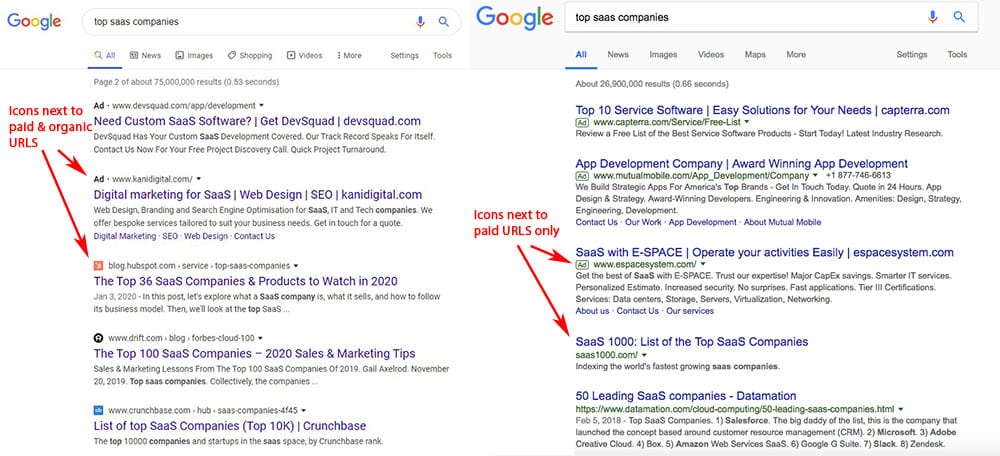
The new Google results page (left) features URLs above page titles with icons preceding them. The old SERP layout (right) featured URLs between the page title and meta description for each listing.
Update from Editor 1/24/2020: After significant backlash from the community about the new layout, the GoogleSearchLiaison Twitter account announced that they would continue to experiment with new icon placements on the search results.
Preceding this change, repeated accusations were made that the advertisements and organic search results were meant to look similar in order to confuse the user into clicking on the paid results more often.
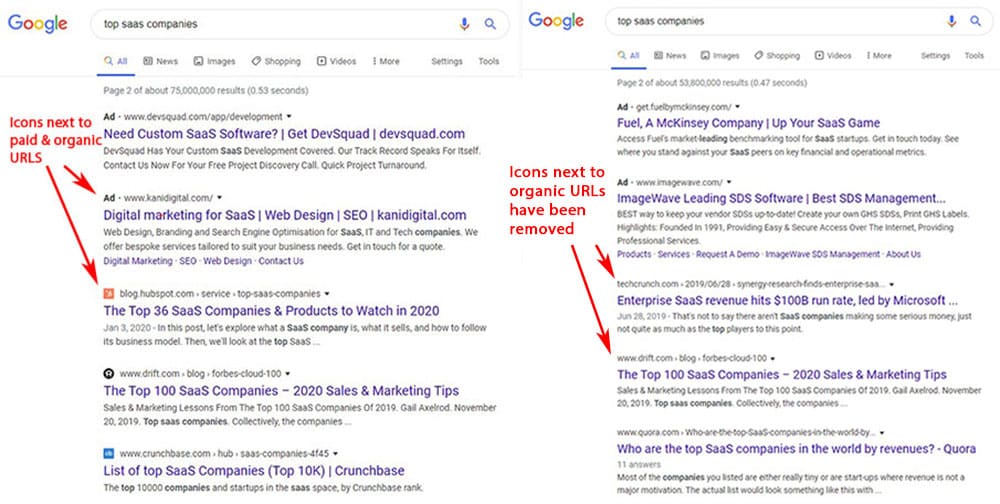
The new Google results page (now on the right) still features URLs above page titles but there are no icons preceding them. The controversial SERP layout (left) that was only active for about a week featured icons for both organic and paid listings.
Paid vs. Organic Results Confusion
However, the biggest difference is that both Ads and organic results are now displaying icons before their corresponding URLs. This makes it difficult for users to recognize which results are paid vs. organic.
After being in the SEO industry for nearly five years, I even found myself accidentally clicking on a paid search result that I thought was organic.
What Does This Mean for You?
In my professional opinion, this Google SERP layout change was made to nudge users toward clicking on paid results more often. This could mean more clicks for paid advertisers, fewer clicks for organic results, and more revenue for Google. The latter is likely why this Google search results page refresh has taken place.
At this point in time, that opinion is merely speculative. However, testing these click-through rate changes would prove nearly impossible, as Google also rolled out a core algorithm update at the same time – ruling out an apples-to-apples comparison. I would venture to guess that the concurrence of these changes was not accidental.
Let MARION Grow Your Organic Traffic
Algorithm changes come and go, but MARION drives lasting results. Our SEO agency stays on top of the latest changes, and builds a time-tested strategy to grow your bottom line.
On Monday, January 13th, 2020, Google rolled out their first Core Algorithm update of the year. According to the Google SearchLiaison Twitter account, this algorithm change has been named the January 2020 Core Update.
Google Algorithm Updates
Google releases several core algorithm updates each year, but they’ve only begun naming and preannouncing these updates as of 2019. Though announcing changes to Google’s algorithm would seem helpful at first, they offer fewer details about each update than ever before.
Google offers no guidance on what was changed, or concrete examples of how you can better position your pages to rank. Their main suggestion from this blog post states that, “We suggest focusing on ensuring you’re offering the best content you can. That’s what our algorithms seek to reward.”
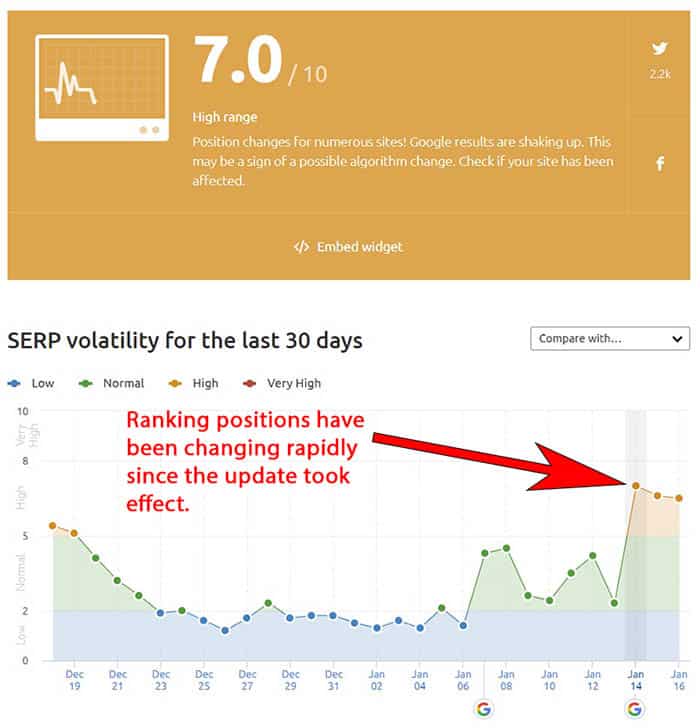
This screenshot from the SEMrush Sensor shows “SERP volatility,” or how rapidly ranking changes are taking place on a given day.
In the end, an SEO-friendly web design with content that best serves a Google searcher’s intent will have the best chance of ranking. Your SEO agency will already have a good handle on SEO best practices that will help you attract relevant website visitors.
MARION Can Help with Your SEO
If you find that you need a new SEO company in Houston, Austin, or anywhere in Texas, MARION can meet your needs. Our highly-renowned digital marketing agency can take your search engine optimization to the next level.
It’s no secret that organic traffic to your website is important, but attracting your target audience comes at a cost. As a small business owner or marketing manager, if you’re not willing or able to invest your time and effort into search engine optimization, you won’t be found by potential customers and clients.
Hiring SEO talent is the best way for your organization to reach your ideal audience at the right time. The question you should ask yourself is – should I outsource SEO, or hire an in-house SEO expert?
What Is SEO Outsourcing?
SEO outsourcing is the act of hiring an external agency or contractor to handle on-page and off-page search engine optimization for your website. This may include the creation and execution of SEO strategies, content marketing, link building, digital PR, local SEO and web design.
Pros and Cons of Outsourcing SEO
The main advantages of SEO outsourcing are cost savings and expertise. This may seem counterintuitive, as hiring an agency is considerably more expensive than doing SEO yourself.
However, our comparison here is between hiring in-house vs. outsourcing marketing talent for search engine optimization. At the time of this writing, hiring an in-house SEO expert will cost you an average of $51,000 per year in the U.S.
The above figure accounts for this employee’s salary, but employees will cost your business around 25% more than their salary. Thus, a staff SEO specialist will cost you around $64,000 a year… on average.
SEO Benefit = [SEO Value] / Cost
When you do the math, that price is the equivalent of a $5,300 SEO retainer if you outsource SEO services to a full team of experts. The fact of the matter is, the benefit is going to be greater when you contract this function to an outsourced marketing agency. Just make sure you know how to choose a good SEO company for your business before you make such a large and important investment.
Outsourcing your SEO to a full team of professionals is also a great way to tap into different strengths. An agency might be comprised of UX and graphic designers, web developers, writers, and search engine optimization strategists. Each of these specialists has in-depth insights on how to help your business succeed.
Lastly, an agency is able to tailor budget expenditure based on the SEO strategies that will be the most effective for your business. If different software tools or niche third-party subscriptions can help improve your rankings, a marketing firm has the ability to make that shift.
In-house SEO is when a business’s search engine optimization strategy is created and executed (at least in part) by internal staff. The phrase “in-house SEO” frequently denotes the staff member in charge of this function. This SEO professional can work alone or as part of an internal marketing team.
Pros and Cons of Hiring an In-House SEO Expert
A major benefit of employing an SEO expert at your business is the proximity they have to you and your business goals. This staff member not only has a deep understanding of on-page and off-page SEO, but they know your product/service. They can communicate what makes your products and services special without needing you to explicitly outline it for them.
Unlike most SEO agencies, an in-house SEO specialist is able to build relationships with team members. They converse with web designers and developers, writers, and production staff in order to execute a more personalized product.
As mentioned in the SEO outsourcing section, hiring an employee is very costly compared to hiring SEO agencies or contractors. You have to pay a salary in addition to certain amounts of their Medicare, Social Security, unemployment insurance and workers’ comp.
Another con is that your internal marketing employee will have a single set of strengths and weaknesses. For example, they may be great at SEO writing and keyword research, but bad at link-building and web development. This could impede their ability to generate business leads and cause your results to plateau.
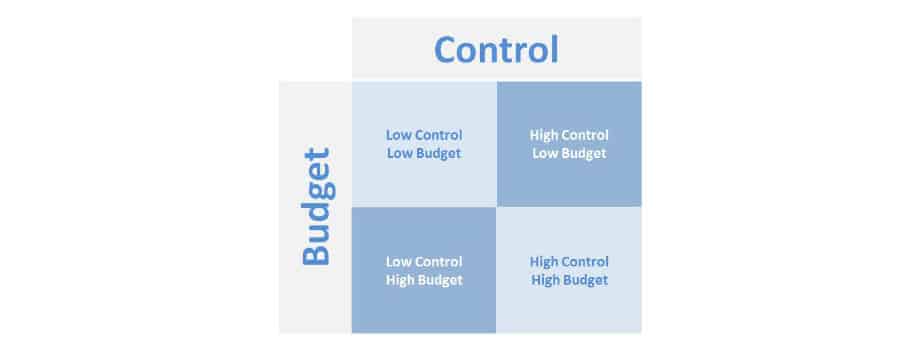
Your decision to keep SEO in-house vs. outsourcing will depend on where you lie on the control – budget matrix. If you value high control and have a higher budget, in-house SEO might be for you. If you are more flexible, and your budget is limited, you may be better off outsourcing your search engine optimization.
One last dimension that you need to consider is whether you need ongoing services or a one-time project.
Outsource SEO Services (Ongoing)
Most SEO strategies require ongoing services, especially if you’re in a competitive industry. Ongoing marketing agency fees are set up as monthly retainers, and will typically require a certain contract length or cancellation notice.
Ongoing services frequently include content marketing, link-building, local SEO, on-page and technical SEO, and sometimes digital PR to help reach your goals and drive revenue for your business.
Outsource SEO Projects (One-time)
Outsourcing your SEO in project form is not as common. This is only recommended if you have an internal marketing specialist or team that can partially manage your search engine optimization strategy, but needs supplemented for certain tasks.
For example, if your internal team struggles with technical SEO, it would make sense to outsource for a one-time audit. Your internal marketing team or web developers can use the audit to seamlessly blend your web design and SEO. You may also be interested in a limited number of sessions from an SEO consultant. Only opt for this type of marketing project if a current staff member has the time and know-how to benefit.