Category: Search Optimization (SEO)

How To Create Content with Google Algorithm Updates in Mind

Google releases several algorithm updates every year, and these changes can have a significant impact on your SEO efforts. In other words, it affects how many eyes will reach your content.

So, how do you keep up with the ever-changing algorithm? Let’s go over some general best practices for ensuring your content stands up to any and all future changes.

How Often Does Google Update Its Algorithm?

Google is well-known for rolling out algorithm updates left and right. On average, there are upwards of 3,000 changes made per year. That being said, the majority of updates are minor improvements that may not be of interest to most content creators and typically go unnoticed.

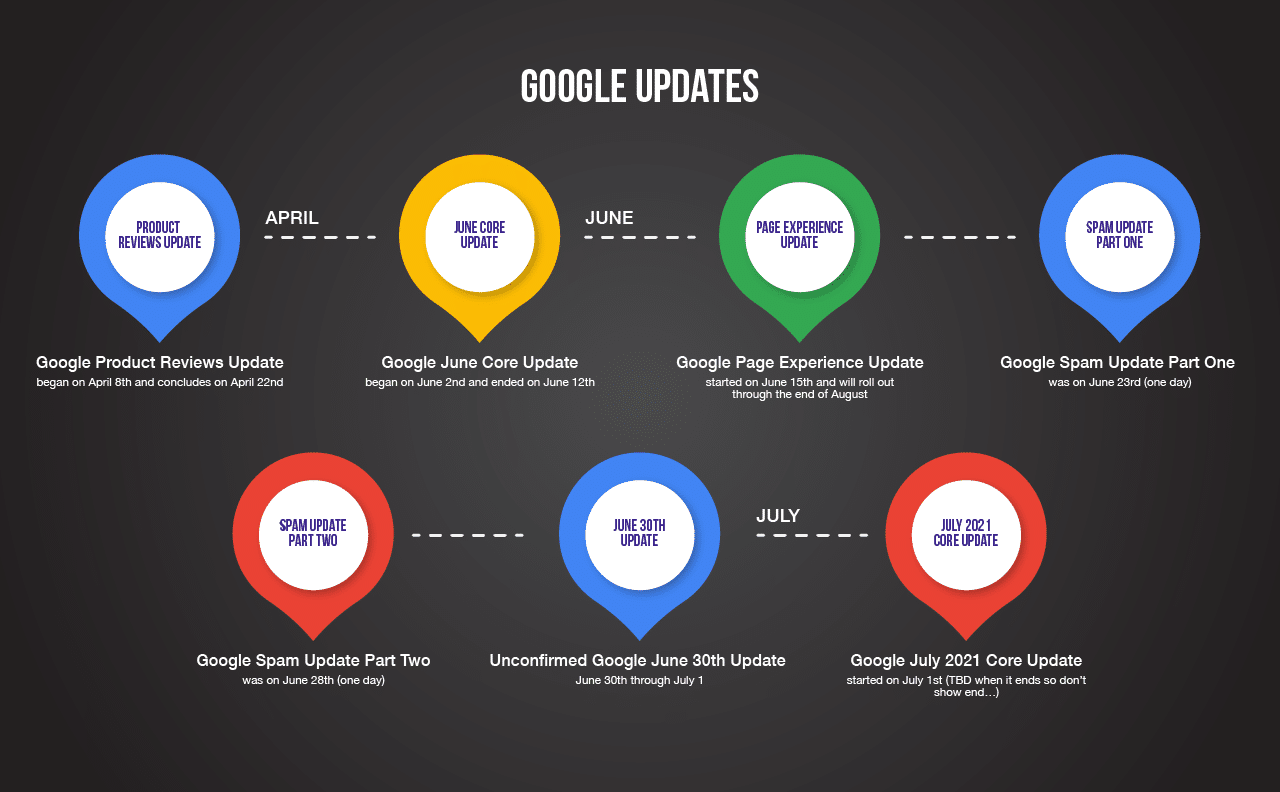
However, Google also launches several significant changes every year, referred to as “core updates.” Often planned months in advance, these critical components of Google’s ranking algorithm are designed to enhance the quality and relevance of overall search results. As many digital marketing experts know, these updates are notorious for drastically affecting SEO, for better or for worse.

google-algorithm-updates-graphic

image source

Check out our ultimate timeline of Google algorithm updates >

Content Creation Best Practices

Simply put, it’s not enough to just produce high-quality content nowadays. Many businesses succeed at creating engaging and valuable content for their target audience—but that doesn’t automatically make it long-lasting, high-ranking content in the eyes of the algorithm.

To ensure your content outlasts future algorithm updates, you’ll need to play by Google’s rules. Follow these best practices and learn how to create the content you need for ongoing success.

Focus on Quality

Regardless of Google algorithm updates over the years, quality is the key to generating inbound traffic. To create truly valuable content, you must have subject matter that is beneficial to the user—whether that be educational information, unique insights, proven research, new ideas, etc.

Additionally, if your content is presented neatly and accurately, your message is far more likely to get across. Avoid any errors that might make visitors click away. The top reasons that users are likely to leave a webpage include:

  • Broken links and forms
  • Spelling and grammar mistakes
  • Outdated information
  • Misleading/irrelevant title
  • Poor format, design, or usability
  • Not mobile-friendly (bad UX design)
  • Overwhelming ads or pop-ups

But more importantly, you must have high-quality content by the algorithm’s standards in order to climb the ranks and beat your competitors. Here are three few red flags Google looks for when ranking websites.

1.     Poor On-Page Optimization

Elements like keywords and page titles play an important role in helping the algorithm determine what your content is about. Fortunately, it doesn’t take long to optimize title tags, image tags, meta descriptions, URLs, and XML sitemaps.

2.     Thin Content

Simply put, thin content is on-page content that is not useful to visitors. This includes doorway pages, affiliate pages, irrelevant guest posts, and content that is automatically generated or stolen from another online source.

3.     Insufficient Links

Not only do you need great content to gain Google’s approval and achieve high ranks, but you also need great links. The more high-value links your site has, the better your web presence. You’ll also want to avoid bad link-building practices to stay on Google’s good side.

Overall, Google favors meaningful, quality content related to the keywords you’re ranking for.

Understand the E-A-T Perspective

Ultimately, Google wants to give its users the best search engine experience possible, which is why it takes careful precautions to only promote trustworthy domains. As a result, Google’s perception of a business often correlates with the impression left on its target audience. So, how can you tailor your content to meet Google’s standards?

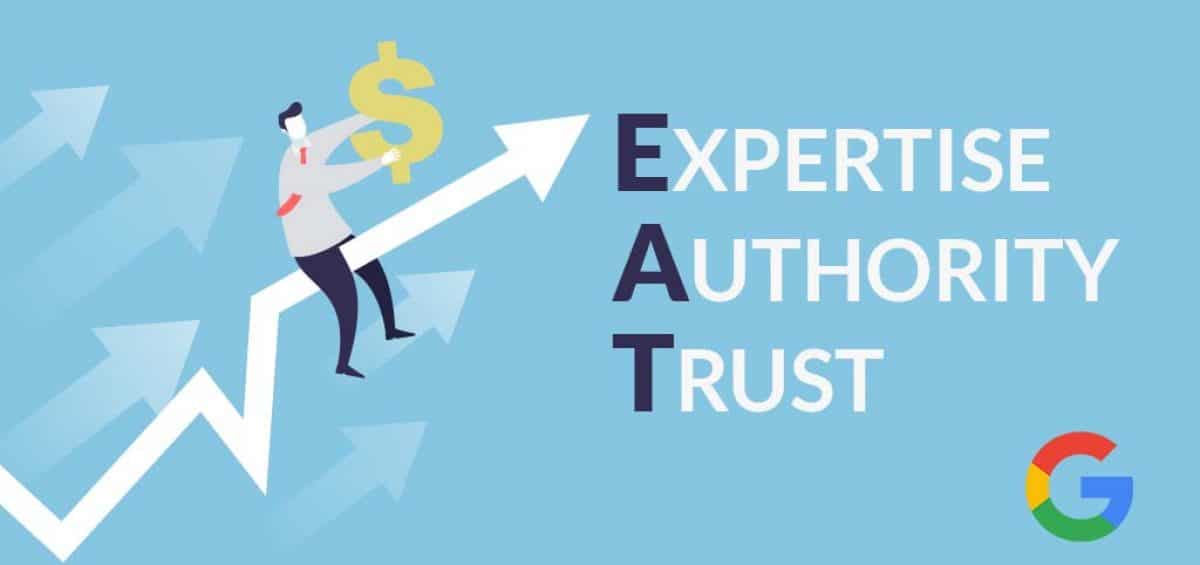
Google measures three main factors when determining how much trust should be placed in a particular brand or website—ExpertiseAuthority, and Trust—also known as E-A-T. The concept of E-A-T has been around for nearly a decade, yet many industry experts still struggle with it today.

Google-E-A-T

image source

  • Expertise – Expertise means to have exceptional knowledge or skill in a particular subject. Google tends to favor content created by subject matter experts. Simply put, the content on your site must demonstrate a higher level of expertise than the competition.
  • Authority – Authority is all about reputation, typically among industry experts and influencers. When people see an individual or website as the go-to source of reliable information on a subject, that constitutes authority.
  • Trust – Trust is about the accuracy, legitimacy, and transparency of a webpage’s content. Citing trustworthy sources is a big part of building trust with Google. Including publisher contact information is also helpful.

What exactly determines E-A-T? Google typically looks at a combination of the content, creator, and website. Therefore, the algorithm is constantly being trained to look for these variables when deciding which web pages to promote in search results.

Keep Reader Intention in Mind

Unlike Google, people don’t generally care about links and tags. They’re just searching for content that meets their needs. Therefore, you must tailor your content to your specific audience to achieve the best results. Ask yourself these questions to better understand Google audience targeting.

  • Who is your target audience?
  • What problems are they trying to solve?
  • What writing style appeals to them most?
  • How can you earn their trust?

Once you know your audience, all you have to do is create content they are specifically searching for. The best content creators know what strategies to use to boost reader engagement and drive traffic. 

For example, you can incorporate descriptive language into your writing to create an image in the reader’s mind and fully immerse them in your work. Likewise, using figurative language can transform ordinary content into an enhanced experience.

Follow these steps successfully, and the algorithm will reward your efforts with high ranks and leads for your business!

marion integrated marketing - contact us

What About Future Google Algorithm Updates?

At this rate, it’s clear that Google won’t be slowing down on the updates anytime soon. And with thousands of algorithm changes per year, it’s impossible to keep up with all of them. It’s true that most updates won’t affect you, but it’s a mistake to ignore them entirely—especially the big ones.

Ultimately, it’s crucial that marketers and content creators know when major changes in the algorithm happen. It’s the only way to understand whether rankings shifted because of an internal change or a Google update.

So, do you have a proactive or reactive digital content strategy when it comes to Google algorithm changes? To ensure your content survives future search updates, you’ll need to raise the bar.

Get ahead of the algorithm and put your best foot forward with the content optimization tips mentioned in this article. Or if you’re not ready to take on that challenge, you can always recruit the help of an outsourced marketing agency that knows its way around the algorithm.

Contact us today to learn more about our SEO services in Houston and Austin, TX.

Marketing emails you’ll actually want to read.

Get marketing tips and news sent to 
your inbox.

This field is for validation purposes and should be left unchanged.
Name(Required)

The Ultimate Guide to Hiring & Working with Local Internet Marketing Agencies

A marketing agency is a business that helps organizations increase the sales of their products and services. Futhermore, there are two ways to categorize marketing agencies: in-house and external. The former deals with the company’s marketing efforts internally, while the latter works with the company’s marketing externally.

Additionally, there are three main types of digital advertising agencies: performance-based, traditional, and integrated. Performance-based agencies provide services like search engine optimization (SEO) or pay-per-click (PPC) advertising; traditional agencies offer services like print or broadcast media; integrated agencies provide both performance-based and traditional marketing services. So, which one is best for your business? Keep reading to find out.

Why Hire a Local SEO Agency in Your Area?

If you’re looking for internet marketing services in your area, these are a few of the biggest reasons why you might want to hire a local SEO agency, regardless of your industry. 

  • SEO Optimization: Agencies would be able to understand the nuances of your industry and help with local optimization.
  • Keyword Research: Agency experts know what kind of keywords and key phrases to target and how to rank well on search engines so that your business will be seen by more people who are looking for products or services like yours.
  • Local Knowledge: Digital marketing agencies near you will know what searches and trends people in your area are searching for. You also can’t beat face-to-face interactions.
digital marketing packages and pricing

How to Find the Best Local SEO Agency for Your Business in Houston

A local SEO marketing agency will have in-depth knowledge of your industry, be close to you geographically, and have the dedication to work with you long-term. The right agency experts will help you build a digital content strategy that dominates your industry.

So, what are the best practices for finding a marketing agency that can help your business grow? Of course, it’s important to find an agency that understands your industry, has strong local connections in Houston, and has the patience to work with you for years to come. But how do you know which one is right for you?

How Much Should You Budget for an Online Marketing Campaign?

Marketing costs can seem daunting. But it is essential to budget correctly so you can be successful at marketing your business online.

The first step to determining your marketing budget is to look at your company’s revenue and growth goals. If you are expanding, there should be an equal investment in growth and marketing if you want the business to grow exponentially.

After assessing growth goals, you need to take into account the cost of customer acquisition. Customers are expensive — it costs about five times more than what it takes to retain a customer through marketing campaigns or by providing excellent service.

Finding the Best Marketing Agency in South Texas

If you are looking for a top marketing agency in South Texas, look no further. You have come to the right place! You will find all kinds of information about marketing agencies here—from tips for getting started with marketing services in Houston to online marketing strategies with the biggest impact on ROI, top questions to ask a branding agency, and more.

In conclusion, the best way to choose a marketing agency that’s perfect for your business is by following these simple steps. First, ask them about what they do for clients with similar businesses to yours or who have an equivalent budget size. Then ask them about their experience working with your particular market or industry. Finally, see if they offer free consultations so you can meet them in person and see if it’s a match!

Ready to hire and work with the best internet marketing agency in Houston? MARION has been helping Texas businesses advertise big since 1981. We work with our clients to manage their entire online presence, from social media and web design to email marketing and reputation management.

Contact our team today and schedule a free consultation to learn more about our services.

Marketing emails you’ll actually want to read.

Get marketing tips and news sent to 
your inbox.

This field is for validation purposes and should be left unchanged.
Name(Required)

The 5 Best SEO Tools for Monitoring Your Site’s Performance

The world of search engine optimization (SEO) can be overwhelming for those who aren’t accustomed to it. The number of tools, strategies and changes by Google is virtually limitless. If you’re new to SEO, where do you start? Here are five SEO tools we think are among the best for monitoring your website’s performance and making improvements.

Why Measure SEO Performance?

There’s an adage out there that says, “you can’t improve what you don’t measure.” While cliché at this point, it rings true. If you’re just improving your website without a benchmark or goal, you’ll only experience success if you’re lucky. For the rest of us unlucky ones, we can actively improve our website’s performance based on specific metrics like organic traffic, search engine rankings and conversion rates.

You see, most of what’s visible to your prospects and website visitors is content. And, according to HubSpot’s Ultimate List of Marketing Statistics for 2021, “the majority of companies (67%) use organic traffic to measure their content success.” Why? Because organic traffic (as opposed to paid or direct traffic) reflects how valuable your content is to your prospects.

So, how do you get your valuable content in front of the right eyes? These days, a good SEO tool is really a requirement. Fortunately, we have some recommendations.

The Best SEO Tools for Performance Monitoring

Any “best” list is going to be subjective, but the truly best tools will show up again and again on recommendation lists or articles. That being said, here are the tools that we’ve seen over the years that have had a demonstrable impact on improving SEO performance for websites.

1. SEMrush

Are there other better all-in-one marketing tools out there? Maybe. But few software alternatives come close to SEMrush when it comes to SEO. After all, search engine optimization is SEMrush’s bread and butter. It’s the company’s specialty. (Just look at the company name. “SEM” refers to “search engine marketing!”) If you’re going to try an SEO tool, we recommend starting with SEMrush.

  • Pros: Robust, deep and packed with features. Extremely helpful customer service team.
  • Cons: Fairly expensive and a bit of a learning curve to use.
  • Best SEO Features: Keyword research, position tracking, organic research, traffic analytics, backlinks, keyword gaps, competitor comparisons, social media management, content marketing suggestions, local SEO and much more.

2. Moz

Moz lost a bit of its luster and appeal when Rand Fishkin exited the company, but it remains a solid SEO option. One of the best parts about Moz is that many features are free! You just need to sign up for an account and there are limits to queries you can submit. But if you have a single business or don’t check in on SEO metrics very often, this might be a good starter tool for you.

  • Pros: Moz also excels at backlink data and has a proprietary Domain Authority score that is a standard in the industry.
  • Cons: You must upgrade to a premium/paid account to use all features.
  • Best SEO Features: Domain analysis, keyword explorer, link explorer.
digital marketing packages and pricing

3. HubSpot

I admittedly have a soft spot for HubSpot, as I’ve obtained dozens of certifications from the company and have used their tools for many years. When it comes to user experience and customer service, HubSpot can’t be beat. While it’s true that HubSpot isn’t an SEO-exclusive tool, it does have many SEO-friendly features that will help you improve your website’s performance. If you’re looking for an all-in-one tool with plenty of SEO features, HubSpot is a can’t-miss option.

  • Pros: Easy to learn, with top-notch UX/UI. Friendly, helpful customer service team.
  • Cons: Expensive (though you get what you pay for). SEO data isn’t as rich or accurate as SEMrush or Google Analytics (based on the traffic sources the tool references), but you still get valuable insights for improvement.
  • Best SEO Features: Content optimization recommendations, topic clustering, robust reporting and valuable SEO-related tools like blogging, landing pages and marketing automation.

4. Screaming Frog

If you have technical aptitude and some SEO experience, Screaming Frog is a tool that will allow you to dive deeper than others on this list. Screaming Frog basically crawls your site in a way similar to search engine robots, helping you identify crucial issues like improper tags, meta information that’s too short or long, missing alt text on images and more.

  • Pros: Rich, deep data, which is easily exportable/sharable.
  • Cons: You’re limited to 500 pages on the free plan. May be too much for new SEOs.
  • Best SEO Features: Site crawling, integrations with other SEO tools, advanced metrics.

5. Google Analytics

Last, but probably first in the list of tools you should consider is Google Analytics. There really is no replacement for the data you’ll see straight from the source with GA. Customizing reports and diving deep into advanced metrics is attainable with Google Analytics, though you definitely need to know what you’re doing.

  • Pros: Most accurate data for organic traffic from Google; highly customizable. Integrates with most SEO tools.
  • Cons: Very steep learning curve; not ideal for new SEOs. Permissions/security can be annoying.
  • Best SEO Features: Visitor behavior tracking, identifying top pages/content, annotations for big changes, customizable tracking and reports.

Bonus: LinkWhisper

We’re huge fans of this final SEO tool, which is ideal for monitoring links in particular. You can easily build reports, identify broken links, set up auto-linking settings for blog posts (limiting them to one per post) and more. If you’re looking to automate the internal and external linking part of SEO, LinkWhisper is worth checking out. (It works with most WordPress-hosted websites.)

Should You Partner with an SEO Agency?

With all these amazing search engine optimization tools available, why would you need to partner with a marketing agency for your SEO? Well, if you notice from some of the cons above, many tools require search engine optimization knowledge to get the most out of them that you can. (This is why several companies like HubSpot and Google offer certifications.)

Additionally, some of the more expensive tools may be out of reach for your company and its budget. An agency, however, may already be on an agency plan and you’ll be able to enjoy the amazing benefits of the tools without the premium price tag. Other benefits include easy integrations, more precise reporting and flexibility.

If you’re interested in learning more about these tools or how we can help with your SEO efforts, contact us today.

Marketing emails you’ll actually want to read.

Get marketing tips and news sent to 
your inbox.

This field is for validation purposes and should be left unchanged.
Name(Required)

Which Online Marketing Strategy Has the Biggest Impact on ROI?            

Return on investment in digital marketing is an incredibly valuable business metric that should not be ignored. Several types of integrated marketing channels are available, from social media and email lists to paid ads and in-depth search engine optimization. In order to achieve consistent growth, companies must leverage these channels and follow the proper steps to maintain optimal return on investment.

But which marketing method has the highest impact on overall ROI? Let’s discuss.

What is Digital Marketing ROI?

In the world of digital marketing, Return on Investment (ROI) is known as the measure of profit or loss generated on your campaign efforts. A positive ROI essentially means that a campaign is making more money than what was spent—and vice versa for a negative ROI.

As a rule of thumb, digital marketers should aim for an average ROI of 5:1 — that’s $5 gained for every $1 spent on a marketing campaign.

And if this doesn’t satisfy you, set the bar a little higher! Exceptional marketing ROI is considered 10:1 or higher. It will likely require more resources and knowledge to achieve this goal, but it is possible, nonetheless. On the other hand, ROI below 2:1 is non-profitable and is indicative that your marketing strategy needs some work.

Why Measure ROI in Marketing?

Measuring ROI is critical in digital marketing to determine the success of your campaigns. Otherwise, you would be marketing “blind” and potentially wasting your budget. Obviously, ROI will vary depending on the campaign type and other contributing factors. But by analyzing the results, you will be able to confidently take actionable steps toward improvement. The more familiar you are with marketing ROI, the better your campaigns will perform. In this article, we will discuss which online marketing campaigns have the highest ROI so that you can plan your marketing strategy accordingly.

How To Calculate ROI in Marketing

Calculating ROI values in digital marketing is simple. A basic ROI formula would look something like this:

roi formula

Which Digital Marketing Strategy Has the Best ROI (1)

Top 4 Digital Marketing Strategies for Success

Now that we’ve explained what digital marketing ROI is and how to calculate it, let’s explore a few different campaign strategies that are known for their positive ROI. We’ll explain the pros and cons of each to ultimately decide which strategy offers the best revenue return.

  1. Search Engine Optimization (SEO)
  2. Email Marketing
  3. Social Media Marketing (SMM)
  4. Pay-per-Click (PPC)

1. Search Engine Optimization

Search engine optimization, or SEO, is one of the most successful and widely used digital marketing strategies for growth. When properly executed, SEO marketing can deliver impressive results at a very low cost.

SEO marketing has an average ROI of 22:1 — that’s 2,200 percent!

Effective SEO can give businesses huge opportunities for driving traffic to their website. Plus, the results are long-term. Your site has the potential to continually grow in rankings over the years, delivering positive ROI with little to no effort on your end. For these reasons and more, SEO remains one of the top online marketing strategies for ROI.

2. Email Marketing

Email marketing is reported as one of the highest ROI digital marketing strategies. It’s a well-known method that requires some initial investment but has high success when it comes to exposing your brand to customers.

Email marketing has an average ROI of 42:1 — that’s 4,200 percent!

So, in theory, for every $1 spent on email marketing, you’ll make $42 in return. It’s no wonder why this method is so popular amongst digital marketers. Creating contact lists and sending out emails is relatively cost- and time-effective when compared to other campaign methods. Also, campaign effeteness will only increase as you expand your audience and grow your email list. In addition, email marketing can be used in conjunction with other online marketing strategies for maximum effectiveness.

The primary drawback of email marketing is the fact that it requires having access to a substantial database of customer emails. Tips for building a sizable contact list include using subscription incentives, sign-up lists, and giving customers the ability to create on-site accounts. Follow these steps, and in time, you can expect results and substantial business growth.

If you are going to run an email campaign, you should consider measuring these metrics when calculating your digital marketing ROI:

  • Open rate
  • Conversions
  • Click-through rate (CTR)
  • Unsubscribe rate
  • Bounce rate
  • Leads acquired

3. Social Media Marketing

Social media marketing is another effective marketing channel that doesn’t require a huge budget or amount of time to succeed. Depending on the extent of your campaign, you can spend hundreds or thousands of dollars per month.

Social media marketing offers several valuable benefits that affect ROI, including:

  • Helps customers discover new products
  • Sparks positive interactions with consumers
  • Provides customer service and engages with followers
  • Increases brand traffic and obtains new customers
  • Contributes to overall marketing strategy

Measuring social media ROI is a bit more complex than measuring the results you’ll get from other types of digital marketing tactics. In social media marketing, you can determine campaign effectiveness by measuring specific metrics. Below we listed the top metrics marketers use to measure the ROI of social media campaigns.

  • Engagement rates
  • Click-through rate (CTR)
  • Clicks
  • Conversions
  • Leads acquired
  • New followers

4. PPC Marketing

When done right, PPC services will generate a positive ROI in digital marketing.

Return on ad spend (ROAS) is much simpler to calculate than the overall ROI for PPC campaigns. The formula is essentially the same as the ROI formula we mentioned previously; it just replaces “marketing” with “PPC.”

ROAS FORMULA

This value, however, does not factor in all costs—just the cost of the paid ads. If you want a more precise estimate of your PPC campaign’s profitability, you’ll want to factor in some additional costs, such as:

  • technology & equipment
  • credit card processing fees
  • fulfillment
  • employee salaries

Unlike SEO marketing, PPC advertising is not long-term; once you turn the ads off, the campaign is over. The only lasting value is the sales from the ads while they were still active.

Which Digital Marketing Strategy Has the Best ROI?

In conclusion, SEO and email marketing have the best reputation when it comes to ROI. However, keep in mind that PPC and social media marketing are also known to achieve positive ROI.

Now, it’s up to you to maximize the ROI of your online marketing campaign. Will you choose email marketing, PPC, SEO, SMM, or perhaps a combination? Be sure to consider your company, budget, and individual marketing style before making this decision.

roi marketing

Improve Your Marketing ROI With MARION Today

If your company is looking to optimize your digital marketing ROI, MARION is happy to help! We are a marketing agency in Texas with decades of experience delivering strategic search engine optimization, PPC services, and various marketing campaigns.

Contact our team of experts today and find out how we can help you get started with your online marketing strategy.

Marketing emails you’ll actually want to read.

Get marketing tips and news sent to 
your inbox.

This field is for validation purposes and should be left unchanged.
Name(Required)

Google Is Experiencing Indexing Issues – September & October 2020

There’s a strong chance that you understand how to use Google Search, but its inner workings are still a mystery to the casual searcher. To make things simple, Google needs to complete three main steps to bring you results:

  1. Crawl – Identify as many pages as possible across the web
  2. Index – Keep a record of all pages they encounter while crawling
  3. Rank & Serve – Based on your search, they will find relevant results from their index and display them as a ranked list

If there is a problem with any one of these steps, it can have a significant effect on the results you see (or should see). 

As of September 2020, Google has been experiencing some problems with step two. Here’s a breakdown of what they’ve released on the matter, and how it could affect your business.

September 2020 Indexing Issues

On October 1st, 2020 Google announced on Twitter that they identified and were working to resolve a mobile-indexing issue and a separate canonicalization issue within their systems. They finished their initial announcement by plainly stating, “In either case, pages might not be indexed….”

The first issue regarding mobile-indexing apparently began in early September, but it’s impact didn’t peak until the end of the month. Google estimates that this issue affected 0.2% of their index.

The second indexing issue regarding canonical pages also affected 0.02% of their index and was said to have started around September 20, 2020.

MARION offers Dallas, Austin, and Houston SEO services, so understanding the impact of these indexing issues is critical to the success of our partners.

How Many URLs Were Affected?

While listing off fractions of a percentage have the psychological effect of downplaying the impact of these errors, the following numbers should give you some perspective. In November 2016, Google claimed they had knowledge of over 130 trillion pages. This is sure to be much larger at the time of this writing, but using this figure we can see that:

  • The mobile-indexing issue would have affected 260,000,000,000 URLs
  • The canonical issue would have affected 26,000,000,000 URLs

Keep in mind that issues with canonicals include sampling bias in the first place. The reason being that only experienced webmasters implement canonical links on their pages or syndicate their content in a way that requires canonicals.

This means that there are fewer total use cases of canonicals in Google’s index, so 0.02% of the index including canonical errors is likely larger than the 0.2% of the index that includes mobile-indexing issues.

Indexing Issues Effectively Resolved in October

Google later reported that the mobile-indexing issue was resolved on October 8th, “with about 99% of the URLs restored.” This leaves a mere… 2,600,000,000 URLs that are still experiencing issues.

On October 14th, Google Webmasters Twitter account announced that the Google Search Console feature that lets webmasters request the indexing of a URL was disabled, “in order to make some infrastructure changes.” However, they specified that it will be available again, “in the coming weeks.” Thus, no clear timeline was given, but I don’t believe these are isolated events.

The last update in the chain of events came on October 19th, with Google saying that the canonical issue was resolved on 10/14, “With about 99% of the URLs restored. We expect the remaining edge cases will be restored within a week or two.” The 260,000,000 edge cases should be buttoned up in no time.

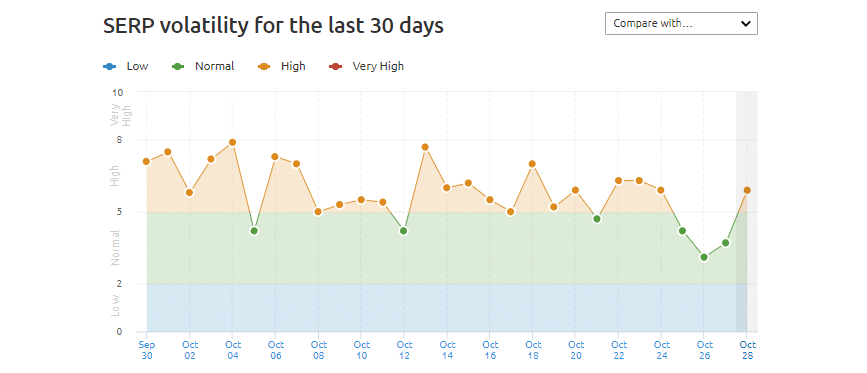
Despite these indexing issues being resolved, volatility in the search engine results pages (SERPs) according to SEMrush appears to have been higher than normal for 23 of the past 30 days. Believe it or not, the 30 days preceding what you can see in this graph actually looked worse.

Google indexing problems - September/October 2020

It’s common knowledge that Google makes several updates to their algorithm every day, but with the indexing issues resolved, we shouldn’t be seeing this much volatility on a regular basis.

My professional experience has shown that Google will generally test core algorithm updates with a soft launch, then tweak them to hedge any unintended consequences and fully launch them several weeks later. My gut tells me that a larger than normal algorithm update test was made in early September 2020 that accidentally broke their systems, and big changes are yet to come.

Need Guidance from Digital Marketing Pros?

There’s a good chance that you weren’t aware of these SEO developments until now. Following the latest search engine trends can be an exhausting task, but one that MARION’s team can take off your busy schedule.

MARION is a trusted Texas marketing agency that has been serving local businesses for nearly 40 years. Our Dallas, Houston, and Austin SEO services have evolved with the times to ensure our marketing partners have campaigns that align with the latest search engine developments.

Schedule a free, no-obligation marketing consultation with MARION today to learn how we can help your website and SEO efforts succeed despite a shifting landscape.

Marketing emails you’ll actually want to read.

Get marketing tips and news sent to 
your inbox.

This field is for validation purposes and should be left unchanged.
Name(Required)


Collapsible Content SEO – Click to Expand, Tabs, & Accordions

Hidden content has been on Google’s radar since the beginning, and it continues to be a high-visibility theme within the SEO community. Today, the conversation surrounding hidden content has moved past blatant shady SEO techniques to thoughtful user experience questions about how click-to-expand buttons, accordions, tabs and SEO work.

The “Wild West” days of SEO when marketers would use CSS to hide keyword-optimized content on their pages has come to an end (thanks to the Panda algorithm update in 2011), but mobile-first indexing has raised new questions.

How does collapsible content affect SEO in a mobile-first world?

What Is Collapsible Content in SEO?

Collapsed content is content that is hidden by tabs, accordions, click-to-expand buttons, or display:none styling. Google began its mobile-first indexing push in July 2019, meaning that websites are indexed based on their mobile user experience (UX). Collapsible content is a valuable and expected part of mobile UX, which has prompted SEO professionals to wonder how this functionality affects search rankings.

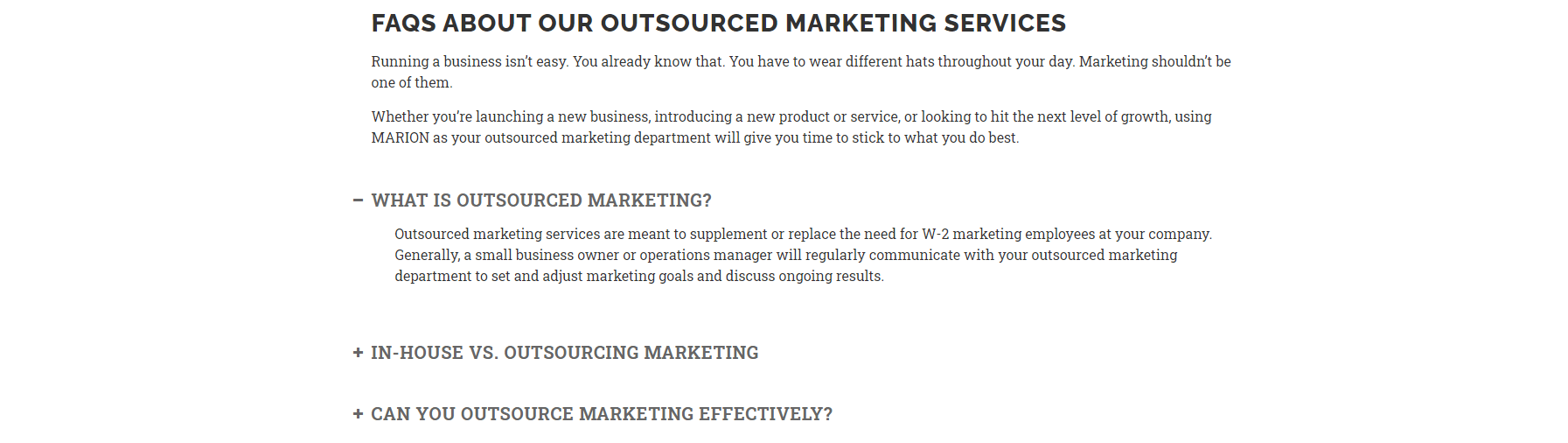
Accordion SEO Example

accordion SEO

SEO for accordions generally involves one or more text headings with a +/- button used to expand or hide different questions. Accordions are a popular way to display frequently asked questions lists on both desktop and mobile to make it easier for users to quickly find their question and answer from a long list of concerns.

Tabbed Content SEO Example

tabbed content SEO

Tabs and SEO involve a text box with set dimensions that will display different content based on which tab is active. The main question that the SEO community has about this functionality is whether the default open tab is weighted more than the tabs that are hidden when the page loads.

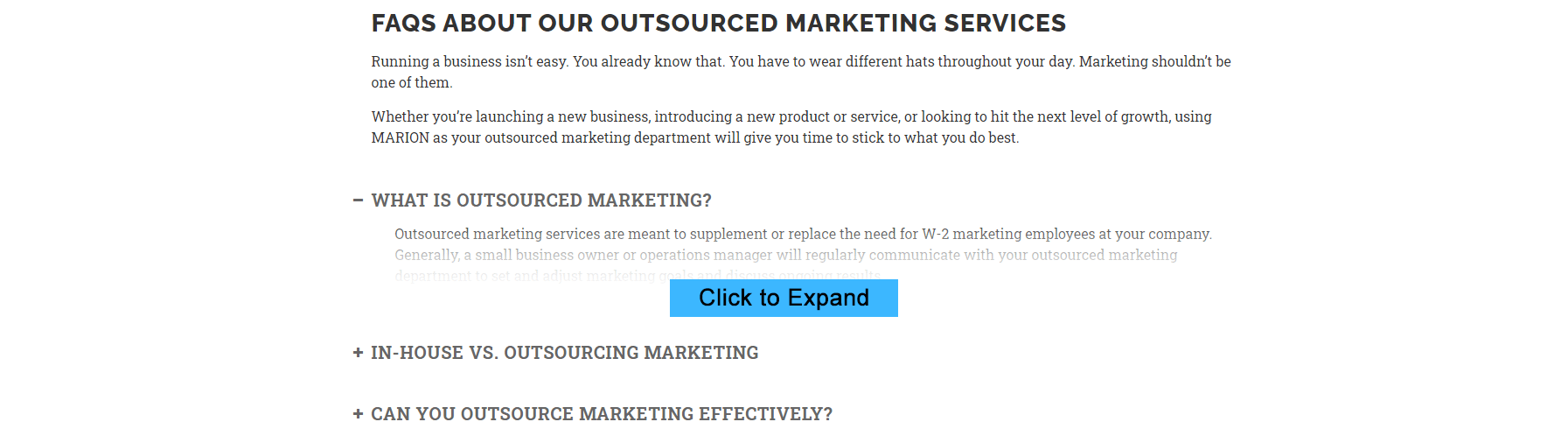
Click-to-Expand SEO Example

click-to-expand SEO

Click-to-expand buttons are frequently used to measure a user’s interest in page content. This functionality is very popular for large publishers wanting to measure how far readers make it down a page by forcing them to click a button to reveal more text.

Search Engine Optimization professionals have been left to wonder whether the hidden text is valued as much as the copy that is automatically visible.

Display:None; Google SEO Example

Display:none is a property/value rule set in CSS that can be used to hide any HTML element on a page. By combining the display property with JavaScript, website developers can create any of the functionality above (accordions, tabs, click-to-expand) to show or hide selections of content from users. There is no example pictured for this property, as it is an underlying component of each of the above examples.

As phone screens are much smaller than a computer monitor, hiding blocks of content by default and only showing them when a web user expresses interest has become a UX best practice.

SEO and Collapsed Content Over the Years

There has been confusion over the past five years about “hidden” content and where the line is drawn. If your website uses accordions, does Google weight the hidden content as much as page content that is automatically visible?

Originally, Google made it clear that content that isn’t visible when a page loads is not as valuable as content that loads by default. After the introduction of mobile-first indexing (meaning that Google ranks pages based on what they look like on a mobile device instead of a computer), Google’s story on this matter changed.

However, there are still reports from SEO professionals that claim rankings and what Google representatives have said about collapsible content do not align. Here’s what the MARION SEO agency has aggregated about this topic.

Collapsed Content in 2014

Well-known digital marketer, Barry Schwartz, mentioned the following observation to Google spokesperson John Mueller in a November 2014 Google Hangout.

“So, you know how Google started to fully render a page as a user would see it? So, I see reports that, when you have, like, on the website “click to expand” to show more content, that since, that Google’s ignoring the content in that “click to expand” because a user doesn’t see it unless they click to expand.”

John Mueller replied, “I think we’ve been doing something similar for quite a while now, where, if we can recognize that the content is actually hidden, then we’ll just try to discount it a little bit. So that, uhhh, we kind of see that it’s still there, but the user doesn’t see it, therefore it’s probably not something that’s critical for this page. So, that includes like the click to expand, that includes the tabbed UIs where you have all kind of content hidden away in tabs… those kind of things. So, if you want that content rally indexed, I’d make sure it’s visible for the users when they go to that page.

Summary: Google discounts content that isn’t visible when a page loads.

Collapsed Content in 2016

Two years later in 2016, a Twitter user asked Google spokesperson Gary Illyes, “on desktop content in page elements like accordions is devalued or not indexed. Is this the same when crawling mobile content?”

Gary Illyes replied, “no, in the mobile-first world content hidden for ux should have full weight.”

Summary: Content that isn’t visible when a page loads “should have full weight.”

Collapsed Content in 2020

John Mueller from Google was asked this question in a March 2020 Google Webmaster Hangout: “In the mobile-first indexing world, will the, hidden text, hidden content behind tabs and accordions still be devalued, for example, because there’s a lower chance that it will be seen by a user?”

Mueller replied, “No. Specifically when it comes to content on mobile pages, we do take into account anything that’s in the HTML. So, if there’s something there that might be visible to users at some point, we will include that in the indexing, so that’s completely normal.”

Summary: Content that isn’t visible when a mobile page loads but might be visible to users at some point is indexed.

The Final Word on Tabbed Content, Accordions, and Click-to-Expand Text on Mobile

According to Google, when collapsible content functionality is used on mobile devices it should have full SEO weight.

On a personal note, I tend to process statements from Google spokespeople as legalese because keeping certain aspects of their algorithm a secret can prevent rankings from being manipulated.

If you analyze the Google statements above from that frame of mind, you’ll notice:

  • The use of “should” in the 2016 statement
  • The focus on “mobile pages” in the 2020 statement.
  • The focus on inclusion in indexing without mentioning the effect hidden content has on “rankings” in the 2020 statement.

I believe that statements from Google representatives are generally true, but the assertions within these statements are often muddled. I also recognize that there is a significant amount of machine learning happening within Google’s systems, which can make it hard to isolate rankings factors with 100% certainty.

You Deserve to Rank – MARION Has You Covered

MARION has been providing quality marketing support to Texas businesses since 1981, and we’ve evolved with the times. Whether you’re looking for an outsourced marketing department, or simply a one-time marketing project – our marketing team can help.

Our local SEO services have been helping Texas businesses generate consistent leads, and we’ve got the case study to back us up.

Contact us today to schedule a free marketing consultation with a MARION team member, and we’ll start you down the path to marketing success!

Marketing emails you’ll actually want to read.

Get marketing tips and news sent to 
your inbox.

This field is for validation purposes and should be left unchanged.
Name(Required)


Cumulative Layout Shift (CLS) – Important Ranking Factor

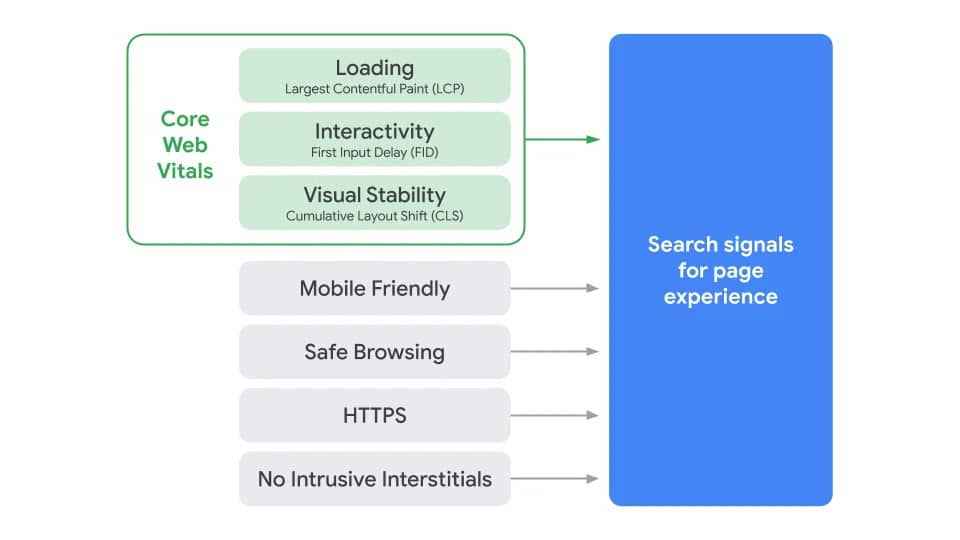
For years, Google has been introducing ranking factors centered around the user experience (UX) on your website. Elements like offering safe browsing, mobile-friendly pages via responsive web design, non-intrusive pop-ups, and using an HTTPS connection are examples of these UX search signals.

A new ranking signal has entered the SEO game and is expected to go into effect during 2021. The new signal is called Cumulative Layout Shift, and is a one of the three Core Web Vitals Google uses to gauge page experience on your site.

What Is Cumulative Layout Shift (CLS)?

Cumulative Layout Shift is a measure of the stability of the elements on a web page. If the visible elements on your page move around a lot within a user’s viewing screen, you likely have a high CLS score.

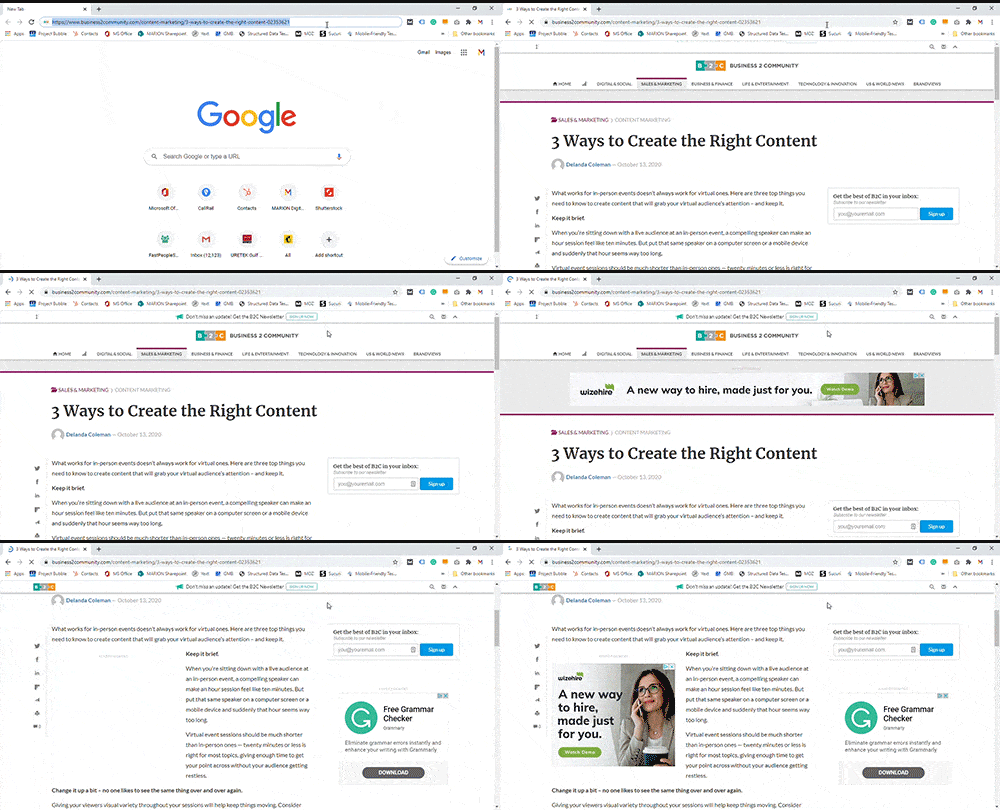
You’re reading a news article and go to click on a link, then—NO!— the page shifts down and you end up clicking something else entirely. If this describes an interaction you’ve experienced before, then you’re already familiar with CLS.

Cumulative Layout Shift is a Core Web Vital within Google that is scored like golf – the lower the shift of your page, the better. CLS can occur because of third-party advertisements, font changes during page load, or videos and images without set dimensions.

cumulative layout shift example

The gif above is an example of a high Cumulative Layout Shift on a news website due to third-party ads. Seconds after the initial page load, advertisements cause the HTML content on the page to shift.

Why Is CLS Important?

In May 2020, Google announced that Cumulative Layout Shift (along with several other Core Web Vitals) will become a ranking signal in 2021. They made it clear that webmasters will be given a six-month notice before this new signal goes into effect.

cumulative layout shift (CLS) - search page experience

Source: Google Webmaster Central Blog

In other words, keeping a stable page that loads quickly will become more important to your Google rankings than ever before.

How to Fix Cumulative Layout Shift

Cumulative Layout Shift can be mitigated by taking the following measures.

  • Always set image/video dimensions
  • Avoid using third-party advertisements on your site without specifying their container’s  predetermined dimensions
  • Don’t use fonts and back-up fonts above the fold on a page

If making these changes are out of your realm of expertise, then our team can help. MARION’s web design in Austin, Houston, and DFW can help with the technical issues that affect your site.

Get Help with CLS from the Pros at MARION

Not only are we versed in web design and development, but we are a full-service SEO agency in Austin, Houston, DFW, and every place in between. MARION has been providing marketing services for Texas businesses since 1981, and we practically started offering SEO services when search engines were born.

Contact us today to schedule a free consultation regarding your company’s marketing growth!

Marketing emails you’ll actually want to read.

Get marketing tips and news sent to 
your inbox.

This field is for validation purposes and should be left unchanged.
Name(Required)


Why Is My Website Not Showing Up on Google? – How to Get on Google

A website not showing up in Google can be a MAJOR problem. However, MARION offers SEO services, so taking our word for it would be like asking a barber if you need a haircut. Instead, consider the following stats.

B2B researchers conduct an average of 12 online searches before engaging with a company. If B2C SEO stats are more relevant to your situation, did you know that 72% of consumers that perform local searches end up visiting a store within five miles?

These statistics make it very clear that learning how to make your website show up on Google is a key part of success in today’s business climate.

There’s a good chance you’re reading this today because you’ve been wracking your brain over a very important question – Why is my website not showing up on Google??

Is My Site on Google?

If you’re asking, “Why is my website not on Google?” you could really be interested in learning two separate things.

  1. Why is my site not being indexed by Google?
  2. Why is my site not ranking on Google?

If you’re new to SEO analysis, you may not realize that these are two different issues. If your site is truly not available in Google, there is likely a technical reason that can be resolved. However, if you conducted a couple of searches for what your company offers and your site isn’t showing up, you may just need some help with optimizing your website.

For the purposes of this article, imagine that the domain name of your website is yourwebsite.com.

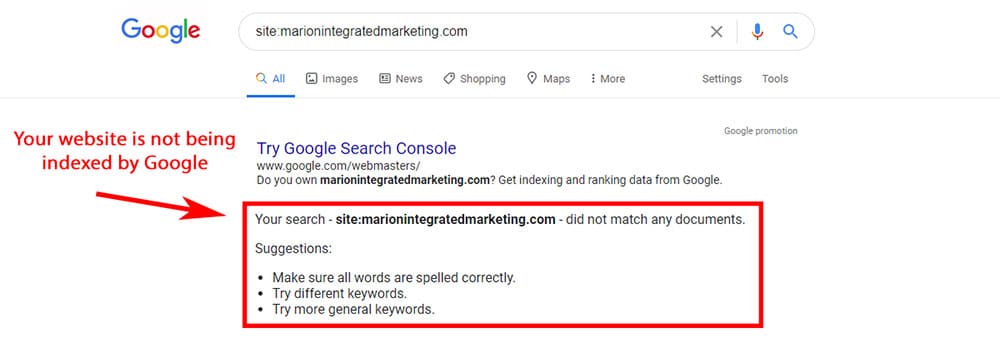
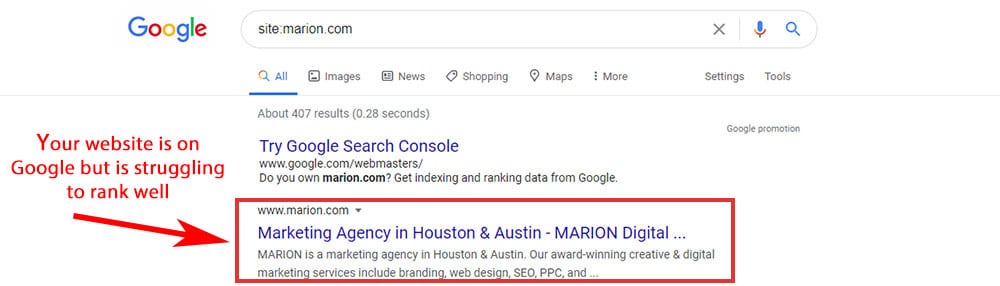
To clear things up, do a search for “site:yourwebsite.com” to definitively see if your site it being included in Google.

If your site is not on Google, you will see search results that look like the following image.

why is my website not being indexed by Google

If your site is on Google but isn’t ranking as you expect it to, you will see search results like the following image.

why is my website not ranking on Google

8 Reasons for a Website Not Showing Up on Google Search

Whether your site is truly not being indexed by Google, or it is just struggling to rank, there are eight common causes that might be impacting your organic search visibility.

  1. Your Site Is Too New
  2. Crawlers Can’t Access Your Site
  3. Search Engines Are being Instructed Not to Index Your Site
  4. Your Site Is Considered Duplicate Content
  5. Your Domain Has a Google Penalty
  6. Your Site’s Content Isn’t Good Enough
  7. Your Site Doesn’t Have Enough Backlinks
  8. Your Website Isn’t Trustworthy

Causes 1 – 5 explain why Google may not be indexing your website.

Causes 6 – 8 explain why your site is being indexed but is not ranking appropriately.

1. Too New – Your Site Isn’t Indexed Yet

A common misconception is that Google ‘IS’ the internet, and if you launch a new website, Google should already know about it. Fortunately for everyone, that is not the case. Google merely identifies a small percentage of available web pages using its web crawlers and includes them in its database.

In Google’s own words, “Crawlers look at webpages and follow links on those pages, much like you would if you were browsing content on the web. They go from link to link and bring data about those webpages back to Google’s servers.” Thus, if other websites aren’t linking to yours, it is difficult for Google to find your freshly minted site.

If you’re interested in learning how to start SEO for new websites, there are two key ways that you can let Google know that your site exists.

Submit Your Sitemap

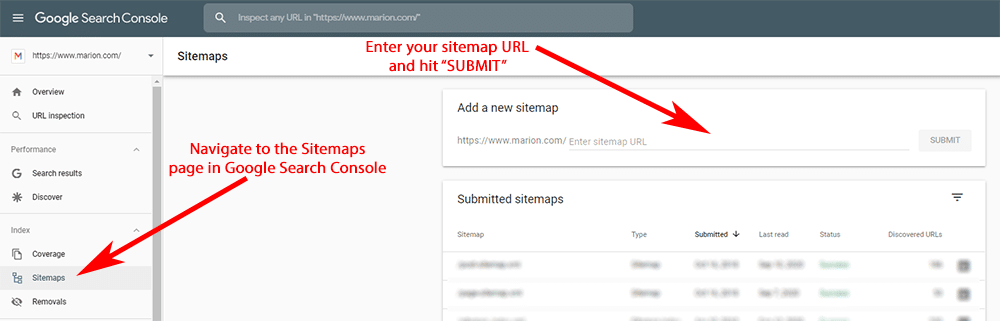
You can submit your website’s sitemap so Google has access to a complete list of your pages. To submit your sitemap, you’ll need to register your website with Google Search Console.

why isn't my website showing up in Google Search - sitemap

Open your Search Console admin panel and click on “Sitemaps” in the left-hand navigation. Then enter the last part of your sitemap URL and hit “SUBMIT.”

Manually Request to Be Indexed

If you don’t want to submit an entire sitemap, you can request that individual pages on your website be indexed by Google. To be clear, this only adds your web page to Google’s database of pages but does not guarantee that it will rank well.

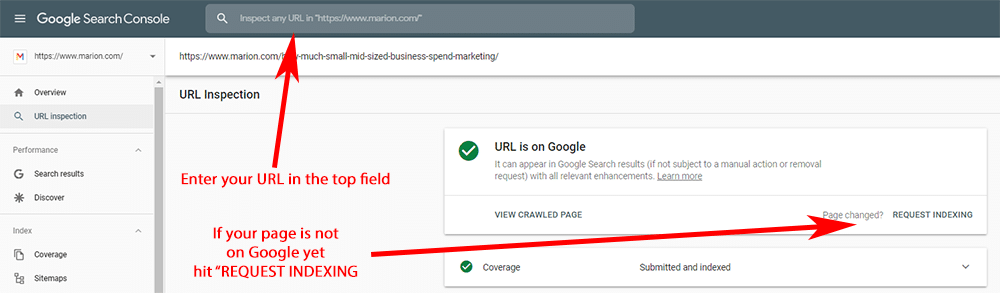
In your Search Console admin panel, enter the page URL you wish to be crawled in the very top field, then hit enter. Google will indicate whether your page has already been indexed. If it has, then you just need to optimize your web page for better rankings.

new website not showing up on Google - submit manually

If your page hasn’t been indexed, hit “REQUEST INDEXING,” and Google will add your page to its waiting list. Your page should be indexed within a couple of minutes.

2. Search Engine Robots Can’t Crawl Your Web Pages

If you’re not a web developer, chances are you don’t have a good grasp on HTML (the code with which most web pages are built). If you find yourself asking – Why isn’t my website showing up in Google Search? – you may be accidentally blocking it from Google’s web crawlers.

Robots.txt

A robots.txt file is like a guest list at a party – if a crawler (also called a User-Agent) isn’t on the list, it can’t enter your site. Put simply, your robots.txt file tells Google and other robots which of your pages should not be crawled.

Your robots.txt file must be in the top-level directory of the host. In other words, it should be located at yourwebsite.com/robots.txt. Not all search engine crawlers (also called “robots” or “bots”) will respect the rules in your robots.txt file, but Google and Bing typically will. This helps prevent search engine crawlers from overloading your site with requests and accidentally crashing it. A complete list of rules is available from Google.

Look at your robots.txt file to make sure you’re not accidentally blocking some or all your web pages. Even if your site is disallowed via your robots.txt file, Google may still index your pages if other third-party websites are linking to it. However, blocking your site via the robots file could severely limit your visibility on Google.

3. Search Engines Can’t Index Your Web Pages

Even if Google can crawl your website, that doesn’t mean that your web pages can be indexed. You can use HTML snippets in the coding of your web pages called meta robots that tell Google not to list your web pages in the search engine results pages (SERPs).

Meta Robots

Meta robots can be used to do several things, but the most common uses are to prevent Google from indexing a page or following a link on your page. See an example of meta robots HTML below.

<meta name="robots" content="noindex, nofollow" />

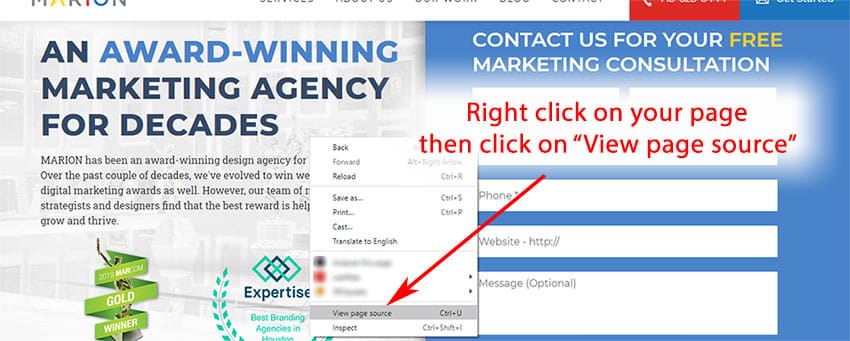
If your site is not showing up in Google Search, check to see if you are accidentally using meta robots tags to keep your site from being indexed. Right-click on the page in question, then select “View page source” to access the HTML view.

why isn't my site showing up on Google - meta robots

I recommend doing a search and find for <meta name=”robots” at that point. If the meta robots content includes “nofollow,” then you’ve found the reason why your web page is not showing in Google Search.

“Discourage search engines from indexing this site” in WordPress

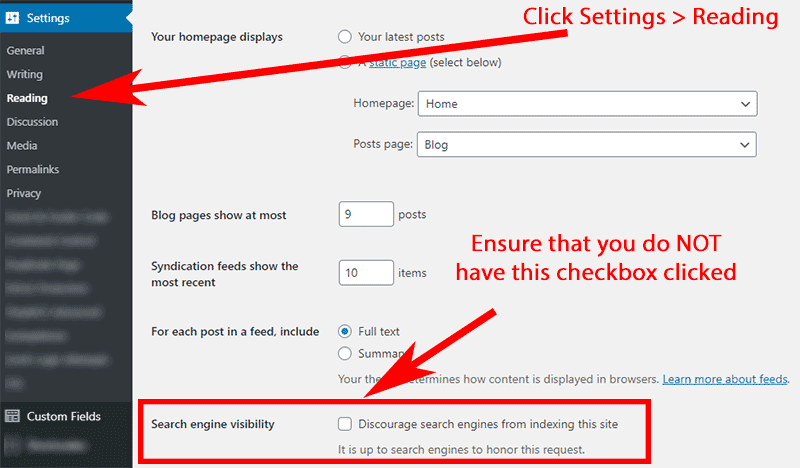
If your website is based on WordPress, then be aware that a single checkbox could implement the “noindex” meta robots tag on all of your pages. Make sure the checkbox next to “Discourage search engines from indexing this site” is not clicked in the Settings > Reading page in your WordPress admin.

is my site on Google - WordPress setting

4. Your Site Is Considered Duplicate Content

Some business owners that are new to SEO strategy may not be aware that your business web pages must contain unique content. If a large percentage of your page content matches the content on another page (either on your site or someone else’s site), then it could be deemed duplicate content.

A page that is considered to be a duplicate will not be indexed by Google. So, if your main SEO strategy is to repost popular industry blog posts, you should not anticipate seeing your pages in Google Search.

Canonical Links

If you must post duplicate content (maybe you want to repost an old blog post or publish it on another website to share with a new audience), then use a canonical link to indicate which URL is the original. This will prevent any surprises about which page Google decides to show in the SERPs, and which page is considered the duplicate.

A canonical link should go in the <head> of a web page. An example of canonical HTML code can be seen below:

<link rel="canonical" href="https://yourwebsite.com/"/>

5. Your Domain Has a Google Penalty

If you still don’t see your website in Google Search, your domain name could be the owner of a manual webspam action from Google. Manual penalties mean that Google’s team of real-life spam monitors have analyzed your site and determined that you are involved in some manipulative practices.

If you’re not familiar with SEO, it’s unlikely you caused this directly. However, there are two highly likely causes.

First, if your domain name isn’t new and you’ve purchased it from someone else, you could have inherited a domain that Google previously flagged with a penalty.

Second, if you’ve been working with a low-budget SEO company, there is a chance they built some spammy backlinks to your site and landed you a manual penalty. For reference, learn how to choose an SEO company before signing an agreement with an outside firm to prevent this from happening.

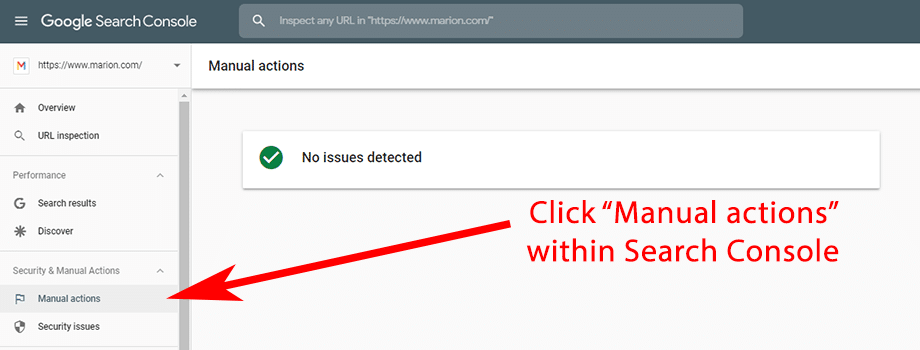
Remember Google Search Console from section #1? If you have Search Console set up for your website, navigate to the “Manual actions” report to see if your site has a manual webspam penalty against it.

why isn't my website showing up on Google - manual penalty

If your report shows that no issues were detected, then keep looking for the cause of your missing website.

If your Manual actions report shows that you do have a penalty against your domain name, get the help of an experienced and trustworthy SEO company to help you resolve this issue.

Manual Action vs. Algorithmic Penalty

Checking Search Console to see if you have a manual action is straightforward. However, Google’s algorithm can also prevent your site from showing in search (without the help of their webspam team).

Generally, algorithmic penalties happen when you’ve over-optimized your website using old school tactics. For example, if your top navigation or footer are packed with keyword-rich links to your product/service pages, you could be over-optimizing and preventing your pages from showing in Google.

An algorithmic penalty is generally easier to recover from than a manual penalty since your domain name isn’t in Google’s naughty list. However, it can be difficult to identify when you’ve overdone it. If you suspect your site is the victim of an algorithmic penalty, get a local SEO firm to audit your website.

6. Your Site Doesn’t Have Good Enough Content (Lacking Expertise)

You’re asking, “Why isn’t my website showing up on Google?” Causes six, seven, and eight on our list pertain to you if you’ve gone through our litmus test at the beginning of this article and determined that your site is technically indexed. The real issue with your website is that it’s not ranking anywhere near page one, making your virtually invisible to potential customers.

Our SEO agency in Austin, Houston, and DFW can help you attract an audience of potential customers in the near term. Contact a member of our team today to schedule a free consultation.

Content Isn’t Optimized

What makes an effective business website? Most small business owners don’t have a clear idea.

Have you ever heard the phrase, “If you build it, he will come?” from the 1989 film, Field of Dreams? Unfortunately, this is the mindset that many small business owners (AKA SEO novices) adhere to when it comes to building and managing their websites.

However, if your website content only consists of what you think your target audience wants to hear, you will consistently miss the mark and underperform. SEO-friendly website design requires hours of Keyword research, competitor analysis, and thoughtful content writing.

If you’re shooting from the hip when it comes to creating content for your business website, this may be why your site isn’t showing up in Google. MARION provides content marketing in Houston, Austin, and DFW that can help turn your low-performing site into an effective business website.

Content Doesn’t Match Searcher Intent

A lesson common possibility reason that your website isn’t showing in Google Search is that your content is good, but not what users need. For example, if you write an incredibly complex blog post about shoes – their origin, different styles, how long they last – your web page still stands a very slim chance of ranking for “shoes” when Google users conduct a search.

Despite doing the topic & keyword research and creating quality content, your web page doesn’t match the intent of what the searcher is looking for.

To prevent this issue from suppressing your website on Google, always do a quick Google search of your own during the keyword research stage. For example, if you’re doing manufacturing SEO for an upcoming web page about “centrifugal pumps,” do a Google search to see what the results look like.

Some of the results might be blog articles about centrifugal pumps, while others may be product pages attempting to sell pumps. Whatever the type of content, make sure that you create the right type of content so that users will find your web page useful once it is optimized and published.

MARION’s content marketing in Austin, Houston, and DFW can help turn your site into a powerful revenue-generating machine. Contact us today to put a free consultation on your calendar.

7. Your Site Doesn’t Have Enough Backlinks (Lacking Authority)

Once you’ve determined that your pages are technically indexed but not ranking, backlinks are a popular factor to consider. Google’s ranking algorithm was originally based on the interlinking of websites. If other websites hyperlink to your website frequently, that’s a good sign that your pages are high-quality and deserve to rank highly.

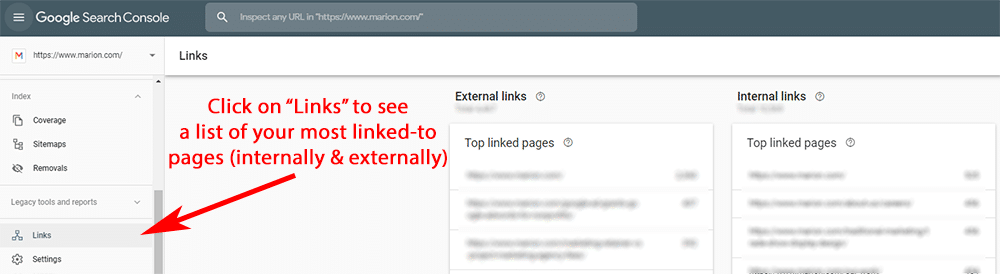
To see how many links your web pages have from third-party sites and internally between your own pages, navigate to Search Console, and open the Links report.

why won't my website show up on Google - links

If your pages don’t have many links, a good place to start is by using a tool like Yext or Bright Local to set up local listings for your site. This accesses tens (even hundreds) of directory listing sites that list your business contact information and a link to your homepage. This builds a baseline of backlinks from established websites that can help establish your site’s authority.

In addition to directory listings, creating high-quality blog articles, useful guides, and free tools on your website is a great way to offer valuable content to which external websites frequently link.

8. Your Site Lacks Trustworthiness

If you’re still struggling to make your website show up on Google, you may be having trust issues. No, literally, there are certain web design components that indicate your website belongs to a legitimate business and deserves to show up frequently in Google Search.

MARION is well versed in B2B web design, and our DFW, Austin, and Houston web design company can help structure your website in a productive manner. Contact us for more help today.

Terms of Service, Privacy Policy, About Us Page

While they may seem like nice to have items, a Terms of Service (TOS), Privacy Policy, and even an About Us page can be important for SEO. Low-quality sites generally avoid creating these pages because they aren’t running legitimate businesses and don’t know about the legal standards required to operate in the digital marketing arena today.

For example, according to the EU General Data Protection Regulation (GDPR), there are certain privacy notices you must clearly present to website users if you operate in the EU. For multinational and global businesses, having these trust components aren’t just good signals that you’re operating a high-quality website, but they’re legitimate legal requirements.

Including a thoughtful website privacy policy is a common element of digital marketing for manufacturing companies that we encounter at MARION. Even outside of manufacturing web design, including an About Us, Privacy Policy, and TOS page can let visitors and search engines know that you mean business.

Few (or Bad) Customer Reviews on GMB and Third Parties

If your presence on industry-relevant third-party review sites is thin or non-existent, your website’s visibility on Google will follow suit. Google My Business (GMB) is one of the most common review platforms for businesses and has a powerful impact on local SEO results. The more positive reviews you have on GMB, the more likely your business is to show up in map pack results for local searches.

Learn how to get Google reviews for your business to quickly improve the trustworthiness of your website.

Not Using HTTPS

In August 2014, Google announced that using secure encryption on your website (HTTPS) was officially a lightweight ranking signal. Switching from HTTP to HTTPS is less of an issue today, as most websites have adopted the practice. However, if you’re still using HTTP for your website, it could be a leading cause of why you’re struggling to rank.

How to Get Your Website on Google

Learning how to get your website to show up on Google has many subtleties, but there are a few basics that can get your started.

  1. Make sure robots.txt and meta robots tags are not keeping your site from Google.
  2. Submit your sitemap in Google Search Console.
  3. Request indexation in Google Search Console for your key web pages.
  4. Create unique, high-quality content that matches searcher intent.
  5. Encourage external sites to link to the resources on your website.
  6. Include common trust signals that will leave a good impression on your site visitors.

This is an oversimplified plan to make your website show up on Google. If you need help from an experienced digital marketing agency in Texas, the strategists at MARION are ready to assist!

MARION Can Help Get Your Website to Show Up on Google Search

MARION has nearly 40 years of experience helping Texas-based businesses thrive. We create customized marketing strategies that resonate with your target audience and turn your website into a revenue-generating machine.

Contact us today to schedule a free consultation if your website isn’t showing up on Google, and we’ll help you create a plan for success.

Marketing emails you’ll actually want to read.

Get marketing tips and news sent to 
your inbox.

This field is for validation purposes and should be left unchanged.
Name(Required)

The Google Search Terms Report Is Being Weakened

As a paying customer in any situation, you like to know what you’re getting. Unfortunately, an upcoming change to Google Ads that limits advertiser access to search term data will be breaking that unspoken contract under the guise of “privacy.”

But first, let’s make sure you understand what search terms are within Google Ads, and why this change has marketers up in arms.

What Are Search Terms in Google Ads?

Search terms are the exact searches that Google users conduct that result in your ad being clicked. For example, if you’re running ads for marketing services, a Google user might use the search term “marketing services near me,” and then click on your result in Google Ads.

Google search term traffic report being limited

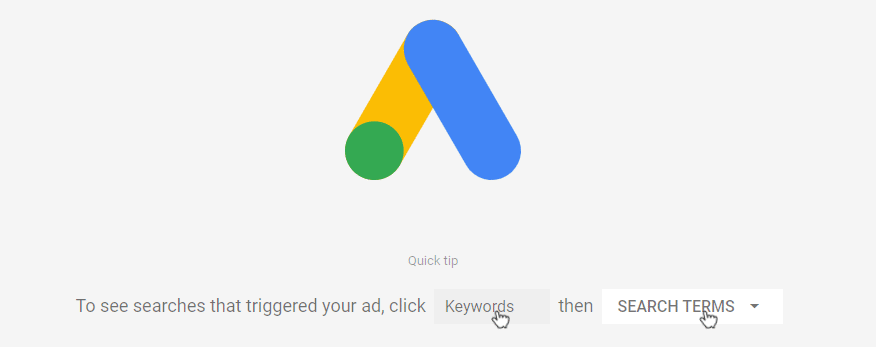
As an advertiser, Google recommends that you “Use the search terms report to see how your ads performed when triggered by actual searches within the Search Network. Identify new search terms with high potential, or see how closely actual searches are related to your selected keywords.”

Search Terms vs. Keywords

In the Google Ads platform, keywords and search terms are different entities. A keyword is essentially a rule for where you’d like your ads to appear within Google Search. Keyword match types include:

  1. Broad Match
  2. Phrase Match
  3. Exact Match

MARION provides pay-per-click in Houston, Austin, DFW, and everyplace in between, so we understand the subtleties of keyword match types in Google Ads. In the three sections below, we’ll identify three keyword match types, and examples of search terms (shown as bullet points) that fit into each type.

Broad Match

In a broad match keyword, any one of the words in your keyword phrase can be used in any possible order. Individual words can even be replaced by “equivalent” words as Google desires. As an example, if you were to use ‘marketing services’ as a broad match keyword in Google Ads, your ad could be served to users using the following search terms:

  • Services for marketing
  • Marketing best practices for services providers
  • Advertising services
  • Marketing services near me

Phrase Match

Phrase match keywords can include additional terms before and after your keyword, but they cannot be injected between your specified keywords. Examples of search terms that could occur under a phrase match keyword for “marketing services” include:

  • Best marketing services
  • What are marketing services
  • Marketing services near me

Exact Match

Traditionally, and exact match keyword was only shown when a user’s search term exactly matched your keyword. In 2018, Google broadened the flexibility of exact match keywords by allowing their system to “Match the intent of a search with close variants.”

Keeping these changes in mind, examples of search terms that fall under the exact match keyword type for “marketing services” might include:

  • Marketing services
  • Marketing service
  • Services for marketing

Search Terms Report in Google Ads Is Being Limited

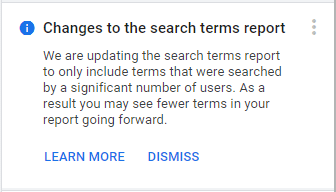
As of September 2020, Google has been giving the following notification to advertisers within their Google Ads accounts, “We are updating the search terms report to only include terms that were searched by a significant number of users. As a result, you may see fewer terms in your report going forward.”

Google search terms report

What does this mean for advertisers that use Google Ads?

Collin Slattery gave a great case study breakdown on Twitter of how hiding Google search term traffic data could impact an advertiser with a $120,000 budget over six months.

The $120k budget was spread across 26,000 search terms, and 44% of the budget was allocated toward search terms with 5 clicks or less. 30% of the total budget was spent on search terms with a single click.

This makes it incredibly important to understand what Google’s new policy means when it says it will only include, “terms that were searched by a significant number of users.” If “significant” means search terms that are clicked more than five times, PPC advertisers may end up losing data for around 44% of the search terms for which their budget is being used.

Google Ads search term popularity being hidden

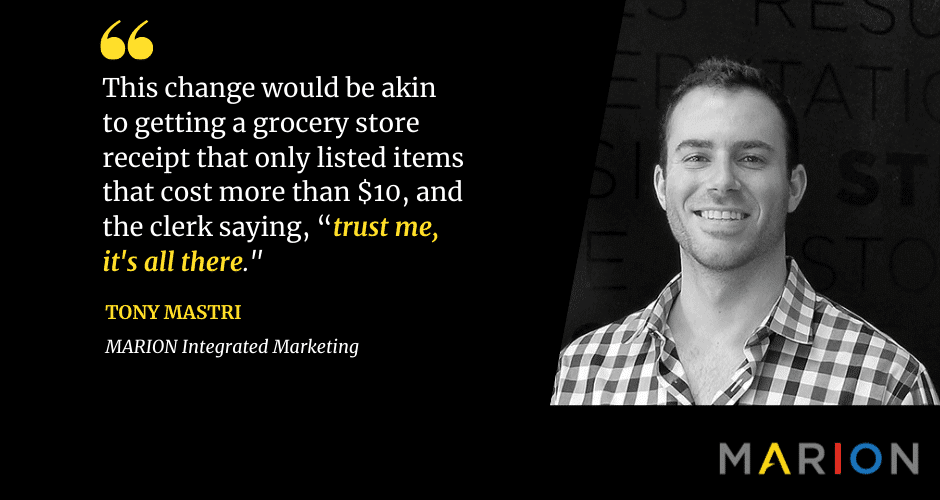
This change would be akin to getting a grocery store receipt that only listed items that cost more than $10, and the clerk saying, “trust me, it’s all there.” A significant portion of what you paid for would remain a mystery despite paying for the privilege to take those items home.

Recapping the Purpose of the Search Terms Report

As a reminder, Google’s own description of the search terms report recommends that you, “Use the search terms report to see how your ads performed when triggered by actual searches within the Search Network. Identify new search terms with high potential, or see how closely actual searches are related to your selected keywords.” If a significant portion of this data is hidden, the following may occur.

  • You will be less effective at seeing “how your ads performed when triggered by actual searches.”
  • You won’t be able to identify as many “new search terms with high potential.”
  • You won’t be able to “see how closely actual searches are related to your selected keywords.”

Several developments to Google Ads over the past years have moved the platform toward acting as more of a black box. This had led to less and less data about how your ad budget is being spent while spending it all the same.

Efforts to Prevent the Hiding of Data in the Google Ads Search Query Report

A team of marketers has recently taken to Change.org to start a petition to prevent Google ads from hiding data about search term popularity within advertiser accounts. For advertisers that like to know what they’re spending their money on, signing the petition might interest you.

MARION Can Help with Your Pay-per-Click Campaigns

MARION keeps a finger on the changing Google Ads landscape so that you don’t have to. We have years of experience with PPC in Austin, Houston, and DFW, and are eager to help your business get results!

Contact our team today for more information about how our digital marketing agency can help grow your business!

Marketing emails you’ll actually want to read.

Get marketing tips and news sent to 
your inbox.

This field is for validation purposes and should be left unchanged.
Name(Required)


SEO vs. Adwords

Search Engine Marketing as it relates to Google often centers around 2 different strategies – organic Search Engine Optimization (SEO) and Pay-Per-Click (PPC) Google Ads. They are distinctly different, involving different tactics and marketing KPIs.

For the inexperienced digital marketer, these two digital marketing strategies can ultimately cannibalize one another. But when implemented properly and with expert care, SEO and Google Ads can help each other and create a well-rounded digital marketing strategy.

So, what is SEO, and what are paid Google Ads? What are the differences between SEO vs. Google Ads? How does Google Ads help organic search, and in turn, how does SEO help Google Ads?

Google Ads vs. SEO

For the most part, Google Ads and SEO share one large, overarching goal – to drive as much relevant traffic to your site from search engines as possible. But when it comes to the approach and the tactics deployed and steps taken to achieve this goal, that is where paid search ads and SEO differ.

What Is SEO?

SEO and Google Ads

SEO, as we mentioned before, is Search Engine Optimization. It is the process of optimizing your site to make it more favorable to users so that search engines rank it higher in the search results for certain keywords. Content curation and link-building strategies are a key part of an effective SEO strategy.

Advantages of SEO

The advantage of SEO is that you do not need to pay for each click generated organically. SEO could potentially be 100% free if you choose to DIY. Alternatively, SEO outsourcing to experienced marketing agencies can provide long term ROI, and the results are typically achieved more quickly.

Disadvantages of SEO

The main disadvantage of SEO is how time-intensive it is, even for the experts. You cannot reasonably expect any significant results in the short-term. SEO is also a continuous, ever-evolving process. You may be getting some very positive results today but find yourself ranking at the bottom of the 4th page tomorrow after an algorithm update. Even when you achieved the results for which you are hoping, you must continue to optimize your site to maintain your ranking.

Another disadvantage lies in the fact that you need technical know-how to be truly effective with your SEO efforts. You could invest all of the time in the world in your SEO, but if you are focusing on the wrong topics and/or are not implementing them properly, you will not achieve the results you are hoping to achieve.

MARION offers SEO in Austin, Houston, and DFW, and our team of marketing strategists has been serving Texas for nearly 40 years. Get a free consultation today!

What Are Google Ads?

Google Ads vs. Organic

Google Search Ads (formerly called Google AdWords) are paid advertisements that show up in the search results, typically at the very top and the very bottom of each page,

Advantages of Google Ads

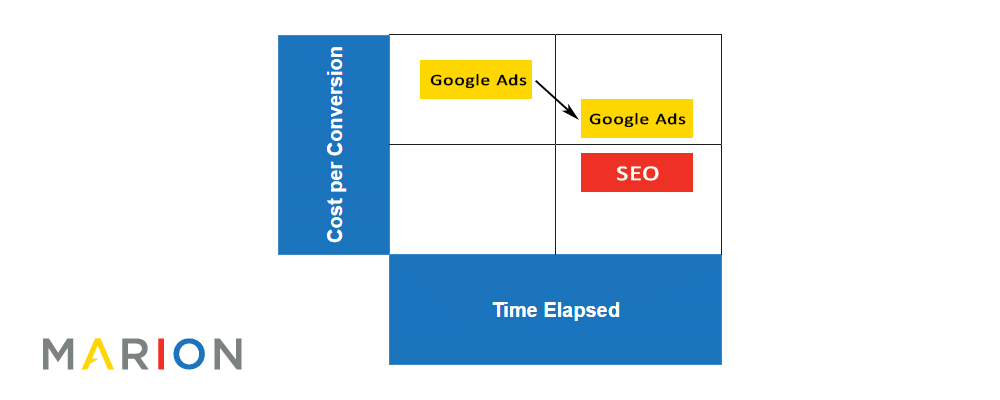
Whereas SEO is a time-consuming process that can take months before you start showing up on the first page, Google Ads enables you to show up at the very top of the first page almost immediately after setup. As soon as your ads are approved and your billing information has been entered, you will start generating impressions.

Disadvantages of Google Ads

The disadvantage of Google Ads is that you do need an additional budget to get visibility, as you pay every time someone clicks on your ads. If you do not have a high enough daily budget, you may not get any visibility. Another disadvantage lies in the fact that the moment you stop running ads, you will no longer have that visibility.

With SEO, on the other hand, if you have a really good foundation in place and have been steadily building on it, you will continue to have visibility even if you have decided to take a small pause.

organic SEO vs. Google Ads

The MARION team offers pay-per-click in Houston, DFW, Austin, and anywhere between. Contact our team today to see how we can help!

Does Google Ads Help Organic Search?

There are multiple different ways in which you can use Google Ads to benefit SEO. For one, the Google Ads platform has numerous tools and reports that help you glean insights not only for your paid Google Ads but also for organic search results as well.

For example, the Keyword Planner tool used in Google Ads to come up with keywords ideas to target in the ads can also be used for SEO to find high-volume keywords to focus on organically.

You can also use Google Ads to test out different meta titles and descriptions to improve your organic clickthrough rate (CTR) and/or on-page headings.

Does SEO Improve Google Ads?

Just as Google Ads can help SEO, SEO can also help improve paid Google Ads results. A key component of SEO is content. Likewise, a key component of paid Google Ads is content. In order to have high-performance ads, you need content on the page containing the keywords that you are targeting. Through close coordination between your SEO and Paid Ads teams, you can curate content that benefits both.

Keep in mind, Google Ads and organic rankings do not have an algorithmic impact on each other. There is no explicit signal between platforms that will cause your organic or paid rankings to increase just because you’re paying for ads or ranking well.

When and How to Use SEO and Google Ads

Though we may be a little biased given that we are a digital marketing agency that provides both SEO and Google Ads services, we are firm believers in the benefits of deploying both strategies simultaneously. This is especially important if you do not have a strong SEO foundation already and need immediate visibility. But there are several other scenarios in which it would be beneficial to use both.

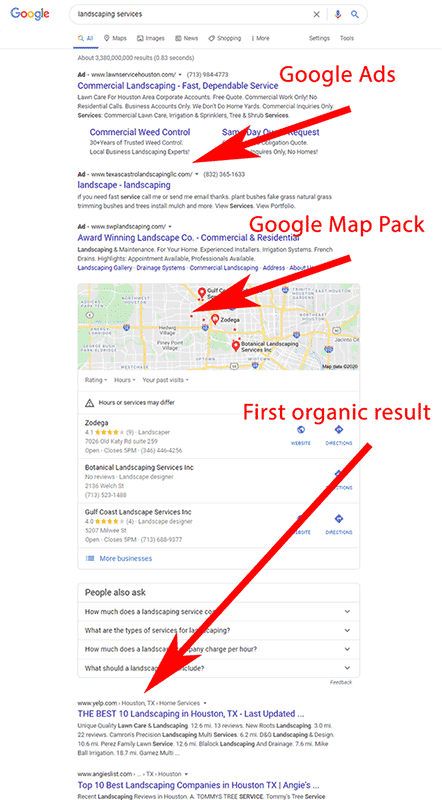
For example, if you decide to branch out and target a new area, service, or keywords that you have not targeted before, paid ads would be beneficial. Even if you do have a very strong SEO foundation and are ranking in the #1 spot across all of your desired keywords if there are a lot of competitors bidding for those keywords through paid ads your organic result could be pushed far down the page. This is particularly true for local results where a map pack is present. In those cases, it would once again be beneficial to pursue both paid Google Ads and SEO.

will Google Ads help SEO

Properly implementing both strategies at once can be complex to the inexperienced digital marketer. The goal is to deploy both strategies at once while ensuring that you are not paying for clicks that you would otherwise have captured for free. The way to do that is through close collaboration between your SEO and Google Ads teams.

There needs to be a consensus between what keywords will be used for paid Google Ads vs. SEO, with high ranking organic keywords being excluded from the paid ads list if there are no competitors for those terms. Google Ads has a predefined report titled “paid & organic” that can help you coordinate the two.  In this report, you can see search terms that people used to see your ads and whether or not there was a paid and organic overlap.

MARION Can Improve Your SEO and Google Ads Results

As a highly-acclaimed digital marketing agency in Texas, MARION has the expertise to implement effective SEO and Google Ads strategies that are sure to maximize the traffic (and future customers) to your site.

Contact us today to schedule a free consultation and learn more about what we can do for you.

Marketing emails you’ll actually want to read.

Get marketing tips and news sent to 
your inbox.

This field is for validation purposes and should be left unchanged.
Name(Required)