Category: Search Optimization (SEO)

Why is Link Building Important for SEO?

Link building is an important aspect of SEO that often gets overlooked by businesses. Yet, it’s one of the most effective ways to improve your site’s search engine ranking and drive organic traffic. In this blog, we’ll explore why link building is crucial for SEO, how it works, and some practical tips to get started.

What is Link Building?

Link building is essentially the process of acquiring hyperlinks from other websites to your own. A hyperlink, or simply a link, is a way for users to navigate between pages on the internet. Search engines use these links to crawl the web; they crawl the links between the individual pages on your website and those between entire websites.

Why Search Engines Love Links

Search engines like Google use complex algorithms to determine the importance and relevance of your website. Links play a significant role in these algorithms. Think of each link as a vote of confidence from one site to another. So, the more quality links you have pointing to your website, the more credible and authoritative your site appears to search engines.

The Benefits of Link Building

Link building isn’t just about getting clicks — it’s about building credibility, driving traffic, and climbing the search engine ranks.

Improved Search Engine Rankings

Links are one of the top factors that search engines consider when determining where to rank your site. As a matter of fact, links remain one of the most important ranking factors in Google’s algorithm. Websites with a higher number of quality backlinks tend to rank higher on search engine results pages (SERPs).

Increased Organic Traffic

Higher search engine rankings often lead to more organic traffic. When your site ranks higher, it becomes more visible to potential visitors searching for relevant keywords. Quality link building can help you achieve these higher rankings and drive more targeted traffic to your site.

Enhanced Credibility and Authority

When reputable sites link to your website, it signals to search engines and users that your content is valuable and trustworthy. This can enhance your site’s credibility and authority in your industry, making it easier to build trust with your audience.

Link Building for SEO

How to Build Quality Links

Ready to boost your website’s visibility? Here’s how to get started.

1. Focus on Relevant, High-Quality Sites

Not all links are created equal. A link from a highly authoritative site like a major news outlet or an industry-leading blog is worth more than multiple links from low-quality sites. Focus on building relationships with reputable websites that are relevant to your industry.

2. Create Shareable Content

One of the best ways to attract quality backlinks is by creating high-value, shareable content. This could be in the form of blog articles, infographics, videos, or research reports. Content that provides valuable insights, solves problems, or entertains is usually more likely to be shared and linked to by others.

3. Utilize Guest Blogging

Guest blogging is another effective link-building strategy. By writing high-quality posts for reputable blogs in your industry, you can earn backlinks to your site. Ensure that the blogs you choose have a good domain authority (DA) and are relevant to your niche.

4. Leverage Social Media

While social media links are typically no-follow (meaning they don’t pass authority), they can still drive traffic and visibility to your content. Share your content across social media platforms to increase its reach and the likelihood of it being linked to by other sites.

Common Link Building Mistakes to Avoid

Avoid these pitfalls to level up your link building game!

Buying Links

Buying links might seem like a quick way to boost your rankings, but it’s against Google’s guidelines. If caught, your site could be penalized, in turn leading to a significant drop in rankings and traffic.

Focusing on Quantity Over Quality

It’s better to have a few high-quality backlinks than numerous low-quality ones. Focus on earning links from authoritative, relevant sites rather than trying to accumulate as many links as possible.

Ignoring Internal Links

While external links are important, don’t forget about internal linking. Internal links help search engines understand the structure of your site and the relationship between your pages. They also help distribute page authority throughout your site.

Tips for Getting Started with Link Building

  1. Conduct a Backlink Audit: Use tools like Ahrefs or SEMrush to analyze your current backlink profile and identify opportunities for improvement.
  2. Create Link-Worthy Content: Focus on putting out content that is informative, engaging, and shareable.
  3. Reach Out: Don’t be afraid to reach out to other websites and ask for a link. Provide value by suggesting how linking to your content can benefit their audience.
  4. Track Your Progress: Regularly monitor your backlink profile to track your progress and be sure to adjust your digital content strategy as needed.

All in all,link building is a vital component of a successful integrated marketing strategy. When you implement effective link-building techniques, you can greatly improve your search engine rankings, drive more organic traffic, and establish your site as an authority in your industry.

Ready to Boost Your SEO with MARION?

If you’re looking to enhance your SEO strategy with effective link-building techniques, MARION is here to help. As a full-service marketing agency, we offer SEO, PPC, and digital marketing services that drive results.

Contact us today to learn more about how we can help your business thrive online!

Marketing emails you’ll actually want to read.

Get marketing tips and news sent to 
your inbox.

This field is for validation purposes and should be left unchanged.
Name(Required)

Are Long-Tail or Short-Tail Keywords Better for SEO?

If you’re just learning about keywords and their role in SEO, you may be wondering which ones are better for optimizing your web presence. Let’s dive into the differences between short-tail vs. long-tail keywords.

What are Short-Tail Keywords?

Short tail keywords are concise, one or two-word phrases that cast a broad net. They have high search volumes and attract a large audience. For example, “digital marketing” or “SEO” fall into this category.

While they offer broad visibility, the intense competition can make it challenging to secure top rankings.

Short-Tail Keywords

Notice how the search volume for the short tail keyword “SEO” is huge? This may seem enticing, but with a Keyword Difficulty score of 100%, it’s safe to say you won’t be seeing any of that traffic.

What are Long-Tail Keywords?

On the flip side, long tail keywords are more specific phrases, often comprising three or more words. Examples include “digital marketing strategies for startups” or “SEO services in Texas.”

These keywords target a niche audience with lower competition and higher relevance. The specificity allows businesses to connect with users actively searching for precise information.

Long-Tail Keywords

Here, you can see that the long tail keyword “SEO services in Texas” has a much lower Keyword Difficulty score of 25%. This means with the right optimization techniques, you can easily make it to the first page of Google. The only catch is that the search volume is only 50. This is why it’s important to take all factors into consideration when developing your digital content strategy.

Striking a Balance for SEO Success

The effectiveness of your SEO strategy often lies in achieving a harmonious balance between short-tail and long-tail keywords. Short tails provide broad visibility, casting a wide net to capture general interest. Long tails, with their specificity, hone in on targeted audiences, improving the likelihood of conversion. A carefully crafted combination of both can do wonders for your SEO.

Whether you lean towards short-tail keywords, long-tail keywords, or a strategic mix, professionals like MARION are equipped to tailor solutions that align with your unique objectives.

Contact MARION for Tailored Digital Marketing Excellence

Seeking an experienced digital marketing agency in Texas? You’ve come to the right place. Contact MARION for a tailored approach that aligns with your business goals. With expertise in Dallas, Houston, Austin, and beyond, MARION offers year-round marketing support to amplify your online presence. From SEO optimization to comprehensive digital strategies, you can trust that our team will grow your business.

Consult with MARION to learn more about our unique approach to integrated marketing.

Marketing emails you’ll actually want to read.

Get marketing tips and news sent to 
your inbox.

This field is for validation purposes and should be left unchanged.
Name(Required)

How to Protect Your Website from Hackers in 2024

Ever had your website hacked? Sometimes it’s obvious — you go to your website, and something other than your content appears, instantly jolting you into a state of dread and dismay. If you’ve not experienced a website defacement before, you may not know what to do about it, which makes it even worse.

But, at least you know an intrusion has occurred.

Lately, hackers have stepped up their use of stealth hacking to compromise websites. Instead of announcing themselves by defacing your website, hackers leave code in place to perform a variety of misdeeds while you, the site owner, are none the wiser.

Search engines, however, can detect malware and blacklist the website, leaving you with a red banner over your content and probably a red face to go with it. Even so, search engines only find a portion of all malware infections, and they don’t block all the infected websites they find.

In 2022, only 8.42% of malware-infected sites identified by search engines were blacklisted.

According to SiteLock.com, a website devoted to website security: “Search engines are using greater caution when blacklisting websites to avoid reporting errors at the site owner’s expense. When a blacklisting occurs, the consequences can impact a website’s traffic, reputation, and even profitability.”

how to secure website from hackers

4 Common Website Security Vulnerabilities

Hackers commonly use these web page security vulnerabilities to exploit your website. Learn what they are and how to secure your website against them.

1. Lack of Server Security

If your website’s hosting environment is not secure, neither is your website. Some budget hosting plans are at increased risk for intrusion due to the high volume of websites and traffic on a single server. If it becomes infected, the hosting company could be forced to shut down your website to prevent harm to other sites on the same server. And it would be you that contracts and pays for the cleanup.

It’s usually preferable that experts deal with a malware infection than to do it yourself. So, a hosting plan with excellent support, such as managed hosting, is beneficial for security.

2. The Login

Brute Force attacks are automated attacks used to crack a login or PIN. In a brute force attack, a software program goes through a series of guesses, for example, a list of words from a dictionary.

Dictionary attacks are still used but not as often as they once were because computer processing power has increased. A modern computer can crack an eight-character alphanumeric password in about 2 hours — no dictionary needed. Guessing every possible combination of letters and numbers is called an Exhaustive Key Search.

Other types of brute force attacks include Reverse Brute Force attack, where a common password is used to try to guess a username, and Credential Recycling, which uses previously discovered user/password combinations.

3. Plugins

Website builders and CMS platforms like WordPress depend on third-party plugins or extensions to provide the capabilities of the modern website. For example, contact forms, event schedules, SEO, layout editors, popups, and a host of other functions come by way of plugins.

Hackers exploit weaknesses in the code of plugins to gain access to the site. Once in, they can leave malware, create user accounts, and wreak havoc.

4. CMS

Content Management Systems like WordPress, Joomla, Drupal, and others are vulnerable to hackers, even without plugins. Always update your CMS whenever a security patch is released. For professionally managed web design in Austin or Houston, contact MARION today!

how to protect your website from hackers

How Prevalent Is Hacking in 2024?

You might be surprised to learn that automated programs have been trying to hack your website today and yesterday, and they’ll be back tomorrow.

SiteLock has this to say about the rate of hacking attempts in 2022 from their SiteLock 2022 Website Security Report:

“The volume of threats doubled in 2022 vs. 2021, with an average of 4.1 million websites having malware at any given time. The primary source of the increase in attack volume is malicious bots. In fact, websites received 5.5 times more traffic from bots than human users, with more than 60% of those bots being malicious.”

How To Secure Your Website from Hackers

Here are six high-level options to protect your website from hackers in 2024 (and beyond!)

  1. Use strong passwords and never re-use a password. Instead, use a password management system like LastPass that stores your passwords and fills in login details for you. Password management systems can also generate random character string passwords for you.
  2. Choose plugins and extensions for your website carefully. Look for evidence that its maker supports the plugin. A list of recent updates, the number of users, and reviews are all criteria to consider before installing any plugin. For further help with WordPress web design in Houston, contact MARION today.
  3. Keep plugins up to date and delete any that are not in use. Enable automatic plugin updates where possible. An intrusion is far worse than the occasional inconvenience that an unattended plugin update may cause.
  4. Keep an eye on your website. Inspect your website at least once per day.
  5. Scan your site for malware every day. There are several ways to obtain automatic malware scanning, from plugins to paid services. Sucuri is a good free option for manual scans, but research paid options for more in-depth scans.
  6. Use a website application firewall. This will detect intrusion attempts and limit access to your website as needed. There are also different types of SSL certificates that can be used to protect access to your site.

Contact MARION for Professional Website Design and Maintenance

Contact MARION for professional web design and maintenance services that blend creativity with functionality. Our digital marketing capabilities have evolved with the industry, and we now offer custom web design services in Houston and Austin, Texas. Don’t let your website be just a presence; let it be a statement. Connect with our digital marketing agency in Houston today, and let’s build a digital experience that resonates with your audience and keeps them coming back for more.

Connect with us today to schedule a free marketing consultation.

Marketing emails you’ll actually want to read.

Get marketing tips and news sent to 
your inbox.

This field is for validation purposes and should be left unchanged.
Name(Required)

5 Tips to Increase Organic Website Traffic with Savvy SEO

Want to attract more visitors to your website using search engine optimization? Here’s how.

Search engine optimization (SEO) has come a long way since the term was first coined in the mid-1990s. In the early days of search engines (remember AltaVista and Ask Jeeves?), ranking highly in search results required little more than writing sufficient content and packing it full of more keywords than your competitors — a practice known as keyword stuffing. In 2000, Google changed the game with its Toolbar PageRank update, which allowed it to rank page importance by the number of quality links pointing to it.1

More than two decades and dozens of updates later, marketers are still scrambling to keep up with Google’s ever-evolving algorithm. The good news is that the arc of Google’s progress bends toward the user, which equates to higher-quality content. In this article, we offer tips for increasing your organic website traffic using the latest SEO best practices. 

1. Give Your Audience What They Want.

Quality content is the lifeblood of SEO strategy. Useful, interesting and readable content attracts inbound traffic to your site by answering questions, providing information or facilitating transactions. This is called organic traffic — visitors who arrive at your site via unpaid sources such as Google and Bing. To entice those visitors, you have to understand what they want and why they’re searching for it. 

Broadly speaking, there are four main types of search or keyword intent


Types of search intent
Before you can craft useful content, you have to understand users’ search intent, or what they hope to achieve by using a search engine.

2. Conduct Thorough Keyword Research

Once you know what your users want, it’s time to investigate how they’re searching for it. This is what’s known as topic or keyword research — an inquiry into the language your audience is using in its search queries. If you can’t speak your users’ language, they won’t be able to find you. 

For example, let’s say you’re a residential construction company and you want to make it easier for prospective customers to locate your website through organic search. Perhaps “residential construction” is the phrase that first leaps to mind, so you decide to test the keyword “houston residential construction.” 


Keyword research results from Semrush
Tools like Semrush allow you to estimate metrics such as search volume and keyword difficulty.

The metrics above suggest that some users enter the phrase “houston residential construction,” but not many. How else might your audience describe what they’re looking for? You might test the keywords “houston house contractor” and “houston home builder” to see if they yield more promising results.


Keyword research results from Semrush
Keyword research like this can help you discover how users are searching for content.

And voilà! The phrase “houston home builder” returns a higher search volume and more competitive keyword difficulty (we’ll talk more about this shortly). The trick to keyword research is empathy. Try to put yourself in the customer’s shoes. What do they know and what do they not know? What words are they likely to use to describe your product, service or related topic? Keep testing different synonyms and word combinations until you find the right keyword.

3. Target Long-Tail Keywords.

So how do you know when you’ve found the right keyword for a given piece of content? Generally, we recommend opting for long-tail keywords. Long-tail keywords are specific phrases comprised of three to five words that allow you to target niche queries and demographics. Short-tail keywords, on the other hand, are broader, one-to-three-word phrases. 

While short-tail keywords attract higher search volumes, they’re also extremely competitive, which means it takes longer to increase your search result rankings. The short-tail phrase “home builder,” for example, has a search volume in the thousands and an extremely high keyword difficulty. While every platform has its own SEO metrics, volume usually refers to the number of people searching for a keyword within a given period, whereas difficulty refers to how much time and effort will be required to compete with other sites for the same keyword. 

Long-tail iterations of “home builder,” such as “environmentally friendly home builders” or “sustainable home builders near me,” reveal much more promising numbers. The first targets a subset of consumers interested in green building practices, and the latter takes it one step further by localizing the query. Both of these long-tail keywords have a relatively high search volume and low keyword difficulty, making them an excellent choice for your primary keyword. 

Why? Because with good traffic and low-to-medium difficulty, you have a better chance of ranking on the first page of Google — and doing so faster. 

4. Compete for Featured Snippets.

Since 2014, Google has been promoting what it considers high-quality content through featured snippets or SERP (search engine result page) features. These snippets are highly visible and helpful, making them likely to attract significant amounts of organic traffic. 

To claim one of these coveted spots, you can optimize your content by using a question-and-answer format. For example, if you want to be featured for the keyword “how to clean a cast iron skillet,” you could include the question in a header or subheader on your page, then answer the question in subsequent body copy. Even if you don’t manage to snag a featured snippet, formatting your content in this way will increase readability and improve the performance of your page. 

5. Optimize Page Titles and Meta Descriptions. 

Page titles and meta descriptions are like an SEO appetizer — they give readers a taste of what’s to come on your page. As such, it’s important that titles not only entice users with attention-grabbing phrasing, but also accurately describe your content. Make sure to include target keywords in page titles and meta descriptions, and keep character limits in mind. Only 30-to-60-character titles will appear in full on SERPs, and meta descriptions should be less than 160 characters. Portent’s SERP Preview Tool makes it easy to ensure you’re staying within your character limits and offers a preview of how your content will appear in SERPs. 


Search engine result page title and meta description examples
Page titles and meta descriptions are usually your first opportunity to attract audiences, so it’s important to make them eye-catching and descriptive.

If you’re looking for a partner to help you implement the latest and greatest SEO strategies, look no further than Design At Work. Let’s talk about how we can increase your website traffic and boost your rankings. 


Sources:

  1. Google Launches the Google Toolbar, Google

AI vs. Human Written Content: A Blogging Experiment

With advancements in technology, artificial intelligence (AI) has made significant strides, and its influence is felt across various industries, including content creation.

AI vs. Human Bloggers: Who Will Prevail?

In the world of blogging, AI-powered language models have emerged, capable of generating impressive articles on a wide range of topics. However, despite the convenience and efficiency offered by AI, there are compelling reasons why human bloggers continue to hold the edge.

Which one will be an invaluable asset to your content creation strategy? Below, we delve into the debate of AI vs. human-written blogs and explore the unique qualities of each.

Benefits of Human Bloggers

Human writers possess unique qualities that make them invaluable in the blogging realm.

The Essence of Authenticity

One of the key strengths of human-written blogs lies in the element of authenticity. Humans have emotions, experiences, and a unique voice that they bring to their writing. Readers can connect on a deeper level with the personal touch and genuine storytelling that only a human blogger can provide. AI-generated content may be coherent and informative, but it lacks the emotional depth and unique perspective human writers infuse into their work.

Creativity and Originality

Human bloggers are unparalleled in their ability to innovate, craft original ideas, and present fresh perspectives. While AI can mimic patterns from existing content, it lacks the creative flair to generate truly novel concepts. Human bloggers draw from their knowledge, imagination, and research, producing content that stands out in a sea of generic AI-generated articles.

Adaptability and Empathy

In a dynamic world where trends change rapidly, human bloggers excel at adapting their writing style to suit current events and shifting audience preferences. They can gauge reader reactions, respond to feedback, and empathize with their audience, making content more relatable and engaging.

human blogger

Context and Nuance

Human bloggers possess a nuanced understanding of language, culture, and context. They can incorporate humor, sarcasm, and colloquial expressions that AI models may misinterpret. Human bloggers can tailor content to specific audiences, ensuring relevance and resonance, while AI-generated content may come across as generic and formulaic.

Ethical Considerations

AI-generated content raises ethical concerns regarding plagiarism and copyright violations. Human bloggers adhere to ethical standards, ensuring proper attribution and citing sources when referencing external information. This transparency builds trust with readers and fosters a sense of credibility that AI cannot replicate.

Knowledge and Expertise

Human bloggers often write from a position of expertise, experience, or specialized knowledge. This authority makes their content credible, especially in niche industries or fields. AI lacks the comprehension and practical experience to provide the same level of in-depth analysis and expert insights. Moreover, human bloggers can adapt to changing trends, news, and cultural shifts more swiftly than AI.

Download Now: Free Content Calendar for Bloggers

Benefits of AI Bloggers

On the other hand, AI-powered content generation also offers several advantages.

Increased Efficiency and Speed

AI-powered tools are designed to automate repetitive tasks and can generate content much faster than human writers. This enhanced speed allows businesses to produce a larger quantity of content in a shorter amount of time, which can be beneficial for content marketing strategies that require a high volume of consistent output. Additionally, AI writing tools can help boost productivity by automating certain activities, saving time and effort for content creators.

Consistent and Error-free Writing

In theory, AI-generated content is less likely to contain grammatical errors, spelling mistakes, or formatting inconsistencies that can occur with human writing. AI tools have been trained extensively to ensure accuracy and precision in their writing, resulting in consistently error-free content. This can be particularly useful for businesses that require a high level of quality control in their integrated marketing efforts.

Ability to Generate Large Volumes of Content

AI-powered tools are fast and efficient, making it easy to quickly produce a significant amount of content. AI can handle data analysis, idea generation, and drafting, freeing time for human writers to focus on infusing creativity, emotional depth, and unique perspectives into the blog content.

AI blogger

The Experiment: AI vs. Human Blog Writers

We decided to put these observations to the test, so we conducted a quick experiment. We gave an AI tool and a human writer the same prompt to see who could create the better content.

The Prompt: “Write an introduction paragraph for a blog about email marketing for small businesses.”

AI:
In today’s highly competitive digital landscape, email marketing has become an essential tool for businesses of all sizes to connect with their target audience and drive growth. In this blog, we will explore the benefits of email marketing, provide valuable tips and strategies, and highlight success stories from small businesses that have leveraged this powerful marketing channel. We will also walk you through the fundamentals of creating compelling email marketing campaigns, optimizing deliverability, and measuring success. If you’re a startup or an established small business owner, this blog is an excellent resource for mastering the art of email marketing and taking your business to new heights.
Human:
Hey there, savvy entrepreneurs and small business owners! Want to take your business to the next level? Look no further than the power of email marketing! In today’s digital age, connecting with your customers has never been easier; email campaigns offer an exciting and affordable way to engage, convert, and build lasting relationships with your audience. Whether you’re just starting or looking to revamp your marketing efforts — this is your go-to guide for mastering the art of email marketing for small businesses. Without further ado, let’s dive right in to discover the magic of crafting killer emails that’ll have your customers clicking and converting like never before!

The Differences

Step 1: Comparing SEO

  • The AI writer included the keyword “email marketing4 times — that’s overkill!
  • The human writer included the keyword twice, which is far more beneficial for SEO.

Step 2: Comparing Complexity

  • The AI writer uses unnecessarily complex language such as “highly competitive digital landscape” and “optimizing deliverability” — most people don’t talk like this. And they certainly aren’t going to be hooked enough to read the rest of your article if the beginning sounds boring and robotic.
  • On the other hand, the human writer uses more casual, interesting language such as “discover the magic,” “crafting killer emails,” and “go-to guide.”

Step 3: Comparing Readability

  • The AI writer’s Flesch readability ease score is 28.3, which is considered “very difficult to read.”
  • The human writer received a much higher score of 51.2.

What Does the Future Hold for AI and Human Blogging?

As technology continues to advance, the ideal scenario might be a collaboration between AI and human bloggers. AI can be used to assist with research, fact-checking, and initial content generation, providing a framework for human bloggers to build upon. This symbiotic relationship allows human bloggers to leverage the efficiency and speed of AI while infusing their creativity, personal touch, and unique perspectives into the content.

In conclusion, while AI has undoubtedly made impressive strides in content creation, human bloggers still possess an irreplaceable quality that enables them to connect with readers on a deeper level. It’s likely that a harmonious balance between AI and human bloggers will prevail, with AI supporting and enhancing the work of human bloggers rather than completely replacing them. The future of blogging lies in the collaboration and synergy between AI and human creativity, resulting in a richer and more engaging blogging landscape for both writers and readers.

Level Up Your Blog with MARION Content Marketing Services

Did you know that the experts at MARION can help you enhance your online presence and grow your business? With our expertise in content creation and marketing strategies, we can help you attract more visitors and potential customers. Our team of skilled writers will craft engaging and informative content that resonates with your target audience, driving more traffic to your website. Additionally, we will optimize your content for search engines, ensuring that your blog and website rank higher in search results.

Contact MARION today for a free consultation!

Marketing emails you’ll actually want to read.

Get marketing tips and news sent to 
your inbox.

This field is for validation purposes and should be left unchanged.
Name(Required)

7 Steps to Developing a Successful Content Marketing Strategy

In today’s digital age, content marketing has become vital to any successful marketing strategy. By creating and distributing valuable, relevant, and engaging content, businesses can attract and retain their target audience while establishing themselves as industry leaders. However, developing an effective content marketing strategy requires careful planning and execution.

What is a Content Marketing Strategy?

A content marketing plan is a strategic approach that outlines the who, what, when, where, why, and how of your content creation and distribution. It is a documented strategy that guides marketers in their content marketing efforts.

Why A Content Marketing Strategy Is Important to Your Business

The plan helps marketers define their target audience, determine the type of content to create, decide on the platforms to distribute the content, and establish marketing goals and objectives for their digital marketing initiatives. By creating a digital content marketing plan, marketers can ensure that their efforts are purposeful, organized, and aligned with their overall marketing strategy.

There are several benefits to having an effective content marketing plan:

  • Helps boost website traffic by providing relevant content that attracts and engages the target market.
  • Drives more sales by establishing expertise, authority, and trust with the audience, making them more likely to make a purchase.
  • Creates brand awareness by consistently delivering valuable content that resonates with the viewer and builds familiarity with the brand.

These benefits contribute to the overall success of a marketing campaign and help businesses achieve their goals.

content marketing planning team

Build A Content Marketing Plan in 7 Steps

Now, let’s explore the essential steps to developing a successful content marketing strategy that will drive results for your business.

Step 1: Define Your Goals and Target Audience

Before diving into content creation, it’s crucial to establish clear goals and identify your target market. Define what you want to achieve through digital content marketing, whether it’s increasing brand awareness, generating leads, driving website traffic, or nurturing customer loyalty.

Understanding your target audience’s demographics, interests, pain points, and online behavior is equally important. This information will help you tailor your content to meet their needs effectively.

Step 2: Conduct a Content Audit

A content audit evaluates your existing content to determine its performance and relevance. Analyze your website, blog posts, social media content, and other materials. Identify content that has performed well and resonated with your audience and identify areas for improvement.

This audit will provide valuable insights into what content types and topics are successful, allowing you to optimize your strategy moving forward.

Step 3: Develop a Content Plan

Create a comprehensive content plan based on your goals, target audience, and content audit findings. This plan should outline the types of content you will create (blog posts, videos, infographics, case studies, etc.), the topics you will cover, and the channels you will use for distribution (website, blog, social media platforms, email newsletters, etc.).

Create a content calendar to ensure consistency and provide a clear roadmap for content creation and publication.

Get Started with Our Free Content Calendar Template >

Step 4: Create High-Quality Content

Now that you have a plan in place, it’s time to create engaging and valuable content. Focus on producing content that educates, entertains, or solves your audience’s problems. Craft compelling headlines, use a mix of formats to cater to different preferences, and incorporate visual elements to enhance engagement.

Remember to optimize your content for search engines by including relevant keywords and providing meta descriptions.

Step 5: Promote and Distribute Your Content

Creating great content is only half the battle; promoting and distributing it effectively is equally important. Utilize various channels to reach your target audience, including social media platforms, email marketing, guest blogging, influencer partnerships, and online communities.

Engage with your audience, encourage social sharing, and consider paid advertising to boost the visibility of your content.

content marketing plan laptop

Step 6: Measure and Analyze Results

Regularly monitor and measure the performance of your content marketing efforts. Utilize analytics tools to track key marketing metrics such as website traffic, engagement, social shares, conversions, and ROI.

This data will help you identify what content resonates most with your audience, what channels are most effective, and areas that require improvement. Use these insights to refine your strategy and optimize future content creation and distribution efforts.

Step 7: Iterate and Improve

Content marketing is an ongoing process that requires continuous improvement. Actively seek feedback from your audience, engage in conversations, and adapt your digital content strategy based on your target audience’s evolving needs and preferences.

Stay updated with industry trends, emerging technologies, and changes in search engine algorithms to ensure your content remains relevant and effective.

MARION Digital Content Marketing Services in Houston, Texas

Whether you’re looking to enhance your brand awareness or boost your online presence, MARION has the expertise and resources to deliver high-quality content that resonates with your target audience. Our team of experienced copywriters and digital strategists is dedicated to providing innovative and effective content solutions that drive traffic, engage audiences, and generate leads.

Contact MARION today for a free consultation!

Marketing emails you’ll actually want to read.

Get marketing tips and news sent to 
your inbox.

This field is for validation purposes and should be left unchanged.
Name(Required)

How to Create a Content Calendar + Free Template for Blogs & Social Media

In the words of billionaire tech mogul Bill Gates, “Content is king.” On the internet, knowing you need to produce content to build your brand is one thing, but finding and implementing a successful content strategy takes deliberate effort. A content planning calendar (also known as an editorial calendar) will streamline your marketing and allow you to think strategically about your goals.

What is a Content Calendar?

At its core, a content calendar is a schedule that details what, where, and when you plan to create and post your online content. While you may have a specific branding or revenue goal, your content calendar provides a detailed roadmap for moving from intention to action and achieving your objective.

Types of Content Calendars

An editorial calendar includes three pieces of information: the content you will publish, where you will publish it, and how you will promote it. To that end, there are three types of tools commonly used to create a content calendar:

  • Spreadsheets: Applications like Google Sheets and Excel make it easy to customize templates with your own categories.
  • Project-Management Tools: These allow your team to collaborate and keep track of assignments and deadlines.
  • Calendar Apps: Provide a simple way to schedule content creation and marketing.

No matter the type of calendar you choose, you must ensure that it’s easy to use and interpret for you and your team.

Blog Content Calendar Example

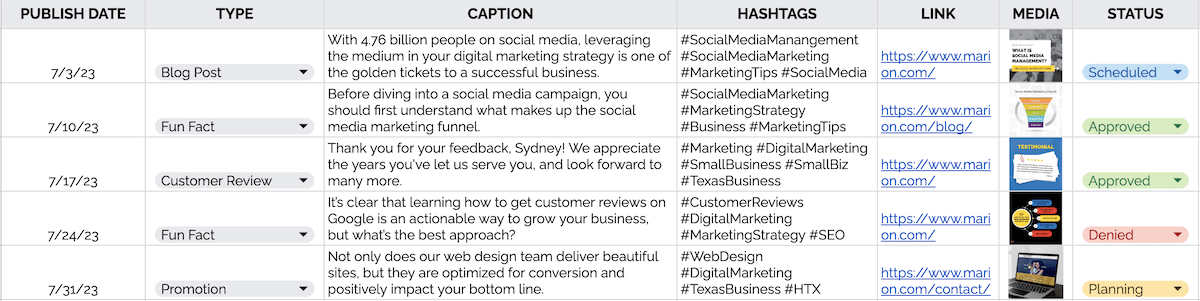
A blog content calendar helps to plan and track the publishing of articles, press releases, and blog posts. A calendar helps ensure all posts are published on time, with relevant topics that will engage readers. Below is an example of a blog post content calendar layout.

blog content calendar example

Social Media Content Calendar Example

A content calendar is an important tool for developing successful social media campaigns. It helps to organize and plan content on various social media platforms, ensuring that your posts are seen by the right people at the right time. Below is an example of a social media content calendar layout.

social media content calendar example

MARION is a full-service marketing agency that offers content marketing in Houston and Austin, Texas. Reach out now to get started!

Who Uses Content Calendars?

Some of the largest journalistic empires in the world make use of editorial calendars to schedule their content creation. However, a content calendar isn’t just for large news corporations. Everyday bloggers, podcasters, YouTubers, and social media managers use them too. In fact, anyone who publishes content regularly can (and should) use a content calendar.

How to Create a Content Calendar

Creating a blog or social media content calendar doesn’t have to be difficult, but you must do some strategic thinking beforehand to develop a solution that works well for you and your team and helps you achieve your ultimate goal.

Establish Your Content Marketing Goals

Before creating a content calendar, you need to understand why you’re creating content in the first place. Determining whether you want to get more traffic, raise your conversion rates, or establish yourself as an authority in your field will give you insight into the type of content you should create and where and how often you should publish.

Build Your Template

A practical editorial schedule starts with a content marketing calendar template that mirrors your team’s content creation workflow. Get started with these four basic steps:

Create a Timeline

Each piece of content should have a set deadline for its publication. How long each content creation step takes will be based entirely on that deadline.

Publishing Frequency

Nail down just how often you will publish your content. Your team should be clear on your content production frequency goals to stay on top of their responsibilities.

Determine Content Types

Your content creation strategy should align with your marketing goals and objectives. For example, you won’t create weekly blog posts if you’re working on building a social media presence. Ensure your editorial calendar includes the content types you want to publish.

Assign Owners

Make sure your team knows who does what. Retaining that knowledge will help streamline your workflow and avoid wasted time and effort due to redundancies.

Tips for Creating Your First Content Calendar

creating content calendar

Creating your first blog content calendar is a daunting task, but there are a few actionable steps you can take to simplify the process for yourself and your team:

  • Ask Questions: Knowing the type of content you create, how often you publish it, and how many people will use your calendar will help you choose the right tool
  • Make it Fit: Create a useful content calendar by listing the steps in your workflow and building them into your spreadsheet or project management application
  • Just Get Started: Start by using a simple content calendar template and refine your process as you go along

Whether you use a simple spreadsheet or a more robust project management application, use what you have and what you’ve learned so far to begin your journey toward more strategic marketing.

Download Your Free Content Calendar Template

If you’re new to creating content calendars, you may be overwhelmed with information and left wondering where to start. Fortunately, our free content calendar template makes getting and staying on track with your content goals easy. Download your Google Docs template today to start building and executing your marketing strategy on your own or with your team.

Download Your Content Calendar Template Here >

Get More Help from the Content Marketing Specialists at MARION

Creating a blog post content calendar is a great place to start working toward expanding your reach, but your marketing efforts shouldn’t end there. Solidifying your brand with a well-designed logo and website and marketing your offers through search engine optimization, paid ads, and a social media presence are all vital pieces of the content marketing puzzle.

Fortunately, our digital marketing experts at MARION have extensive experience providing client-focused integrated marketing services to businesses of all types.

Contact our team today to learn how we can help you build and grow a lasting brand.

Marketing emails you’ll actually want to read.

Get marketing tips and news sent to 
your inbox.

This field is for validation purposes and should be left unchanged.
Name(Required)

How to Stay Ahead of Google Algorithm Updates

This past March, Google rolled out another core algorithm update, which has had the SEO community buzzing about how it will impact website rankings. While the full effects of this update have likely not been observed, it is important to understand that measures can be taken to minimize the impact of Google’s ongoing algorithm updates.

Understanding The Foundation of Google’s Search Algorithm

With each update, Google is constantly refining its algorithms to ensure that the most relevant and authoritative content is featured prominently in search results.

Search intent and website relevance create the bedrock upon which Google’s search engine lays. Google has become the largest search engine in the world because it consistently delivers relevant, high-quality search results to users. Google uses these algorithm updates to better analyze, understand, and rank website content so that it can continue providing pertinent content to users.

If you’re worried that your search rankings will drop as a result of this algorithm update and other subsequent updates, fear not. There are many digital content strategies and useful tools to help you maintain and improve your rankings.

Google Algorithm Updates

SEO Best Practices to Improve Your Google Rankings

Keeping up with Google algorithm updates is essential for any website or business that wants to stay competitive in the ever-changing digital landscape. This means that it’s important for website owners and marketers to keep on top of these changes so they can adjust their strategies accordingly. Below, we offer SEO best practices and steps you can take to ensure your content remains visible and relevant.

Prioritize High-Quality Website Content

Develop a thorough understanding of what your target market is researching, and create content aimed at educating, captivating, and providing solutions for their questions.

There are plenty of tools available (like SEMrush) that can help you find appropriate keywords to base your website content around. Remember, Google Search uses keywords at the core of its algorithm, so understanding the specific language consumers use and implementing it on your website will prove most successful.

Optimize For User Experience

Having relevant content isn’t enough if your website takes too long to load. Google wants users to be able to access information quickly. So ensure that page load time is fast, buttons and forms are accessible on mobile devices, and the website’s layout is conducive to a strong customer experience.

Set Up Google Alerts or Follow Google Search Relay on Twitter

Constantly monitoring the hundreds of updates that occur every year isn’t realistic; however, Google Alerts can notify you when a core algorithm update is scheduled to take place so that you have time to prepare and adapt. Simply go to google.com/alerts and enter keywords like “Google algorithm” to receive emails about when these alerts will take place. Another option is to follow Google Search Central on Twitter. This account regularly reports noteworthy changes occurring within the Google world.

Using Search Console, Google Analytics, and SEMrush To Regularly Monitor Rankings

Using these tools to monitor website traffic and conversions, as well as keyword rankings, can further assist you in staying ahead of Google’s algorithm updates. You can use these tools to see whether there are dips or spikes in website activity, which can be indicative of an algorithm update. These SEO monitoring tools can provide you with a better understanding of whether your content is compelling and offer insights into improving your content for better performance.

How to Rank Higher on Google with MARION Integrated Marketing

Ultimately a strong SEO strategy is the only way to maintain good rankings with Google. Therefore, developing strong SEO practices is paramount to showing up on Google Search regardless of an algorithm update. For more on SEO and marketing best practices, visit the MARION blog.

Contact MARION today to learn more about keeping up with SEO algorithm updates.

Marketing emails you’ll actually want to read.

Get marketing tips and news sent to 
your inbox.

This field is for validation purposes and should be left unchanged.
Name(Required)

What’s The Difference Between Organic vs. Paid Search?

If there’s one thing 2023 has made us realize, it’s that there are numerous ways we can drive traffic to our websites and landing pages. Of course, it’s obvious that one of the best sources we can tap into for traffic is Google, but things start getting confusing when it comes to organic vs. paid search.

Organic Search and Paid Search: An Overview

Google is the largest search engine in the world, with over 4.3 billion users across the globe. So there’s certainly more than enough website attention to go around. Two ways to tap into this huge traffic source are organic search and paid search.

What is Organic Search?

In the world of online marketing, the term “organic” refers to something that happens naturally. In this instance, “organic search” refers to the users who find your content on Google or Bing by clicking on one of the unpaid results from the search engine results pages.

The one downside to ranking well on Google is the time and work it takes for your site to be seen in the organic search results.

It can easily take six months or more before obtaining a first-page ranking on Google. However, once you get there, you will reap the benefits of Google organic traffic.

what is organic search?

In the early days of the internet, it was incredibly easy to rank well on Google. There wasn’t much competition, and Google’s algorithms were fairly easy to game.

Now that practically every business has a website, Google has begun cracking down on “black hat” SEO practices that allow people to rank through illegitimate tactics (such as keyword stuffing and private blog networks).

In 2023, the journey to ranking well on Google isn’t easy, but the result is very much worth the effort. Google has become part of our daily lives, and customers rely upon reliable search queries daily to inform their purchase decisions. Organic traffic is still relevant when driving traffic to your business.

If you’re searching for reputable SEO companies to help increase your organic traffic, reach out to our team today.

What is Paid Search?

You can think of paid searches as a “front of the line” pass in the sense that your ad will always appear at the top of Google, even above those who have worked hard to earn the top spot organically.

Like most online advertising platforms, Google allows you to pay for your link to be seen first. Some online consumers aren’t even aware that the first few links at the top of a Google search are ads (although Google labels each ad with a tiny green box).

Ads fit naturally at the top, and it’s easy to forget or overlook the fact that they are, indeed, ads. Where organically ranking on Google can take months or longer before you see results, Google paid ads can provide relatively instant results. This is the primary reason that paid searches have become extremely popular.

There’s a reason Google Ads is one of the most popular advertising platforms on the web. Internet marketers realize the effectiveness of Google paid search and have jumped in head-first.

Despite its popularity, starting a campaign without knowing what you’re doing would be very unwise. If you don’t set up your ad properly, there’s a good chance it won’t perform well, and you’ll quickly hemorrhage money.

If you’re searching for targeted pay-per-click advertising experts to manage your paid campaigns, contact MARION today.

what is paid search?

Organic Search vs. Paid Search – Which One Is Better?

As paid search continues to skyrocket, the topic of natural search vs. paid search has led to many heated arguments.

Some have argued, quite enthusiastically, that organic search will always be better due to the sheer amount of traffic you can drive to your business website without the need for an advertising budget. Others believe that paying to “cut to the front of the line” is the better option because it shaves time off the long period it would take to otherwise rank well on Google.

Both sides make valid points, but it all boils down to this: some people will click on paid advertisements while others will click on organic links. Instead of focusing on organic vs. paid search, marketers should focus their attention on both streams of traffic.

The Best of Both Worlds

Think about it this way — every business owner and marketer would love to organically rank for the keyword(s) they deem beneficial for their business. But it’s ridiculous to believe that every website on the internet can achieve the number one position.

In the same sense, every brand loves the idea of being first for every possible query, yet the amount of money they would have to invest to achieve this goal would likely bankrupt them. There are just too many highly competitive keywords to cover.

Leveraging the benefits of both organic and paid queries will allow you to gain maximum exposure. There will be certain situations where you will want to use one over the other.

For example, if you’re looking to draw in free, consistent traffic for your business, implementing a long-term SEO plan should be your plan of attack. However, if you need quick results, paid search will be the best option.

Typically speaking, organic search is the most cost-effective long-term strategy to draw in traffic. Likewise, a well-optimized Google Ads campaign can be a cost-effective traffic-generation strategy. It all comes down to finding a balance between organic and paid search.

How to Measure Paid and Organic Search Results in Google Ads

If you’re already practicing search engine optimization and using Google Ads to get leads for your business, you can access a special report. There is a report in Google Ads called Paid & Organic. This report shows the paid and organic results for a single keyword.

organic vs. paid search statistics

For example, imagine that you are running paid search ads for the exact match keyword “digital marketing services,” and you also have a page on your public website that ranks well organically for that exact keyword. The Paid & Organic report would show you how many paid clicks and impressions you received for “digital marketing services” in addition to the organic clicks and impressions during that same time.

Marketers find that advertising for a search term you’re already ranking results in more total clicks than doing one or the other. For instance, imagine you’re getting 30 organic clicks per week for “digital marketing services.” It happens like clockwork, and you can’t seem to get any more clicks than that.

When you start using Google pay-per-click ads, your paid campaigns generate about ten clicks per week, but your organic clicks increase to 35 per week. Marketers speculate that seeing a brand in both paid and organic results encourages people to favor your brand by clicking on your results at a higher rate.

This Google help guide will help you connect your accounts and access the report. Now you can analyze data from your organic and paid search results.

Implementing The Best Traffic Strategy For Your Business

Savvy marketers know there is value in leveraging both organic and paid search. It’s your job to examine your industry’s organic vs. paid search statistics and determine which combination is right for your business.

No matter what type of marketing tactic you intend to use to drive traffic to your website and landing pages, you can rely upon the expertise of MARION to help you make the right decision to meet the needs of your business. Our digital marketing agency in Houston offers various services, including internet marketing, SEO, and PPC, to help your business grow.

Contact our team today to learn what we can do for your business.

Marketing emails you’ll actually want to read.

Get marketing tips and news sent to 
your inbox.

This field is for validation purposes and should be left unchanged.
Name(Required)

How Much Does SEO Cost in 2023? Average SEO Rates

As one of the highest ROI marketing channels, SEO—or Search Engine Optimization—can make or break your business. A solid online presence is the key to staying ahead of the competition and growing your bottom line. So, how much do SEO services cost? And is it even worth it for small business owners? This guide will tell you everything you need to know about current SEO rates and pricing.

Should I Pay for SEO Services?

Are you allocating around 8% of your revenues to marketing?

According to the SBA, small businesses should have a B2B marketing budget of around 7-8% of their yearly revenue. However, the Small Business Administration mentions that in specific industries, businesses may need to earmark up to 20% of their annual revenue during the early branding years.

2019 study from BrightEdge shows that an average of 53% of all web traffic comes from organic search.

If your marketing budget should be 8% of your yearly revenue, and half of your small business marketing results come from search engines, then shouldn’t you invest 4% of your annual income in SEO?

Let’s do some math. For a small business with approximately $5 million in yearly revenue, you could invest up to $16k per month to reach SBA budgeting benchmarks.

This begs several questions for small business owners…

  • How much does SEO cost?
  • Should I pay for SEO services or do it myself?

There’s a good chance you started your business because you are an expert in your industry, not SEO. Read through the following considerations to better understand how much to spend on SEO and whether or not you can do it yourself.

What Kind of SEO Help Do You Need?

Depending on your industry, you may be generating several million in revenue without maintaining a staff of your own. You could be a solopreneur or leverage contractors when you need to execute outside your area of expertise.

Depending on your preferences and business goals, you have the following options for search engine optimization.

how much should I pay for SEO

Optimize Your Own Site

The do-it-yourself approach to SEO is not for everyone, especially if you’re strapped for time. Believe it or not, Google’s algorithm goes through an average of 3,000 changes per year.

As a small business owner trying to manage customers, your business process, and even your own books, you likely don’t have the bandwidth to keep up with Google’s algorithm updates.

If you decide to take on this responsibility to cut the hard cost of SEO services, you’ll need to learn the basics. You can leverage plenty of free online resources during your SEO training. However, doing your own SEO requires a larger investment of your time in return for lower search engine optimization costs incurred by external resources.

There’s also a good chance that you’ll recognize early in the game that you need to heavily edit or even redesign your website. However, while a bias for action generally gives you an edge in business, it can have the opposite effect in the realm of SEO. So make sure you learn how to redesign a website without losing SEO before you make any changes.

Hire an SEO Specialist

Your next option is to hire an SEO specialist. So if you’re a small business owner wanting to keep your payroll taxes to a minimum, this option may not be for you. Hiring a W-2 employee will also require management on your part, so your time is still at risk of being invested in SEO. In addition, you will likely be limited to paying for an employee with a few years of experience since you won’t be able to provide much direction for new marketing talent.

One of the advantages of hiring an in-house SEO expert is that you have more control over the process without becoming too involved. In addition, content creation and industry subtleties won’t go overlooked because your employee has direct access to your insights and will become very familiar with your industry over time.

The most significant disadvantage is that hiring an in-house SEO specialist costs not only more time on your part but wages and payroll taxes too. How much is search engine optimization when you add up all the hidden costs of an employee? On the other hand, it may be less expensive to hire an agency with experience and specialized resources that a W-2 worker probably won’t have access to.

Hire an SEO Company

Hiring an SEO company is the best option for a small business owner who values their time and wants to leverage SEO professionals’ collective power and expertise. SEO services pricing will vary based on your business goals, and there is a minimal time investment required on your part. Learn how to advertise a small business locally.

How much do SEO services cost when you use an agency? You can take most of your time out of the cost equation and consider only the monthly SEO rates between agencies. Keep in mind that not all agencies will perform on the same level. In business, you get what you pay for—which is especially true for the value of SEO services.

For the highest quality SEO services in Texascontact MARION today. We’ll review your marketing needs and craft a unique strategy to grow your online presence and get leads for your business.

Project-based or Ongoing SEO Services

How much is SEO per month vs. as a project fee? Of course, there is a difference, but whether or not you should use ongoing monthly SEO services or project-based search engine optimization pricing will depend on your long-term goals.

Monthly Retainer for SEO

A monthly retainer makes the most sense for a business without SEO talent on payroll. Even for small businesses with a marketing manager or CMO, the internal marketing talent may not know enough about SEO to want to make optimizations themselves.

The monthly SEO retainer is especially relevant for growing small businesses that need all their online branding and marketing services handled by a third party. The monthly recurring fee model is designed for two things:

  1. Maintenance for small companies with a smaller budget and little web development knowledge
  2. Growth for small businesses with a larger budget and no internal SEO talent

Paying monthly SEO rates will not align with your goals if you only need your company’s website “cleaned up” from a technical SEO standpoint.

SEO Project-based Pricing

Project-based pricing will make more sense for a small business with an internal marketing team but needs to establish a healthy search engine optimization foundation. The internal team may have experience with blogging and social media marketing campaigns but needs help formatting their site structure and website page templates to improve their inbound marketing results.

It may seem attractive to pay an SEO project fee and hope that you can just coast once your SEO support completes the job. However, your organic traffic will slowly dwindle without regularly publishing skillfully created and technically polished content. Content marketing services play a significant role in the success of your SEO, and project-based pricing will not help you achieve lasting success.

Hourly Consulting Pricing

Hourly SEO pricing makes the most sense for a do-it-yourself small business owner or a company with a small marketing team that lacks SEO experience. SEO consultants can help pinpoint technical website challenges while training you or your team to maintain your organic performance.

If you require substantial hourly consulting work, you may consider opting for monthly recurring SEO services to avoid reinventing the wheel.

cost of SEO services

How Much Do SEO Services Cost?

Let’s go back over the disclaimers before you decide how much to spend on SEO.

  • What are your goals? The higher your growth goals, the higher your SEO spending should be.
  • You get what you pay for. If you want to pay low prices, you can expect low-quality results.
  • If you’re paying for SEO only, your prices will be lower than for an all-encompassing digital package or a full-service marketing package.

The following ranges of SEO pricing are from a survey of over 400 respondents released in early 2016. The following ranges refer to the cost of monthly SEO services.

  • 10%— less than $500
  • 27%— $500 – $1,000
  • 29%— $1,000 – $2,500
  • 20%— $2,500 – $5,000
  • 15%— $5,000 – $10,000

These costs for SEO services seem to align with the SBA’s marketing budget benchmarks.

The next time you ask yourself if you should pay for SEO services, you’ll be able to make an informed decision based on the above data. Of course, the amount you spend on SEO services will hinge on your business goals and the firm you choose to partner with.

Marketing emails you’ll actually want to read.

Get marketing tips and news sent to 
your inbox.

This field is for validation purposes and should be left unchanged.
Name(Required)