Category: Lead Generation

OptiMole: Optimize for Free
Free. I love that word. But, when I see it with plugins or WordPress themes, call me skeptical.

Consider automated image optimization plugins. Sure, the free tier of any of the popular plugins help to optimize images somewhat and, depending on your unique situation, may produce a worthwhile reduction in image size for your page. This can help improve website load times.

But, overall, my experience with free optimization has been disappointing: No granular image quality control. No image resizing. Oh, wait! We have all that right here! For $XX.99 per month. Forever!

Subscriptions, from what I’ve seen, seldom justify the cost per use for average websites in the long term. I’ve worked on countless Houston and Austin web design projects over the past decades. Quite often, a website requires a large number of image optimizations before it launches. Post-launch, most websites add or change images at a slow rate.

Some websites require frequent image uploads and changes, such as fashion blogs or photo gallery sites. For them, a subscription might be worth every penny. But, generally speaking, I’ve yet to find an economically feasible substitute for manually optimizing images for the typical WordPress web design. But that was before I ran into OptiMole.

About OptiMole and WebP

Pptimole image compression

OptiMole uses a new image optimization technology called WebP. WebP images can be considerably smaller than other image formats without losing quality. You can learn more about WebP here.

Most modern computer browsers and mobile devices support WebP, and OptiMole falls back to your original image if it encounters a browser that won’t. 

OptiMole does not alter the images on your website. Instead, it serves replacement images to your visitors through its CDN (content delivery network). 

Sounds fantastic. Learning that made me extremely curious, I must say. So, I decided to create a simple test and write a blog post about the results.

Testing OptiMole

I created a page on a default WordPress installation. I added several large images to the page, far bigger than I’d probably ever need on a website, around 4000px wide. The largest sizes I usually use are less than half that.

(To avoid confusion due to srcset attribute being applied by WordPress, I inserted the images by manual coding rather than the media uploader.*)

I then installed the free OptiMole plugin and kept the default settings, i.e., enabled image replacement and letting OptiMole decide the best image size depending on the user’s browser. Under the Advanced settings, I left the quality slider alone. Still, it’s interesting that there is a quality slider available in the free version of the plugin. 

For testing, I decided to use Google’s PageSpeed Insights. PageSpeed Insights shows a detailed breakdown of images it detects are too big, and even makes recommendations with links to more in-depth explanations.

PageSpeed Insights is a great tool for working toward an SEO-friendly web design. The test results are clear and easy to understand, with many links to aid better understanding.

The Results

Google Page Speed Without OptiMole
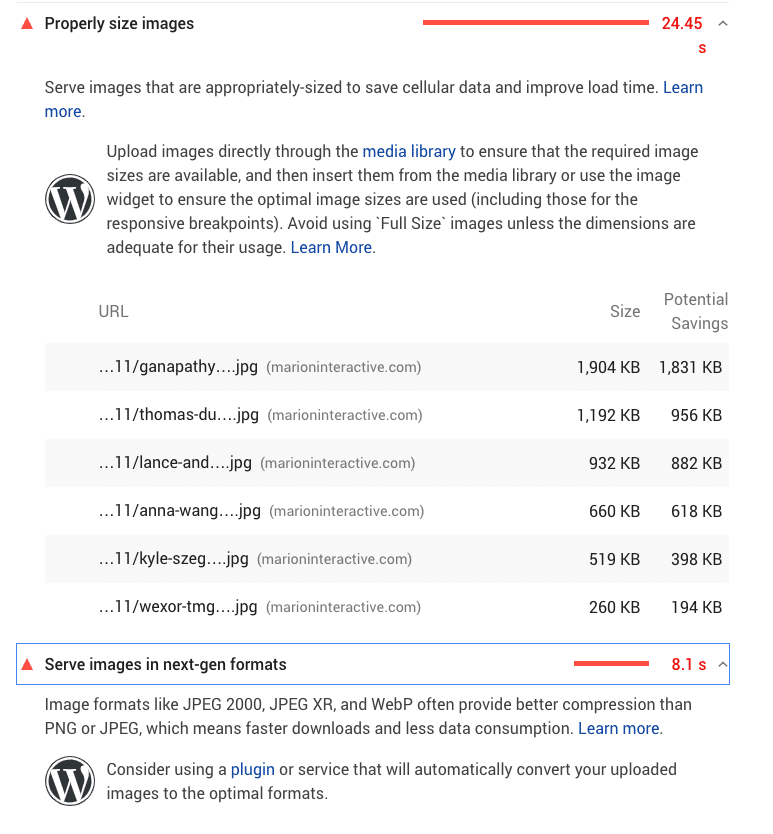
web image optimization results

Explanation: Google detected all the overly large images on the page, ranging in size from 100KB up to almost 2MB. Above and below the list, Google makes recommendations, including two WordPress-specific hints to consider.

The first, about using the media uploader, is correct. I deliberately did not use the Media Uploader for the test.* The other hint suggests using a plugin to help with the images. While I’m sure some may balk at using a plugin as a first line of defense, a plugin may be the most practical solution for many people in this situation.

With OptiMole (after waiting about 5 minutes)
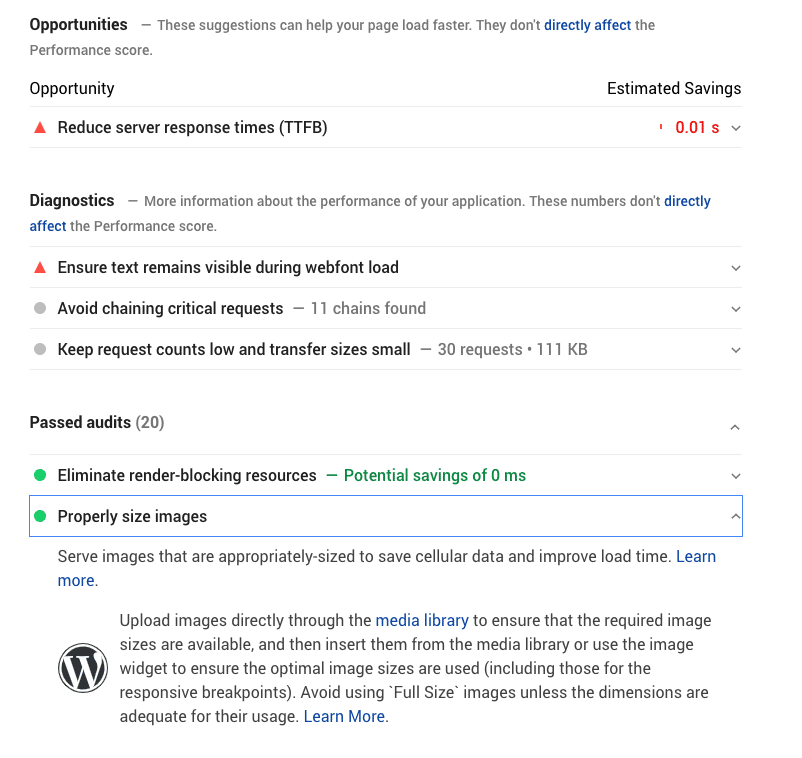
website image optimization results

Explanation: With OptiMole active on the site and providing it enough time to generate the replacement images, Google did not detect any overly large images. The only thing the tester complained about was not using the media uploader, as explained before.

Summary

I used oversized images (some as large as 4000px wide) to get a clear picture of what happens with OptiMole active. Without Optimole, the tester flagged all the images. With OptiMole active (and waiting a few minutes), the page passed the “Properly size images” audit, while using the free tier of the OptiMole plugin.

So, the next time I need to optimize a website full of bandwidth-killing images, will I use OptiMole and save myself 5-10 hours of work cleaning up the mess? Quite possibly. I have to consider each situation on its own, but I can see this plugin saving me much time and aggravation.

website image speed optimization

It’s important to note that OptiMole’s free plan includes 5000 unique visitors to your website per month. Learn more about OptiMole’s pricing tiers here.

I also see OptiMole as a great temporary solution. I don’t want to leave a library full of too-large images on someone’s website. Ideally, every image should be the right size for its use and not require plugin assistance. But with OptiMole, images can be safely corrected in the background. Your customers aren’t waiting for slow pages to load while I apply the permanent solution.

MARION Can Help with Your Web Design and Optimization

A slow website is bad for users and for performance in search results. Using custom web design services in Houston or Austin could be your best bet at a visually stunning site that loads quickly! MARION is an inbound marketing agency in Houston and Austin that can help you reach your marketing goals!

Contact us today to schedule a free consultation where we can discuss how to make your website the best that it can be!


*The Media Uploader automatically adds the “srcset” attribute to images, which results in a group of images in varying sizes that display depending on the size of the user’s browser. For this test, I needed to see what happens with OptiMole doing that on its own.

Marketing emails you’ll actually want to read.

Get marketing tips and news sent to 
your inbox.

This field is for validation purposes and should be left unchanged.
Name(Required)

Website Homepage Content Ideas – What to Write

When creating an effective business website, one of the most important elements to think about is the first thing your potential clients will see – the homepage!

Your website’s homepage is often the first thing your potential customers will see.

4 Questions Your Website Homepage Needs to Address

In his book Don’t Make Me Think, User Experience (UX) expert Steve Krug highlights the four questions that he asks when evaluating website homepage contents.

  1. “What is this?”
  2. “What can I do here?”
  3. “What do they have here?”
  4. “Why should I be here – and not somewhere else?”

These questions seem pretty obscure and open-ended, but you can address them using homepage content sections that align with your overall marketing strategy.

Learn about five of the most important things to include on your homepage to turn visitors into customers and advocates for your brand.

5 Website Homepage Content Sections to Include

You only get one first impression. Make sure your homepage content comes off as polished and professional while creating an online presence for your business.

  1. Hero Message
  2. Navigation
  3. Product/Service Overview
  4. Social Proof
  5. Helpful Footer

1. An Effective Hero Message

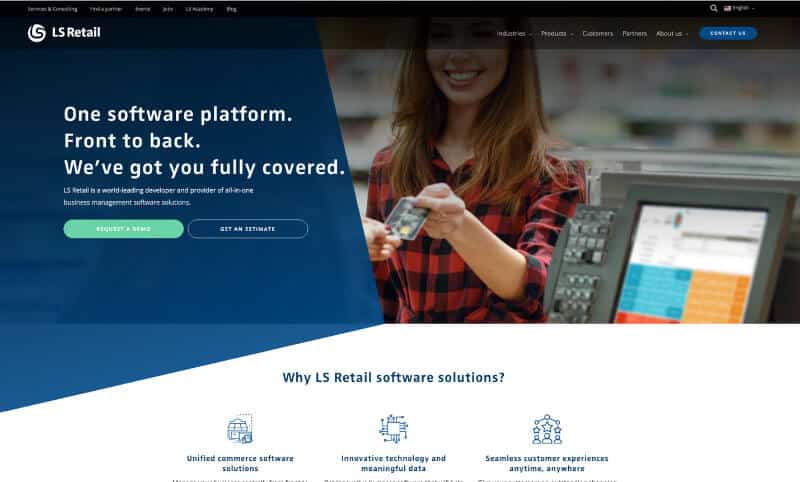
Dumping a whole mess of text and out-of-context images onto your homepage does nothing for visitors. Instead, have an eye-catching hero image that instantly tells them what you do and/or what you offer. A concise hero image and message is one of the most frequently recommended components in B2B website examples.

Take some extra time to craft the perfect, clear headline focused on all the benefits you can bring to the table. Make sure you include a call-to-action at the end to get them started with your product or services.

homepage content for website

LS Retail

2. Easy Navigation

After visitors are hooked, the next step is providing them with a smooth experience when navigating your website. Make sure that each category is clearly titled and organized- disoriented visitors will quickly leave if your website is not intuitive. The goal is to not make them “hunt” for anything- instead, you should focus on providing all the information they seek and more.

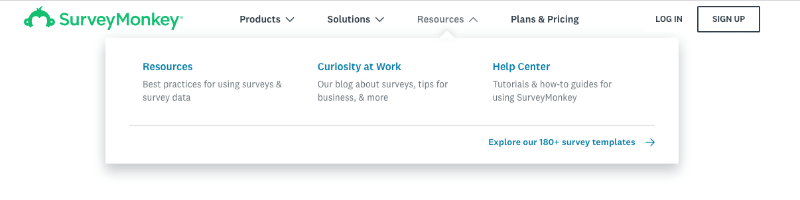
One important improvement to your navigation is making every navigation element clickable. Add an arrow to indicate drop-down menus and differentiate them from direct links. This ensures that people clicking on subcategories can find more pages pertaining to what they’re looking for.

Keep in mind that an important element of the menu items found on your homepage is being able to tell which one is active once they start exploring. A cleanly-designed top navigation uses hierarchies and color differentiation to make it obvious where they are located within your site. For example, using breadcrumbs or styling the menu link that is currently active within the top nav to have a different color and background can help users determine exactly where they are.

Don’t forget to make sure that clicking the logo takes them back to the home page. Users have come to expect this as standard practice, and good web design companies will know to implement a clickable logo.

It can be difficult to predict user behavior or what they’re looking for but brainstorming and testing different content hierarchies and sections of a website homepage can make a big difference. You can use tools like heatmaps to see which format works better over time.

website homepage content ideas

SurveyMonkey

3. Overview of Services or Products

When people come to your website, one of the primary things they are looking for is what you offer. You want to easily display your services or products offered so they can immediately see the different options. If someone is looking for what makes your company special compared to your competitors, they’ll want to leave if the message is muddled and hidden.

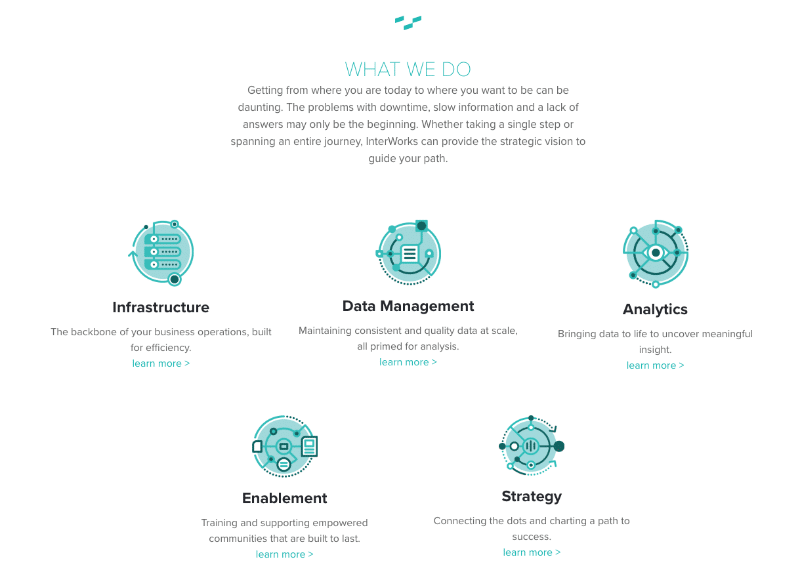
One of the best ways to avoid that scenario is to have simple visual representations with a sentence or two accompanying each one to summarize or elaborate each service. Keep the message direct and clear so that potential clients can zero in on what they want from you as fast as possible!

what content should be on a homepage?

InterWorks

4. Social Proof and Success indicators

People want to know they can trust your company. Luckily there are several ways to earn this trust. One idea for what content should be on a homepage is social proof. In marketing, social proof is a method of using third parties to influence potential customers.

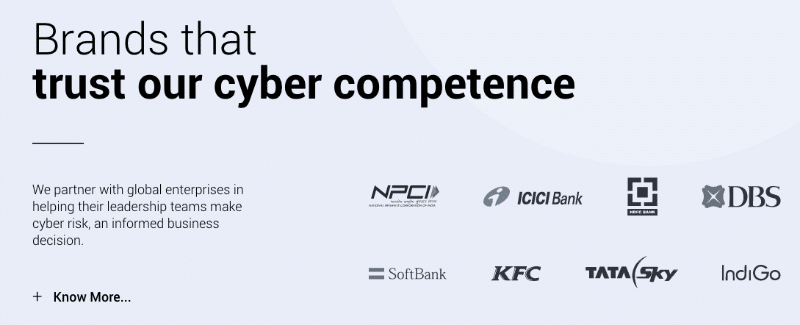
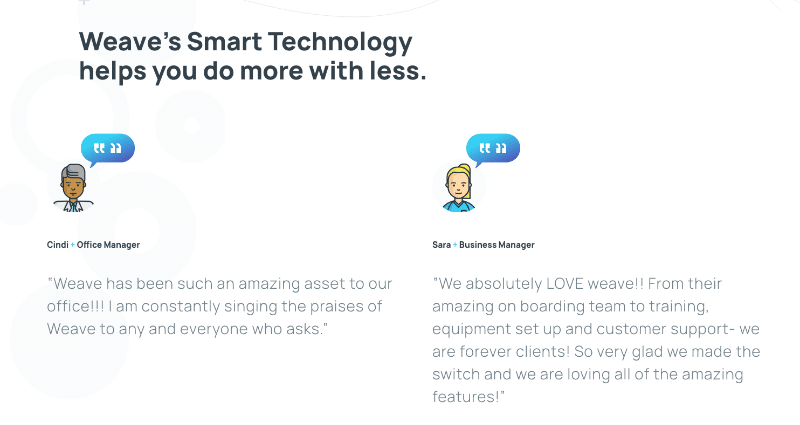
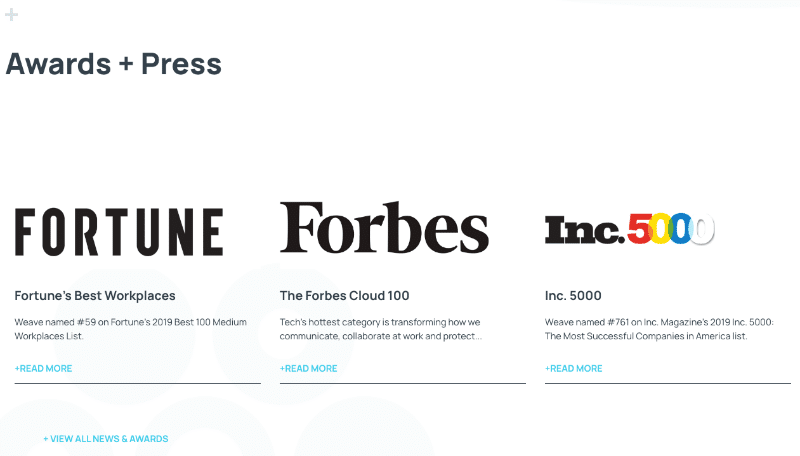
Social proof can come in many different forms. Anything that is evidence of your success is a good way to indicate your trustworthiness. For example: customer testimonials, a board of client logos or businesses you’ve partnered with, awards you’ve received, case studies, press mentions, positive statistics, etc.

The more examples you can provide of your company’s skill and superior performance, the more people will want to work with you.

You can start building social proof by learning how to get Google reviews for your business.

content for website homepage

Lucideus

what to write on a homepage

Weave

what to put on homepage of website

Weave

5. An Organized Footer

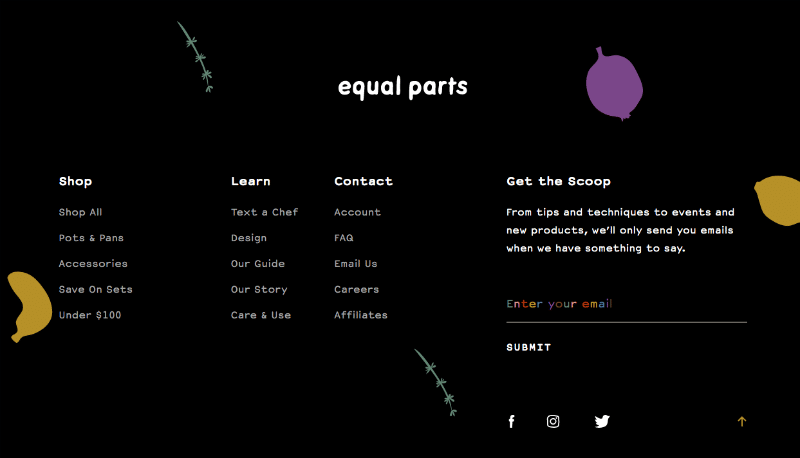
A footer is an underrated element of a website homepage. A good footer grounds a website by offering an organized view of the most important links on your entire website and useful external links such as social media profiles or partner websites.

If someone is having trouble locating something, they will often scroll to the bottom of the webpage looking for the footer as a guide.

One of the most important things you can do is include a contact page or even a way to sign up for your newsletter. Making sure customers can easily find contact information or frequently asked questions can help convert visitors into leads.

creating a website homepage

Aloha

homepage best practices

Equal Parts

Let MARION Help You Design Your Homepage

If you’re struggling to decide what content should be on a homepage, a custom website design company like MARION can help! Our SEO, content, and web design specialists come up with a straightforward plan to implement the best website homepage content ideas or your brand.

Contact us online today to schedule a free consultation!

Marketing emails you’ll actually want to read.

Get marketing tips and news sent to 
your inbox.
This field is for validation purposes and should be left unchanged.
Name(Required)

LinkedIn’s New Forecasted Results in Campaign Manager

Learn how this new tool is helping marketers build better campaigns.

Last month, LinkedIn announced the release of new advertising tools designed to help marketers better target their paid campaigns. Among them is a feature that allows for much more robust audience forecasting. Read on to learn how LinkedIn has improved its Audience Forecasting tool with the introduction of the new “Segment Breakdown” feature.

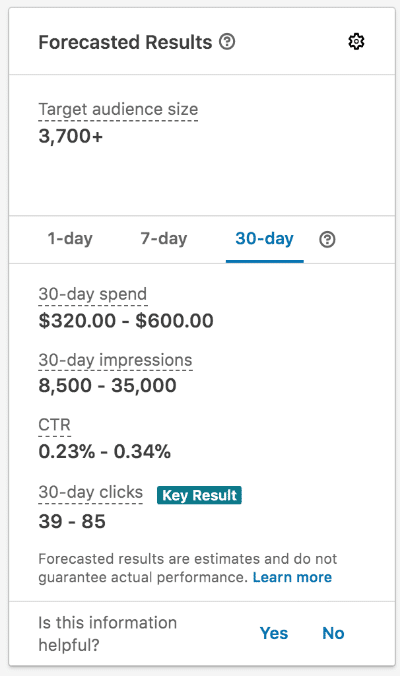
Forecasted Results Window in Campaign Manager

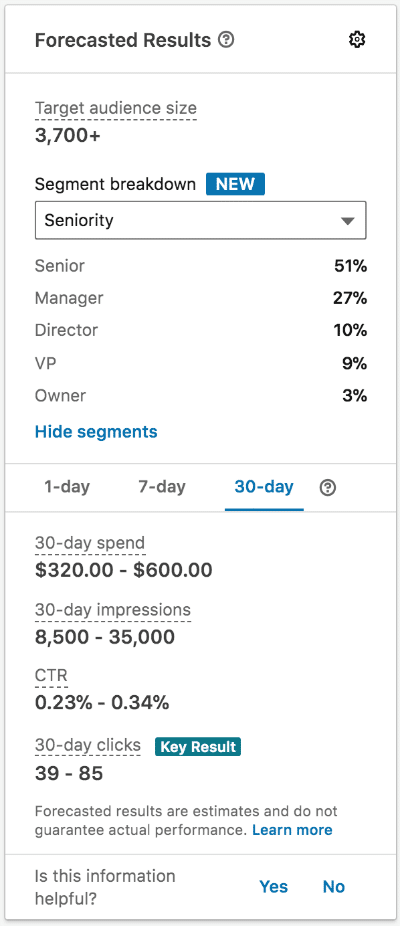
The Forecasted Results window appears on the ride side of the page when you are creating a new campaign in LinkedIn Campaign Manager. Previously, this window would only report on forecasted audience size, campaign spend, and campaign results. Thanks to LinkedIn’s recent “Segment Breakdown” addition, this panel now provides insights about your target audience including: Job Function, Job Seniority, Years of Experience, Company Size, Company Industries, and Interests.

[su_row]

[su_column size=”1/2″ center=”no” class=””]

Previous Forecasted Results Window

LinkedIn forecasted results

[/su_column]

[su_column size=”1/2″ center=”no” class=””]

New Forecasted Results Window

forecasted results breakdown LinkedIn

[/su_column][/su_row]

Build Better Target Audiences with the New Forecasted Results

This feature is such a great addition to LinkedIn Campaign Manager because it helps marketers improve their LinkedIn ad targeting and  increase their likelihood of reaching ideal prospects.

With better knowledge of the makeup of a forecasted audience, marketers are able to make strategic changes to audience targeting and see the effect it will have on the audience that will be reached in real time. Better initial audience forecasting means less time and money spent on A/B testing!

In addition, when a campaign is using a lookalike or matched audience, this feature will allow marketers to gain better insight into the types of people they are targeting. This insight will allow for the creation of social media marketing creative assets and messaging that will resonate best with the forecasted audience.

How to See the New LinkedIn Forecasted Results

If you go into your campaign manager and you are not seeing the audience breakdown view, make sure you have selected a location, language, and added at least one targeting segment or matched audience segment (as it will not show until these things are included).

If you still are not seeing this feature, you may need to click the text under “Target Audience Size” that says “show segments” to expend the segments tool.

Contact MARION for Help with Social Media Advertising

Struggling to hit the mark with your social media advertising? MARION’s social media marketing agency in Houston and Austin can help you streamline your efforts.

Our social media strategists can help you learn how to advertise your business on social media in a way that attracts the right people at the right time.

Contact us to schedule a free consultation today!

Marketing emails you’ll actually want to read.

Get marketing tips and news sent to 
your inbox.
This field is for validation purposes and should be left unchanged.
Name(Required)

Why B2B Businesses Should Be on LinkedIn

In today’s day and age, social media plays a major role in a business’s marketing strategy. For B2B companies, LinkedIn is woven into the fabric of the modern social media landscape — it’s the tool industry leaders turn to when they need to make meaningful business connections. Today, we’ll be discussing why your B2B business should embrace the “LinkedIn era.”

LinkedIn Is a One-of-a-kind Tool

When LinkedIn first came about in 2003, online social networks were used for connecting with friends and dating — not for networking and business. LinkedIn has revolutionized the way we think about business, networking, job searching, and so much more.

The fact is, LinkedIn is a one-of-a-kind online professional tool. It’s the world’s largest professional network, and there really is no other platform like it for businesses to reach qualified professionals and connect with potential customers.

In terms of advertising through social media, LinkedIn allows businesses to reach highly targeted professional audiences. Compared to other platforms like Twitter and Facebook, LinkedIn Campaign Manager provides a wealth of more in-depth targeting parameters, such as the ability to target a user based on job experience (seniority, skills, job title, job functions, etc.), company information (company name, size, industry etc.), education, interests, and demographics.

To learn more about LinkedIn’s advanced targeting capabilities, check out our guide to building LinkedIn Ad audiences.  

LinkedIn’s Audience Is Large — and Will Only Continue to Grow

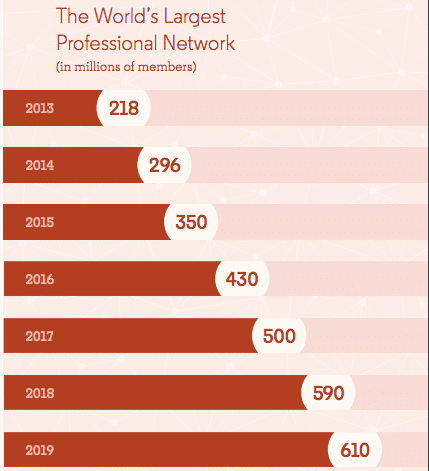
LinkedIn has maintained an impressive growth rate since its inception over 16 years ago. In fact, over the last two years, LinkedIn has gained 123 million users (comparatively, Twitter has only gained 9 million users during the same time period).

With over 630 million professionals using LinkedIn and 50% of Americans with a college degree using the platform, it has become a major tool in the lives of today’s professionals. With two new users joining every second, LinkedIn’s popularity will only continue to boom over the coming years.

B2B marketing through Linkedin

Source: LinkedIn

Experts predict that LinkedIn will continue to grow and become an even more vital tool in the business landscape, saying that LinkedIn could one day become such a vital communication tool that it replaces the need for work email — seriously!

According to Forbes, LinkedIn will be adding many exciting features soon. Some of these may include building local connections through a location radius tool and putting more emphasis on using hashtags for building connections and fostering community discussions.

LinkedIn’s Users Are the Most Qualified Social Audience for B2B Marketing

LinkedIn’s user audience is not only large — it’s also very qualified. LinkedIn users are an educated audience who are far more likely to be experts in your field than your other social audiences, such as Facebook or Twitter.

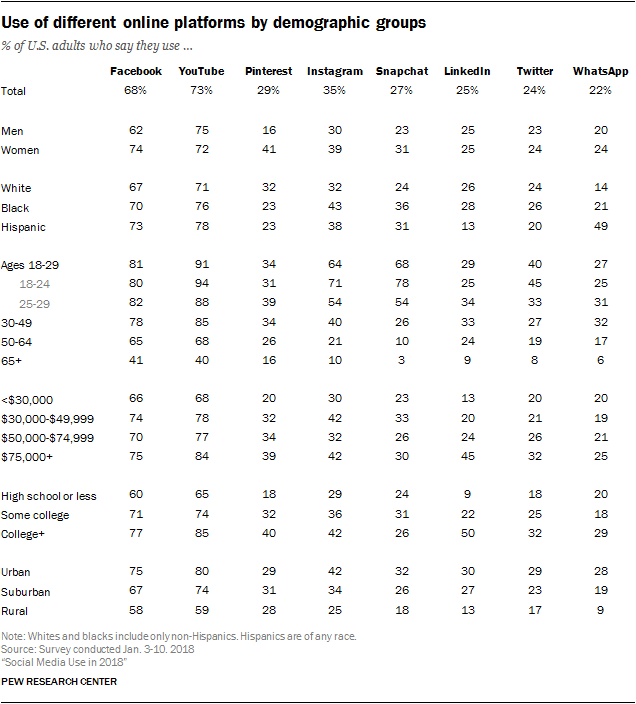
According to research conducted by Pew Research Center, LinkedIn is most popular among educated, urban, professional Americans from households earning more than $75,000 per year. It reaches a wealthier and more educated audience than Instagram, Snapchat, or Twitter.

Take a look at all the data to compare how LinkedIn performs against other popular social media platforms:

B2B marketing using Linkedin

Source: Pew Research

LinkedIn’s users also holds a lot of power within their respective organizations, with four out of five LinkedIn members driving business decisions. Furthermore, they hold two times the buying power of web audiences. LinkedIn’s audience is made up of 630 million members, including 180 million senior-level influencers, 63 million decision makers, and 10 million c-level executives.

In short, if you want to reach qualified B2B decision makers, LinkedIn is the effective and targeted social platform you need to be using!

Leading B2B Marketers Love LinkedIn

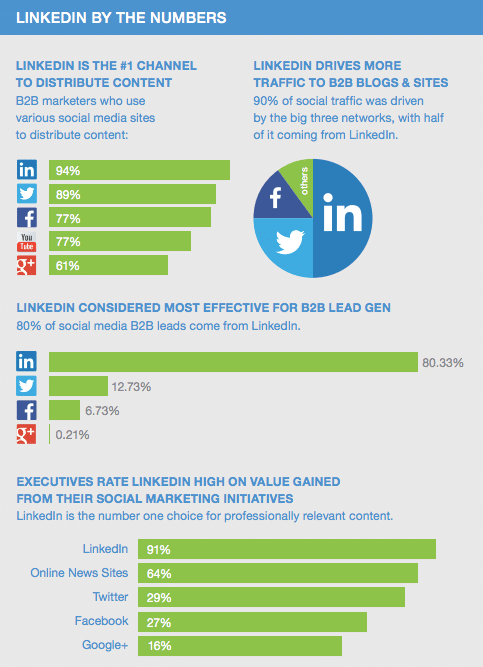
Did you know LinkedIn has been rated the #1 platform for B2B lead generation by marketers?  This is because LinkedIn allows businesses to reach a quality audience in a professional context, allowing B2B businesses to engage with users in a very meaningful way.

LinkedIn is also the #1 channel for B2B marketers to distribute content, as well as the highest traffic-driving social media platform, with half of all social traffic to B2B blogs and websites coming from LinkedIn.

Furthermore, a staggering 80% of all social media B2B leads come from LinkedIn, and executives consistently rank LinkedIn high on value gained from their social media marketing initiatives.  

Linkedin B2B marketing statistics

Source: LinkedIn

Everyone’s Doing It

Remember when your mom used to say “If ‘so and so’ were going to jump off a bridgewould you jump, too?” Well, if ‘so and so’ is 30 million companies and the bridge is over a pool of social media success, then we’d have to say yes!

The fact is, over 30 million companies have LinkedIn profiles — and while you may not be on LinkedIn yet, chances are, you competitors already are (and as we’ve learned, your ideal target audience definitely is).

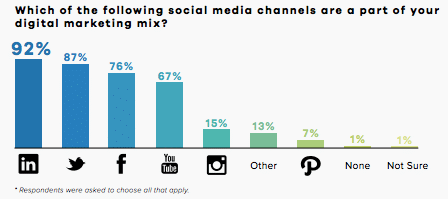
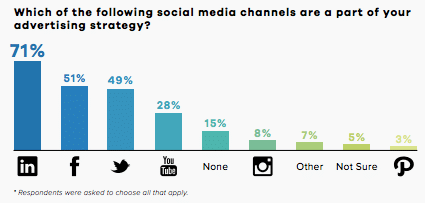
In fact, LinkedIn is the leading social media channel for B2B marketers, with 92% reporting that LinkedIn is a part of their digital marketing mix and 71% reporting that it’s a part of their advertising strategy. Frankly when it comes to other social media channels, they cannot match LinkedIn’s potential by a long shot and today’s business leaders understand that.

B2B marketing via Linkedin
effective use of Linkedin for business

Source: DemandWave

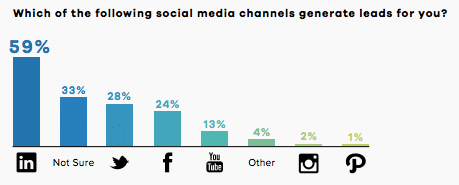
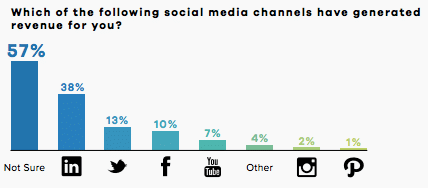
And when it comes to seeing actual, real results from using LinkedIn, B2B marketers like what they see, with 59% reporting that LinkedIn is the #1 social network for lead generation and 38% saying LinkedIn has helped their business generate revenue.

how effective is Linkedin
Linkedin stats for business

Source: DemandWave

Well, what are you waiting for? Take the first step to achieving B2B social media success and create your LinkedIn business page now!

Contact MARION for Social Media Marketing Help!

If you’re not sure how to use LinkedIn for your B2B marketing strategies, MARION’s social media marketing experts are here to help!

Contact us today to learn how we can help you reach your social media goals.

Marketing emails you’ll actually want to read.

Get marketing tips and news sent to 
your inbox.
This field is for validation purposes and should be left unchanged.
Name(Required)

How I Built a Custom Email in a FREE MailChimp Account

Many of our customers use MailChimp for their marketing email campaigns. MailChimp is a terrific product with excellent deliverability and a plethora of useful features, including pre-designed layouts and fully developed, colorful themes. You can create an effective email campaign without knowing a line of code — just drag and drop content blocks and upload images. Done.

But, if you don’t know a line of code, you may find it hard to send the perfectly-tailored message to your subscribers. One of Marion’s services for email marketing in Austin and Houston is custom email design. We design your email, convert it to HTML, then send your unique campaign using MailChimp’s  “Code Your Own” feature.

Well, unless you’re using the free MailChimp account, that is. Cue sad music.

MailChimp Custom HTML Workarounds

I recently had a Houston email marketing assignment to convert a customer-approved email mockup from Photoshop into HTML, then use the customer’s free MailChimp account to send the campaign. But, it turns out, I would not be able to write the HTML and paste it into a Code Your Own template. Because, in the free MailChimp account, you only have access to some of the layouts and themes and no access to the Code Your Own environment at all.

I used the modifier “customer-approved” in the previous sentence for a reason. It would be tough to go back to a client at this point and say we can’t deliver as promised. They’re expecting us to send the design he paid for through MailChimp. Tomorrow.

I nervously considered options. Of course, it was due the next day, because … life. (Cue tense music, probably with a high sustained violin and repetitive synth base slowly increasing in volume.)

The mockup included a three-column section that needed to stack vertically on mobile devices and a couple of other design features not similar to any content blocks in the MailChimp layouts. I looked at the available templates to see if any were even close to the mockup. Other than the logo at the top, none were a good match. Several rows deep in the layouts are some three-column designs, but they may as well be on Jupiter because they are for paying customers only.

Using the Code Block

I was somewhat relieved to find the layouts I could access include the Code Block:

MailChimp custom HTML email

The Code Block lets you drag a section of HTML into your email to display content not otherwise possible with the other blocks. For example, you may need to show an image edge-to-edge in your email, i.e., “Flat Design” style. You can’t do that with the Image block, it will always add space around your images. But with the Code Block, you control all the display parameters.

Cue Happier Music: Sorry to ruin the suspense, but I tamed this beastie with a free MailChimp layout. Here’s how I did it:

I like to start with the hardest problem first: The three-column responsive section. I already knew that MailChimp has some code you can re-use for this purpose, available in its support section.  The only problem is the MailChimp code shows a two-column layout. Would it also render three columns?

I knew I’d feel a lot better about the whole thing if that one piece fell into place. I copied the HTML and CSS from the Responsive Columns how-to and opened it in my code editor. The two-column version used a percentage width (50%) on the columns. So, I copied the middle column and pasted it into the code where it should go, then changed the widths to 33%.

So far, so good, I could now see three columns with nothing broken or displaying weirdly. I could also see that the images used in the tutorial were set to fixed widths, which made the columns too wide for the message. Changing those image widths to 100% (so they would fill their containers and not exceed them) did the trick, everything fit.

To test it, I pasted my code into the Code Block, then used the built-in MailChimp previewer to see if the columns stacked on mobile device widths. All looked good there, so I sent it to my email and was relieved to see the three-column section behaving responsively in an actual email.

Finishing Up Your Mailchimp Custom Email

The top of the mockup was a Flat Design consisting of borderless images next to colored boxes of text with no space between anything. Code Block to the rescue again! This is much simpler than responsive columns.

Upload your images to the MailChimp library and copy the source URL. The code block itself provides some sample code for images and text. The only “gotcha” is making sure your image is already sized to the right width for the layout. MailChimp layouts are 600 pixels wide. Even though a larger image scales to fit the width in your previews, it may exceed the width of the layout in email clients, leading to all sorts of problems.

All that was left was another two-column section above the three-column section. This was not a pair of 50% columns. I revised the percentages to match the mockup.  Easy. The same code I borrowed from the support section worked correctly.

Details

Having big problems resolved reduced my stress. Of course, there are a hundred details in any beautiful design, including fonts, text size, line-height, colors, links, buttons, and so on. MailChimp has adequate tools for getting the details right, even in the free account.

I love the Code Block. Just … please …………. stay free.

Let MARION Help with Your Internet Marketing Today

If you’re in the market for a Houston internet marketing company, speak with a strategist from MARION’s team today! We have almost 40 years of marketing experience serving businesses in Texas and have a proven track record of traditional and digital marketing success.

Contact us today to schedule a free consultation, and learn how we can help your business grow today!

Marketing emails you’ll actually want to read.

Get marketing tips and news sent to 
your inbox.
This field is for validation purposes and should be left unchanged.
Name(Required)


Marketing Lessons the Pumpkin Spice Latte Taught Us

What marketers can learn from the drink’s massive success

It’s that time of year again — soon, there will be a fresh crisp in the air and the leaves will begin to turn bright orange. It’s time to pull out your sweaters and scarves and RUN to your nearest Starbucks. The Pumpkin Spice Latte is back, everyone!

Starbucks started selling the Pumpkin Spice Latte on August 27th this year, the earliest launch date ever. The Pumpkin Spice Latte (lovingly known as PSL) celebrates its 16th birthday this year, and consumers are more obsessed than ever.

The latte’s unrivaled success over the years has led many companies to jump on the pumpkin spice bandwagon. Today, we have Pumpkin Spice Oreos, Cheerios, cough drops. There’s even pumpkin spice toothpaste and newly-released Pumpkin Spice SPAM.

Since its inception, over 350 million Pumpkin Spice Lattes have been sold, and the PSL is now the most popular seasonal drink of all time. So just what can the beloved PSL teach marketers?

Today, we’ll explore some of the drink’s spicy tactics on its journey to become everyone’s favorite fall beverage.

The power of customer engagement

The PSL has shown marketers the importance of customer interaction. Starbucks has done an unparalleled job engaging an online community of people who just can’t get enough pumpkin spice.

The PSL is possibly Starbucks’ most viral drink, with other Starbucks offerings, such as the unicorn frap, trying unsuccessfully to unseat it. In fact, in 2016, pictures of the specific PSL drink on Instagram shortly after launch received 493 percent more likes than photos tagged with just #Starbucks alone!

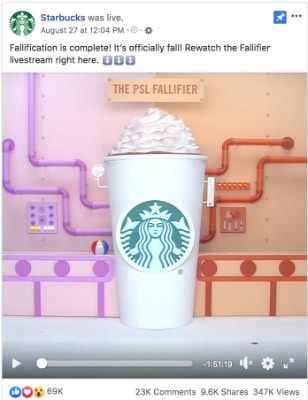
This year for the PSL launch, Starbucks generated hype on social media by creating an event for a Facebook Live session it called “First Day of Fall.” The company used this 2-hour long live video to announce the arrival of the PSL, and therefore, fall! Talk about successful social media campaigns.

For more tips about how to generate seasonal buzz with your Austin or Houston social media marketing, schedule a consultation with MARION today!

In fact, Starbucks’ whole campaign is centered around the idea that fall starts with the release of the PSL. It may seem like a bold move (especially since the drink was released almost 4 weeks before the real first day of fall) but that’s just how iconic the drink is. When Starbucks says it’s pumpkin spice season, it’s pumpkin spice season people!

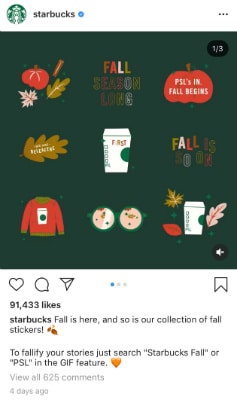
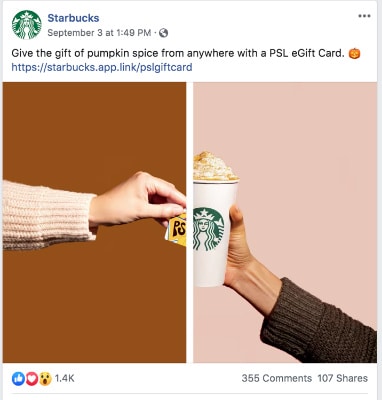
Look at some of the social media hype they created below through live sessions, videos, and Instagram stickers. Starbucks even created a series of special PSL eGift Cards, telling users they could “give the gift of pumpkin spice.”

But social engagement doesn’t just stop there. In the comments section, Starbucks interacts with users bringing personality to the brand and continuing to nurture and communicate with their die-hard fan base.

pumpkin spice social media campaign 1
pumpkin spice social media campaign 2

pumpkin spice social media campaign 3
pumpkin spice social media campaign 4

The power of exclusivity

PSL’s success over the past 16 years is a strong example of just how powerful marketing exclusivity can be. One of the biggest catches of the Starbucks pumpkin spice hoopla is that it’s only offered once a year for a few precious months, and this limited-time window has contributed greatly to the drink’s fandom.

With the worry that the fall classic will soon be gone, millions of consumers flock to get their fix of PSL before it’s too late, or before Starbucks runs out of pumpkin spice (there was a huge fiasco in 2012 where they almost did!). The fear of missing out (FOMO) for PSL is so high that there’s even a website whose only purpose is to let people know when the drink becomes available. As PSL has clearly shown, exclusivity sells!

The power of providing an experience for your customers

When people drink a PSL, it’s not just another cup of coffee — it’s so much more. One sip sends back a rush of memories of autumns past. The feeling of fall takes over, as notes of cinnamon and nutmeg remind one of watching leaves change color, carving pumpkins and enjoying Thanksgiving dinner with family and friends. Heck, I want to throw on a flannel and go grab one right now just talking about it!

Starbucks fully knows the sentimentality the drink holds, and it markets to that. Starbucks is selling more than just a drink — it’s selling the entire fall experience, and it sells it well.

pumpkin spice social media marketing 1
pumpkin spice social media marketing 2

Image Source: https://bit.ly/2lTjcUU
Image Source: https://bit.ly/2meelO2

Every autumn, Starbucks not only stirs up all the aromas and flavors of pumpkin and spice in a tall, grande or venti cup, but it also reinforces them through its visual advertising as well, as shown in the images above. The company places its PSL cup within classic images of pumpkins, leaves and nostalgic autumn scenes to help announce that everyone’s favorite fall drink is back.

In many stores, the signature Starbucks chalkboards echo the colorful fall vibes the drink is famously associated with. Starbucks focuses on providing a cohesive image of the Pumpkin Spice Latte as the go-to taste of fall, and each year, consumers can’t help but show their neighborhood Starbucks some PSL love with their pocketbooks.

The Pumpkin Spice Late is truly one of a kind, and it seems like its cult following is here to stay. Welcome back, Pumpkin Spice Latte! We’re glad you’re here (if only for a limited time).

Start the Next Social Media Trend with MARION

Improving your Houston or Austin social media marketing campaigns is possible with a mix of creative and tactical excellence. MARION brings those exact talents to the table with our creative team and marketing strategists.

Contact us today to schedule a consultation and see how we can work together to build a cohesive marketing campaign that will grow your business!

Marketing emails you’ll actually want to read.

Get marketing tips and news sent to 
your inbox.
This field is for validation purposes and should be left unchanged.
Name(Required)


How NOT to Lose Your Domain

Having the most advanced website anywhere, hosted on the fastest server on earth, amounts to nothing if you suddenly lose your domain. Without your domain, you can’t even post your phone number — at least not where someone will immediately find it.

Over time, a business will become more and more intricately tied to the domain used to identify the business online. The address is probably used in multiple places, including print as well as a multitude of inbound links. Losing your domain could be catastrophic for your business and your SEO.

Many people do not have a firm idea of what a domain is, so let’s cover the basics first.

What Is a Domain Name?

A domain is a word, such as “Marion.com”, that represents a set of numbers. Humans can remember words far more quickly than they can remember strings of numbers. But computers need more than words to find servers on the Internet.

Therefore, domains were invented to map words to IP addresses, which are merely strings of numbers used to identify servers. For example, instead of typing google.com into your browser’s address bar, you can enter 216.58.213.14 and it will still take you to Google’s website!

When you “register” a domain you have access to its numbers and therefore control various things like website hosting and email related to that domain.

How to Register a Domain Name

To obtain a domain, you must register it through a company that provides domain services. When registering your domain, you will specify the duration of the registration.

If the registration period expires without payment for a renewal, then the domain is up for grabs by anyone. The lapsed domain can be locked in a millisecond by programs whose sole purpose is to get that possibly expensive domain away from you. Once that happens, you might be forced to pay whatever the new registrant wants for it. This practice is also known as cybersquatting or domain hijacking.

How do I know this? It happened to me. One of my domains lapsed, possibly due to missing notification emails. When I tried to register it again, I discovered that the registrar now wanted $1600.00! That might not be much for a business to absorb, but for me, it was impossible.

how to get my domain name back

Later, someone bought it and tried to sell it back to me. I could have bought it then, but the idea of paying a cybersquatter, someone attempting to profit from my misfortune, was unthinkable. I waited years but eventually caved when another squatter offered it to me for about 100 bucks.  

How to Get Your Domain Name Back – Legal Recourse

It’s expensive to hire a lawyer but might be necessary to untangle a domain mess. More legal protections are in place for victims of cybersquatting than existed at the time I lost my domain. But it is a situation you can avoid.

How to Prevent Your Domain Name from Being Taken

To prevent a disaster, be sure you take the following precautions:

  • Do not let your domain expire. Register your domain for the longest amount of time possible. Keep a valid credit card on file at your registrar and enable the Auto Renew feature.
  • Be sure the email address used for domain renewal notifications is working and available to you. The notification email address should not match the domain, because if you lose the domain, the email address will probably stop working. To clarify, if you register xyz.com, your notification email address must not be yourname@xyz.com.
  • The contact information for your domain is public, by law. One of the first things a domain thief will do is try to locate the contact email address and hack into it. However, you can use a service that hides your information with an intermediary company while forwarding all contact requests to you. Most reputable domain sellers offer protection services for additional charges. There are independent companies that offer domain protection as well.
  • Even after you’ve deployed domain protection, your previously visible information might be discoverable. So, it’s important to also change your domain contact email address to one not used before. The new email address should be a newly created account. Most modern email clients can be configured to download messages from multiple accounts.
  • Know who your domain registrar is without needing to look it up.
  • Know where your credentials are. You must be able to access your domain registrar or website hosting account on a moment’s notice, both for administering your domain and for other reasons. You might not be able to find your credentials. If you know who your domain registrar is, you can at least call the domain registrar to use other means of identifying yourself as the rightful owner of the domain.

    You may find that a secure password vault system such as Dashlane or LastPass to be helpful. A single account can be configured to work with all your devices and browsers. Countless times we’ve requested domain or admin access from a customer and received an untested user/pass to “something” dredged out of an assistant’s inbox in a panicked search.
  • If you don’t remember who your domain registrar is, that information is public and available through WhoIs search.
  • Be sure you are in control of your domain and not a contractor you hired to do the work of creating a website or information system. Very often, the contractor will register the domain with his or her information. In the event of a dispute, that person may decline to relinquish control of the domain.
  • Make sure that the domain registrant must approve any changes to contact information.
  • Use well-known registrars. Several large U.S. companies register domains. If you registered through a lesser company, consider transferring the domain to a firm with a strong reputation and 24/7 domain support.

Let MARION Keep Your Domain and Website Secure

The marketing strategists at our Houston digital marketing agency have experience with designing and hosting websites from countless industries. For custom web design in Houston or Austin, please contact MARION today to schedule a free consultation.

Marketing emails you’ll actually want to read.

Get marketing tips and news sent to 
your inbox.
This field is for validation purposes and should be left unchanged.
Name(Required)

3 Proven Marketing Strategies to Increase Sales

There are ways to improve sales strategies and marketing tactics without being pushy, but you definitely can’t sit back and expect customers to arrive at your doorstep. Even the most basic marketing plan to increase sales must be clearly defined for you to reach and connect with as many target customers as possible.

3 Examples of How to Improve Sales and Marketing

In this post, we’ll discuss how to improve sales with proven business marketing strategies.

1. Create Buyer Personas

example of marketing strategies to improve sales - customer personas

Buyer personas are detailed profiles that describe an ideal target customer as if they were a real person, including important traits beyond basic information like age, gender, and income. Buyer personas often include details such as their job role, duties, shopping preferences, desires, obstacles, and more.

It’s up to you to decide which information is relevant to your business or brand and tailor it to different types of customers you’d like to attract in order to solve their problems.

Struggling to build a profitable brand? Download our free guide to building a better brand today, and position yourself for major growth!

Once you’ve created a few buyer personas, you can then create personalized experiences for each category. You can create copy, landing pages, blog posts, and even e-books with specific personas in mind. Without buyer personas, your unempathetic copy might not resonate with the person you’re trying to convert. When it comes to sales, you can prepare beforehand and switch up your script depending on which category the prospect falls under.

Craft a buyer persona by brainstorming with fellow employees, send out surveys, analyze market research, or observe reports from social media and your website. When you figure out which channels your persona will most likely be reached through, you can invest your time in those and waste less time on less effective platforms.

Once you understand each buyer persona’s needs and start tracking them over time, you’ll be able to tailor your marketing message with greater accuracy and increase sales. 3 in 5 people are more likely to make a purchase when recommended options based on past preferences or purchases.

2. Establish Thought Leadership

business marketing strategies to increase sales - thought leadership

One of the best marketing strategies to increase sales is to educate people. This shows that you are knowledgeable but also eager to assist your customers in achieving their goals. Providing them with resources means giving your audience immediate value, which builds trust and goodwill to increase the number of people who return.

Useful resources include whitepapers, e-books, blog posts, case studies, video guides, and much more- the possibilities are endless. Keeping it varied and consistent (and not overtly promotional) will slowly build your reputation as an industry leader whose thoughts and opinions are credible and reliable.

Make your content available on your website, social media, and email campaigns to nurture your leads and convert them into sales (take a look at our blog post about the 7 touches of marketing/sales!) At conferences, trade shows, or speaking engagements, you can direct your new contacts to your digital properties where they’ll find your valuable resources. Over time, this will help reduce costs of both B2C and B2B marketing strategies as your list of resources and contacts grows.

Simply sharing valuable information created by other people is also a good strategy because it shows you’re not simply promoting yourself all the time and engaging with others in the industry. Creating a social media calendar that includes a robust mix of internal and external industry information is a great way to get started.

Shaping and nurturing a strong community is a useful strategy in building awareness, especially for smaller businesses- which leads us to strategy #3!

3. Word-of-Mouth Marketing

ways to improve marketing techniques to increase sales - word of mouth

Out of all the marketing tips to increase sales, word of mouth marketing is one of the most effective and proven marketing strategies available. According to Neilsen, 92% of people trust recommendations from friends and family over all other types of marketing campaigns.

There are several ways to take advantage of word of mouth marketing, the most common of which being referral marketing and the most recent being affiliate and influencer marketing.

As a matter of fact, referrals influence up to 50% of all purchasing decisions. Not only that, referrals tend to generate more than 2 times the sales of paid advertising. This is evidence that people place a lot of stock on other customers’ opinions rather than directly from the business itself.

While good customer service and memorable experiences may cause customers to organically recommend you to their friends, setting up a referral program can yield faster and greater results. You can get creative with how you want to incentivize your customers to refer their friends with different rewards that work for your company.

Although affiliate marketing works similarly, the two people usually do not have an existing relationship. It’s usually “one-sided”, such as a celebrity. Even if you’re a smaller business without a huge marketing budget, spreading the word with micro-influencers (less than 100,000 fans) can be a more cost-effective solution than hiring influencers with large audiences.

Sometimes it’s just more effective – period. AdWeek found that on average, engagement actually drops the more followers an account has. Leveraging influencers can yield excellent results if you take the time to find the right one.

Lastly, you can simply ask existing customers to write reviews and post them online. According to BrightLocal, 88% of consumers say they trust online reviews as much as personal recommendations. Once you collect a decent catalog of reviews, this word of mouth avenue will play an essential role in gaining you customers.

Work with MARION for Better Marketing to Increase Sales

Not all marketing is created equal. After nearly 40 years serving Texas, MARION is among the top Houston marketing agencies.

Schedule a free consultation with one of our experts today to determine if we are a good fit for growing your business together!

Marketing emails you’ll actually want to read.

Get marketing tips and news sent to 
your inbox.

This field is for validation purposes and should be left unchanged.
Name(Required)

Differences Between Cost-Based Pricing and Value-Based Pricing in Marketing

If anyone tells you there are hard and fast rules when it comes to pricing marketing services, they’re lying. Marketing fees and pricing structures can range from downright cheap to obscenely expensive.

Setting the right pricing structure can make or break a business. That’s why it’s vitally important that business owners understand the differences between cost-based and value-based pricing in marketing.

What Is Cost-based Pricing in Marketing?

With the cost-based pricing approach, businesses calculate the costs of providing a service. A markup is then applied to determine the charge to the customer. The goal is to charge more for the service than it costs to produce.

For this reason, cost-based pricing lends itself well to marketing projects. Individual projects can range in scope, causing prices to fluctuate depending on various goals and objectives. Cost-based pricing can easily scale with projects of different sizes, making it the ideal choice for project pricing.

Benefits of Cost-based Pricing

Businesses that operate on a cost-based pricing structure tend to charge by the hour. This method benefits both the business and the client – businesses can easily work out the price of the project with the client without the need for in-depth data analysis or market research.

A markup percentage can then be added to ensure costs are covered while leaving enough room for profit. Clients benefit by seeing their money put to work based on the amount of time and material needed to complete a project.

Examples of Cost-based Pricing in Marketing

what is cost-based pricing in marketing?

Let’s say a digital agency is hired for a manufacturing web design project. The agency will need to consider employee salaries, overhead costs, marketing objectives, the size of the agency, and other factors to determine the cost of the project. When the costs have been added up, the agency can then markup its web design services to ensure they make a healthy profit.

The same could be said for a logo design project. The agency would have to calculate the cost of the graphic designer, scope of the project, hours logged, and the markup to determine the price of the project.

What Is Value-based Pricing in Marketing?

Value-oriented pricing is determined by how much value your product or service adds to your client. Businesses that use value-based pricing should consider several vital questions:

  • How much does your target consumer perceive the value of your product or service?
  • Are your customers happy?
  • Does your product/service provide a benefit?

Clients who keep marketing agencies on retainer often prefer value-based pricing. Marketing retainers are typically determined by the perceived value of the service provided. Keeping a marketing agency on retainer ensures you have access to a vast pool of marketing knowledge whenever you pick up the phone.
value based pricing model - A-OK gif
Source: Giphy

Good retainers often pay for themselves in the value they provide. There may be instances where you would use value-based pricing for marketing projects as well. This, of course, depends on the scope of the project.

Benefits of Value-based Pricing

One of the primary benefits of the value-based pricing model is that it helps you determine what price point your customers are willing to pay for your products and services. This should confirm that your customers are interested in what you have to offer in terms of value.

Also, the value-based pricing approach encourages businesses to provide higher quality products and services. Typically, businesses that sell value-based products and services will continually increase the quality of their goods, allowing them to raise their prices accordingly.

Value-based pricing requires a continuous and close relationship with your target audience. You will need to learn their needs and wants so you can provide a viable solution as you improve upon the services you already offer.

Examples of Value-based Pricing in Marketing

benefits of value-based pricing and cost-based pricing

Let’s say a full-service marketing agency notices that one of its clients struggles with digital marketing and can’t seem to find any customers. Because the full-service marketing agency provides a range of effective services (such as social media marketing services, custom web design, custom logo design, etc.), they can justifiably command a high monthly retainer.

Alternatively, let’s say you lack the skillset to rank your website on Google organically. Therefore, you keep an SEO agency on retainer so they can help you improve your search engine ranking. Businesses are typically willing to pay SEO specialists anywhere from $2,500 – $5,000 (or more) a month due to the immense value of their services.

Value-based Pricing and Cost-based Pricing – Which Is Right for Your Business?

Some say cost-based pricing is the superior pricing model, while others argue in favor of value-based pricing. While they both have their strengths, the pricing structure you decide to use will often be determined by your industry and service offerings.

No matter what pricing structure you prefer, MARION’s digital marketing agency is here to help you execute on your ongoing campaigns and marketing projects. Our team of professionals is on standby to help you succeed in your marketing endeavors.

Contact MARION today for more information or to schedule a consultation.

Marketing emails you’ll actually want to read.

Get marketing tips and news sent to 
your inbox.
This field is for validation purposes and should be left unchanged.
Name(Required)

What is the Rule of 7 and How Can It Help Your Business?

Are you constantly looking for ways to improve your marketing in today’s digital-first world? Don’t limit yourself by only investigating the latest platforms and digital tools. Many of the best marketing principles were developed decades ago, and applying them to your current strategy and process can be a great way to enhance your results today!

This post will cover the marketing rule of 7, and how you can leverage this classic principle for better results and a greater marketing return.

What is the Rule of 7 in Marketing?

The Rule of 7 is an established marketing adage that states a prospective customer needs to view your marketing message at least 7 times before noticing and taking the desired action. Many marketers may argue that it takes a lot more than 7 times, but the lesson is still clear – an overwhelming majority of your audience will not make their decision the first time they see your message. In order to convert customers, you need to consistently retarget potential buyers.

7 “Touches” of Sales

what is the rule of 7 in marketing?
A similar concept is the sales strategy of using around 7 touchpoints with a lead after a cold call to generate a conversion. Every buyer’s journey is different but taking the time to check in with a lead and being persistent beyond a second or third attempt is vital in getting your message through. At the beginning of every journey, future customers are simply gathering the information they need to make a decision as you help build their awareness.

Variety is Key

Following the Rule of 7 without being overly repetitive or intrusive can be difficult. That is why variety is important when executing multiple touches of sales. Expanding the number of ways in which you reach out to people with means getting creative.

An excellent way to make sure you stay on track with your progress is to plan a system in which you have these interactions mapped out. Take a look at the examples below for inspiration on creating your own strategy.

How to Execute the Rule of 7

When you are creating content to share with potential clients, make sure you are focusing on cultivating a relationship instead of just throwing them a sales pitch. Go into each interaction with the intent to create value and offer solutions.

Email

marketing rule of 7

Email makes it extremely easy for you to reach out to a large number of the same people at different intervals. Crafting emails that are valuable to your email marketing list is critical so they don’t unsubscribe (which they will if you’re sending irrelevant information that they won’t find useful). You can use email to welcome potential customers, inform them of new developments or products, offer gifts or discounts, or send a regular newsletter.

Video Marketing

Creating video content is another avenue worth exploring. Companies that use video in their marketing strategy show a 66% higher average website conversion rate than those who don’t. Videos are shareable, engaging, and can make your business seem more authentic.

Creating good videos can greatly increase your brand’s visibility, especially if you attract a loyal following. The more views there are, the more chances you have at attracting and converting more customers. Some ideas for videos include a business introduction, product or service explainers, tutorials, or staff messages. The possibilities are endless!

Are you struggling to build awareness for your brand? Download our free guide for building a better brand and start improving your business growth today!

Blog Posts

Blog posts are an excellent way to showcase your company’s expertise and to communicate with your customers. There are several marketing benefits of blogging. Having several links pointing to your site will also help it rank better on search engines. Writing long and engaging content means that third-party websites are more likely to link to your content, and prospective customers will come back to your site.

marketing rule of seven blogging

According to Hubspot, companies that put up 16+ blog posts a month gained 3.5 times more traffic than companies that only published posts 0-4 times a month. By creating a content calendar, you can maintain a steady publishing cadence and ensure that you’re addressing different pain points for your audience.

Social Media

Harnessing the power of social media is one of the most cost-effective ways to enact the Rule of 7. There are quite a few benefits that make it clear why businesses need social media.

You can directly speak and interact with your customers, share content that you’ve created just for social media or repurpose old content, and target ads towards people who may be interested in your business. If you are posting content that people want to see, they will share your story themselves (which is very powerful as people tend to trust the opinions of their peers more than brands).

Hedge Your Marketing Bets

There are countless more creative B2C and B2B marketing strategies to gain exposure for your business (podcasts, whitepapers, presentations, etc.) Don’t rely on just one method to communicate your message. Having a wide range of strategies creates more chances for success. It also creates a safety net in case people stop using one channel.

For example, if someone quits Twitter, you can still have your message displayed on LinkedIn, Facebook, their inbox, search engines, and more. If popular social media channels reduce the organic reach of your content, you can start to use social media advertising for your business. If your whitepapers aren’t pulling in as many clients, you can just pivot your focus on blog posts.

The more opportunities you give people to be familiar with your business, the better. Try as many methods as possible, determine which ones are most effective, and watch your business grow!

Partner with MARION to Improve Your Exposure Today

Do you need help reaching your audience, and turning your marketing efforts into revenue? MARION is a traditional and digital marketing agency with the experience needed to enhance your exposure and turn your target audience into happy customers.

Contact us today for a quote! Our team of marketing strategists and creatives will help turn your brand into a professionally branded revenue-generating machine.

Marketing emails you’ll actually want to read.

Get marketing tips and news sent to 
your inbox.

This field is for validation purposes and should be left unchanged.

Name(Required)