Category: Lead Generation

4 Top Marketing Mistakes & Errors You Can Stop Making Today!

By this point, we’ve all been relentlessly beaten over the head with marketing advice from thousands of digital marketing “gurus.” Frankly, everyone has a “magic bullet” that’ll make your marketing campaigns successful.

And while there’s plenty of great advice out there, the best teacher is often failure. Fortunately, you don’t have to do the failing yourself when you can learn from the marketing mistakes of others.

4 Top Marketing Mistakes to Avoid

While even the most experienced marketers still make mistakes from time to time, you can still prevent the most egregious and common mistakes by identifying what has worked for others and what hasn’t.

  1. Failing to Pay Attention to Current Events
  2. Not Having a Unique Selling Proposition (USP)
  3. Making Promises You Can’t Keep
  4. Isolating Segments of Your Audience

Let’s take a look at 4 top marketing mistakes examples.

1. Failing to Pay Attention to Current Events

The world is continuously changing, and current events can have a significant impact on your traditional or online marketing campaign. If you’re not vigilant you may end up making a series of terrible marketing blunders.

marketing errors

Take the guerrilla marketing campaign launched by Cartoon Network in 2007. In a bid to promote one of its shows, Cartoon Network set up a series of LED signs throughout Boston.

At the time, the idea probably seemed ingenious. However, a resident thought the display was a bomb and called the authorities. At the time the city was on edge against terrorist attacks, and the police took no chances as they shut down roads and transportation lines before sending in the bomb squad to disarm several of the harmless LED displays.

The bomb scare was eventually cleared up, but Cartoon Network paid a heavy price, literally. The company paid $2 million for the emergency response team, and the CEO resigned as a result.

As marketers, we must always pay attention to current events and public perception. People who live in cities are always on the lookout for things out of the ordinary. It’s hard to say that this event was complete negligence by the marketers at Cartoon Network, but it’s still a lesson we can learn from and avoid during our own marketing campaigns.

2. Not Having a Unique Selling Proposition (USP)

Your unique selling proposition (USP) is what sets you apart from your competition. Essentially, you’re letting your customers know what’s unique about the service you provide. Your USP should lie at the core of your brand development strategy and marketing campaigns.

If your customer has no clue of how your product/service can benefit them, then you either don’t have a USP, or your USP is so ambiguous that it’s too difficult to understand.

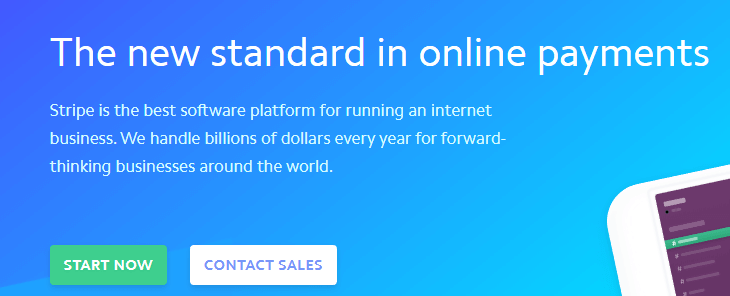
Let’s look at an example of a good USP:
positioning errors in marketing

The moment you arrive on the homepage, Stripe communicates what they are and who they’re for. If you’re an online entrepreneur, you’ll be hard-pressed not to hit the “start now” button to learn more about what Stripe can do for your business. The best B2B marketing strategies revolve around a powerful and concise USP.

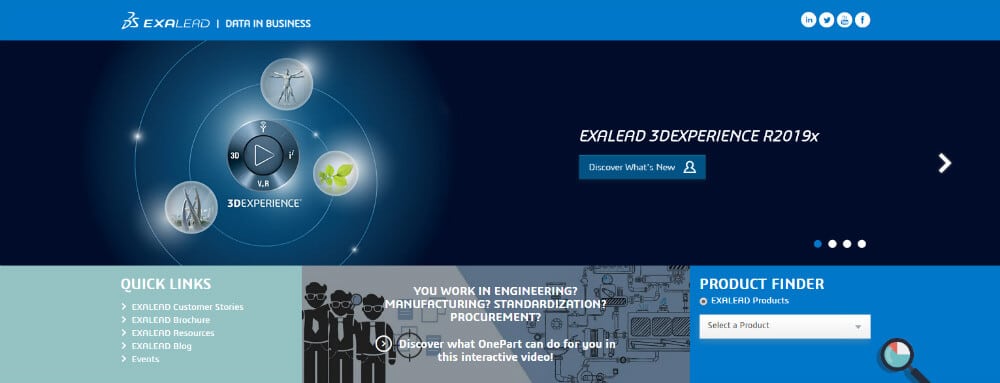
Now here’s a bad example:
marketing mistakes and successes

You wouldn’t know it by looking at it, but ExaLead is a search engine. As you peruse the homepage, you’re not really convinced that you should use this service, and the industry-specific jargon is confusing.

You’ll likely have to thoroughly research the site to learn what ExaLead really brings to the table, but there’s an equal chance that you’ll leave due to confusion. If you’re not diligent, positioning errors in marketing can lead to the failure of your digital and traditional campaigns.

3. Making Promises You Can’t Keep

One of the biggest marketing blunders you can make is to get overzealous and make a promise you may not be able to fulfill when it comes time to deliver. Brand promises are meant to be kept, that’s marketing 101. Failing to deliver on a promise will prompt a loss of faith in your brand.

There’s no greater example than the disastrous launch of Fallout 76 by the video game studio Bethesda. In their marketing campaign, Bethesda made promises of a grand online multiplayer open-world adventure that would be teeming with life (amongst many other promises).

At launch, instead of jumping into a world full of eager players and interesting NPCS, players were instead greeted by a flat, empty world with numerous game breaking bugs. To add insult to injury, practically none of the features that were promised by Bethesda were actually present in the game at launch.

As you may have guessed, Fallout 76 fell flat on its face at launch, Bethesda lost millions, and the fanbase completely turned its back on the once beloved video game studio.

biggest marketing blunders

It just goes to show that if you promise something you must deliver or you will forever tarnish your reputation. Some speculate that Bethesda may never recover from this debacle.

Avoid major marketing errors by working with MARION, a top rated marketing company in Houston and Austin!

4. Isolating Segments of Your Audience

When writing marketing copy, you should choose your words carefully. There’s nothing wrong with creating a clever slogan or tagline, but ensure you’re not isolating a segment of your audience, accidental or otherwise. There are a lot of people online, and the wrong image or phrasing can cause the kind of backlash that may turn your audience against you.

An Instagram post by fashion brand Benetton is a prime example of why you should carefully select the wording of your marketing campaigns.

common marketing mistakes

I think it’s safe to say that Benetton had zero intention of actually offending anyone here but simply wanted to hammer home a clever post for a few chuckles. The above image, which features three boys with the tag line “Sorry ladies. Girls not allowed!” garnered all sorts of negative feedback and controversy.

Benetton’s followers hit the fashion brand hard with accusations of sexism and promoting negative gender roles. The fashion brand has since recovered from the debacle, but they will forever have to live with this stain on their record.

The lesson to be learned here is to be careful with the message you’re promoting in your marketing campaigns. Whether you intend to or not, you may end up offending a segment of your customer base.

Avoid the Biggest Marketing Mistakes

Marketing mishaps happen. All you can do is roll with the punches, learn your lesson, and try again. It’s inevitable you’ll make a few slip ups here and there, but you can avoid the most common marketing mistakes by learning from the failures of others.

Your marketing mistakes and successes will play a major role in how your brand is defined. Make sure your marketing is done right by contacting MARION today. We’ll help you avoid common mistakes and create a winning marketing campaign for your business.

Marketing emails you’ll actually want to read.

Get marketing tips and news sent to 
your inbox.

This field is for validation purposes and should be left unchanged.
Name(Required)


4 Key Metrics to Measure for Social Media Goals

Social media is one of the most powerful tools businesses have in reaching modern consumers. In fact, 69% of U.S. adults and 45% of the total world population use at least one social media platform. In the coming years, social media’s popularity will continue to grow with social media penetration set to hit three billion people worldwide by 2021.

Like any marketing tool, the results and performance of your social media efforts should be carefully tracked and analyzed to ensure that the time and money your business is spending is worth the return on investment.

Setting goals and tracking metrics can seem like a daunting task, but I’m here to help make it easy! Below, I discuss how you can get started setting your social media goals, along with some of the most common social media metrics that go along with each.

Begin with an audit

Before you dive into common social media goals and metrics, you’ll want to take a step back and look at what your business is doing right now by conducting a social media audit. Doing this will help you get a clear picture of where you currently stand so you have a baseline to measure any new social efforts against.

social media audit

Begin your audit by thinking carefully about all of the different social accounts your company has and forming a list of these active accounts. Make sure your company doesn’t have any duplicate or old pages that may no longer be in use.

Next, search your company’s name on Google and various social media sites to see what social accounts exist. If you find accounts you don’t recognize, determine if they’re actually connected to your company. If you think they may be imposter accounts run by someone not affiliated with your brand, take the necessary steps to get them removed.

Once you have a clear list of all your social accounts, create a social audit spreadsheet to keep track of all of your information.  For each of your social accounts, record the following information in your audit spreadsheet:

  • the link to your profile
  • the social handle of the profile
  • the internal person or people that manage the account (whoever “owns” it)
  • the top three posts in terms of engagement
  • any key demographic information
  • include a column for any additional notes for the account

Next, make sure each account is consistent with your brand image by setting cohesive profile pictures and cover images that align with your brand. Ensure your profile and biography text align with your current brand message and check that you are using the same handle across all platforms to ensure consistency. Use this brand strategy template if you need help aligning your messaging and imagery.

Don’t leave your branding up to chance. Download this free sample brand style guide today to align your brand materials!

Now, since you’ve already identified your best posts, it’s time to analyze them and look for patterns. Notice what kinds of posts, content, and copy get the best response, as well as how post engagement differs between platforms. For example, do posts with pictures perform better than posts with links? Write your thoughts on these patterns in the notes column of your audit spreadsheet.

Lastly, decide which channels are right for your business by looking at how each existing channel is currently performing and considering if there are any new platforms that may be right for you. Look at demographics for the various platforms and match them up with your target audience to determine where your time and effort is best spent to serve your business.

Once you have conducted your social media audit and have a good understanding of your social platforms, it’s time to set your goals and figure out what social media marketing metrics you should keep track of.

Setting social media goals and metrics

social metrics

Here are some of the most common social media marketing goals and objectives, along with the metrics that should be tracked for each:

1. Increase conversions/sales

After years of offering social media marketing in Austin, we’ve found that this is a favorite social media goal among businesses because it directly relates to a company’s bottom line and is one of the best ways to show the value in social media.

A conversion is when a customer takes a specific action, like downloading a whitepaper or filling out a contact form. Conversions are not sales, but they are very valuable actions that have measurable value for the company. Measuring this goal is particularly useful for most B2B marketing strategies.

Key metrics related to conversions and sales include:

  • conversion rate
  • click-through rate
  • conversions
  • cost-per-click
  • cost-per-conversion

2. Generate Website Visits

Another popular goal for social media marketing is to increase traffic to your company’s website. Companies who choose to set this goal are focused on getting users to their site in the hopes that it will encourage them to browse around other pages, become more interested in their business, and maybe even make a conversion (such as filling out a contact form).

Key metrics related to generating website visits include:

  • link clicks
  • site visits
  • cost-per-click

3. Build & cultivate an engaged community

Fostering an active and engaged community means you have a ready audience that is interested in keeping up with your company’s latest news and developments. This is particularly useful for B2C companies, as a loyal audience is a major asset when launching a new product, having a sale, or trying to create a positive social brand image.

engaged community

Key metrics related to community engagement include:

  • engagement rate
  • amplification rate
  • applause rate
  • reactions

4. Build brand awareness

Brand awareness is the extent to which people are familiar with your company. Set this goal if your main focus is to have social users know you exist and understand what your company does.

Key metrics related to brand awareness include:

  • brand mentions and tags
  • reach
  • impressions
  • shares
  • ad recall lift (for Facebook social ads)

Once you have figured out your goal and the key metrics that go along with it, be sure to add them to your social media audit to see where your company currently stands.

Lastly, consistently monitor and analyze how your ads are performing (given your key metrics) to ensure you are on track to meet your goals.

Now get out there are start making social media work for your business!

Develop Your Social Media Marketing Strategy with MARION

MARION’s social media marketing agency in Houston has experience with small, medium, and enterprise level businesses. If you’re looking to develop a cohesive strategy for your company, contact us for more help today!

Marketing emails you’ll actually want to read.

Get marketing tips and news sent to 
your inbox.

This field is for validation purposes and should be left unchanged.
Name(Required)

7 B2B Marketing Strategies for IT Companies

In today’s market, promoting services from one business to another has become a common practice. Trends give rise to new strategies which need to be employed to stay ahead of competitors and to draw in customers.

Information technology companies face marketing challenges unique to their field, though an abundance of opportunities offsets this. With that being said, marketing for IT companies just requires the right strategies.

B2B Marketing for IT Companies

Effective B2B marketing strategies are essential for any IT company, but which tactics should you use? These B2B marketing strategies are proven to help you create your own IT services marketing plan.

1. B2B Event Marketing

There are countless IT services marketing strategies available, but few are as powerful as hosting a B2B marketing event. Marketing events are offline marketing channels where real-life experiences are leveraged to achieve a variety of business goals like:

  • sales acceleration
  • customer retention
  • brand awareness

B2B event marketing are centered on education and building relationships between organizations, and a firm handshake can be a great step towards closing a deal. During these in-person interactions, the use of video and interactive sales presentations are highly recommended to keep potential customers engaged.

2. Visual Content

Visual content has completely permeated the marketing landscape. Formats such as videos, images, live discussions, and webinars are some of the most popular forms of visual content widely utilized.

Simply put, people prefer interacting with other people. Blogging for business has marked benefits, but blog copy can only convey so much emotion. Visual content, however, hints to prospects know they’re dealing with another living, breathing human. This builds reliability and trust.

Need to improve the ROI of your digital marketing? Learn how to run an effective online marketing when you download this free eBook today!

3. Social Media

Social media management plays a major role in B2B marketing for IT companies. While social media channels are often used to participate in industry discussions, it can also be used to promote and share content.

Marketing in the IT industry would not be effective without a well-planned social media strategy in place to attract new prospects and improve your business lead generation strategies.

Looking to establish an effective social media marketing campaign? MARION’s social media marketing in Houston can help develop tailored strategies to grow your business in a meaningful way!

4. Content Marketing

marketing strategies for IT companies

Content marketing has been a widely successful approach in the B2B space over the past decade. For your content marketing to be effective, focus on delivering quality, highly relevant information that delivers value to your readers. Delivering value first will build trust and pave the way to future business partnerships.

Content such as blogs, whitepapers, and case studies work well to draw in potential clients. Relevancy should be one of your main focuses during content creation. Nowadays, businesses are focused on topics such as cloud computing, cybersecurity, storage and Office 365 amongst other topics.

Not sure how to create quality content assets that your customers will appreciate? For expert content marketing in Houston, let MARION’s team of strategists help. Unlike some other IT marketing firms, we have firsthand knowledge about growing a highly profitable IT services company.

5. Mobile Marketing

An effective marketing strategy for an IT company would not be complete without the inclusion of mobile marketing. Mobile website marketing campaigns are ideal for reaching executives who are constantly on the move. Executives are often inundated with meetings, management duties, and other similar responsibilities, and often only have time to quickly scroll through their phone during a short break.

Ensuring your pages are mobile friendly will guarantee greater interaction between your business and its intended audience. You’ll also be providing a personalized experience for your users, something everyone appreciates.

6. A Winning Website

Once upon a time, marketing strategies for IT companies relied chiefly upon word of mouth for growth and brand awareness. Nowadays, an impressively designed website has taken over this role.

Focusing on a winning website design is crucial because your site acts as an indicator of your credibility. A website that fails to impress visitors can act as a deterrent to successfully selling IT products to interested organizations. We have more details in a recent blog post if you’re unsure of what makes a good website.

marketing plan for IT company

Marketing ideas for IT companies should always include a winning website design. Remember, your website is your primary hub for setting up an online marketing presence. This is where visitors can view your mission statement, access links to your social media profiles, visit your blog and much more.

Contact MARION for custom web design in Houston that will leave a lasting and positive impression on your potential customers.

7. Marketing Automation

A solid marketing strategy for IT services often includes automation tools. The advent of marketing automation technology has completely revolutionized marketing practices across the board.

Automation tools can allow your IT company to personalize email messages with the press of a button, create an increase in website traffic, update social media channels, and much more. With minimal management required and the right automation tools, your marketing strategy can be set on autopilot which makes marketing automation a must. Any IT marketing agency worth their salt can get you set up with the right tools for your unique circumstances.

Developing a Winning B2B Marketing Plan for IT Companies

Knowing how to market an IT company is essential for reaching the right audiences, developing business relationships, and establishing new clients. We recommend trying the above strategies to find what works and what doesn’t for your marketing efforts.

MARION makes digital marketing easy. The careful approach of our award-winning marketing agency ensures that your business will always have access to the resources needed to make your marketing strategies successful.

Contact us today to schedule a consultation!

Marketing emails you’ll actually want to read.

Get marketing tips and news sent to 
your inbox.

This field is for validation purposes and should be left unchanged.
Name(Required)

Going to Gutenberg

(Please visit this post as it was originally composed using the Gutenberg editor.)

I just about lost it the first time I had to edit something with Gutenberg … because I’m busy and I have to get work done on time. Just like you.

So, instead of using Gutenberg, I installed the Classic Editor. Probably just like you.

But, change is inevitable, and some growing pains come with it. We’ll have to learn this soon or later, and I must admit I like the new interface, it’s just that my fingers don’t know where anything is yet. So with that in mind, the purpose of this post is to make that first humbling learning curve a little less painful for you than it was for me.

Blocks

The Gutenberg editor uses the term “Blocks” to describe various elements of content you can add to an article or page. For example, this paragraph is a single paragraph block. If I move my mouse around inside the block, a pale grey line appears on the four sides of the paragraph to visually delimit the block. If I want to add another paragraph block, all I need to do is hit enter and

POOF! Another paragraph appears in its own block, so writing text is the same as you’re used to. When I mouse over any paragraph you can see its delimiter as well as the formatting bar in a tab on the left:

So how did I insert the screenshot? Simple. With the cursor inside the paragraph block, the tab menu appears. Click the More Options dots on the right. Choose Insert Before or Insert After and an empty block appears.

There are a couple of ways to insert the image. On the left is a plus icon which pulls up the block menu, just choose “image” and follow the directions. Or, use the shortcuts on the right side of the block which includes icons for adding images, headings and galleries.

This is an empty block. Start typing, or use the Plus icon or the icons on the upper right to begin.

“Blocks” is also a descriptive name. The new editor is designed to let you arrange and easily re-arrange your block-delimited content into practically any layout, without requiring a plugin or hand-coding in the text editor or updating a style sheet to manage the display of content across devices. Blocks can be dragged, even nested into other blocks. Layouts can be saved for re-use. This is a real gain for editors.

Types of Content

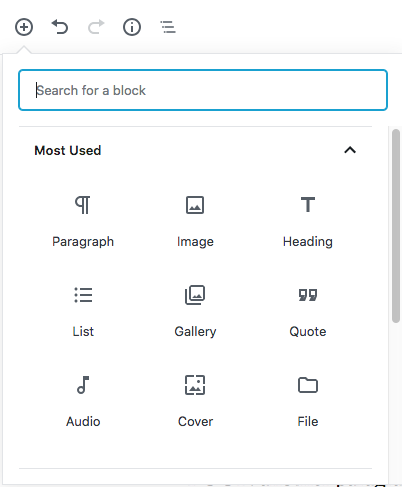
At the upper left of the content editor, click the Plus icon and many types of content available will display in a menu below the icon.

The top half of the drop down menu showing the most common types of Block content.


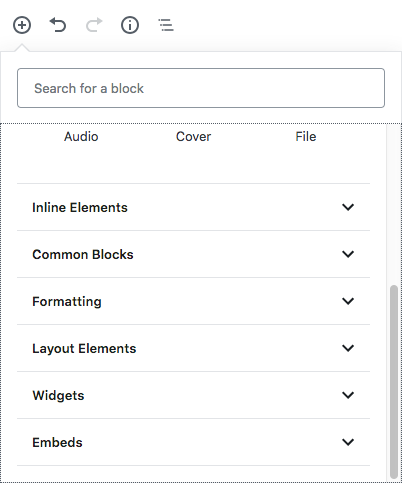
The sliding bar on the right reveals more categories of content available.

The sliding bar on the right reveals more categories of content available.

We won’t examine everything you can insert as a Block but let’s look at a few that will enhance your content right away.

Columns!

Although CSS columns have been around for a while, the old editor had no means of creating them without some hand coding in the text editor. Without CSS and HTML knowledge, editors depended on plugins or pre-defined layouts with custom fields to ensure columnar content displays appropriately on desktops and mobile devices. For some of us, this skill is still needed because it will take time for Gutenberg and plugin makers to catch up with each other, and many websites use pre-defined layouts with custom fields for which the Blocks editor may not be compatible.

But don’t worry about all that – that’s really my job. Let’s make some columns.

Column 1

This is so easy you’ll flip. All I did was hit enter, click the plus sign, and scroll down to Layout Elements, then choose columns. Suddenly I had two side-by-side boxes to type in.

The text of this blog article as it appears in columns.


HOW TO: 3 Columns

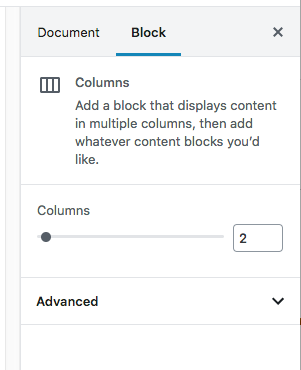
Making a 3 column group required me to Google a little, oh well. It turns out you need to select the column group, then determine the number of columns from the right sidebar column slider.

I discovered you must insert the default 2 column layout, then use the mouse to select the whole column group. It was a bit difficult to select it with the mouse, I found I had the best results by mousing near the middle of the columns. Once the mouse detected the group, the right sidebar changed to show the columns slider. I typed a 3 in place of the 2 and voila!

After labeling the columns to make it clear, I have this, below. You can insert more blocks into each column, i.e., nesting blocks within blocks.

I’m finding that as I write this first post, I’m getting better and better at selecting the elements, for example, the column groups. Just mousing slightly above the group revealed the group and the all-important plus icon for inserting blocks.

Beautiful Backgrounds

So how did I do that? It’s called a “Cover” and is available from the Add Block menus. But just to mess with you, I’m going to teach you a shortcut. Hit enter and type “/cover” without the quotes and hit enter again. Or just type a / and you’ll get a shortcut menu. Nice. Once you do that, you’ll see the obvious Cover options to upload or browse to your background.

Once the background is chosen, you’ll be able to type your title in the prompt.

Notice there are options for your cover in the tab menu at the top. You can make exciting 100% width content easily, just click the Full Width

icon and since this is enough learning for one day …

Marketing emails you’ll actually want to read.

Get marketing tips and news sent to 
your inbox.

This field is for validation purposes and should be left unchanged.
Name(Required)


Sharing Google Access With Your Marketing Team

If you are a person, organization or business who engages in some form on online marketing, chances are highly likely you possess accounts with Google.  Most digital marketing, whether it is search engine optimization or pay per click management, requires active use on Google.

As a growing business, you’ll want to delegate certain responsibilities, which might include marketing.  Some companies hire a marketing person to work within the business.  They are onsite and usually have access to the accounts necessary for online marketing. As a business owner, you may be reluctant to share your personal or company based email credentials with a new employee. Other companies will choose to partner with an online marketing agency that will handle the digital marketing of the business.  To do that effectively and efficiently, it’s imperative that the agency has proper access to the currently used marketing channels.

It is extremely counterproductive for an agency or individual to create a new business listing on different directories like Google Maps and Bing Places, when the business already has an existing listing on that directory.   Doing that creates more clutter and bad profiles across the internet.  You would also be creating competition for yourself, with your own business.  Don’t believe that Google and other search engines will display both listings.  The truth is, the original listing will be included in the index but is unlikely to be displayed in search results.  What’s worse, the whole account can be penalized for spam (according to Moz). Trust me; it is best to share access.  This way, all of the work your business is paying the agency to do will happen on your existing profiles, and whenever the billing relationship ends, you can deactivate the shared access.  Your accounts retain the benefits of the work done by the agency, versus the agency reclaiming the profiles they created for your business and leaving your business back at the beginning.

However, before you start sharing access to your precious accounts, make sure the person/agency receiving access has a clear plan of action.  More importantly, make sure you understand what they will be doing as they represent you and your company.  For example, you may share Google My Business access with the agency.  This means they can correct and update your business listings and other information. It also gives them the ability to respond to reviews (read our blog about how to ask customers for Google reviews).  Make sure you have discussed responses and when to reply, if that is part of the agreement.

We are a fully integrated digital marketing agency, meaning we will build your website, optimize the website for search engines, pay for search engine traffic by click, design and send emails, and manage your social media.  With so many different services provided, we always need access to existing profiles.  Getting the proper shared access or current login credentials can be a hassle at times.

**Full transparency…I created this post to not only encourage you to share profile access with your marketing teams, but so our new clients can have a guide as to why to share profile access with us.  🙂

How To Share Google Account Access

Once a website has been launched, we immediately go into marketing mode.  It’s extremely important to get things set up with Google first.  The steps below will help you share the correct access with your marketing team.  Within Google, you’ll likely need to share access to Google Search Console, Google Analytics, Google My Business, and Google Ads.

Google Analytics Access

Google Analytics is a program that tracks website visitors and provides various types of data about the website visitor.  If you want to know how many visitors your website had, what they did while visiting and what the referral source was, you’ll need Google Analytics.  Follow these steps to share access to Google Analytics.

1. Log in to Google Analytics. https://analytics.google.com

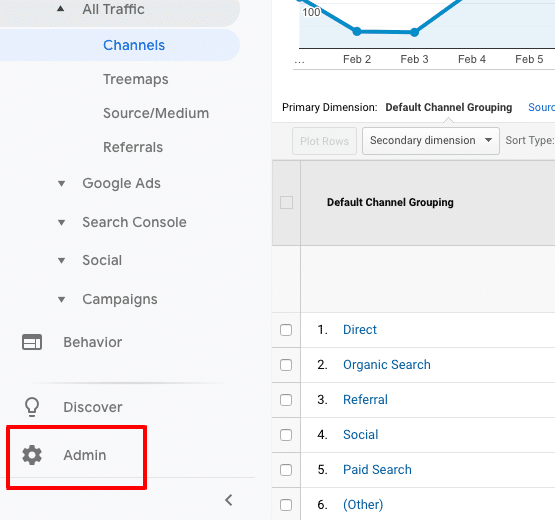
2. Select “Admin” at the bottom left corner

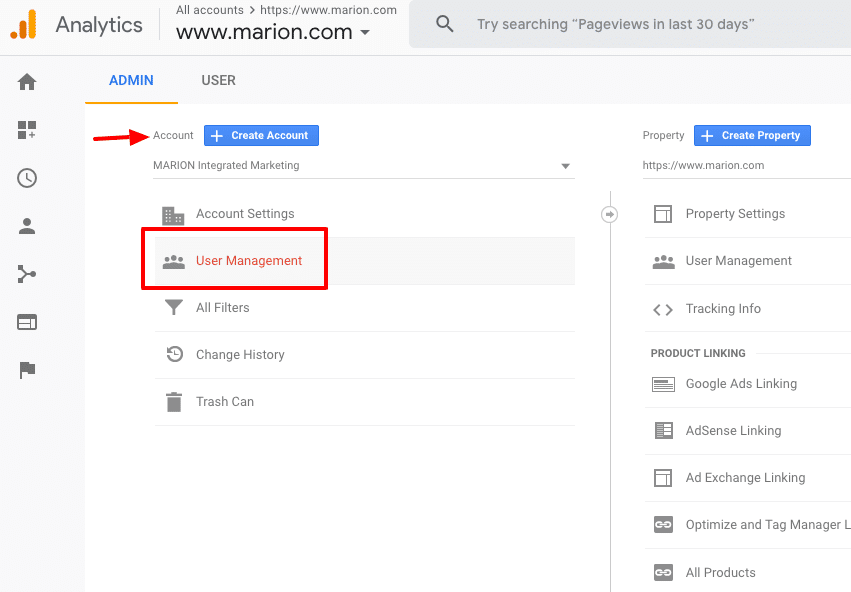
3. Select “User Management” in the Account column

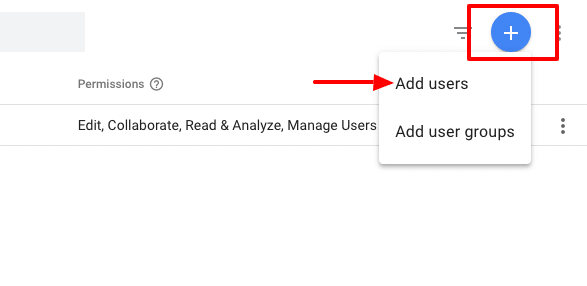
4. Click the “Plus sign” in the upper right corner and select “add users”.

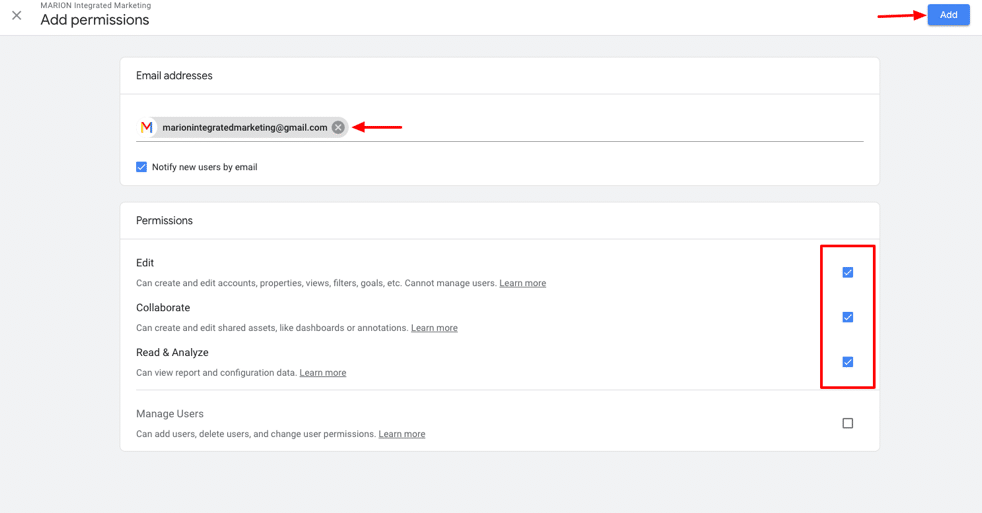
5. Input “marionintegratedmarketing@gmail.com” and check all the permission boxes.

6. Click “add” at the top right.

Once those steps are complete, the user receiving access will get an email indicating they have been given access and they should see the account when they log into Google Analytics.

Google My Business Access

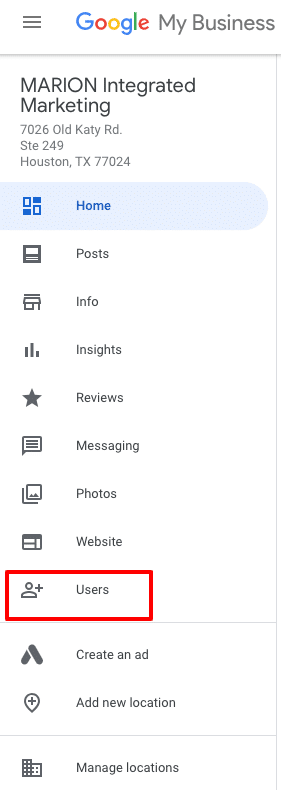
Google My Business is a program created by Google to manage your local listings.  It has changed over the years.  It used to be Google Local; then it changed to Google Places.  Now, it is Google My Business.  Once this profile is verified, you can update your business listings, add images, videos and contact information as well as respond to reviews given by Google users.  If you need to be found in local searches, a properly optimized Google My Business page is necessary.  Follow these steps to share GMB access with your marketing team.

1. Log into GMB at business.google.com. If more than 1 location, select the location that access is being given to.

2. On the left menu, click “Users”

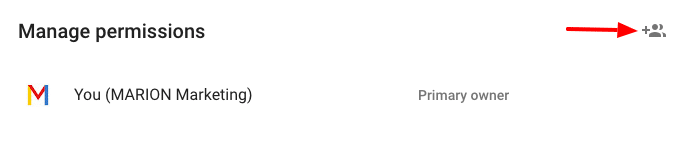
3. Click the “+” on the window that opens to add a new user

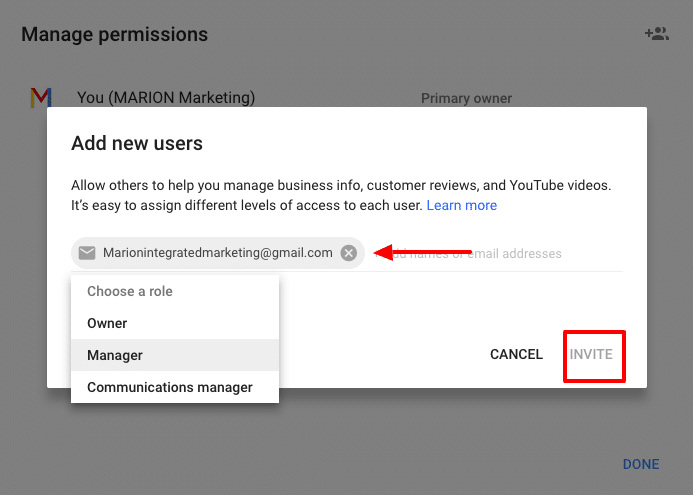
4. Input “marionintegratedmarketing@gmail.com” and choose the role of “Manager.”

5. Click Invite

Once completed, the invited party will receive and accept the invitation.

Google Search Console Access

Google Search Console is basically home base for your search engine optimization campaign.  GSC was formerly known as Webmaster Tools. This is where you inform Google of your website intentions.  Are you targeting domestic or international traffic?  Is this website using “www” or “non www”?

GSC is also where you indicate how you want your website to be indexed.  You submit sitemaps and request pages to be indexed by Google within GSC.

Accessing your link profile is done through GSC. Once logged in, you can see who links to your domain, when they linked, and what pages they are linking to.  This same area is where you disavow links.

More importantly, GSC is the messaging platform for Google to send you notifications about your website. If your site has been hacked, gets penalized, has broken pages or is inaccessible for any number of reason, GSC is where you’ll get the message.

Follow these steps to share Google Search Console Access with your marketing team.

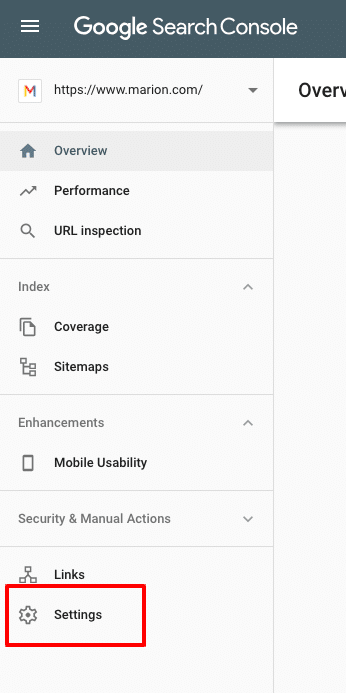
1. Log into Google Search Console at https://search.google.com/

2. Click “Settings” in the left menu

3. On the Users and permissions bar, click “Add ”

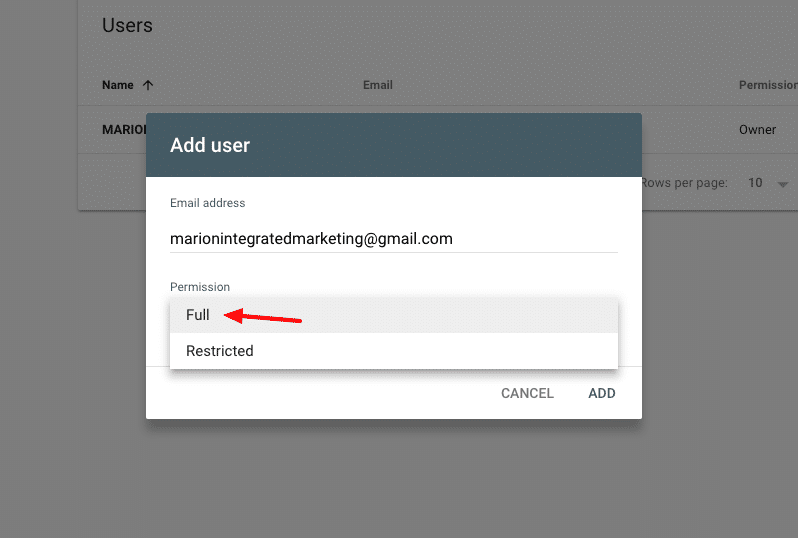
4. Input marionintegratedmarketing@gmail.com (the email address the agency has for access), give Full permission and click ADD

The end user will receive a notification that they have been given

Google Ads Access

Google Ads is the advertisement platform used to create search, display and video ads that show on Google and its properties.  It is formerly known as Google Adwords.  Any pay-per-click activities that show ads on Google should be managed through Google Ads.  There are platforms that will publish and manage your Google Ads such as WordStream, AdRoll, and others.  These platforms work fine and definitely serve a purpose in digital marketing.  I use them from time to time, but prefer to operate directly in Google Ads, or Google Ads Editor (offline Google Ads management program).

Some businesses prefer that the agency create their own new Google Ads account.  For a business that is new to Google Ads, it makes sense to do so.  However, if your company been using Google Ads for some time, it’s worth sharing that account with the new agency.  I can’t speak for all, but our process involves reviewing your past performance data.  We’ll research and develop our strategy. When possible, we like to review the past year or two worth of data to learn about peak months, top keywords and ads, and all types of other performance indicators.

There are two ways to share Google Ads access.  The client (business) can assign access to a user or a user can request access to a client.  Either way, the other party has to approve and accept it.

Follow these steps to share Google Ads access with your marketing team.

1. Log into https://ads.google.com

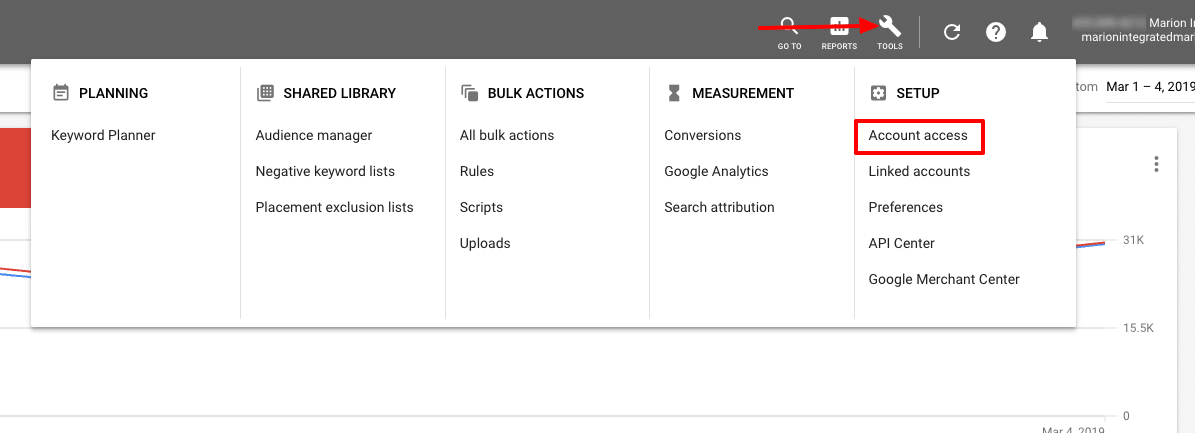
2. Click the “tools” icon (wrench) in the upper menu and select “Account ”

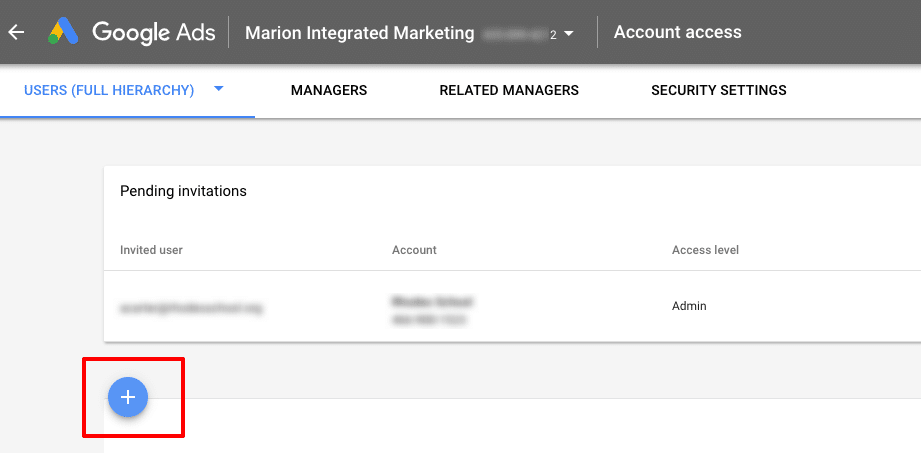
3. Click the “+” to invite a user

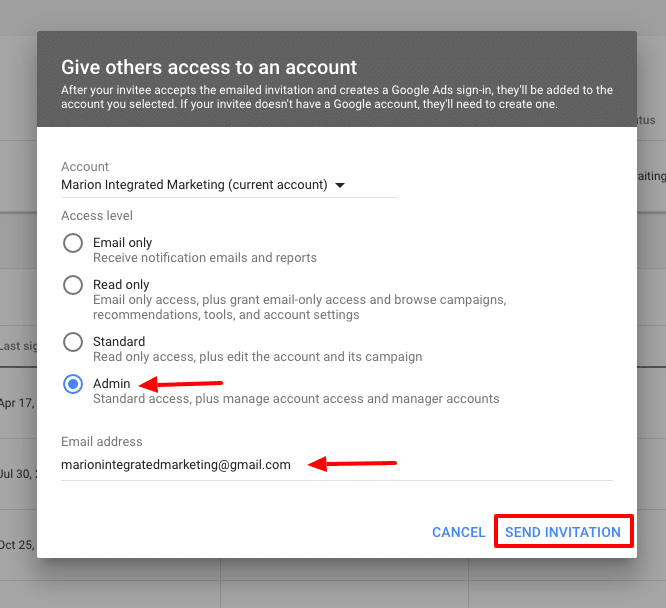
4. On the pop-up window, select the access level (normally admin) and input the email address the agency has supplied you with. Click “Send Invitation.”

The end user will receive a notification that they have been invited to access your Google Ads account.  Once logged into their existing Google Ads account, the invitation can be accepted.  At that point, they can manage your Google Ads account.

If your business has a website, and a goal to have potential clients find your website using search engines, you’ll need to actively use them. According to StatCounter, Google accounts for 88% of searches in the USA.   It’s safe to say, for effective online marketing you must be present on Google platforms.  If an agency or marketing team is managing your digital marketing efforts, share with them the correct access so that they can do the best job for you.

Marketing emails you’ll actually want to read.

Get marketing tips and news sent to 
your inbox.

This field is for validation purposes and should be left unchanged.
Name(Required)

16 Mobile Marketing Statistics to Help Improve Your Digital Marketing

If you’re not focusing on mobile website traffic, then you’re behind the times. 60% of consumers across the globe use their mobile devices as their primary source of internet access.

Consumers today are savvier with mobile devices than ever before. It’s crucial that digital marketers and business owners alike adopt mobile website marketing into their marketing and brand development strategies.

Mobile Internet Usage vs. Desktop

It has been a long time coming, but mobile devices have finally overtaken desktop in terms of internet usage. This means one thing for digital marketers – it’s time for a mobile-first strategy.

The world is increasingly becoming mobile-centric. Everyday problems are being solved with a quick Google search from a mobile device. Users prefer the convenience of being able to access the internet while on the move. This is a luxury not afforded when using a stationary desktop computer.

Need to improve your website’s performance? Download this free eBook with 24 tips for boosting your digital marketing results!

16 Top Mobile Optimization Statistics

If you’re looking to increase the traffic to your website or place of business in 2019 and beyond you need to have a firm understanding of mobile marketing statistics.

Check out these 16 mobile marketing stats to help you improve your digital marketing.

1. 9 in 10 users who enroll in SMS loyalty programs feel they’ve gained some form of value

One great way to build loyalty with your customers is to implement SMS coupons and rewards for your business. Your customers will appreciate the personalized approach of a text and will view you in a different light compared to your competitors.

(Stat from BrickandMobile)

mobile optimization statistics

2. 70% of consumers delete emails almost immediately that don’t render well on mobile devices

Make sure the messages you send aren’t deleted because they weren’t optimized for mobile users. Run a few tests on a variety of mobile devices (cell phones, tablets, etc.) before sending anything out to your customers.

(Stat from Blue Hornet – now Mapp)

3. 69% of consumers are more likely to buy from companies whose mobile site helps them find answers to their questions

Consumers desire convenience more than anything else when shopping online with their mobile devices. What makes a good web page for mobile viewers?

Optimize your site for mobile and position useful data in easy-to-reach sections of your website. This is a great way to get leads for your business and increase your bottom line.

(Stat from PixelUnion)

4. SMS response rates are 8 times higher than email

While email is still a popular form of communication, text messaging has dominated the hearts and minds of consumers. Users are drawn to the convenience of reading and sending text messages on the go. To reach an even wider pool of prospects, consider adopting SMS marketing tactics.

(Stat from RetailDive)

5. Mobile advertising is expected to represent 72% of all U.S. digital ad spend by 2019

While this statistic is a straightforward and optimistic outlook for mobile advertising, you may find this next statistic to be even more interesting…

(Stat from MarketingLand)

6. 70% of users report disliking mobile ads

As ad spend is increasing, user dissatisfaction is growing. Users are tired of intrusive ads dominating their handheld screens. With dissatisfied users blocking ads at an increasing rate business owners and marketers need to pay close attention to ensure their audience is receptive to mobile advertising.

Non-intrusive mobile ads, sponsored content, and native advertising can help get your message across to target users. Contact MARION, a marketing firm in Houston, for help with digital advertising opportunities.

(Stat from HubSpot)

mobile website marketing

7. Google drives 96% of mobile search traffic

When it comes to mobile search vs. desktop search, Google reigns supreme in both domains. The best way to increase mobile search traffic is by optimizing for Google on mobile devices.

You can do this by learning ways to reduce page load time across your site and making sure your text and buttons are large enough on mobile screens. For advanced optimization, contact an experienced SEO company in Houston.

(Stat from NetMarketShare)

8. 48% of millennials view video solely on their mobile device

If your audience is on the younger side, you should incorporate videos into your mobile marketing strategy. Starting a YouTube channel is a great way to start promoting your brand through this medium.

(Stat from Business of Apps)

9. 68% of businesses have begun integrating mobile marketing into their marketing strategy

There’s a reason all your competitors are jumping into mobile marketing. It’s a profitable investment that will make your business a lot of money. Don’t get left behind.

(Stat from Salesforce)

10. 48% of consumers turn to search engines for mobile searches

Though nearly half of consumers turn to a mobile search, 33% go directly to the site they have in mind. Producing the highest quality content possible should always be your priority, but this statistic reinforces that fact.

Good content allows your audience to find you easier. Of course, don’t forget to optimize your site for mobile queries. For more help, choose an SEO company that can produce high-quality content that performs well in organic search.

(Stat from Smart Insights)

11. 61% of users are unlikely to return to a website they had trouble accessing with mobile devices

… and 40% go to a competitor’s website instead. We can’t express how important it is to optimize your website for a flawless mobile experience. Potential customers are immediately turned off when they encounter a site that’s difficult to navigate and will turn to your competitors as a result.

(Stat from McKinsey & Company)

mobile search vs. desktop search

12. 64% of Pinterest’s referred traffic comes from tablets or smartphones

Facebook, Twitter, and Instagram often get all the love whenever anyone talks about social media marketing. But, did you know that Pinterest is the most heavily used social media site by mobile users?

Businesses that target mobile users should consider paying more attention to Pinterest if they want to draw in more mobile traffic.

(Stat from Mobile Marketing Watch)

13. Users spend 80% of their social media time on mobile devices

Whether the platform is Facebook, Twitter, Instagram, Pinterest, or LinkedIn, social media has become a large part of owning a mobile device. It’s important to learn how to effectively use social media for advertisements on desktops and mobile devices to maximize your return.

(Stat from ComScore)

14. Over 50% of smartphone users immediately reach for their smartphone the moment they wake up

Most of us do this, but it can be an excellent opportunity for digital marketers. Posting early in the morning (depending on where you are in the world) will ensure that a greater number of people will see your content.

(Stat from ExpressPigeon)

15. 57% of mobile users say they won’t recommend a business with a poorly designed mobile site

First impressions are everything. A poorly designed mobile site will make your business look unprofessional and untrustworthy. Make sure you implement aesthetically pleasing website design and SEO best practices.

(Stat from socPub)

16. 50% of mobile search is aimed at local businesses

Local businesses have traditionally been the slowest when it comes to adopting new online trends. Breaking from the pack and adopting mobile marketing will make you stand out from your competitors and attract customers that are already searching for your solutions.

(Stat from Search Engine Watch)

Incorporating Mobile Web Statistics into Your Marketing Strategy

If the above mobile marketing data is clear about one thing it’s this – mobile marketing is no longer an option; it’s a requirement. It’s safe to assume most people you’re targeting own smartphones, so dive into mobile marketing as quickly as you can.

Studying mobile web statistics can be tedious work. Why not leave it to a top marketing firm?  MARION is a marketing agency that has been helping businesses like yours for nearly 40 years.

Our responsive web design in Houston and Austin is delivered by a top-notch team of professionals. We’ll ensure your site is mobile ready.

Contact MARION today to learn more!

Marketing emails you’ll actually want to read.

Get marketing tips and news sent to 
your inbox.

This field is for validation purposes and should be left unchanged.
Name(Required)

Marketing Retainer vs. Project – How Do Marketing Agency Fees Work?

If you’re in the process of choosing a marketing agency, you will eventually need to enter into a marketing fee agreement. Marketing agency fees can follow several different formats, so make sure you know what to expect from the firm you’re considering.

You can choose to pay either a monthly retainer fee or pay per project. Understanding the advantages and disadvantages of each fee structure will help you decide which marketing fee agreement best suits your goals.

What Is a Marketing Retainer?

A marketing retainer is a monthly agreement between your company and a marketing agency. Each month, you agree to pay the agency a certain dollar amount in exchange for their services. The scope of their monthly services will be included in your retainer agreement.

Retainers are mostly used for long-term relationships and are not specific to any particular project. Retainers give agencies time to familiarize themselves with your brand and develop and optimize effective B2C or B2B marketing strategies unique to your organization.

Just like an on-call lawyer, setting up a marketing agency retainer agreement allows you to regularly tap into a wealth of expertise you don’t possess on your own.

How Does a Marketing Retainer Agreement Work?

Your business will sign a contract with your marketing firm that agrees on a monthly budget for a pre-determined range of services performed each month. For example, if you need social media marketing services, you will pay a social media retainer to an agency that specializes in organic and paid SMM.

After you communicate your marketing goals and objectives, it’s the job of the agency to build and execute on strategies that fall within the scope of the retainer to achieve them. A further benefit is that the agency is “on call,” meaning you are well within your rights to contact your marketing firm for in-scope additions, changes, or advice at any time.

The Benefits of a Marketing Retainer

Retainers tend to be mutually beneficial for both parties. Here are a few reasons why:

Benefits for your business:

  • Fast service
  • Predictable costs
  • Real and ongoing value
  • Leveraging the skillsets of specialists

Benefits for agencies:

  • More focus on your brand
  • Solid expectations and improved service
  • Greater control over strategy changes to best meet your goals

Marketing retainers allow agencies to internally adjust strategies so that they can best meet your goals. This is the most important insight in this article.

What does this mean?

Imagine you need to improve your organic traffic, and you’d like to optimize your website for search engines. You could take the following two approaches.

  1. Approach a marketing company for a three-month-long SEO audit that includes on-page optimization, building 10 backlinks, and publishing 50 local citations.
  2. Approach a marketing company for a monthly SEO retainer.

In the first approach, your agency might deliver exactly what was laid out in your project agreement, but your website’s rankings and organic traffic remain unchanged. You have thrown your money away.

In the second approach, your marketing firm will consider your goals, build a strategy to reach those goals and then execute each month to achieve them. In the first month, they might focus heavily on your on-page optimization. In month two, your firm establishes all local citations and begins building links to your website. In month three, your firm continues to build links and starts to publish blog content according to a rigorous content strategy.

To your marketing agency, your account was highly-unprofitable for the first three months. However, during month four and beyond, your firm spends less time on your account but continues to blog and build links consistently each month. This allows them to recuperate the profitability of your account while achieving your goals and making you money.

Stop paying for marketing services and start paying for RESULTS! Get a free marketing consultation today, and let our experts identify growth opportunities for your business!

This is the biggest difference between a marketing retainer and project. A retainer will allocate resources to achieve your goals, while a project will provide a deliverable that you’ve requested.

What Is a Marketing Project?

A marketing project is an agreement for a one-time deliverable to be completed within a specified time-frame at a set dollar amount. Where retainer agreements are better suited for long-term relationships, projects are ideal for short term or one-time needs.  For example, projects may include web design, mobile app development, logo design, or setting up a social media advertising campaign for your business.

While you could argue that most marketing agencies are designed for retainer relationships (it takes time to generate results in marketing), even marketing services can be categorized as a project if the campaign has a singular focus to achieve a specific objective.

How Does a Marketing Project Work?

project marketing agency fees

Projects are well-defined in scope. Deliverables are typically needed in a short timespan (usually three months or less), and the project does not need continuous attention after it has been completed.

For example, imagine your company requires a complete redesign of your website. You would turn to an agency that specializes in website design and development and pay a set price. Due to the short-term nature of the job the project will be billed at full price.

In some retainer relationships, project work that falls outside of your retainer’s scope is billed at a discount due to the promise of a long-term relationship which guarantees a monthly stream of income for the agency. For example, MARION offers highly discounted website redesigns and graphic design work for clients that are on a monthly retainer with us.

Benefits of Marketing Projects

Projects have several benefits that affect agencies and clients in the same way. Benefits include:

  • Ideal for single objectives
  • The budget is clear-cut
  • Generally shorter time frames
marketing retainer agreement

Choosing the Correct Marketing Agency Fees to Reach Your Objectives

Frankly, the marketing agency fees you decide to pay (retainer vs. project) will depend on what needs to be accomplished. Let’s look at a few key points to help you determine which choice you should make for your business.

3 Reasons to Choose a Marketing Retainer

If you meet one of the following three criteria, you should consider entering a marketing agency retainer agreement.

1. You Require a Broad Range of Services

In many cases, retainer arrangements require a broad range of services such as digital marketing, web design, and SEO services. With some projects, it can be difficult to define the scope and duration of services needed to accomplish the job.

Therefore, the responsibility falls upon the agency’s shoulders to determine which strategies are needed to accomplish your goals and objectives.

2. Your Timeline Is Longer than Six Months

Retainers are ideal for projects that require the ongoing services of an agency for more than six months. In most cases, retainers tend to last 1 to 3 years in length. During this time, your agency will typically be expected to perform a wide range of services.

3. Need Prioritization Over Projects

Some agencies will give prioritization to clients paying an ongoing retainer as opposed to those who simply come through the door on a project by project basis. This can put project clients at a disadvantage.

At MARION, we consider this type of prioritization to be immoral and bad for customers. We value and prioritize the goals of project and retainer clients alike.

2 Reasons to Choose a Marketing Project

How much should a company spend on marketing for one-time needs? The following two situations may indicate that you should opt for a marketing project vs. a marketing retainer.

1. You Have One-time Needs

If you have a project that needs to be completed one time, then a project is the ideal choice. As mentioned previously, examples of projects include rebranding, web development, and the initial setup for a social media advertising campaign.

2. You Have Short-term Deliverables

If you have deliverables that need to be completed in the short-term with a limited budget and timeframe, then paying per project is the right choice. The moment the deliverable(s) has been turned in, the project comes to an end and thus payment is required. To start a new project, you would have to sign a new contract.

Understanding How Advertising Agencies Charge for Services

As a business owner, you have the right to know how marketing agency fees work. Understanding the differences between marketing retainers vs. projects will help you make the right choice when you require the services of a marketing agency.

With so many marketing agencies to choose from, it’s difficult to sort out the good from the bad. MARION is an award-winning marketing company that offers a wide range of services for small businesses. Whether you desire a continuous relationship or a one-off project, we can help you.

Contact MARION today to learn more about our services and schedule a consultation.

Marketing emails you’ll actually want to read.

Get marketing tips and news sent to 
your inbox.

This field is for validation purposes and should be left unchanged.
Name(Required)

8 Easy Ways to Grow Your Company’s LinkedIn Page

If your business is mostly B2B, LinkedIn is a necessary tool to connect with industry peers and potential clients. Whether you’ve just created a new LinkedIn company page or you’re looking for ways to grow your follower count, here are some LinkedIn company page tips to get you started.

1. Make Sure Your Page Looks Good

No one wants to follow a sloppy-looking business with an incomplete page. Your LinkedIn page should make sense aesthetically- take the time to write a good, concise description and use engaging visuals for your header and profile images. Remove as much clutter as possible to keep your page looking professional and streamlined.

Another thing that is easy to overlook is your custom URL. When you create a page, the default URL will include a group of random numbers at the very end. For example, our LinkedIn URL is www.linkedin.com/company/marionmarketing instead of a bunch of numbers at the end. You can customize your URL to look more professional and in control of your brand.

Keep in mind that your old URL will not redirect to your new URL if you change it. So, if you’ve linked to your LinkedIn page over the years on several websites, online profiles, or guest blogs, you will have broken links scattered across the web. Make sure you’re happy with your custom URL from the start so you don’t have to change it.

2. Get Employees Involved

One of the easiest steps to growing your company’s page is to have your employees list it on their personal profiles. Every time someone checks out their profile, it will lead back to your company’s LinkedIn page. They can also share company updates, blog posts, pictures, etc. to their own personal page. The more they engage, the more credibility it lends to the company’s page.

Another easy method is to have them add a small LinkedIn button at the bottom of their email signatures so that any time someone corresponds with your company’s members, they have an easy way to visit your company page.

3. Post Good Content Consistently

how to promote your company page on LinkedIn

One of the best ways to attract and retain followers is to share good content consistently, but not too often. Posting on a reliable schedule with content that is relevant and valuable to your audience is the best method of gaining followers in the long term. Relentless self-promotion will turn away most people, so make sure your B2B marketing through LinkedIn includes helpful links, videos, infographics, etc. that will give them a reason to keep following you.

For a more structured approach, consider learning how to curate content for social media and then create a content calendar with the best material you can find.

4. Craft a Showcase Page

Showcase Pages are extra pages that you can create from your main company page that show off specific products or services. Users are able to follow Showcase Pages without following the business, which means you can cater to specific audiences. There are countless ways you can set up a Showcase Page. They are also an excellent way to gradually attract people that wouldn’t normally follow your company page.

5. Use Existing Clients

Ask your clients to follow your page- after all, they’re already fans of what you do and are more inclined to share your posts and articles than someone who has just stumbled onto your page. It’s a no-brainer to tap into an audience you already worked hard to get.

6. Join LinkedIn Groups

LinkedIn Groups is a feature where professionals can gather to share insights and network with each other. Drive engagement by joining industry-related groups and actively participating by sharing your thoughts and joining discussions.

You can even make your own community by creating your own LinkedIn Group. The most important thing to remember is that to be successful using this method, you must be providing something of value for the members. Building trust and reputation in communities will drive visitors to your page.

7. Paid Advertising

how to promote your business on LinkedIn

LinkedIn allows pages to boost or “sponsor” their content or more straightforward options such as dynamic and text ads. Whichever you choose, your social media advertising campaign can be fine-tuned to be highly specific as LinkedIn can target people based on factors like:

  • Company name
  • Company size
  • Industry
  • Number of followers
  • Job title/function
  • Job seniority
  • Years of experience
  • Schools
  • Degrees and fields of study
  • Skills
  • Groups
  • Age
  • Gender
  • Location

With a combination of these factors (and even more that haven’t been listed), it’s easy to reach the exact audience that you are looking to attract.

8. Cross-Channel Promotion

Make sure you embed a LinkedIn button in all your relevant marketing channels. This includes emails, newsletters, business blog posts, other social platforms, company website, and more. You can even include the URL on business cards, brochures, etc. Any blog posts that you have on your company website should include an option to “share on LinkedIn” so the reader can post it onto their personal LinkedIn page if they’d like. This simple but ubiquitous presence can fill the holes in promoting your growing page.

Growing followers for your business can happen organically if you dabble in a few or all of these tips to increase visibility. For B2B marketing strategies, LinkedIn is extremely vital to your organization’s social media marketing success.

Looking for the best marketing company to put these LinkedIn marketing tips to use? Contact MARION today to learn how we can grow your business with our social media marketing services.

Marketing emails you’ll actually want to read.

Get marketing tips and news sent to 
your inbox.

This field is for validation purposes and should be left unchanged.
Name(Required)

Say Cheese to Video Marketing

Why Video Marketing Is the Future

Video has become the white-hot marketing tool, having grown immensely in popularity the last few years. Video marketing provides a unique opportunity to reach consumers in extremely personal and effective ways, bringing them as close to real-life interactions with brands as possible.

Research has shown that this platform, whether used long form or short form, can be extremely impactful in generating leads that ultimately turn into customers. Keep reading to find out why you need to start using video advertising today.

Videos Aren’t Just for Social Media Anymore

In the past, video advertising has been a popular outlet on Facebook, YouTube and other social sites. But recently we have seen a shift from video for the purpose of enjoying viral social media content to enhancing everyday life. Brands are now using video throughout the entire customer journey as a versatile tool to educate buyers, build relationships and improve satisfaction.

According to research conducted by Ascend2 in partnership with Vidyard, companies with the greatest success in video marketing see customer testimonials, product demonstration videos, tutorial videos and thought leadership interviews as the most important and effective types of video.

video marketing interview

This shows that video is one of the most diverse tools we have for reaching consumers in the manner they want to be reached within their customer journey. Video marketing provides many avenues to interact with the consumer, giving them just what they want, when they want it.

Consumers Simply Like Video

Research shows that today’s consumers have a shorter attention span than ever before. In addition, they have higher expectations than consumers before them, expecting to be both entertained and informed by ads. These modern consumers respond so positively to video content that 69 percent of them reported preferring to watch a video instead of reading content online when presented with both options in order to learn about a product or service.

Videos Are Memorable

Consumers who view video ads retain 95 percent of the message, versus just 10 percent when they read an ad. Furthermore, these videos stick with people, with 80 percent of consumers recalling a video ad they viewed in the past month.

video marketing services

Not surprisingly, funny ads are most likely to be remembered. With 71 percent of consumers preferring funny ads, it’s no wonder advertisers are fighting every year to get the biggest laughs from their Super Bowl commercials.

Videos Build Trust

Consumers nowadays are more distrusting of digital ads than ever before. Ads are seen as an annoyance and a pain to consumers’ everyday lives, rather than having any real credibility and relevance.

According to a recent survey, only 7 percent of consumers view online ads positively, and more than 30 percent of respondents complained about page-load times, the presence of irrelevant ads and the size of digital ads they were served. In a separate study about brands and advertising, 69 percent of consumers said they distrusted brands’ advertising.

With these alarming statistics, marketers must focus on new ways to build trust. Enter video advertising! Nielsen reports that almost half of consumers across the globe trust video ads. Furthermore, people who watch video ads increase their purchase intent for that brand by a whopping 97 percent. In a time when trust and honesty are the ultimate marketing buzzwords, we cannot ignore the power of video advertising.

Want to build a better brand for your company? Learn how today with this free eBook about brand building like a pro!

Video advertising will continue to gain traction and change the way consumers view and interact with ads in the years to come. Advertising must always be improving and moving forward to meet the changing needs of consumers, and video marketing is the wave of the future.

Contact MARION today and hit the PLAY button on incorporating video ads into your digital marketing campaigns.

Marketing emails you’ll actually want to read.

Get marketing tips and news sent to 
your inbox.

This field is for validation purposes and should be left unchanged.
Name(Required)

WordPress Editing Tips, Part 2: Images

You have a well-crafted article you’re eager to publish. But you know a beautiful picture (or diagram) will help get the attention your content deserves.  So, how do you place your images into the article where you want them?  WordPress gives you the ability to insert pictures into text, with appropriate size, margins, and alignment, all without needing to code those instructions yourself.

WordPress, out of the box, provides several other critical image editing features we will detail in this article. Gallery display, along with convenient image optimization tools available with WP plugins, is also covered here. Correctly displaying pictures and accompanying information in your posts and pages is essential both for aesthetic and technical reasons.

The Media Library

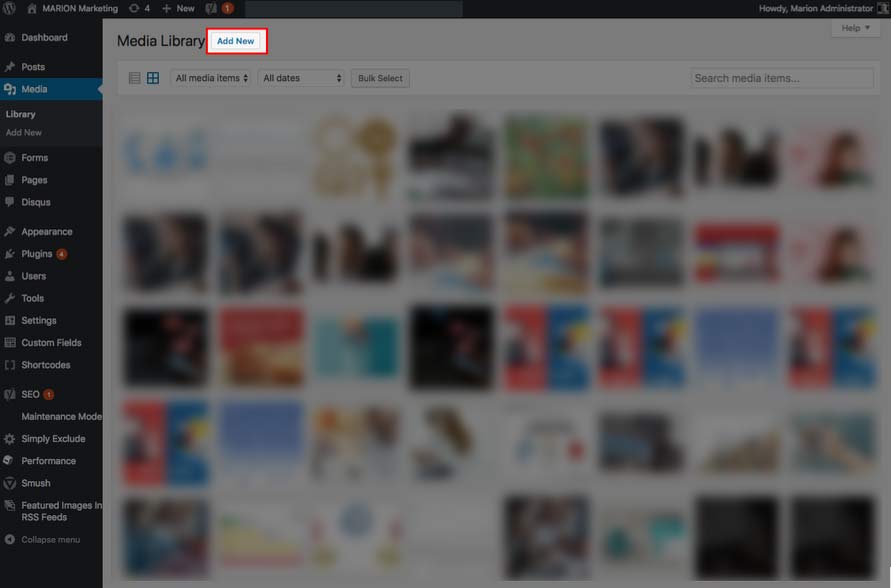
First, let’s look at the Media Library. The Media library allows convenient uploading and accessing of image files and other content for your blog.

Figure 1

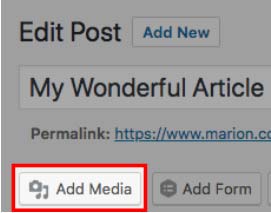
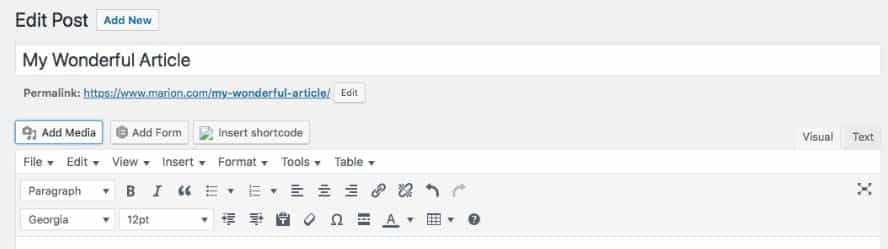
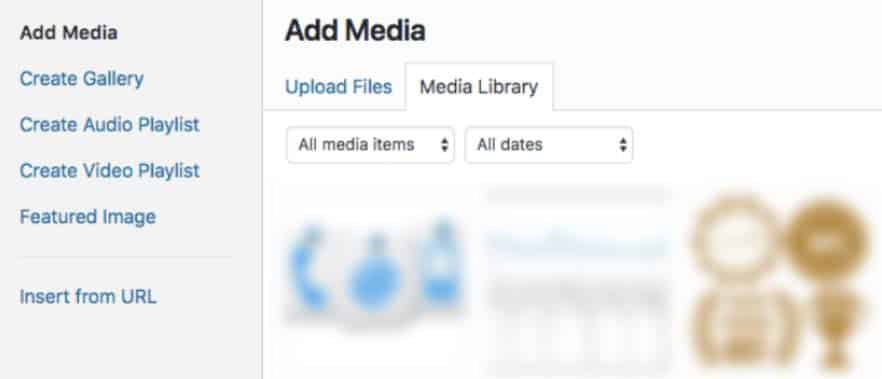
Images can be added directly to the Media Library (Add New) for use later or added from the Add Media buttons on any page or post editor. Most of the time you will upload .jpg, .gif, or .png image formats for use in posts and pages, but several other image types are uploadable to the Media Library.

Figure 2 - Add Media Button


File Size!

Before you upload a picture to your website, it’s important to consider its file size, measured in bytes of data it contains. Photos you take with your phone or other cameras are usually much bigger than required for screen display. They should be optimized (compressed to the minimum size required) for screen use, or else they may load slowly, especially on mobile devices. Page-load time is a factor in computing page rank for search engines.

However, image compression is a burden on content creators who may not have, or know how to use, optimization software such as Photoshop. There are also different best practices for image optimization with SEO vs. social media marketing.

WordPress does not optimize images automatically, but there are plugin solutions that, among other things, compress files in the background during upload. Some of these plugins can also limit picture dimensions to a preset pixel width and height. Read the linked article to understand possible options and view a comparison of the compression results available from five popular image compression plugins.

An image used as a full-screen display image, as a rule, should not be over 100 kilobytes. Keeping the file sizes of your images may even be included in your marketing performance tracking process as they can influence page load times. Pictures used in blog posts or other articles are usually 20 to 30 kb.

Image dimension is another consideration for screen use. There is no point in using images on your website that are taller or wider than necessary. The images will scale down to fill the available space. Nonetheless, the entire file must download anyway, a waste of time and bandwidth. A good rule of thumb is to limit the largest side of your image to 1280 pixels. That will accommodate over 90 percent of your website visitors. If you need to target the widest monitors, pictures should be 1920 pixels up to 2560 pixels.

Adding Images to Pages and Posts

First, be sure you have permission to use the image. That’s extremely important. Using an image without authorization could expose you to serious liability. So, if you did not create the photo yourself or have express permission to use it, either purchase the rights from a stock photography website or locate pictures from free image sources. Follow the link to find out more about picture libraries using Public Domain or Creative Commons licenses.

Naming

Once you’ve chosen your image, be sure to save it with a meaningful name. The file name should describe the picture and support the content of the article. People may be searching for your content online. The text contained in your file names will help them find it. Image naming can be a critical part of new website SEO and ongoing optimization.

Scenario 1: Right Align an Image Within a Paragraph.

  1. Place your cursor in the space above the paragraph you’d like to wrap around the left side of an image.
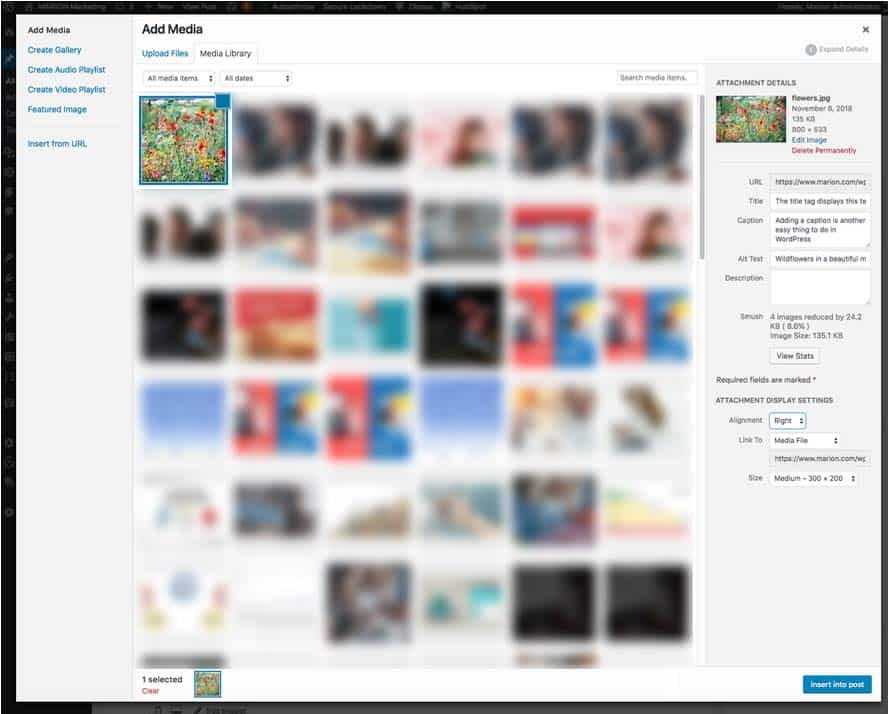
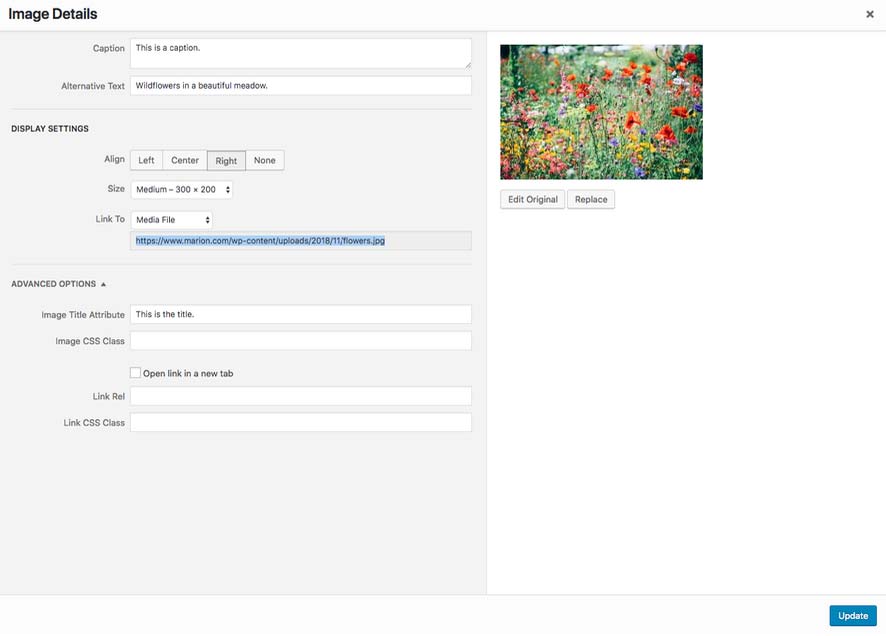
  2. Upload the image to the Media Library with the Media button.
  3. Once the image has finished uploading, the media library will open. On the right are the options you need to display your image.
  4. Always fill in the Alt Text box, because that displays text in case the image can’t be rendered and allows search engines to identify your pictures for searching and other reasons. The alt text also enables screen readers to help people with vision impairment. The Title tag text appears when mousing over an image. (You can disregard the description box for purposes of this article.) Learn more about these essential image attributes.
  5. Caption: If you would like to caption the image, WordPress will display the caption text according to caption display styles from your WordPress theme.
  6. Select the image alignment you want, in this case, Right Align.
  7. Choose the appropriate dimension. When you upload, WordPress automatically creates a group of images in descending widths and heights from full size to thumbnail. Therefore, you may not need to upload the exact image dimensions you want to see in your article, freeing you from having to do that with software before publishing. This image group is also used by WordPress to display images responsively, i.e., scaled for the screen width of your reader.
  8. Linking: By default, WordPress will link to the full-size version of your image. You can change that to any other link destination or have no link at all.
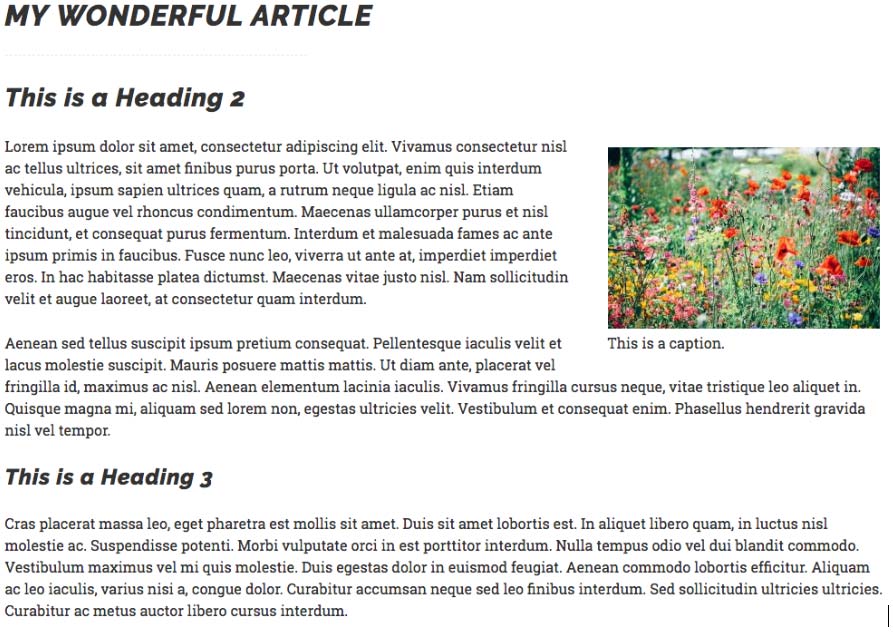
  9. Preview the result. Your result may show different margin and caption styles, as defined in the style sheet for your WordPress theme. But, in general, your image should appear on the right side of your article column with text flowing around it:
    Result
  10. Save Draft or Publish

Editing 

  1. Return to the Visual Editor
  2. Click on the image to reveal the image editing menu. There are four alignment icons: left, center, right and none. (If you choose none, images will align left by default unless otherwise instructed by style sheet rules governing their behavior). Use the x icon to delete the image or click the pencil to edit attributes or even replace it.
  3. After clicking the pencil icon, a large image editing window appears. Here you may change any attributes, or apply an advanced option such as adding style classes.
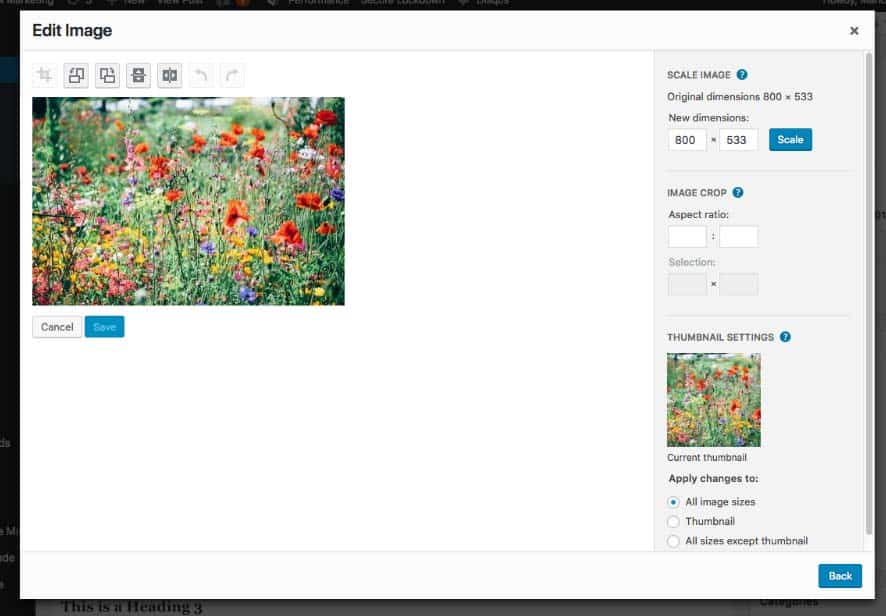
  4. Click “Edit Original” on the right to view more image editing features. On the left are icons for image rotation and flipping, and grayed-out cropping and undo/redo icons.
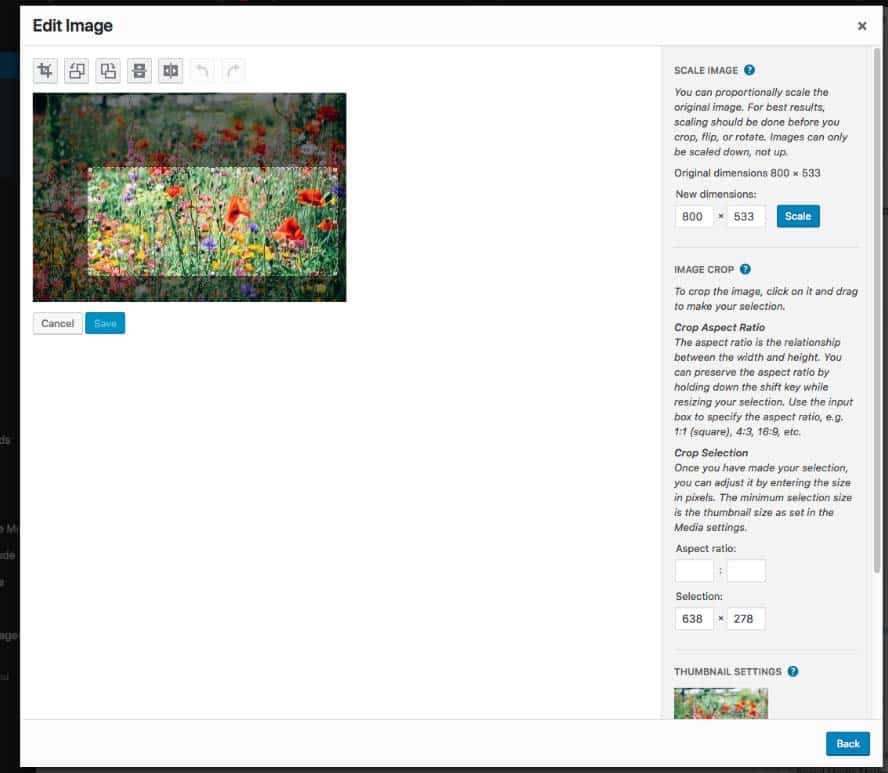
  5. Scaling and cropping: Click the question mark symbols to reveal more information. Images can always be scaled down, however, avoid enlarging images because that reduces image quality.
  6. To crop an image, click the picture with the mouse and drag across it. A highlighted rectangle will appear showing you the area of the image to be kept after cropping. You can also indicate a specific aspect ratio in the box on the right. Play with these controls to see what happens. When satisfied with your cropped area, click the crop icon above the image and save it. (You will not destroy your original image. Once you apply changes to scaling or cropping in this window, a Restore Image button will appear allowing you to return to the original upload at any time. However, be sure to keep the original file on your computer in case something goes wrong.)
    Figure 9

Revisions 

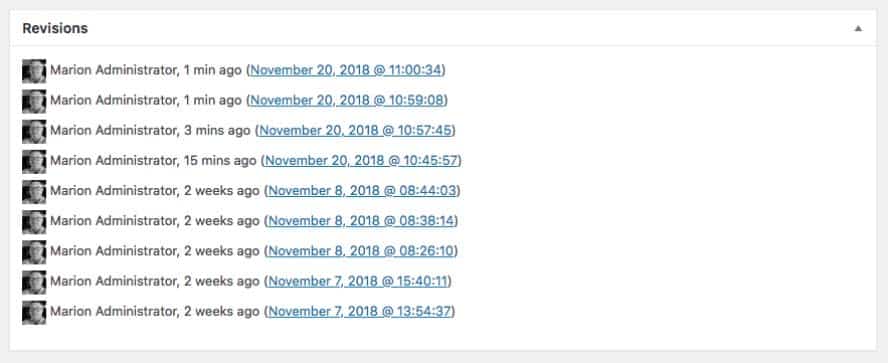
Sometimes things don’t go as planned or you change your mind and decide you want to go back. WordPress makes that very easy, by using the Revisions panel in the editor screens.

  1. Scroll down toward the bottom of the post editor. You should see something like this:
    Figure 10
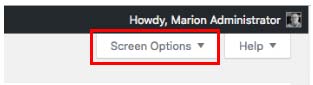
  2. If you don’t, then you need to enable it by accessing the Screen Options tab in the upper right corner of the WP desktop. Click Screen Options. To make the Revisions panel visible, check the box.
  3. Select the revision you need and follow the instructions on the screen.

Galleries 

WordPress ships with a thumbnail gallery option. First, we’ll cover how to add a gallery without adding a gallery plugin:

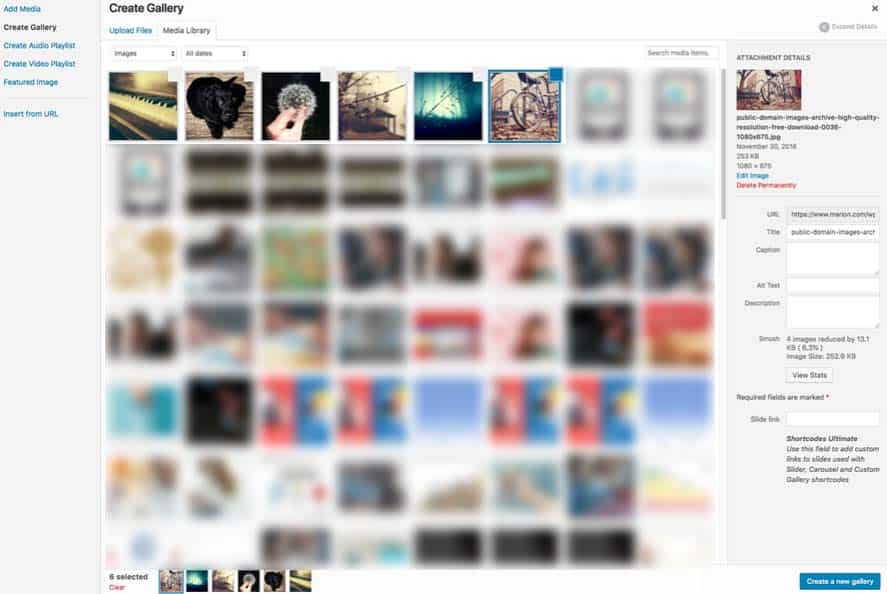
  1. Place your cursor in the post editor where you’d like to show a gallery of images and press the Add Media button. Notice the options listed on the left. At the top is Create Gallery.
  2. Click Create Gallery and the Media Library re-displays, but now you can select several items at a time or upload new things.
  3. Upload your group of images or select several from the library. Then press Create New Gallery
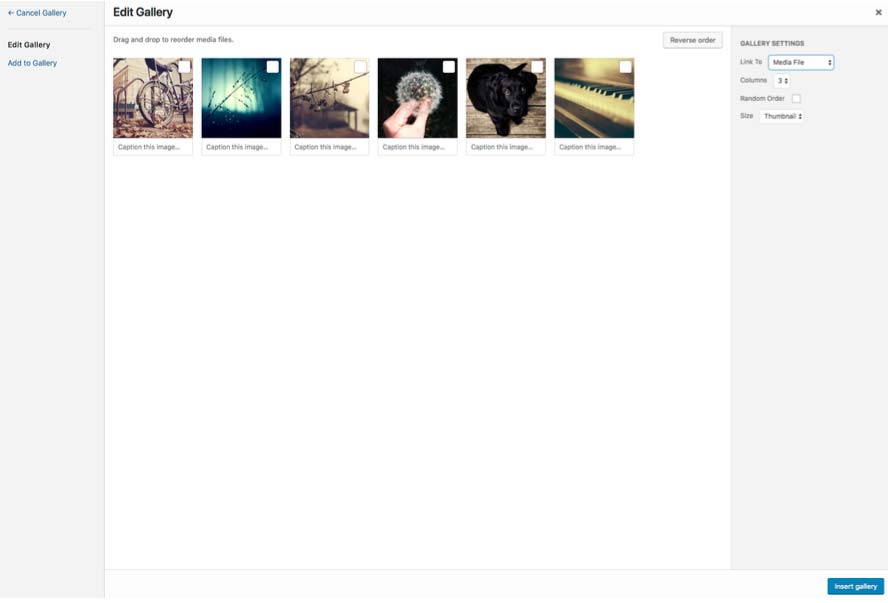
  4. The screen will change to allow you to select options for the gallery including the number of columns and image size and linking. Most of the time you will link to the media file. 
    Figure 14
  5. Click Insert Gallery, and it will appear in the editor.
  6. Preview or save your edits. Here’s how the thumbnail gallery looks in the published article after choosing three columns of thumbnail-sized images. 
    Figure 15

Editing Galleries

  1. In the post editor, click anywhere on the gallery showing in your article. An editing tab will appear, so click on the pencil icon. 
    Figure 16
  2. Here you can add or remove images, re-order them, edit captions and so forth.

Creating more advanced Galleries 

WordPress does an excellent job of displaying a grid of thumbnails with borders, flexible margins, and captions. But it does not have advanced gallery features such as slideshow, or alternate layouts. The thumbnail gallery is not fully responsive, and you can’t navigate between images without returning to the article and clicking on another picture.

Creating Galleries with a Plugin

Fortunately, it’s easy to obtain advanced gallery features for your blog by installing gallery plugins. We’ll show you how to use one of the most popular examples by Envira.

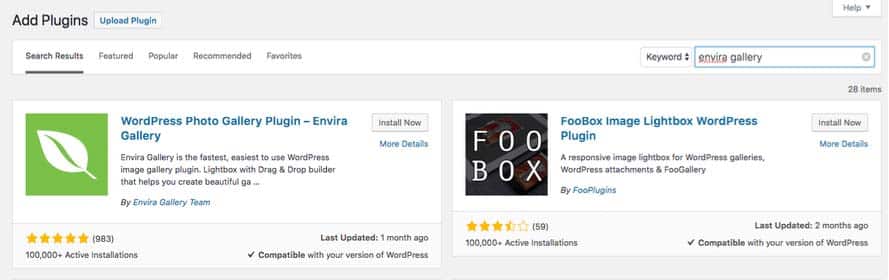
  1. Go to Plugins, Add New and type Envira Gallery in the search box.
    Figure 17
  2. Click Install Now, then Activate the plugin.
  3. Then, mouse over Envira from the menu on the left and select Add New
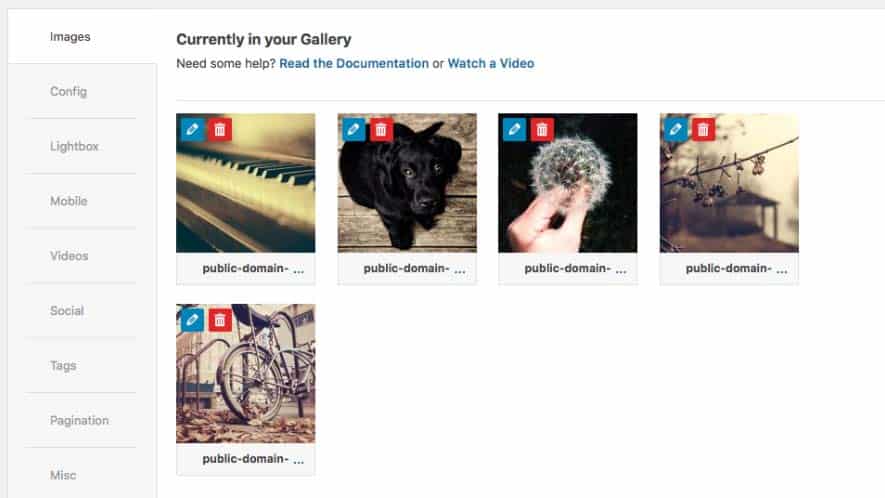
  4. From the screen that opens, you can upload new images or Select From Other Sources (which will open the Media Library). Here we have selected some photos we’ve already uploaded:
  5. The pencil icon on each image allows you to set links, alt text, etc. By default, each image will caption itself with the image name, but you can delete that information in the image editing windows.
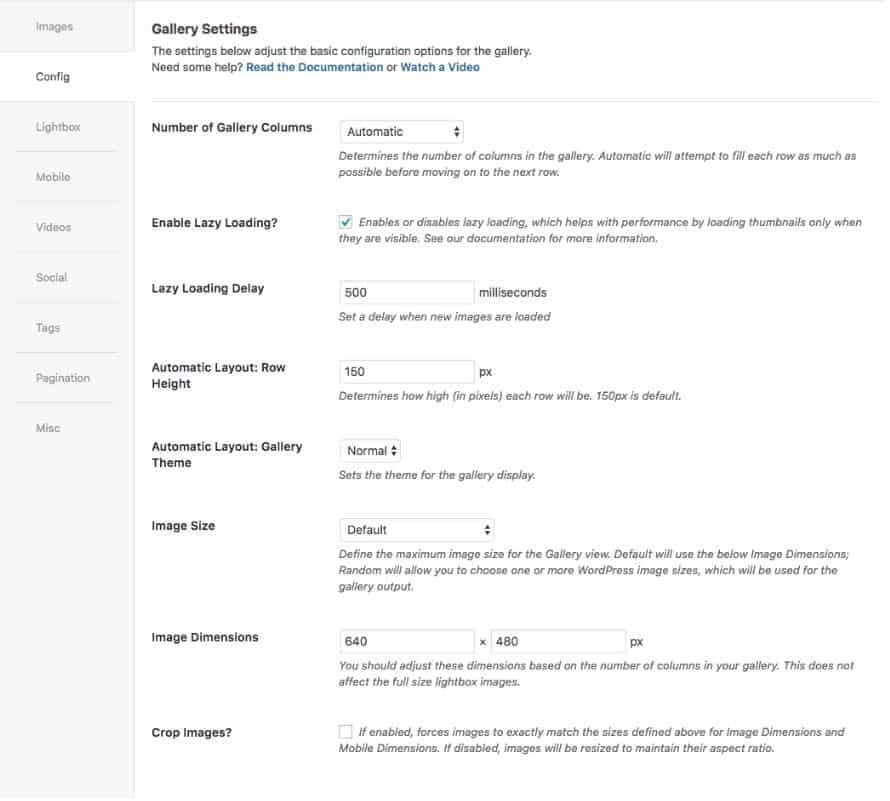
  6. The Config tab is where you define the number of columns and several other display features. You can accept the defaults for this exercise. 
  7. Give the Gallery a name and Publish it, then return to your post.
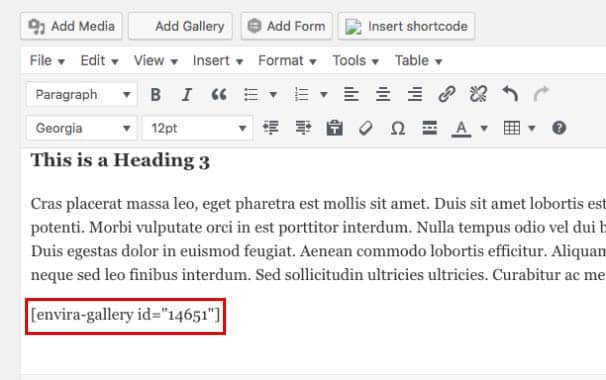
  8. You’ll see that an Add Gallery button is now available on the post editor screen. Place your cursor where you want the gallery to appear and click the Add Gallery button. The published galleries will appear on a new screen. The plugin will automatically add a “shortcode” to your post that WordPress will interpret to display the gallery when you view the published post.
  9. Save draft or publish and preview the new gallery. You’ll see your images displaying in an attractive mosaic layout, and each will open in a convenient lightbox.
  10. Experiment with the various settings and features and add many more features by upgrading to a premium version.

Patience! 

It takes a little practice to overcome unfamiliarity with the interface. Always give yourself plenty of time to do image editing. Take breaks. Pause to read the screen between each step. The only way to learn how to do this is to do it! Very soon these tasks become second nature.

If you need help with the execution of your digital strategy, our Houston marketing agency can help! MARION has been around for over 30 years, and has experienced the evolution of digital marketing and custom website development and design firsthand.

Contact us today to schedule a consultation, and together we’ll discover how to improve your business’s bottom line!

Marketing emails you’ll actually want to read.

Get marketing tips and news sent to 
your inbox.

This field is for validation purposes and should be left unchanged.
Name(Required)