If you’re a small business owner, you probably wear more hats than you can count. From balancing payroll to hiring employees to marketing, you do it all. One piece of marketing that your small business may use is social media.
I’m a social media marketer, and I’m also the daughter of a small business owner. My mom is the founder and owner of a fitness business. Over the past 12 years, I’ve watched as she’s grown her small business from the ground up. I’ve also seen her struggle to learn to navigate social media for her business, so I understand first-hand the challenges it can pose.
So today, I’m here to help all you other small business owners out there learn about some free tools that will help make mastering social media for your business easy. Get ready to have some knowledge dropped on you!
After several years of doing social media marketing in Houston, I can confidently say that these tools will revolutionize the way you use social media for your small business!
6 Free Social Media Management Tools for Your Small Business
If you have multiple social media accounts and you want to be able to take a “set it and forget it” approach with your company’s social media, then you need to try a social monitoring tool (Hootsuite, Sprout Social, Buffer, etc.). In my experience, the time and headache it will save you is well worth the cost and being able to schedule bulk messages in advance is a great perk. These platforms vary in price but if your company has three social platforms or less, I recommend you start out with a free Hootsuite plan.
Besides scheduling future posts, these tools also set up streams to monitor your page, what’s going on in your industry, your messages and mentions, and more. It’s like having everything you need for all your different social profiles in one simple dashboard — and what could be easier than that?
1. Unsplash
As a small business, you may not have the resources to take all your own pictures — that’s where stock photos can come in handy. While stock photos can often be pricy to buy, there’s a better option — enter Unsplash!
Unsplash.com is a website that offers over 800,000 photos that can be downloaded for free. It may sound too good to be true, but it’s very real! So next time you’re in need of the perfect shot, check here first before you waste valuable time or money.
2. Grammarly
Kiss spelling and grammar mistakes goodbye with Grammarly! This free tool can be installed as an extension on your browser. Once installed, it will pick up on whatever you type and automatically make suggestions for incorrect spelling and grammar. It’s really that easy!
3. Canva
Here’s a truth bomb: Photoshop is expensive and difficult to learn how to use. Save yourself hours of watching “photoshop for dummies” tutorial videos and use Canva instead! With an easy to use drag and drop interface, this free tool is so user friendly, anyone could do it in a snap. And with over a million photographs, graphics, and fonts, the possibilities are seemingly endless!
Canva also features a variety of different canvas sizes and layout options, so it isn’t just for social media. You can also use it to craft professional flyers, mailers, and more. Trust me — try it once, and you’ll be hooked!
4. Feedly
Feedly is a free feed reader (try saying that 10 times fast). This tool takes all your favorite news feeds and compiles them into one, easy-to-read feed. This tool is especially useful for small businesses that like to share curated content on their social platforms.
By having all the articles in one organized place, Feedly saves you time you would otherwise have to spend visiting different websites and blogs to find content.
5. Hashtagify
Hashtagify is a hashtag search and discovery engine. With this tool, you can search for a hashtag term and Hashtagify will give you stats on its popularity on Twitter and Instagram, as well as show how it has been trending recently. It will also give you recommended hashtags so you can easily find related hashtags to add to your posts.
6. LastPass
My mom’s biggest social media downfall? She can NEVER remember her business’s account passwords! If you have the same issue, LastPass is here to save the day. This is not technically a social media tool, because it can be used throughout your business to save and share your passwords.
LastPass works as a browser extension or as an app on your phone. This tool stores passwords and automatically enters them when you are on a website that you have saved a password for. And like all these other tools, there’s a great free version available.
So, there you have it! While you may have your hands tied with a million other things for your small business, using these simple and free tools can help take the headache out of social media.
Let the Social Media Strategists at MARION Help Today!
Social media presents a major opportunity for your business – don’t let it pass you by! To improve your social media marketing in Austin or Houston, let MARION’s experts help!
Our award-winning marketing company has nearly 40 years of experience helping local businesses grow. Contact us today to schedule a free consultation, and learn how we can grow together today!
LinkedIn ads is the preferred method of advertising for many business to business companies. In fact, 59% of B2B marketers say LinkedIn generates leads for their business and 90% say they reduced cost per lead by using LinkedIn Advertising.
LinkedIn has over 610 million members, including 180 million senior-level influencers, 63 million decision makers, and 10 million c-level executives. In addition, four out of five LinkedIn members drive business decisions, and LinkedIn’s audience has two times the buying power of the average web audience.
With so many users out there, how can your business tap into your social media potential and reach your target audience? The answer lies in LinkedIn Ad’s targeting facets.
LinkedIn Targeting Methods
Today, we’ll discuss how you can use LinkedIn’s many targeting options to build the perfect audience for your B2B marketing strategy.
Building a Custom Audience for LinkedIn
LinkedIn has five different target facet categories from which you can build your custom audience. They are:
1. Experience
Job Function
Job Title
Job Seniority
Years of experience
2. Company
Company Name
Company industry
Company Size
3. Education
Schools
Degrees
Fields of Study
4. Interests
Skills
Groups
5. Identity
Age
Gender
Location
When creating a custom audience, make your audience specific… but not too specific. If your audience is too broad, your ads will reach unqualified users. If your audience is too specific, there may not be enough users to show your ads to and they may not be able to spend their budget. I like to call this quest to find the perfect sized audience “the Goldilocks challenge.”
In order to successfully face this challenge, use LinkedIn’s audience estimation tool. When creating ads, this tool will show on the right side of the screen, and it will tell you whether your audience is too broad or too specific — or just right!
As you’re building your audience, keep an eye on the audience estimation and note how including and excluding targeting features impacts your potential reach. If your audience is too specific, try taking away some targeting facets, and if it’s too broad, add a few more. It’s all about testing what works best and keeping an eye on LinkedIn’s prediction tools.
LinkedIn Matched Audiences
With the matched audiences feature, LinkedIn allows you to target users who have visited your website, as well as your current contacts or target companies/accounts. This feature allows you to get very specific in your targeting and accurately serve ads to your target audience. (Please note that you must have a list of at least 300 contacts to use this feature.)
By installing a LinkedIn Insights tag on your website, you can track your website visitors and serve them ads on LinkedIn. LinkedIn allows you to highly target these users by giving you the option to target visitors to all pages on your site or just visitors to a few specific pages.
For example, if a company sells office furniture and they want to advertise a new line of desks, they could target people who have visited their website page showing the desks they carry.
If you want to target your current contacts, it’s as simple as uploading your contact list (with email addresses) into LinkedIn. LinkedIn will then search your list and match your contacts with existing LinkedIn profiles, based on their emails.
The process is the same for targeting current companies and accounts — simply upload a list of the companies you’d like to target, and LinkedIn will do the work from there.
LinkedIn Lookalike Audiences
LinkedIn’s newly released lookalike audience feature allows you to target users who very closely resemble those in a matched audience you have created. While LinkedIn just released this feature in March 2019, lookalike audiences has been a feature of Facebook Ads for years.
This feature is one of the most accurate ways you can reach a potential new audience. While you can try your luck at building a custom audience using LinkedIn’s targeting facets, the matched audiences feature does all the work for you and, in most cases, produces a more accurate audience. To create a lookalike audience, LinkedIn analyzes all the data from the users in your matched audience and automatically finds users that closely resemble them.
You can create a lookalike audience from any matched audience you’ve created, either from website visitors, current contacts, or target companies/accounts. As a reminder, if your list length is too small to create a matched audience (less than 300 contacts), you will not be able to make a lookalike audience.
Improve Your LinkedIn Ads Targeting Today
For more comprehensive help with your social media marketing in Houston or Austin, contact MARION’s experts today! Our marketing agency has helped hundreds of businesses appeal to their target audience, and we’d like to serve you next!
Follow these tips for creating a LinkedIn Ads audience, and you’ll be well on your way to reaching your perfect target audience with B2B marketing via LinkedIn!
Your Google Ads budget is arguably just as important as your keywords and your ads. You need an adequate budget to ensure you’re getting visibility for your chosen keywords, but you should also monitor how much you’re spending so you don’t go over budget.
While easy enough in theory, Google made this last part a little more difficult on October 4, 2017, when they made a significant change to how your budget is spent. On that date, Google changed their policy to allow them to spend up to twice your daily budget, rather than just the additional 20% that it was previously. As a direct result, advertisers have experienced some issues with overspending their Google Ads budget.
Within the past few days, Google has rolled out a new feature that will help alleviate this pain point. But first, what exactly is the daily budget and how do you calculate it? What are some of the pitfalls of the daily budget? And what is this mysterious new feature that Google is rolling out?
The Daily Budget, How to Calculate It, & Its Pitfalls
Your daily budget is literally just that: the average amount of money you are willing to spend each day in your Google Ads campaign. But the Google Ads daily budget can be a major pain point for advertisers.
For one, you typically operate with either a monthly or quarterly budget rather than a daily budget. The daily budget is also set at the campaign level rather than the account level, so you’re constantly being forced to calculate and re-calculate a daily budget any time you create a new account, build a new campaign, or update your overall budget.
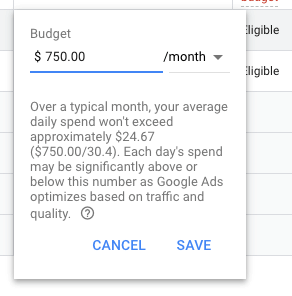
While all you must do to calculate your daily budget is take your monthly budget and divide it by 30.4 (the average number of days in a month), this process can still be a bit of a hassle.
The most cumbersome aspect of the daily budget is the monitoring to ensure you do not go over budget. Google states that even though they’re able to spend as much as twice your daily budget, they will not spend more than the calculated monthly budget (the daily budget multiplied by 30.4). There are some cases where people tend to panic and make adjustments to their budget that end up having negative repercussions.
For example, imagine that your account simply hasn’t spent a lot of the budget over the course of the month. To make up for what wasn’t spent at the beginning of the month, you increase your daily budget for the last few days. Suddenly, your account starts spending twice the amount of your daily budget for several days in a row and you don’t catch it until it’s too late.
This, and other scenarios like this, happens all the time, leaving advertisers constantly wishing that they could just set a monthly budget and be done with it. If you’re one of those, we have some very good news for you.
The New Google Ads Monthly Budget Feature
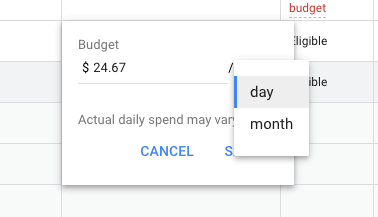
As we were analyzing our accounts and ensuring that everyone is on pace in terms of budget, we noticed an interesting new feature: a dropdown menu that allows you to select between a daily budget and a monthly budget. This will largely eliminate the confusion and slight panic that occurs when you see the drastic fluctuations in your daily spend.
As of right now, very little information has been released regarding this new feature, as Google has yet to make a statement acknowledging it. As far as we know, it appears that this feature has only been rolled out to a small number of accounts.
It’s still unclear as to whether this will become a permanent feature, or if it’s just something that Google is testing out for a limited time. If it does turn out to be a permanent fixture, it’s also unclear whether this new monthly budget structure will replace the daily budget. This will simply be something for which we have to keep an eye out.
Google Ads Monthly Budget Change in 2020
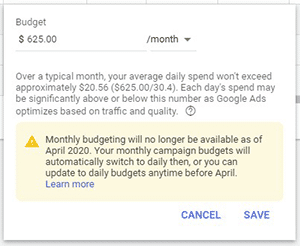
Update from the editor, effective April 2020: The monthly budget feature in Google Ads will not be available as of April 2020. Once April rolls around, all budgets will be switched back to daily budgets.
The beauty of monthly budgeting in Google Ads was that your ad strategy could align with your actual business budget. After making this feature available for several months, Google may have decided to roll it back if it had a negative effect on ad revenue.
If you need assistance with your ongoing paid search campaigns, learn more about our Houston and Austin PPC services today!
Contact MARION for Your PPC Needs
If you’re looking for a PPC company in Houston or Austin to manage your Google or Bing Ads account so you can focus on running your business rather than worrying about overspending your ad budget, contact the experts at MARION today.
Are you constantly looking for ways to improve your marketing in today’s digital-first world? Don’t limit yourself by only investigating the latest platforms and digital tools. Many of the best marketing principles were developed decades ago, and applying them to your current strategy and process can be a great way to enhance your results today!
This post will cover the marketing rule of 7, and how you can leverage this classic principle for better results and a greater marketing return.
What is the Rule of 7 in Marketing?
The Rule of 7 is an established marketing adage that states a prospective customer needs to view your marketing message at least 7 times before noticing and taking the desired action. Many marketers may argue that it takes a lot more than 7 times, but the lesson is still clear – an overwhelming majority of your audience will not make their decision the first time they see your message. In order to convert customers, you need to consistently retarget potential buyers.
7 “Touches” of Sales
A similar concept is the sales strategy of using around 7 touchpoints with a lead after a cold call to generate a conversion. Every buyer’s journey is different but taking the time to check in with a lead and being persistent beyond a second or third attempt is vital in getting your message through. At the beginning of every journey, future customers are simply gathering the information they need to make a decision as you help build their awareness.
Variety is Key
Following the Rule of 7 without being overly repetitive or intrusive can be difficult. That is why variety is important when executing multiple touches of sales. Expanding the number of ways in which you reach out to people with means getting creative.
An excellent way to make sure you stay on track with your progress is to plan a system in which you have these interactions mapped out. Take a look at the examples below for inspiration on creating your own strategy.
How to Execute the Rule of 7
When you are creating content to share with potential clients, make sure you are focusing on cultivating a relationship instead of just throwing them a sales pitch. Go into each interaction with the intent to create value and offer solutions.
Email
Email makes it extremely easy for you to reach out to a large number of the same people at different intervals. Crafting emails that are valuable to your email marketing list is critical so they don’t unsubscribe (which they will if you’re sending irrelevant information that they won’t find useful). You can use email to welcome potential customers, inform them of new developments or products, offer gifts or discounts, or send a regular newsletter.
Video Marketing
Creating video content is another avenue worth exploring. Companies that use video in their marketing strategy show a 66% higher average website conversion rate than those who don’t. Videos are shareable, engaging, and can make your business seem more authentic.
Creating good videos can greatly increase your brand’s visibility, especially if you attract a loyal following. The more views there are, the more chances you have at attracting and converting more customers. Some ideas for videos include a business introduction, product or service explainers, tutorials, or staff messages. The possibilities are endless!
Are you struggling to build awareness for your brand? Download our free guide for building a better brand and start improving your business growth today!
Blog Posts
Blog posts are an excellent way to showcase your company’s expertise and to communicate with your customers. There are several marketing benefits of blogging. Having several links pointing to your site will also help it rank better on search engines. Writing long and engaging content means that third-party websites are more likely to link to your content, and prospective customers will come back to your site.
According to Hubspot, companies that put up 16+ blog posts a month gained 3.5 times more traffic than companies that only published posts 0-4 times a month. By creating a content calendar, you can maintain a steady publishing cadence and ensure that you’re addressing different pain points for your audience.
Social Media
Harnessing the power of social media is one of the most cost-effective ways to enact the Rule of 7. There are quite a few benefits that make it clear why businesses need social media.
You can directly speak and interact with your customers, share content that you’ve created just for social media or repurpose old content, and target ads towards people who may be interested in your business. If you are posting content that people want to see, they will share your story themselves (which is very powerful as people tend to trust the opinions of their peers more than brands).
Hedge Your Marketing Bets
There are countless more creative B2C and B2B marketing strategies to gain exposure for your business (podcasts, whitepapers, presentations, etc.) Don’t rely on just one method to communicate your message. Having a wide range of strategies creates more chances for success. It also creates a safety net in case people stop using one channel.
For example, if someone quits Twitter, you can still have your message displayed on LinkedIn, Facebook, their inbox, search engines, and more. If popular social media channels reduce the organic reach of your content, you can start to use social media advertising for your business. If your whitepapers aren’t pulling in as many clients, you can just pivot your focus on blog posts.
The more opportunities you give people to be familiar with your business, the better. Try as many methods as possible, determine which ones are most effective, and watch your business grow!
Partner with MARION to Improve Your Exposure Today
Do you need help reaching your audience, and turning your marketing efforts into revenue? MARION is a traditional and digital marketing agency with the experience needed to enhance your exposure and turn your target audience into happy customers.
Contact us today for a quote! Our team of marketing strategists and creatives will help turn your brand into a professionally branded revenue-generating machine.
Now that the digital age is in full swing, traditional B2B marketing strategies and tactics are no longer the most viable choice for your brand. Constantly evolving technology requires an approach that’s more fluid in nature. If you’re not able to meet the expectations of your audience, your digital campaign is destined for failure.
What Is a Digital Marketing Campaign?
A digital marketing campaign is an online effort put forth by an organization to drive conversions, revenue, traffic, or engagement to achieve a specific marketing goal, such as building an email list or selling a product or service. During an online marketing campaign, one or more digital channels are utilized to reach a targeted audience.
Most campaigns are composed of three stages – Planning, development, and management. With your goals outlined, your messaging and voice developed, and campaign properly managed, you will set your digital marketing campaign on the path to success.
When targeting other businesses, the focus of your internet marketing campaign should be to establish yourself as an authority in your industry and build in-depth relationships.
Let’s look at the most effective types of online campaigns for B2B, and some corresponding digital marketing campaign examples.
1. Social Media
Imagine yourself on a stage surrounded by millions of people at any given time, but there are thousands of stages just like yours vying for the attention of the masses. How do you earn the crowd’s attention? That’s social media marketing in a nutshell – Constantly competing for the attention of your audience.
It takes nuance to get a social media campaign just right, but you’ll have to master it if you intend on staying competitive. For B2B marketing, Instagram and LinkedIn are the primary social media platforms to target. However, old warhorses like Facebook and Twitter still have plenty of value to offer.
Here are a few tips on the type of content you should post for a B2B-focused social media page:
Testimonials
Industry news
Educational material from your company (links to your blog)
It’s also important to consider advertising through social media to supplement your organic reach. Now take a look at this example of a digital marketing campaign that leverages social media.
Huawei Showcases Its Mastery Over Twitter
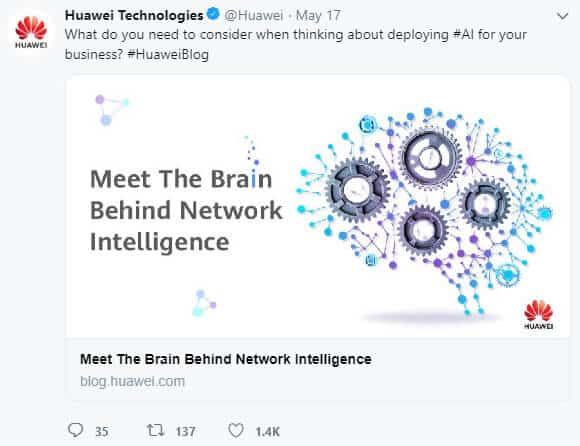
Huawei, the world’s largest manufacturer of telecommunications equipment, showcases what it means to provide value with nearly every post on its Twitter page. Huawei offers endless resources on technology trends and quotes from leaders in the industry.
From its Twitter page alone, it’s easy to see that Huawei stands out from its competition with its consistent flow of relevant and highly informative content.
Your marketing budget should always include room for a healthy PPC (Pay Per Click) campaign. No digital media campaign would be complete without one, and with the right targeting and the right budget, you can get fantastic results. After years of providing PPC in Houston, we’ve identified the following insights.
Many digital ad campaigns nowadays provide top-tier segmentation, allowing you to accurately reach your target audience with pinpoint accuracy. Google Ads and Facebook are prime examples of advertising platforms that excel due to in-depth segmentation features.
Another benefit of PPC is that you’ll have access to analytics, which will enable you to see what works in your digital advertising campaigns and what doesn’t. When utilized correctly, a PPC campaign can be one of the most effective tools in your kit for raising brand awareness and getting leads for your business.
Pay-per-click is a very targeted strategy to include in internet marketing for manufacturing and industrial companies. We frequently see industrial firms opt for PPC instead of social media because of the platform’s high commercial intent.
Need help gaining real exposure for your brand? Ask a MARION marketing strategist about our Austin PPC services.
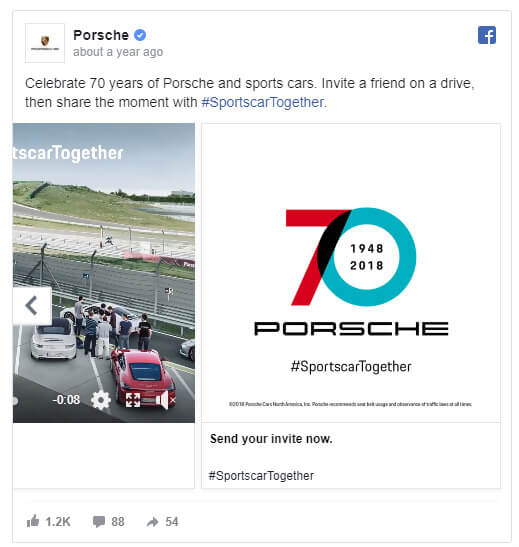
Porsche Automates Every Aspect of its Facebook Ad
Porsche shows everyone how it’s done with this fully automated PPC-optimized ad.
Porche’s ad is completely interactive, featuring a carousel feature and chatbot. For your own B2B digital marketing endeavors, remember that customer interaction is key to drawing attention and holding interest.
While video ads are popular with many marketers for their visual appeal, you’ll find that podcasts can be just as attractive, especially in the B2B world. For the past few years, podcasts have been exploding in popularity.
CEOs and business owners often find podcasts to be useful because they can be consumed while multitasking. For example, you can listen to a podcast while commuting to work or eating lunch.
That makes podcasting a prime target for B2B digital marketing. Guest starring on the best business podcasts in your industry or paying for an advertising spot are great ways to approach this strategy.
Learning Podcast Marketing from the Masters
The podcast Good Copy, Bad Copy: the B2B Copywriting Podcast has a highly informative blog post highlighting everything they’ve learned about podcasting for B2B audiences. While much of the post discusses the do’s and don’ts of podcasting, you’ll get a unique perspective of what it means to incorporate a podcast into your B2B digital marketing campaign.
4. Advocate Marketing
Likely one of the most effective types of digital marketing campaigns you can employ, advocate marketing involves leveraging your existing networks to generate new leads. Advocate marketing is effective because people are more likely to listen to people they trust.
If, for example, your business partner suggests a specific product to improve your digital marketing, you’ll be more inclined to give the service a try.
Docu-Sign Uses Advocate Marketing to Influence Millions in its Pipeline
Docu-Sign implements advocate marketing beautifully by using advocate marketing software platform Influitive to influence more than $3 million in their pipeline. The moral of the story is never to underestimate the power of advocacy – it could generate your business millions.
The Importance of Online B2B Marketing Campaigns
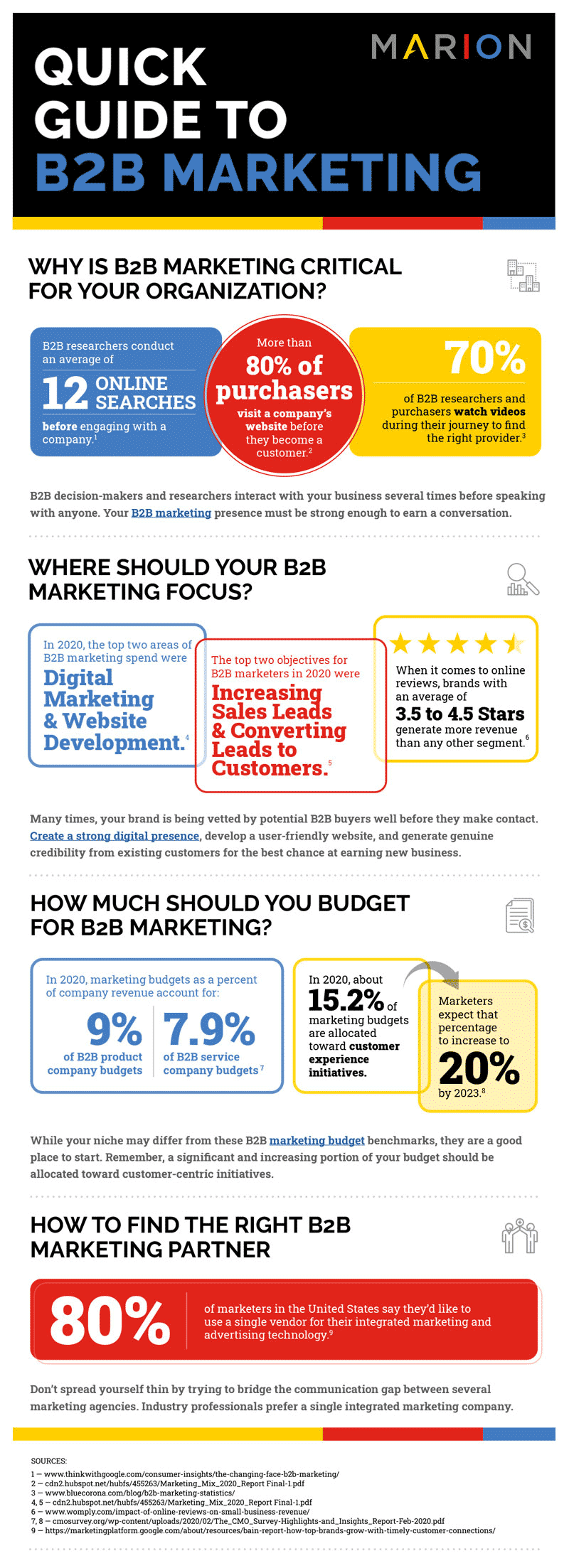
If you’re nervous about diving headfirst into the marketing abyss, don’t be! This infographic outlines exactly why your business needs to overhaul its approach to B2B integrated marketing campaigns today!
Implementing the Best Digital Marketing Campaigns for Your Business
Is your business leveraging the best online marketing campaigns? Are they working? Do they require tweaking? No matter what strategy you implement, focus on utilizing analytics to see what works and what doesn’t, and gradually tweak your campaigns until you start seeing results.
Creating a flawless B2B campaign takes expertise. Contact MARION today so our experts can show you how to run a digital marketing campaign the right way.
Like the name implies, trendjacking is the act of a third party applying brand content to a trending topic. The trending topic can be anything – usually it’s a hashtag, event, meme, or new slang term. It can be difficult to decide the right moment to chime in on a trend- too early and not enough people will understand it, but too late and you’ll be grouped in with the “overdone” category. You also risk being an unwanted or inorganic voice in the conversation.
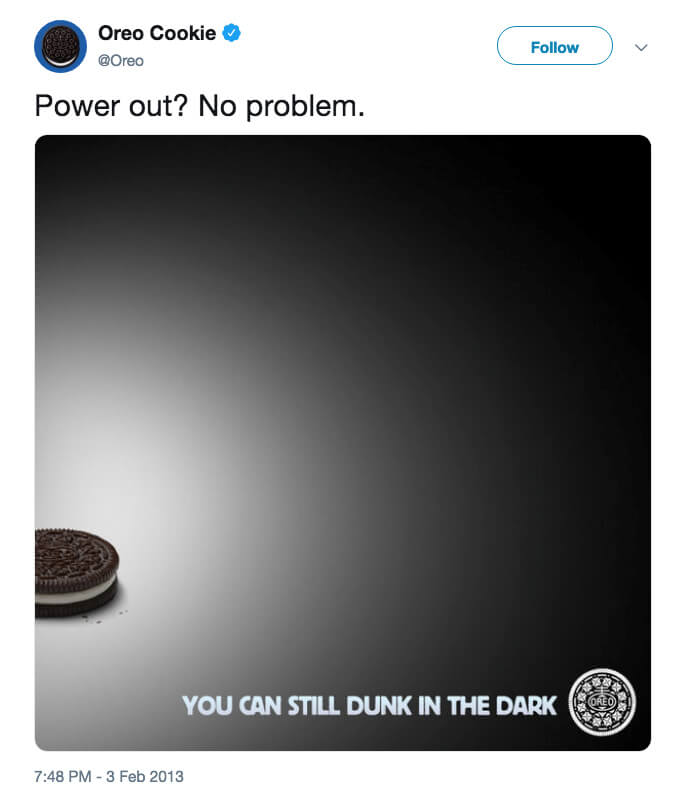
Done right and tastefully, however, it can be an effective way to cut through the noise, boost your exposure, and gain a few fans. One of the most successful and earliest examples of this was Oreo’s tweet during the infamous Superbowl blackout in 2013. Their creative team whipped this up within minutes of the blackout to many people’s delight.
@Oreo on Twitter
How to Find a Trend to Hijack
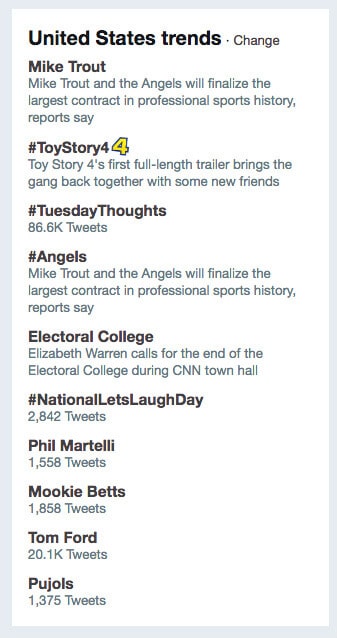
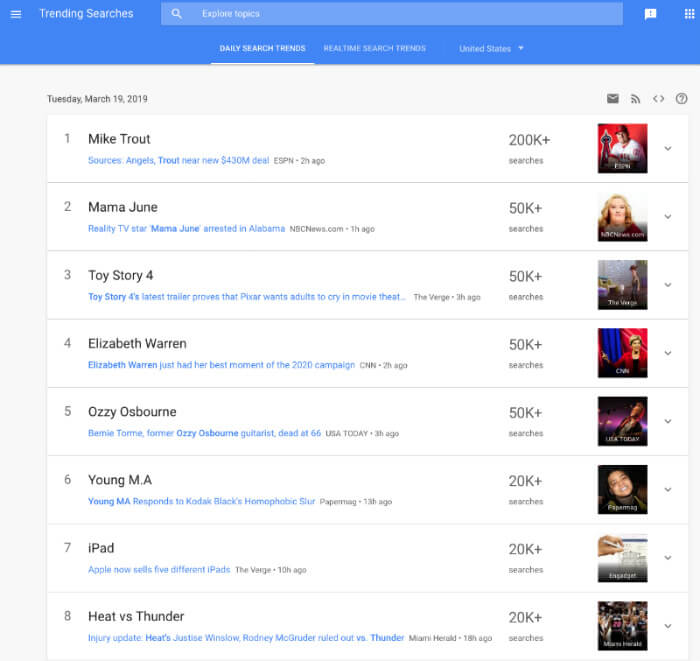
The easiest way to find a trend is to check a few tools. Twitter has a trending topics section on their timeline’s sidebar and Google Trends is a free tool to see what people are searching. Twitter will sometimes compile a group of tweets on a particular trending topic to give users a rundown.
Google Trends will sometimes dedicate an entire page analyzing a popular search trend from that week or month. Both tools are customizable to see what’s trending in different regions, so you can localize your trendjacking if you need to!
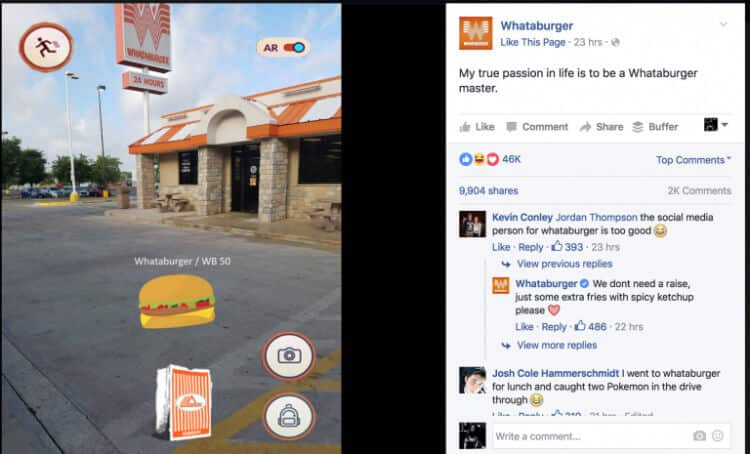
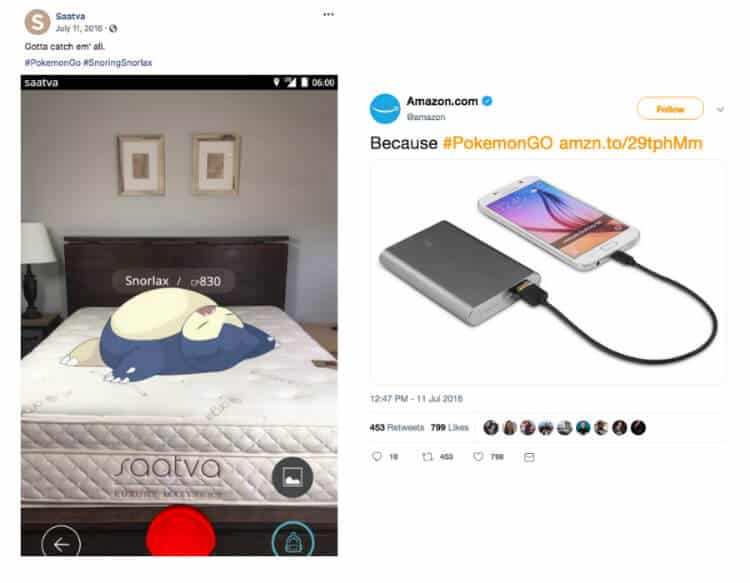
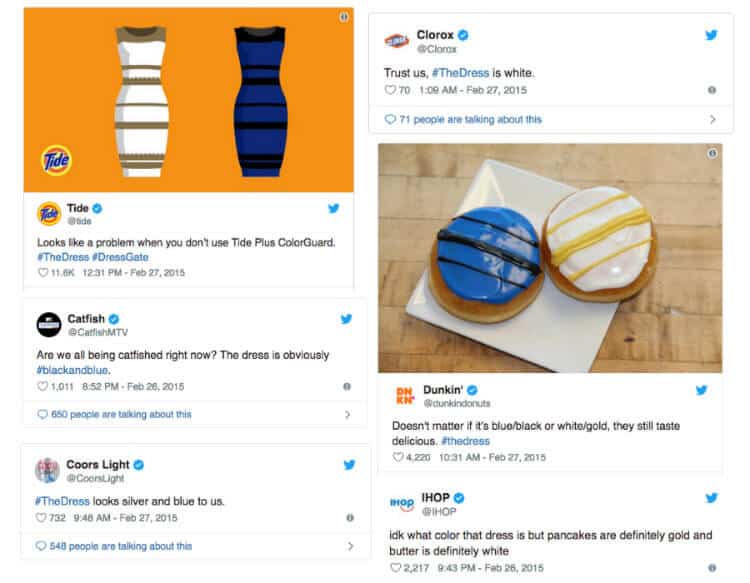
Sometimes, the trend is unavoidable- unless you’re living under a rock, you’ll hear about it. For example, the Pokemon Go craze of Summer 2016 or the great Internet debate over what color #TheDress was.
At its peak, there were over 10,000 tweets per minute about #TheDress- and clearly, most brands made sure they weren’t going to miss out.
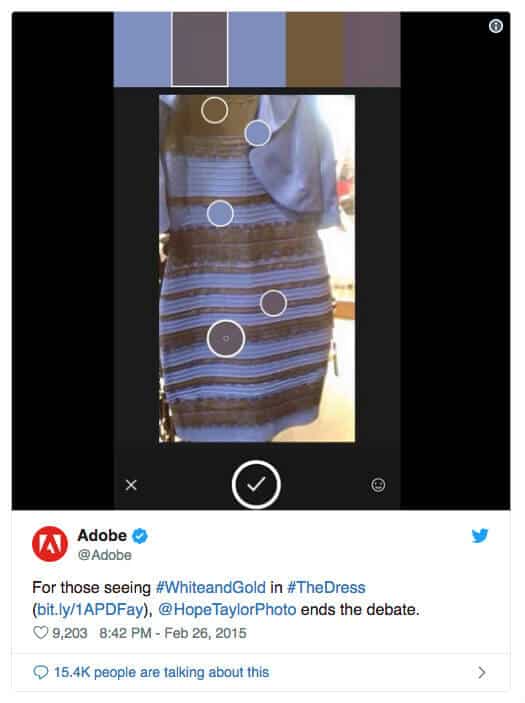
One of the best tweets was from Adobe, who used their product to stay relevant to the conversation and end the debate once and for all.
Adobe on Twitter
Still, it’s important to make sure your team is on the pulse- not every trend will be as in your face and ubiquitous as the ones mentioned above. Other methods include following websites that track viral content such as Buzzfeed, BoredPanda, Reddit, Ranker, Uproxx, and much more.
Should My Business Tweet About This Topic?
So how do companies use social media to advertise while still aligning with their target audience? When you have found a trend you’d like to comment on, make sure you ask yourself a few questions first.
1. Is it on brand?
If your brand will totally shift its tone in order to join the conversation, reconsider publishing that post. If you are an auto shop, it makes less sense for you to tweet about #NationalPancakeDay than if you were a diner. It may also appear off brand if you’re a prestigious legacy brand and you suddenly start throwing around slang phrases, no matter how trendy or ubiquitous they are. A prime example would be House of Fraser’s #Emojinal campaign backlash, where one Twitter user called it a “masterclass on how to ruin a century-old upscale brand with one terrible social media campaign”.
This doesn’t mean that the trend has to be clearly or directly related to your brand. If you can make a connection that is extremely humorous or clever, just make sure that the post doesn’t seem forced and your brand keeps its voice. You might just strike gold and grab the attention of some new followers.
2. Have I been trendjacking too much or too recently?
It’s best to comment on trending topics sparingly. If your account is constantly churning out low quality tweets, you will lose followers or annoy them. If the tweet will not add value to your brand or encourage people to interact with you in a positive manner, don’t press send.
3. Is it timely?
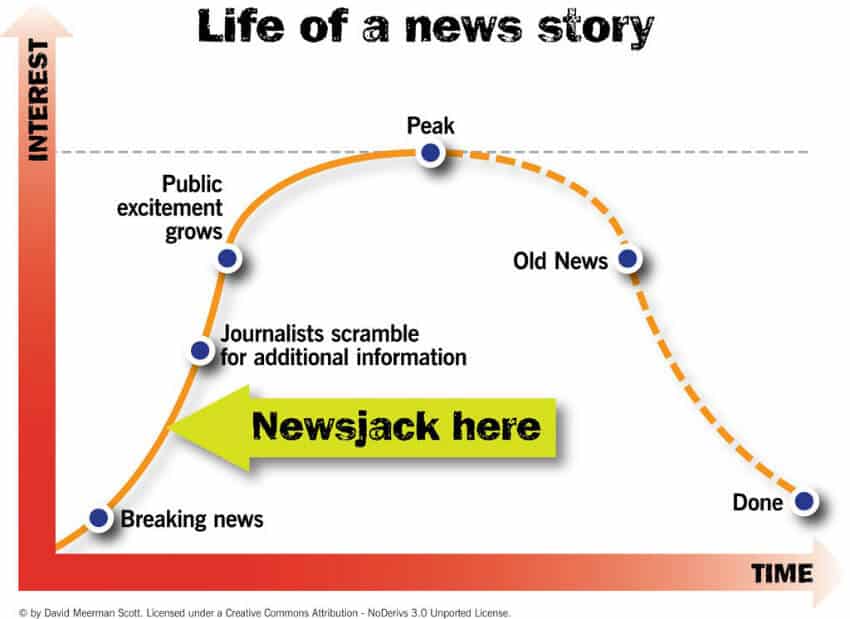
The trickiest part is figuring out what lifecycle stage the trend is currently at. You want to participate while the topic is still relevant, preferably right before it peaks. After this, your tweet will seem tired.
There are certain topics that are in your best interest to stay away from altogether. Some of these may be obvious, but as you’ll see with each example, huge brands have made these very marketing mistakes. This is a prime example of why small businesses need social media guidance.
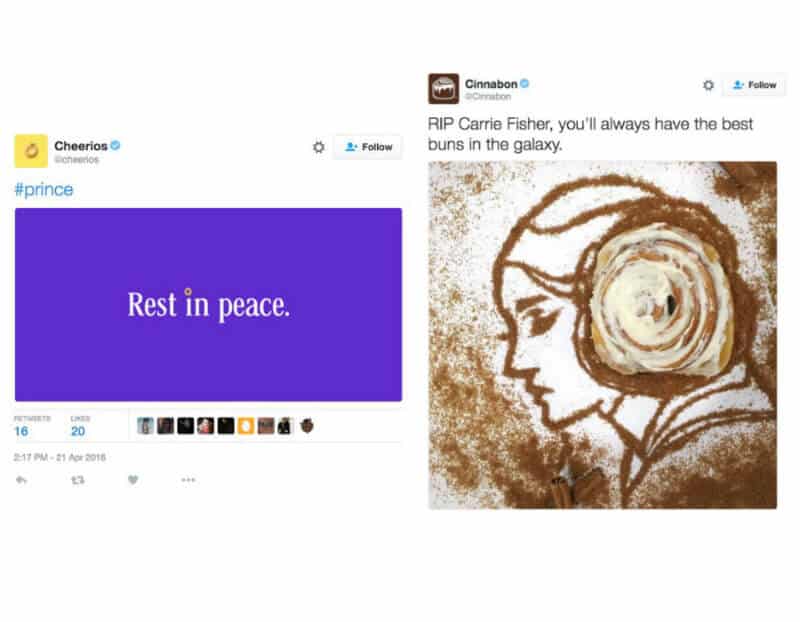
Err on the side of caution and avoid paying tribute to the death of a notable person (unless they had a direct, clear, and significant impact on your industry or product- but anyone short of a founder or creator may backfire). It may seem harmless, but people will always view capitalizing on death or great misfortune as very poor taste.
Cheerios and Cinnabon both sent out ill-advised tweets about the deaths of Prince and Carrie Fisher, respectively. In both instances, they were removed not long after public displeasure.
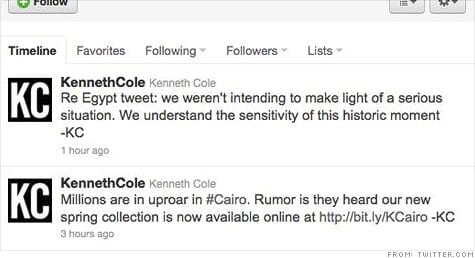
One of the most infamous gaffes, however, goes to Kenneth Cole who published this tone-deaf tweet during some violent protests. Make sure you do your research before tweeting with a trending hashtag! Many PR nightmares could have been avoided with a simple Google search.
CNN Money
2. Problematic Hashtags
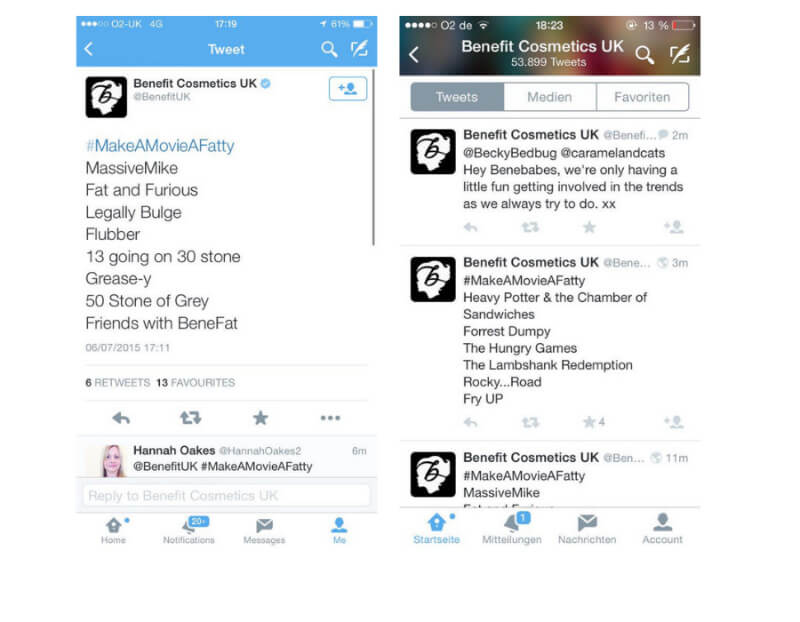
Many times, a hashtag will go viral where people will make fun of another group at their expense. Benefit Cosmetics joined in on the hashtag #MakeAMovieAFatty and doubled down when people took offense. They eventually apologized, but the damage was done.
@freshaima on Twitter
3. Easily Misinterpreted Hashtags
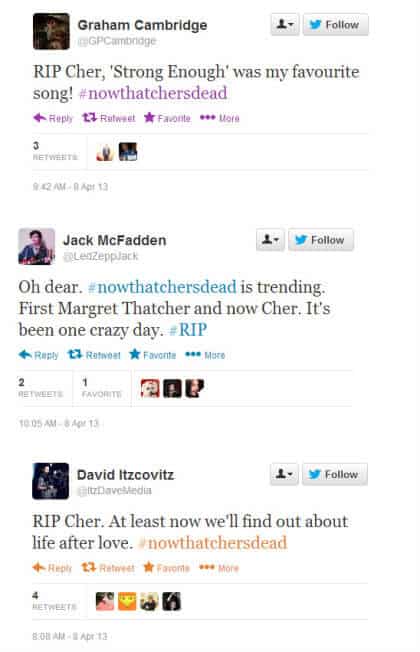
When Margaret Thatcher passed away in 2013, the hashtag #NowThatchersDead began trending. Many people misread the hashtag as #NowThatChersDead and began mourning the popular singer Cher (who was very much alive).
@ebananuka on Twitter
Get Expert Help from MARION!
Trendjacking provides a huge opportunity for your brand, but it must be approached with caution. By using the tips above, you can enjoy the upside with minimal risk to your brand and business.
If you are a person, organization or business who engages in some form on online marketing, chances are highly likely you possess accounts with Google. Most digital marketing, whether it is search engine optimization or pay per click management, requires active use on Google.
As a growing business, you’ll want to delegate certain responsibilities, which might include marketing. Some companies hire a marketing person to work within the business. They are onsite and usually have access to the accounts necessary for online marketing. As a business owner, you may be reluctant to share your personal or company based email credentials with a new employee. Other companies will choose to partner with an online marketing agency that will handle the digital marketing of the business. To do that effectively and efficiently, it’s imperative that the agency has proper access to the currently used marketing channels.
It is extremely counterproductive for an agency or individual to create a new business listing on different directories like Google Maps and Bing Places, when the business already has an existing listing on that directory. Doing that creates more clutter and bad profiles across the internet. You would also be creating competition for yourself, with your own business. Don’t believe that Google and other search engines will display both listings. The truth is, the original listing will be included in the index but is unlikely to be displayed in search results. What’s worse, the whole account can be penalized for spam (according to Moz). Trust me; it is best to share access. This way, all of the work your business is paying the agency to do will happen on your existing profiles, and whenever the billing relationship ends, you can deactivate the shared access. Your accounts retain the benefits of the work done by the agency, versus the agency reclaiming the profiles they created for your business and leaving your business back at the beginning.
However, before you start sharing access to your precious accounts, make sure the person/agency receiving access has a clear plan of action. More importantly, make sure you understand what they will be doing as they represent you and your company. For example, you may share Google My Business access with the agency. This means they can correct and update your business listings and other information. It also gives them the ability to respond to reviews (read our blog about how to ask customers for Google reviews). Make sure you have discussed responses and when to reply, if that is part of the agreement.
We are a fully integrated digital marketing agency, meaning we will build your website, optimize the website for search engines, pay for search engine traffic by click, design and send emails, and manage your social media. With so many different services provided, we always need access to existing profiles. Getting the proper shared access or current login credentials can be a hassle at times.
**Full transparency…I created this post to not only encourage you to share profile access with your marketing teams, but so our new clients can have a guide as to why to share profile access with us. 🙂
How To Share Google Account Access
Once a website has been launched, we immediately go into marketing mode. It’s extremely important to get things set up with Google first. The steps below will help you share the correct access with your marketing team. Within Google, you’ll likely need to share access to Google Search Console, Google Analytics, Google My Business, and Google Ads.
Google Analytics Access
Google Analytics is a program that tracks website visitors and provides various types of data about the website visitor. If you want to know how many visitors your website had, what they did while visiting and what the referral source was, you’ll need Google Analytics. Follow these steps to share access to Google Analytics.
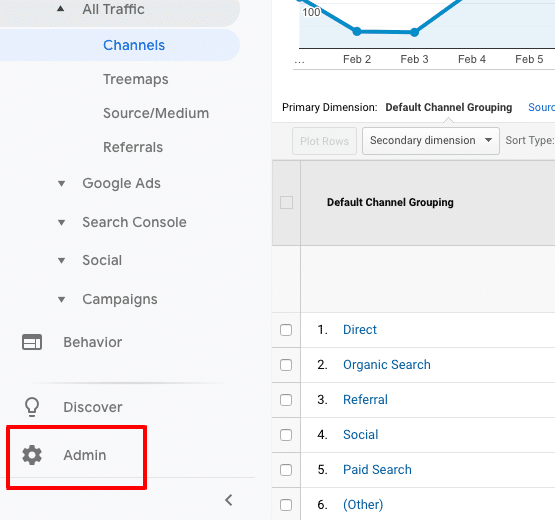
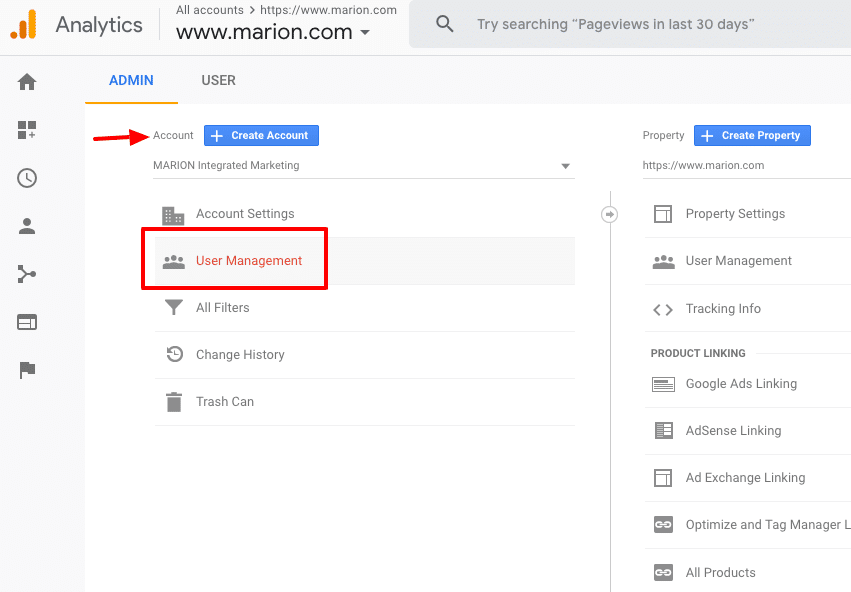
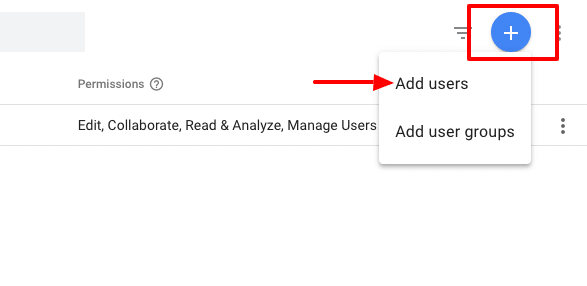
4. Click the “Plus sign” in the upper right corner and select “add users”.
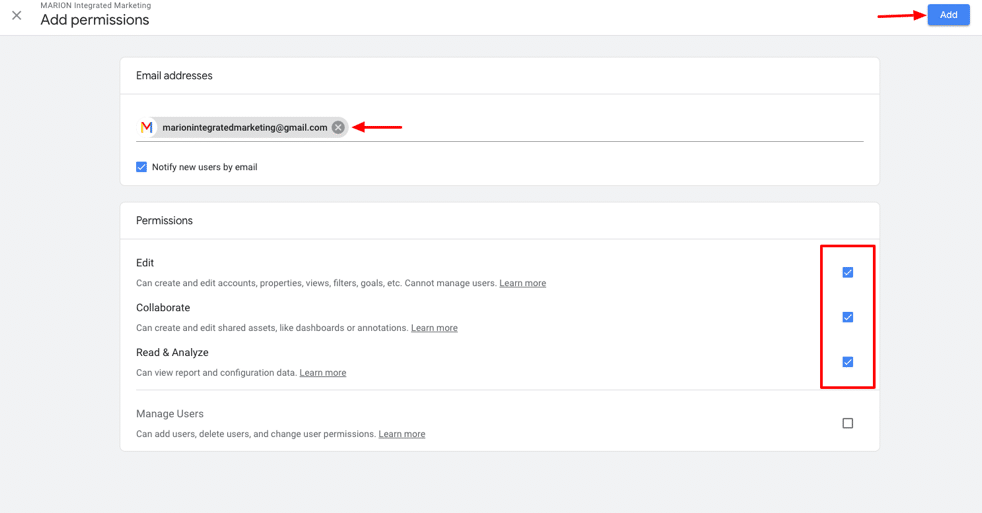
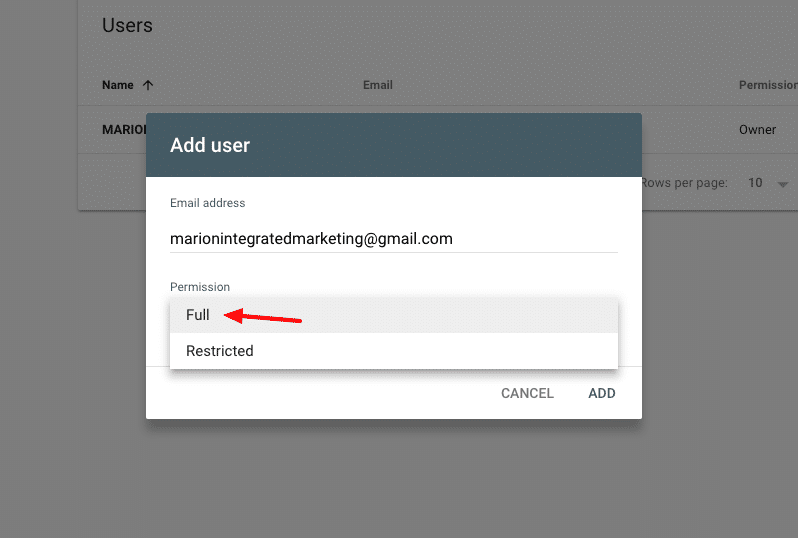
5. Input “marionintegratedmarketing@gmail.com” and check all the permission boxes.
6. Click “add” at the top right.
Once those steps are complete, the user receiving access will get an email indicating they have been given access and they should see the account when they log into Google Analytics.
Google My Business Access
Google My Business is a program created by Google to manage your local listings. It has changed over the years. It used to be Google Local; then it changed to Google Places. Now, it is Google My Business. Once this profile is verified, you can update your business listings, add images, videos and contact information as well as respond to reviews given by Google users. If you need to be found in local searches, a properly optimized Google My Business page is necessary. Follow these steps to share GMB access with your marketing team.
1. Log into GMB at business.google.com. If more than 1 location, select the location that access is being given to.
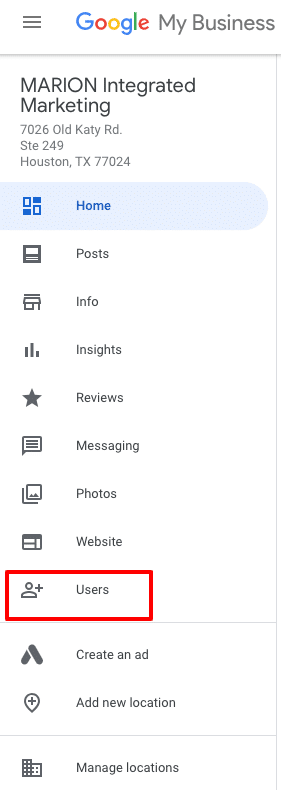
2. On the left menu, click “Users”
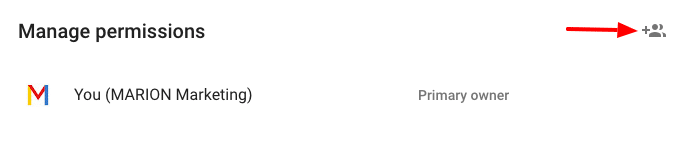
3. Click the “+” on the window that opens to add a new user
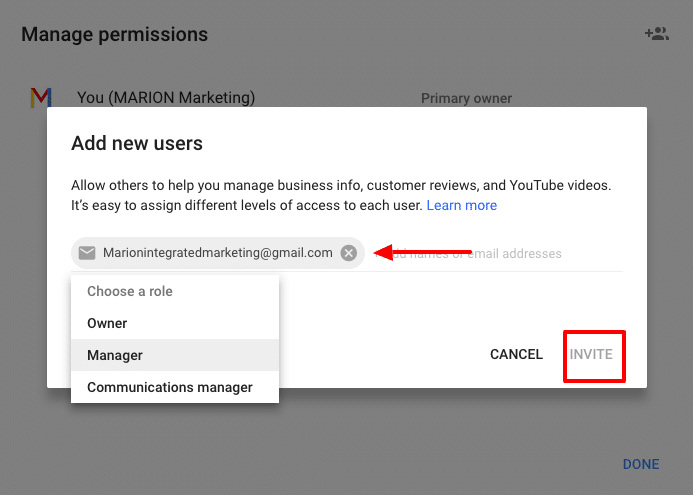
4. Input “marionintegratedmarketing@gmail.com” and choose the role of “Manager.”
5. Click Invite
Once completed, the invited party will receive and accept the invitation.
Google Search Console Access
Google Search Console is basically home base for your search engine optimization campaign. GSC was formerly known as Webmaster Tools. This is where you inform Google of your website intentions. Are you targeting domestic or international traffic? Is this website using “www” or “non www”?
GSC is also where you indicate how you want your website to be indexed. You submit sitemaps and request pages to be indexed by Google within GSC.
Accessing your link profile is done through GSC. Once logged in, you can see who links to your domain, when they linked, and what pages they are linking to. This same area is where you disavow links.
More importantly, GSC is the messaging platform for Google to send you notifications about your website. If your site has been hacked, gets penalized, has broken pages or is inaccessible for any number of reason, GSC is where you’ll get the message.
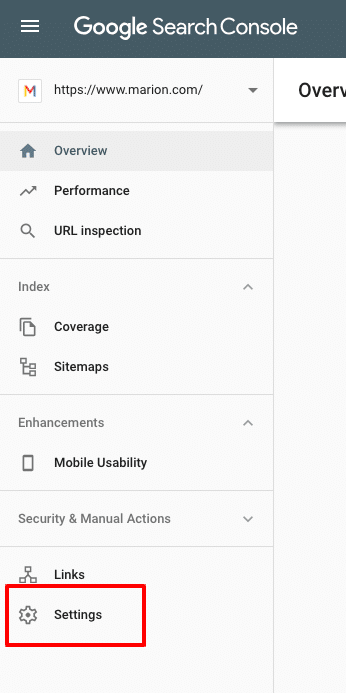
Follow these steps to share Google Search Console Access with your marketing team.
The end user will receive a notification that they have been given
Google Ads Access
Google Ads is the advertisement platform used to create search, display and video ads that show on Google and its properties. It is formerly known as Google Adwords. Any pay-per-click activities that show ads on Google should be managed through Google Ads. There are platforms that will publish and manage your Google Ads such as WordStream, AdRoll, and others. These platforms work fine and definitely serve a purpose in digital marketing. I use them from time to time, but prefer to operate directly in Google Ads, or Google Ads Editor (offline Google Ads management program).
Some businesses prefer that the agency create their own new Google Ads account. For a business that is new to Google Ads, it makes sense to do so. However, if your company been using Google Ads for some time, it’s worth sharing that account with the new agency. I can’t speak for all, but our process involves reviewing your past performance data. We’ll research and develop our strategy. When possible, we like to review the past year or two worth of data to learn about peak months, top keywords and ads, and all types of other performance indicators.
There are two ways to share Google Ads access. The client (business) can assign access to a user or a user can request access to a client. Either way, the other party has to approve and accept it.
Follow these steps to share Google Ads access with your marketing team.
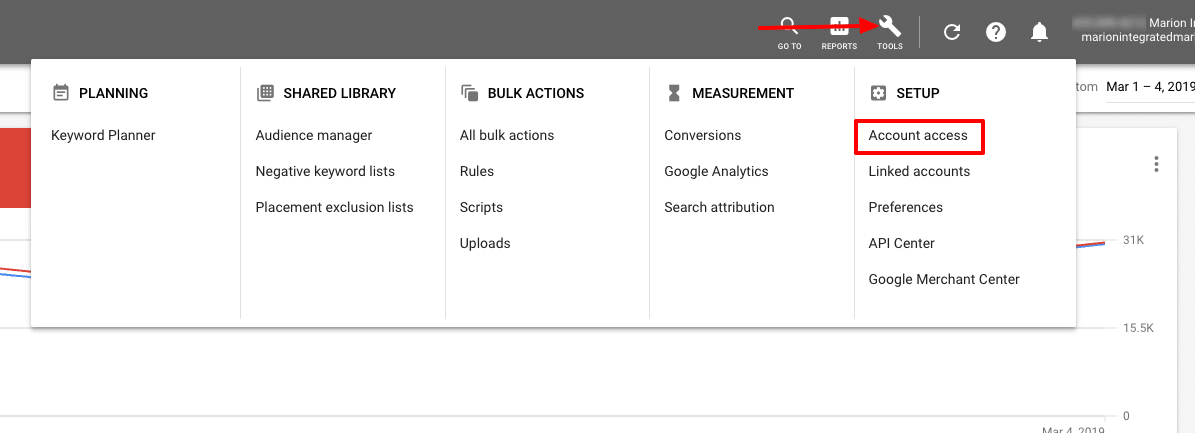
2. Click the “tools” icon (wrench) in the upper menu and select “Account ”
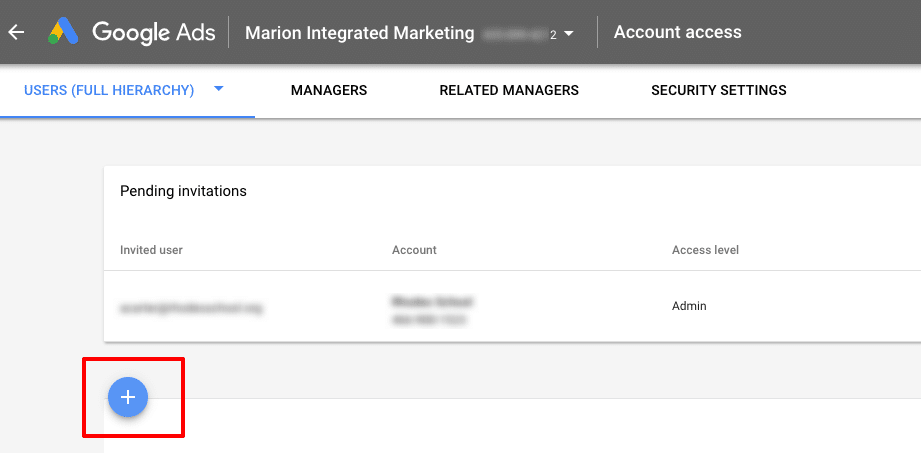
3. Click the “+” to invite a user
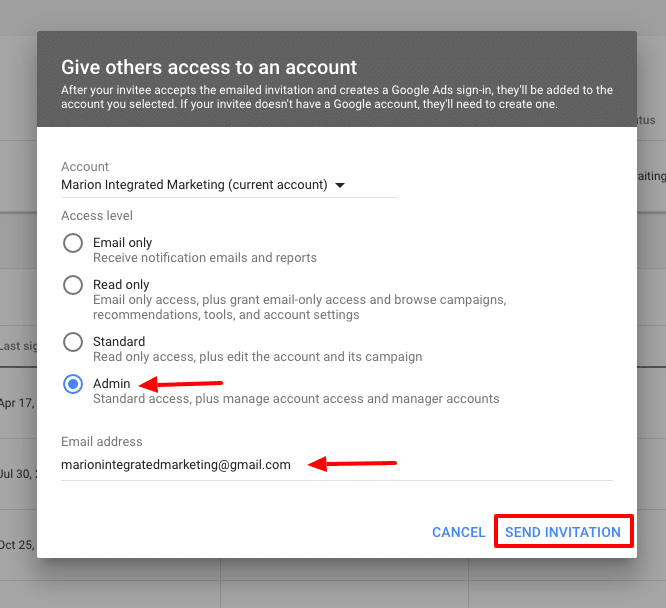
4. On the pop-up window, select the access level (normally admin) and input the email address the agency has supplied you with. Click “Send Invitation.”
The end user will receive a notification that they have been invited to access your Google Ads account. Once logged into their existing Google Ads account, the invitation can be accepted. At that point, they can manage your Google Ads account.
If your business has a website, and a goal to have potential clients find your website using search engines, you’ll need to actively use them. According to StatCounter, Google accounts for 88% of searches in the USA. It’s safe to say, for effective online marketing you must be present on Google platforms. If an agency or marketing team is managing your digital marketing efforts, share with them the correct access so that they can do the best job for you.
If you’re not focusing on mobile website traffic, then you’re behind the times. 60% of consumers across the globe use their mobile devices as their primary source of internet access.
Consumers today are savvier with mobile devices than ever before. It’s crucial that digital marketers and business owners alike adopt mobile website marketing into their marketing and brand development strategies.
Mobile Internet Usage vs. Desktop
It has been a long time coming, but mobile devices have finally overtaken desktop in terms of internet usage. This means one thing for digital marketers – it’s time for a mobile-first strategy.
The world is increasingly becoming mobile-centric. Everyday problems are being solved with a quick Google search from a mobile device. Users prefer the convenience of being able to access the internet while on the move. This is a luxury not afforded when using a stationary desktop computer.
If you’re looking to increase the traffic to your website or place of business in 2019 and beyond you need to have a firm understanding of mobile marketing statistics.
Check out these 16 mobile marketing stats to help you improve your digital marketing.
1. 9 in 10 users who enroll in SMS loyalty programs feel they’ve gained some form of value
One great way to build loyalty with your customers is to implement SMS coupons and rewards for your business. Your customers will appreciate the personalized approach of a text and will view you in a different light compared to your competitors.
(Stat from BrickandMobile)
2. 70% of consumers delete emails almost immediately that don’t render well on mobile devices
Make sure the messages you send aren’t deleted because they weren’t optimized for mobile users. Run a few tests on a variety of mobile devices (cell phones, tablets, etc.) before sending anything out to your customers.
(Stat from Blue Hornet – now Mapp)
3. 69% of consumers are more likely to buy from companies whose mobile site helps them find answers to their questions
Consumers desire convenience more than anything else when shopping online with their mobile devices. What makes a good web page for mobile viewers?
Optimize your site for mobile and position useful data in easy-to-reach sections of your website. This is a great way to get leads for your business and increase your bottom line.
4. SMS response rates are 8 times higher than email
While email is still a popular form of communication, text messaging has dominated the hearts and minds of consumers. Users are drawn to the convenience of reading and sending text messages on the go. To reach an even wider pool of prospects, consider adopting SMS marketing tactics.
As ad spend is increasing, user dissatisfaction is growing. Users are tired of intrusive ads dominating their handheld screens. With dissatisfied users blocking ads at an increasing rate business owners and marketers need to pay close attention to ensure their audience is receptive to mobile advertising.
Non-intrusive mobile ads, sponsored content, and native advertising can help get your message across to target users. Contact MARION, a marketing firm in Houston, for help with digital advertising opportunities.
When it comes to mobile search vs. desktop search, Google reigns supreme in both domains. The best way to increase mobile search traffic is by optimizing for Google on mobile devices.
You can do this by learning ways to reduce page load time across your site and making sure your text and buttons are large enough on mobile screens. For advanced optimization, contact an experienced SEO company in Houston.
8. 48% of millennials view video solely on their mobile device
If your audience is on the younger side, you should incorporate videos into your mobile marketing strategy. Starting a YouTube channel is a great way to start promoting your brand through this medium.
(Stat from Business of Apps)
9. 68% of businesses have begun integrating mobile marketing into their marketing strategy
There’s a reason all your competitors are jumping into mobile marketing. It’s a profitable investment that will make your business a lot of money. Don’t get left behind.
(Stat from Salesforce)
10. 48% of consumers turn to search engines for mobile searches
Though nearly half of consumers turn to a mobile search, 33% go directly to the site they have in mind. Producing the highest quality content possible should always be your priority, but this statistic reinforces that fact.
Good content allows your audience to find you easier. Of course, don’t forget to optimize your site for mobile queries. For more help, choose an SEO company that can produce high-quality content that performs well in organic search.
11. 61% of users are unlikely to return to a website they had trouble accessing with mobile devices
… and 40% go to a competitor’s website instead. We can’t express how important it is to optimize your website for a flawless mobile experience. Potential customers are immediately turned off when they encounter a site that’s difficult to navigate and will turn to your competitors as a result.
12. 64% of Pinterest’s referred traffic comes from tablets or smartphones
Facebook, Twitter, and Instagram often get all the love whenever anyone talks about social media marketing. But, did you know that Pinterest is the most heavily used social media site by mobile users?
Businesses that target mobile users should consider paying more attention to Pinterest if they want to draw in more mobile traffic.
13. Users spend 80% of their social media time on mobile devices
Whether the platform is Facebook, Twitter, Instagram, Pinterest, or LinkedIn, social media has become a large part of owning a mobile device. It’s important to learn how to effectively use social media for advertisements on desktops and mobile devices to maximize your return.
14. Over 50% of smartphone users immediately reach for their smartphone the moment they wake up
Most of us do this, but it can be an excellent opportunity for digital marketers. Posting early in the morning (depending on where you are in the world) will ensure that a greater number of people will see your content.
15. 57% of mobile users say they won’t recommend a business with a poorly designed mobile site
First impressions are everything. A poorly designed mobile site will make your business look unprofessional and untrustworthy. Make sure you implement aesthetically pleasing website design and SEO best practices.
16. 50% of mobile search is aimed at local businesses
Local businesses have traditionally been the slowest when it comes to adopting new online trends. Breaking from the pack and adopting mobile marketing will make you stand out from your competitors and attract customers that are already searching for your solutions.
Incorporating Mobile Web Statistics into Your Marketing Strategy
If the above mobile marketing data is clear about one thing it’s this – mobile marketing is no longer an option; it’s a requirement. It’s safe to assume most people you’re targeting own smartphones, so dive into mobile marketing as quickly as you can.
Studying mobile web statistics can be tedious work. Why not leave it to a top marketing firm? MARION is a marketing agency that has been helping businesses like yours for nearly 40 years.
Our responsive web design in Houston and Austin is delivered by a top-notch team of professionals. We’ll ensure your site is mobile ready.
A successful social media campaign isn’t easily defined. Usually, high rates of engagement and “going viral” are good indications of an effective social media marketing campaign. However, the most memorable and award-winning social media campaigns are set apart because of their creativity and innovation.
10 Best Social Media Campaigns
When executed well, these types of digital marketing campaigns can connect with channel users on a personal level and help drive signficant change! Let’s explore some effective social media campaign examples that pushed boundaries and reinvented the process.
Do you need to improve the return on your marketing investment? Download this free eBook about how to run an online marketing campaign today!
1. Disney #ShareYourEars Campaign
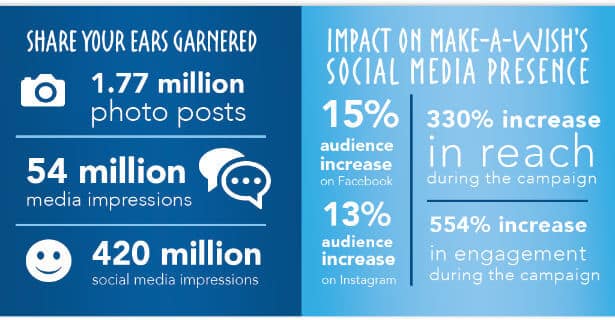
At the end of 2018, Disney wrapped up its third consecutive year partnering with Make-A-Wish for their #ShareYourEars social media campaign. For every photo of a person wearing Mickey Mouse ears with the hashtag #ShareYourEars, Disney pledged to donate $5 per post with a maximum of $1 million matched.
Why It Worked: Back in 1981, the first official Wish was granted to Frank “Bopsy” Salazar and part of his wish was to visit Disneyland. In fact, a third of all Make-A-Wish requests are granted by Disney. This modern campaign reinforces their partnership and is a sweet reference to the roots of their history together.
This successful social marketing campaign was a fun, visual, and easy way to create goodwill. Disney spurred this on by doubling the amount of money donated- bringing it to a total of $3 million raised. Anyone could take a picture and post it to Twitter, Facebook, and Instagram easily.
By utilizing people’s desire to raise money for a good cause and giving them a set incentive, participants created a bevy of user-generated content and was a massive success in bringing attention to the campaign.
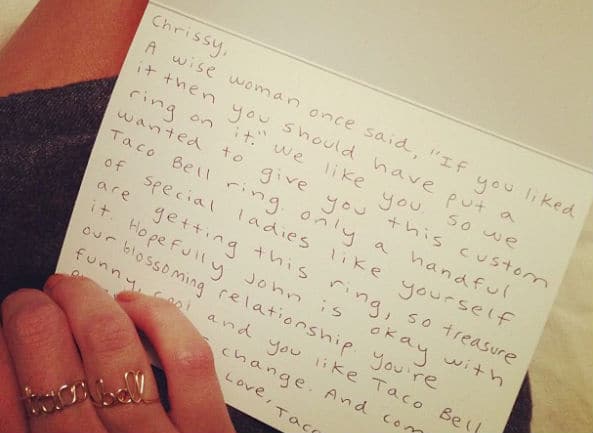
Back in 2013 when influencer marketing wasn’t as ubiquitous as it is now, Taco Bell was ahead of the curve by sending jewelry and handwritten notes to minor models and actresses known for their internet presence. They also included a gift card and an invitation to visit their test kitchens.
Why It Worked: By using tongue-in-cheek humor and a set of “Instagrammable” objects, Taco Bell spread the word through the influencing power of Internet-famous females. Recipients included Chrissy Teigen, Jessica Lu, Acacia Brinley, Leah Cecil (Miss California 2012), Kristen Storms, and Alexa Losey. The personalized letters to each woman crafted a cheeky persona to Taco Bell’s brand.
The main conversations surrounding this stunt were sparked by the highly coveted gold rings (that spelled out “Taco Bell” in cursive). These rings ended up being so popular Taco Bell began selling them in limited quantities. It’s also birthed countless copycats on sites like Etsy, making this campaign a lasting success.
Always (the feminine hygiene product brand) launched the #LikeAGirl campaign with a video that challenged female stereotypes with the purpose of empowering young girls. The film showcased how the phrase “like a girl” has come to have a negative or weak connotation. They showed confident young girls redefining the phrase into a meaningful and powerful statement instead of an insult.
Why It Worked: The video encouraged viewers to participate in what it meant to do things like a girl. Social media was flooded with anecdotes, personal achievements, and encouragement to adolescent girls.
The video has amassed over 66 million views on YouTube and has won several awards. According to Design and Art Direction, 76% of viewers stated they no longer saw the phrase with a negative connotation. 2 out of 3 men who watched the short film said “they’d now think twice before using “like a girl” as an insult.
By facilitating such a strong emotional connection with a large base of their consumers and beyond, Always created a viral hashtag that inspired everyone to lift up young women.
4. Spotify Wrapped
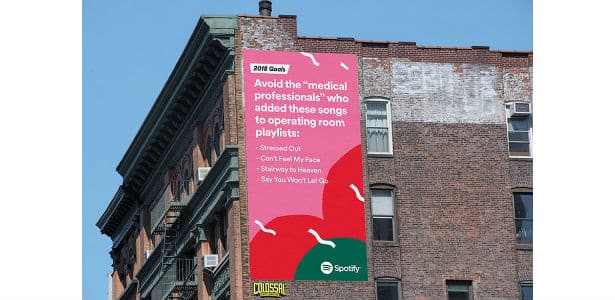
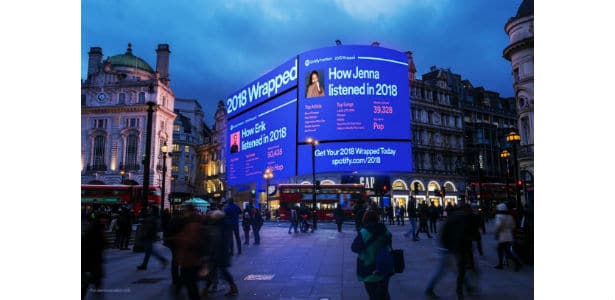
In 2017, Spotify unveiled a quirky-looking site that gave personalized statistics garnered from your listening data. Giving a much-needed update to their Year in Music campaign, Spotify used the same visuals as their data-driven billboards.
In 2018, Premium users were given the chance to have their personal Wrapped statistics broadcasted on digital billboards at landmarks like Times Square and Piccadilly Circus.
Why It Worked: Having personalized numbers over pleasing graphics made screenshotting these statistics and posting them on social media a no-brainer. By compiling listening data and presenting them to users visually, Spotify started a viral conversation at the end of every year (and kicked off the next with some free advertising). Showing your friends your listening habits is a unique way to show your personality and Spotify recognized that.
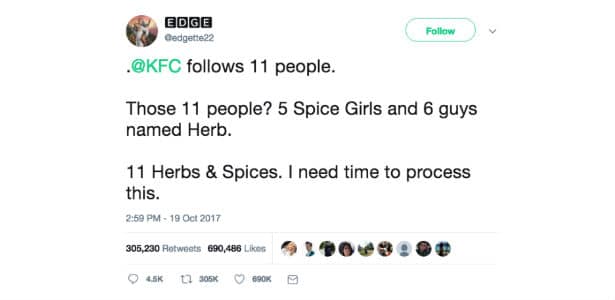
5. KFC’s Twitter Herbs and Spices
Sometime before October 2017, KFC unfollowed everyone except 6 people named Herb and the 5 Spice Girls.
@edgette22 on Twitter
After this Easter egg joke about their famous recipe was discovered, the tweet went viral and was shared hundreds of thousands of times. KFC rewarded the man behind the tweet with a custom painting and 52 gift cards.
Why It Worked: KFC’s sneaky gag paid off by sparking an organic conversation through the discovery of their hidden joke. They attempted to continue the viral discussion by commissioning a whimsical painting of Colonel Sanders and the Twitter user behind the revelation. This social strategy was genius in its playfulness and simplicity. KFC came off as a lighthearted brand that likes to have fun with its customers.
@edgette22 on Twitter
6. Apple #ShotOniPhone Campaign
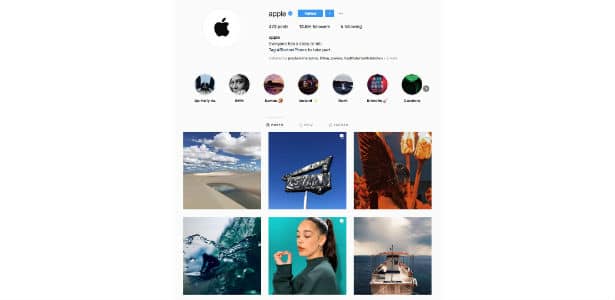
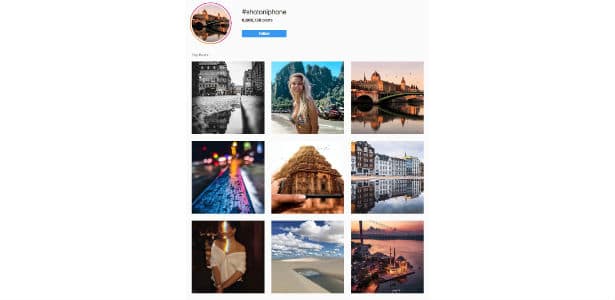
Apple’s #ShotOniPhone campaign is one of the most successful social media campaigns ever. Following a successful billboard campaign featuring photos shot on- you guessed it- iPhones, Apple encouraged social media users to share their own photos with a chance for their work to appear on a billboard. Over the past couple of years, that hashtag has taken off and Apple’s official Instagram is dedicated exclusively to pictures #ShotoniPhone.
Why It Worked: With one of the biggest pools of consumers under their belt, Apple leveraged user-generated content to celebrate their technology in creative and visual ways. Artists tend to use the hashtag to showcase their creative skills without the use of expensive or excessive equipment. In return, Apple gets to show off how easy it is to create high-quality content with their product. The hashtag #ShotoniPhone has over 6.5 million entries on Instagram alone.
People with iPhones could easily submit their pictures on social media, making this a simple and authentic ongoing campaign that shows no signs of slowing down (for as long as iPhones are popular, at least).
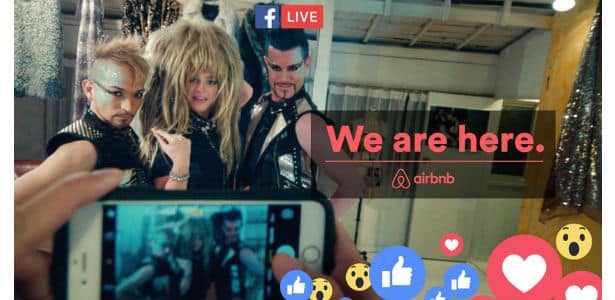
Why It Worked: Airbnb expertly included consumers in real-time and gave as good as a first-hand experience as they could. Anyone with an internet connection could view the Experiences and imagine themselves being there. The authentic nature of live streaming and on-the-ground Experiences was a natural fit. It was also a newer form of social media interaction, which was an exciting risk for Airbnb that paid off.
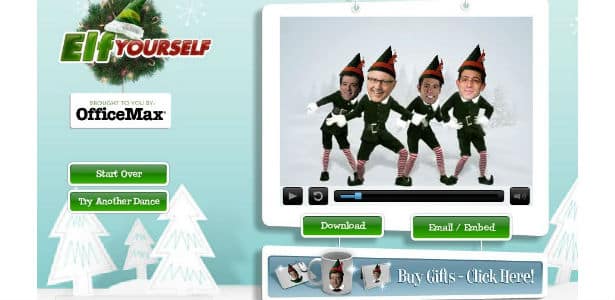
OfficeMax launched a website in 2006 called Elf Yourself where people could upload pictures of themselves to generate videos of dancing elves.
Viral Blog
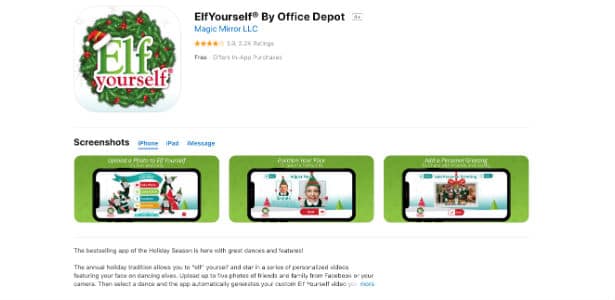
When this marketing campaign first launched, Facebook had just opened to the public. The “viral” nature of Elf Yourself spread through email. Now, Elf Yourself has a Facebook AR filter and is shared countless times on various social platforms each year they relaunch the site.
Why It Worked: People enjoy humor and personalized content, and OfficeMax was pioneering corporate viral content with this idea. Back when it first launched, the website was gaining 200 hits per second with 8 elves created per second. Now, OfficeMax/Office Depot (merged in 2013) is constantly adapting with mobile apps and social media filters that offer easy ways to share your elves with others. Sometimes they offer coupons of up to 25% off after you share a post. This annual holiday delight has no signs of disappearing anytime soon.
9. Lonely Whale Foundation #StopSucking Campaign
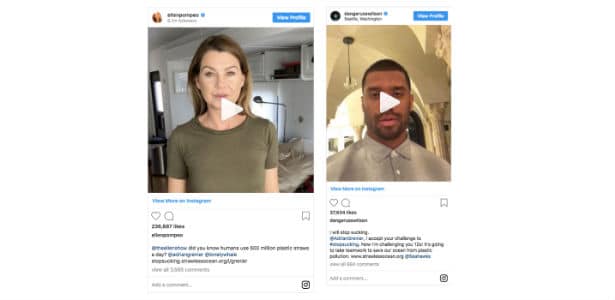
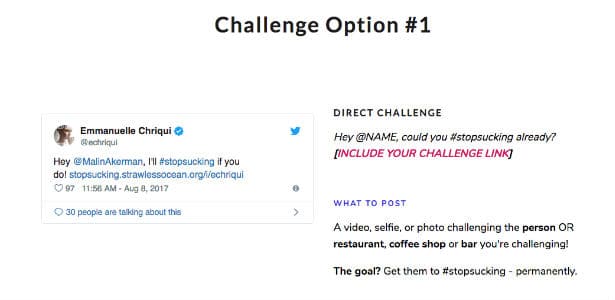
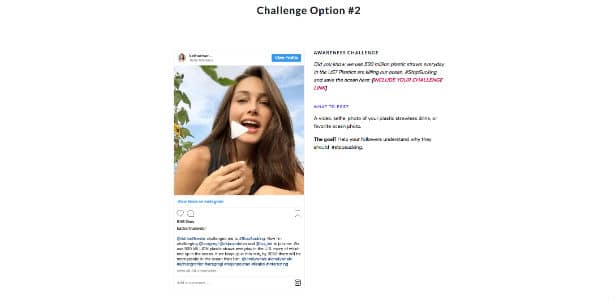
The Lonely Whale Foundation launched a social media campaign challenging people to #StopSucking and cease their use of single-use plastic straws. Straws are one of the biggest polluters of oceans and other waterways. After this campaign launched, it quickly became viral thanks to celebrities like Adrian Grenier (the co-founder), Ellen Pompeo, Russell Wilson, and Emmanuelle Chiriqui. Because of these efforts, Seattle has banned plastic straws and the state of California has banned restaurants from automatically giving patrons plastic straws. Starbucks has officially banned single-use plastic straws partially due to direct efforts from the Lonely Whale Foundation.
Lonely Whale
Why It Worked: The playful humor behind the hashtag #StopSucking made a serious issue eye-catching and shareable. Lonely Whale harnessed star power and the desire to do good in order to build a conversation and draw attention to the cause with a challenge.
They offered instructions on two ways to complete the challenge, which encouraged people to participate and bring others in. Before you posted, you could generate a Challenge Code URL to track your challenge post’s influence.
In 2015, Beats by Dr. Dre and Universal Pictures created a website called StraightOuttaSomewhere.com to promote the biographical drama Straight Outta Compton (based on rap group N.W.A.). Visitors could create their own #StraightOutta memes and input any place and picture. This quickly made the hashtag go viral as people shared their creative and personal posts with the website soon reaping over 10.8 million visits.
Why It Worked: #StraightOuttaCompton became the number one topic on Twitter, Facebook, and Instagram within 24 hours due to its highly customizable and shareable format. Several celebrities wanting to curate content for social media joined in, including Serena Williams, Bette Midler, Ryan Reynolds, LeBron James, Ava DuVernay, and Jennifer Lopez. This helped boost the meme’s popularity even further. Even Oxford University joined in on the fun.
Posts ranged from clever to hilarious to personal, and there was something new yet recognizable in each one through utilizing N.W.A.’s iconic logo. By using user-generated content, the organic reach for this film reached heights that would have been unachievable without this effective social media campaign.
Contact MARION for Help Building Innovative Social Media Campaigns Today!
You’re interested in building an innovative and effective social media marketing campaign for your brand, but where do you start?
As a nonprofit organization, gaining buy-in from the community is paramount to accomplishing your mission and making the world a better place. Marketing your mission and values isn’t always easy. The Google Ad Grants program was created to help you spread the word in a meaningful and targeted way.
What Is Google Ad Grants?
Google Ad Grants (frequently referred to as Google AdWords for Nonprofits) is a program that lets 501(c)(3) nonprofit organizations reach and inform people searching for nonprofits online through free Google Ads placements. The Google Grants program was launched in 2003 and is available in over 50 countries.
Google Ad Grants Eligibility
There are several eligibility criteria for nonprofits wishing to leverage ad grants from Google.
1. Apply for Google for Nonprofits
You must enroll in the Google for Nonprofits program. To start, you must be registered as a charitable organization. This means that the IRS must recognize your organization as a 501(c)(3), even if you have a group exemption (such as a church). Google requires that your organization be verified by TechSoup (to build a level of automation to their eligibility process).
You cannot be a hospital or healthcare establishment
You cannot be a government entity or organization
You cannot be a school, university, or academic institution
2. Hold 501(c)(3) Organization Status
Being recognized as a 501(c)(3) organization is part of the application process for Google for Nonprofits as well as a requirement for the Google Ad Grants program.
3. Agree to Nondiscrimination and Donation Receipt Use
You must certify the following about your organization:
Your hiring/employment practices don’t discriminate based on sexual orientation or gender identity.
You don’t discriminate on an unlawful basis for hiring/employment practices or program and service administration within your company.
“My organization may receive this donation under its own policy and applicable laws and regulations; this donation will not negatively impact Google’s current or future ability to do business with my organization; and this donation will not be used to corruptly influence any government official to obtain or retain business or any improper advantage.”
4. Have an Acceptable Website
The website policy for Google Ad Grants is very comprehensive. Your organization’s domain name must be approved during the Google grant application process. You can request to have additional domains approved using a special form that is reviewed within 10 days of submission.
Our bullet points below will cover the bulk of what the website policy entails but for more details see the official Google Ads for Nonprofits site.
You must own the domain that your ad users are sent to upon clicking your ads. In some situations, you can send your ad users directly to third-party verified donation processors like Classy, FrontStream Artez, or Blackbaud Luminate.
Your website must be “high quality.” This means a great About Us page with details on your organization, its mission, and the activities it is involved in. Your site must offer a great user experience (quick load times, easy navigation, good CTAs) with unique content, verifiable claims (if any), and a secure HTTPS connection.
Your site cannot revolve around commercial transactions. If your site does facilitate eCommerce, you must disclose an annual report that shows exactly how the proceeds are used.
Your site cannot use Google AdSense or affiliate advertising links. Any existing ads need to be relevant to your mission and non-obtrusive.
If your site is struggling to comply with the criteria, let MARION help. Our web design company can help you polish your user experience, navigation, and develop unique and valuable content with our content marketing services.
Need to improve your website’s performance? Download this free eBook to discover the 24 website must-haves for improved traffic, engagement, and conversions on your site.
Google Grants for Churches
If you meet all the requirements of the Google AdWords grant for nonprofits, then your church can access the monthly $10,000 of free Google Ad Grants.
Google grants can help drive awareness for your church and spread your mission in a meaningful way. Alternatively, author Jeremy Smith speculates that Google Grants for Nonprofits are a way for the tech giant to get tax write-offs, refine their advertising product, and inflate keyword bid prices for advertisers that don’t have access to ad grants.
Regardless, maintaining your Google Ad Grants eligibility can be difficult for a church for several reasons. Read the section below about how to stay eligible for Google Ad Grants to see why using Google grants for churches may prove difficult.
Google Grants for Schools
In most cases, using Google Ad Grants for schools isn’t possible. Schools, universities, and educational institutions cannot join Google for Nonprofits, and they aren’t classified as 501(c)(3) organizations. Your school itself may not qualify, but Google makes a point to say that “philanthropic arms of educational institutions are eligible.”
While a Google Ad Grant may not be accessible to your educational institution, there are resources available through the Google for Education program. This includes G Suite for Education, online computer science training, and more.
How to Apply for Google Ad Grants
Now that you have all the Google Ad Grants eligibility requirements above, you can get started in five easy steps:
Verify that you’re eligible for the Google Grants program.
Enroll in the Google for Nonprofits program (this has additional eligibility requirements – make sure you’re registered with TechSoup).
Apply for the Google Ad Grants Program.
Create your Google Ads account to set up your search ads.
Submit your Google Ads account and campaign for review.
How to Stay Eligible for Google Ad Grants
To start, your account must be structured using the appropriate geo-targeting. If your nonprofit serves your local area, make sure your Google Ads geo-targeting reflects that. If you try to run a national campaign just to use your $10k ad budget, your account could be suspended.
You must have at least two ad groups with two active text ads in each campaign. Make sure you have two different sitelink extensions set up in your account as well. These criteria are mostly in place so that Google Ad Grant users are following the minimum acceptable best practices. If you can’t meet these standards, you will have to opt for AdWords Express instead of the full Google Ads experience.
Next, if you’re not using AdWords Express, your account has to have an average Google Ads CTR of at least 5%. Further, if you’re using a bidding strategy that requires some sort of conversion information (like Maximize Conversion, Target ROAS, etc.), then you must properly set up conversion tracking.
Even if you have your account set up and nearly optimized, you still need to log in monthly or you run the risk of being suspended. Follow all program policies, and you should be able to maintain eligibility with ease.
The Google AdWords Grant program isn’t the only available program for nonprofits. Here are more marketing grants that you can leverage to improve your digital marketing presence.
YouTube for Nonprofit
The Google Ad Grant will only get you text ads in search, but what if your nonprofit could benefit from video exposure? The YouTube Nonprofit Program might be just what you need.
The YouTube program lets you use special CTA overlays and donation “cards” on your videos, so you can send viewers to the appropriate donation channels. YouTube is a Google company, and they also require that you apply for Google for Nonprofits to join their program.
Grants.gov
Established in 2002, Grants.gov is a repository and clearinghouse for thousands of grant programs. While they may not be marketing specific, you can search and apply for grants that apply to your organization. Grant applicants will be taken through a five-step application process before applying to any grants.
Seek Expert Marketing Help
MARION marketing is a top marketing agency in Houston and Austin. While we are not part of the Ad Grants Certified Professionals Community, we have years of experience offering effective pay-per-click services to area businesses.
Contact MARION today to learn how we can help your organization reach its goals!